
A professional email domain is one your business owns: [email protected]. Ownership and consistency are what make it professional, not the extension. .com is the safest default, but .co, .net and country extensions are unremarkable. The only choice that reliably reads as unprofessional is a free webmail address.
This question usually arrives when someone is about to register a domain and is worried about picking the wrong one. The reassuring answer is that the stakes are lower than they feel, with one significant exception.
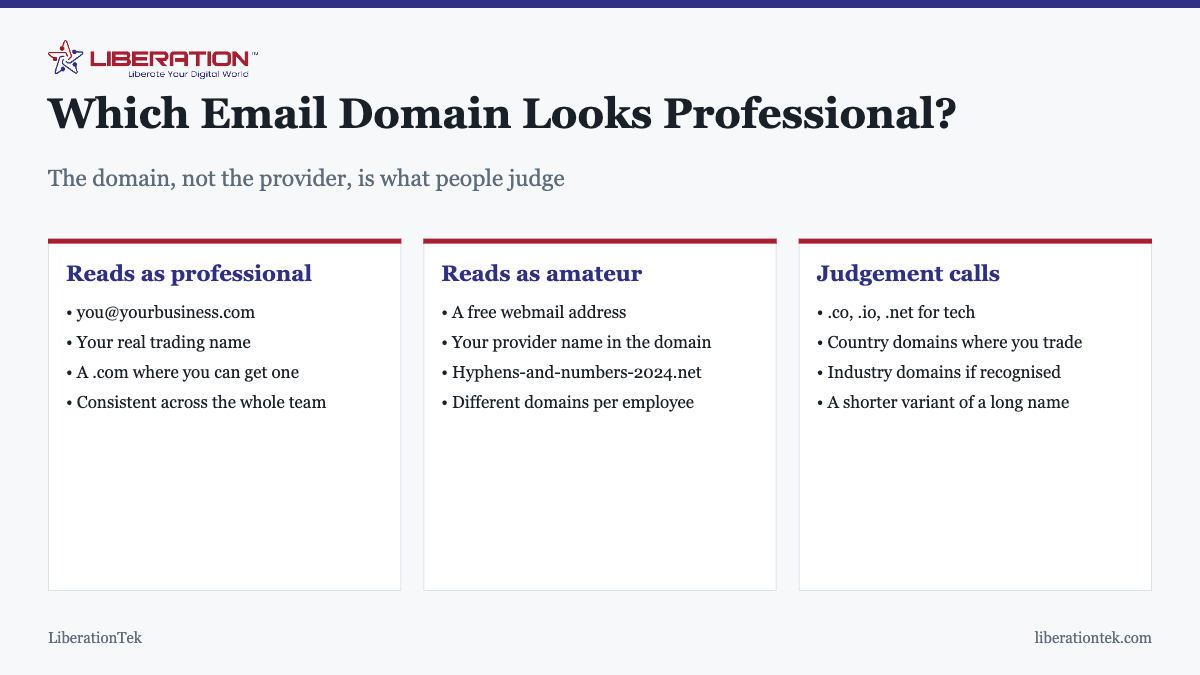
The part that actually matters
Your domain is the part after the @. Everything about how professional it reads comes down to three things, in this order:
- Do you own it? An address at your own domain says the business exists and was set up deliberately. An address at a free webmail domain says neither.
- Does it match your trading name? People check this without realizing. A mismatch creates a moment of hesitation, and that hesitation is the thing you are trying to avoid.
- Is it consistent across the team? Everyone on the same domain reads as an organization. Mixed domains read as a few people who happen to work together.
The extension comes a distant fourth, which is the opposite of how much attention it usually gets.
The one genuinely unprofessional option
A free webmail address for business correspondence. This is the only choice on the list that consistently costs you credibility, and the reason is simple: anyone can create one in about a minute, so it carries no signal that a business exists behind it.
Worth separating two things people conflate. Gmail and Outlook are excellent mail systems, and plenty of professional operations run on them with their own domains attached. The issue is never the technology. It is the visible address ending in a domain you do not own.
The practical costs are real: it makes you harder to distinguish from someone impersonating you, it means invoices carry an address anyone could have created, and, as covered below, it makes proper email authentication impossible.
Choosing an extension
| Extension | Reads as | Use when |
|---|---|---|
| .com | Default, universally recognized | Almost always, if available |
| Country extension | Local and legitimate | You trade mainly in one country |
| .co / .io | Modern, normal in tech | Technology and startups |
| .net | Slightly dated but fine | When .com is unavailable |
| Industry extensions | Clear if recognized | Where your sector uses them |
| Novelty extensions | Varies widely | Only if it genuinely fits |
| Free webmail domain | No business behind it | Never, for business mail |
People overwhelmingly assume .com, so if you use something else expect to spell it out on the phone. That is a small, permanent tax rather than a serious problem, and worth paying if the alternative is a worse domain name.
What makes a domain name itself read badly
- Hyphens. Hard to say aloud, easy to mistype, and associated with domains registered in a hurry.
- Numbers, especially a year. It dates the business and invites “is this still current?”
- Deliberate misspellings to get a shorter name. Every customer who types it correctly reaches nobody.
- Excessive length. If it does not fit comfortably on a business card, it will be mistyped.
- Something that no longer describes you. A domain naming a service you stopped offering creates confusion you have to explain.
If your preferred name is taken, a shorter variant, a different sensible extension, or adding a genuine word such as your town or trade reads better than inserting hyphens.
The part nobody mentions: deliverability
Owning your domain is not only about how the address looks. It is what makes proper email authentication possible.
SPF, DKIM and DMARC are DNS records published on a domain you control, and together they prove to receiving servers that mail claiming to come from you genuinely did. You cannot publish them for a free webmail domain, because it is not yours. That means business mail sent from a free address has no authentication story of its own, and it is increasingly treated with suspicion as the large providers tighten their requirements.
So the domain decision is a credibility decision and a deliverability decision at once. The detail is in what SPF, DKIM and DMARC are, and the symptoms of getting it wrong are in why emails go to spam.
Practical decisions once you have the domain
- Use real names, such as firstname@, rather than initials that mean nothing to a recipient.
- Keep role addresses for roles. info@, sales@ and accounts@ are useful and should reach a monitored inbox.
- Be consistent. Decide firstname@ or firstname.lastname@ and apply it to everyone.
- Avoid noreply@ where you can. It discourages replies, and replies are both good service and a positive deliverability signal.
- Register the obvious variants of your domain if they are cheap, and point them at the main one.
What people actually judge, and what they do not
It is worth being clear about how much of this a recipient consciously notices, because the honest answer shapes how much time to spend on it.
Almost nobody evaluates your domain extension deliberately. What happens is faster and less considered: they glance at the sender, and either nothing registers or something does. A free webmail address registers. A mismatch between the domain and the company signing off registers. A domain full of hyphens registers. Beyond those, a reasonable domain simply passes without comment, which is exactly what you want.
The practical consequence is that this is a decision to get right once and then stop thinking about. Own the domain, match your trading name, apply it consistently, and you have captured essentially all of the available benefit. Agonising over .com versus .co after that point is optimizing something nobody is measuring.
The exception is regulated or high-trust contexts. If your customers are routinely targeted by people impersonating businesses like yours, then a recognizable, consistent domain does real work, and so does publishing a strict DMARC policy so that impersonation attempts fail outright rather than landing in their inbox.
What it costs
Less than most people expect, which is why the free-webmail habit is hard to justify once the numbers are in front of you. A domain is roughly $15 a year. LiberationTek Email starts at $1.95 per user per month, runs on standard IMAP, SMTP, CalDAV and CardDAV so nothing is locked in, exports in full whenever you want, and is not scanned for advertising, model training or data brokers. There is no long-term contract.
For teams that also want calendars, files, chat and video together, Hub For Teams starts at $7.49 per user per month on US-owned hardware. If you already have mailboxes elsewhere, moving them is covered in what email migration means, and the full setup walkthrough is in what a professional email address is and how to set one up.
How to Set Up a Professional Email Domain Step by Step
Getting a professional email domain is quick once you know the order of the steps. Most small businesses can finish in an afternoon, and the result is an address customers recognise and trust. Here is the process we recommend for a new professional email domain.

- Choose a short name that matches your business and is easy to say aloud.
- Register the domain in your own name, so you stay in control of it. ICANN publishes beginner’s guides that explain how domain names work.
- Create a mailbox for each person and a few shared ones such as info and support.
- Set up SPF, DKIM and DMARC so your messages are trusted. Our guide to SPF, DKIM and DMARC walks through it.
A professional email domain only works if the mail reaches people, so check delivery with a few test messages before you print business cards. If messages land in junk, read why emails go to spam.
Keeping Your Professional Email Domain Safe and Consistent
Once your professional email domain is live, a few habits keep it working for years. Renew the domain automatically, use a strong unique password for the registrar account, and keep a backup contact on file. Losing a professional email domain to a missed renewal is a painful and avoidable mistake.

- Use one professional email domain for the whole business, not a mix of old and new addresses.
- Set up aliases so role addresses like sales and billing reach the right person. See email aliases for business.
- Move existing mail across carefully. LiberationTek offers free migration from another provider; see what email migration involves.
- Review who has access whenever someone joins or leaves.
Liberation Email starts at $1.95 per user per month and works with your own domain, so a professional email domain is within reach of even a one-person business. If you are comparing options, our page on a professional email address explains what to look for. Churches and nonprofits can also ask about the 15% discount. Whatever you choose, a professional email domain you own and manage carefully is one of the cheapest ways to look established.
Frequently asked questions
What is a professional email domain?
A professional email domain is the part after the @ in your address, and it is professional when it is a domain your business owns: [email protected]. What makes it professional is ownership and consistency, not the extension. A free webmail domain is the one thing that reliably reads as unprofessional, because anyone can create one in a minute.
What is the most professional email domain extension?
.com remains the most recognized and the safest default, because people assume it without thinking. That said, .co, .io and .net are unremarkable in technology, country extensions are entirely normal where you trade, and a well-known industry extension is fine. The extension matters far less than owning the domain and matching your trading name.
Is a Gmail address unprofessional for business?
For a business, yes, in the sense that it signals you have not set up your own domain. Gmail itself is perfectly professional infrastructure, and Google Workspace runs on it with your own domain. The problem is the visible address ending in a free webmail domain, not the technology behind it.
Should my email domain match my website domain?
Yes, wherever possible. A mismatch makes people check whether the message is genuine, and that hesitation is exactly what you are trying to avoid. If you trade under a shorter name than your registered one, use the trading name consistently across the website, email and invoices rather than mixing them.
Can I use a different domain for email than for my website?
Technically yes, and there are legitimate reasons, such as a long registered name and a short trading one. But it costs you recognition every time someone sees an address that does not match the site they were just on, and it makes phishing harder for your customers to spot. Keep them aligned unless you have a specific reason not to.
Do hyphens and numbers in a domain look unprofessional?
Generally yes. They are hard to say aloud, easy to mistype, and they carry an association with hastily registered domains. If the domain you want is taken, a shorter variant, a different sensible extension, or adding a real word usually reads better than inserting hyphens or a year.
Does my email domain affect whether messages get delivered?
Owning your domain is what makes proper authentication possible, and authentication is the main thing determining whether business mail reaches inboxes. You cannot publish SPF, DKIM and DMARC records for a free webmail domain you do not control, so your own domain is both a credibility and a deliverability decision.
What is the most professional email domain?
Your own business domain, such as [email protected], is the most professional choice. A .com is the most familiar, but a name that matches your business matters more than the ending. Free addresses from public webmail services look less established to customers.
What is a good business email address?
A good one is short, easy to spell aloud and uses your own domain, such as [email protected] or a role address like info@ or support@. Avoid numbers, nicknames and underscores.
What does a professional email address look like?
It looks like [email protected] or [email protected]. Professional email with your own domain starts at $1.95 per user with Liberation Email.
Related reading
- Choosing the Right Business Email Solutions
- Choosing the Best Conservative Email Marketing Software
- What Is a Professional Email Address? (And How to Set One Up)
- Secure Alternatives to Traditional Email
- Email Aliases for Business: What They Are and When to Use One
- Email & Collaboration Savings Calculator
- Business Email Hosting for Small Teams That Own Their Data