Ditch Microsoft & Google Today!

Protect Your Website

With CodeGuard Backups

Get protection against viruses, hackers and even your own code accidentally breaking your site with CodeGuard Website Backup.

cg dashboard

Your Website Backed Up Every Day So One Bad Update Never Costs You The Site.

Protect your site from data loss and corruption, as well as against threats from viruses, hackers and malware with Daily Automated Website Backups from CodeGuard.

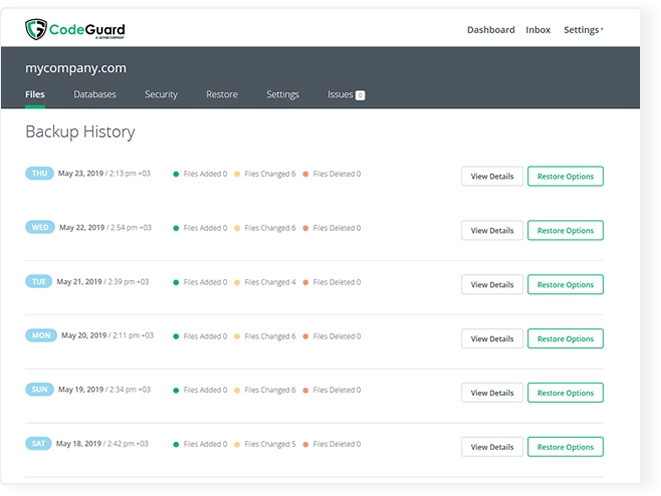
With CodeGuard Website Backup, your website is backed up daily and if disaster strikes, you can restore your site to a previous point in time at the click of a button.

Daily Automatic Website Backup

Secure your website with automated daily backups stored offsite with built-in redundancy.

Unlimited Files & Databases

Backup an unlimited number of files and databases - you are restricted only by the storage space you use

One-Click Restores

A simple restore process makes it easy to rollback a single file or your entire website to a previous version.

Malware Monitoring

Rest easy knowing CodeGuard is diligently checking your site for changes every day.

Automatic WordPress Updates

Automatically update WordPress and its plugins to keep it secure with auto recovery in case of problems

File Change Monitoring

Get notified by email anytime something changes within the source code of your site.

Staging of Restores

Quickly test any backed up site with simple and automated staging prior to restore.

Email Backup

Get protection for your emails too as they are backed up as part of your websites files.

Full Automation

Completely hands free setup and ongoing backups with automated notifications if things go wrong.

Why An Off-Site Backup Matters

Most Sites Are Lost To Mistakes, Not Hackers

A bad plugin update, a theme edit that breaks the layout, a developer overwriting the wrong file, an accidental delete — these end more websites than break-ins do. What they have in common is that nobody notices immediately, so by the time you look for a clean copy, the damage is already in whatever backup ran last night. Per-file version history is the difference between rolling back one change and rebuilding a site.

A Backup Stored Where The Problem Isn’t

CodeGuard keeps encrypted daily copies of your files and databases off-site, away from the server they came from. It connects over SFTP and MySQL rather than running as a plugin, so a compromised admin login or a broken plugin cannot switch your backups off or reach the archive. Encryption applies in transit and at rest.

You Get Told When Something Changes

File Change Alert Monitoring emails you when files change between backups, which is often the first sign of an injected script or an edit nobody authorized. You see exactly which files differ and can restore just those, or roll the whole site back to a specific day. Pair it with SiteLock malware scanning if you want detection and removal as well as recovery.

Where Your Backups Are Stored

99.999999999%

data durability on AWS S3 storage

AES-256

encryption on your stored backups

Since 2010

backing up websites

CodeGuard MalwareGone automatic malware removal icon

MalwareGone Add-On

Removes malware from a backed-up site so a restore point is a clean one.

CodeGuard automatic WordPress plugin updates icon

Automatic WordPress Updates

A backup is taken before updates are applied, so a bad plugin or theme update can be rolled back.

Restore Only What You Need

Compare a backup with your live site and restore just the changed files, or roll the whole site back to an earlier date.

Independently Tested

CodeGuard has its security independently tested for vulnerabilities every year.

More about the service at codeguard.com.

CodeGuard Backup Plans

PlanPrice
1GB Lite
Students, personal projects, trying us out
$2.59/moOrder â†’
5GB Personal
Personal websites and individual projects
$4.29/moOrder â†’
10GB Professional
Larger personal sites through to small and medium business
$7.59/moOrder â†’
25GB Business
Medium to large business websites
$17.97/moOrder â†’
50GB Business Plus
Large business websites
$25.95/moOrder â†’
100GB Power
E-commerce, web apps, complex sites and agencies
$47.91/moOrder â†’
200GB Power Plus
Power users and enterprise, multi-department agencies
$75.86/moOrder â†’

All plans include daily automatic backups, unlimited files and databases, one-click restore, file change alert monitoring and malware monitoring. Plans differ only by backup storage.

For a plain explanation of daily offsite copies, retention and restore tests, see our guide to automated website backup.

Starting From $2.59 A Month

Frequently Asked Questions

CodeGuard is a fully automated website backup service that gives you complete protection against data loss and malware

CodeGuard provides an independent offsite backup solution for your website along with daily monitoring to ensure your website is online and malware free.

CodeGuard takes daily automated snapshots of your website. Using these snapshots, you can restore your entire site or a specific file to an earlier version at any time.

Switching plans is easy! You can upgrade and increase your disk storage allowance in just a few simple clicks via our client area.

Backups are stored on a offsite Disaster Recovery Storage System which provides market leading resiliance and redundancy for your backups.

Yes, backups are stored encrypted using the AES-256 Encryption Standard.

Yes, databases can be backed up also. Database backups are supported for MySQL and MSSQL databases.

CodeGuard can monitor and notify you by email when your website changes to alert you to new threats and malware

With CodeGuard’s daily snapshots, if your website gets attacked, you can restore to a previous uninfected version at any time.

Plans start at $2.59 a month, priced by how much storage and how many websites you need. Backups, change monitoring and one-click restore are included at every tier — restoring your own site is not treated as a paid extra.

Yes. CodeGuard backs up files over SFTP/FTP and databases over MySQL, so it works with WordPress, Joomla, Drupal, Magento and custom-built sites alike. It runs outside your site rather than as a plugin, which means a broken plugin or a hacked admin cannot disable your backups.
Host backups are a safety net for the host’s infrastructure, not a version history for your site. They are often overwritten on a short cycle, restored only as a whole account, and stored in the same place as the thing they are protecting. An independent off-site backup with per-file history is what lets you roll back one bad change from three weeks ago. Our hosting plans include backups too — CodeGuard is the belt to that pair of braces.

What Our Customers Say

★★★★★ Rated 4.9/5 on Google and 4.7/5 on Trustpilot

Need A Custom Solution?

Liberation Offers Custom Management Solutions

LiberationTek global edge network map

Global Edge Network

Liberation’s global edge network provides enhanced performance & security.

Population Reach
90 %
Countries
90 +
Networks
2500 +

Ready For Digital Liberation?