Ditch Microsoft & Google Today!

When Did You Last Test A Restore?

Backup And Disaster Recovery For Small Business Websites

Backups run on two levels here. CodeGuard is included on most plans and keeps encrypted daily copies of your files and databases off-site, with one-click restores you run yourself. Underneath that, the data center is backed up daily with seven days of retention.

This page explains what each layer covers, what it does not, and how to build a disaster recovery plan that survives contact with a real bad day.

“A year ago, I decided to migrate my website to their hosting platform in order to move away from big tech, and gradually, moved all of my domains over. Customer service is 5 stars. You get a one-to-one relationship as well as fast, friendly and knowledgeable service.”

Donna Gentile · Google review

The Two Layers Of Protection

Website-level backups and infrastructure-level backups solve different problems. Most people find out they are different on the day they need one of them.
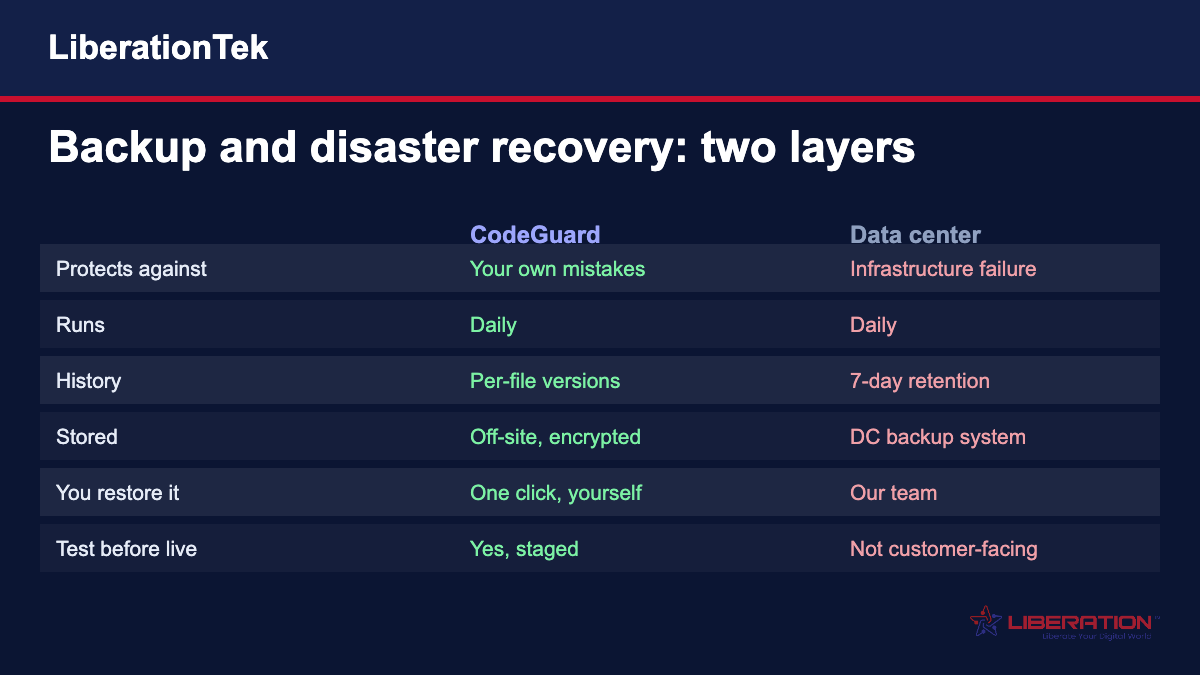
Backup and disaster recovery chart: CodeGuard website backups compared with data center backups on what they protect, frequency, history and restores

What you are comparing
CodeGuard website backups
Data center backups
What it protects against
Your own mistakes — a bad plugin update, an overwritten file, a broken theme edit, a hacked site
Infrastructure failure at the data center level
How often it runs
Daily, automatically
Daily
How far back it goes
Per-file version history, limited by your storage
Seven days of retention
Where it is stored
Off-site and encrypted, away from the server it came from
Data center backup infrastructure
Who restores it
You do — one click, a single file or the whole site
Our team, as part of infrastructure recovery
Can you test it first
Yes, restores can be staged and checked before going live
Not a customer-facing process
Included
On most plans
On all hosting

What CodeGuard Actually Does

Daily Off-Site Copies, Encrypted

Encrypted daily copies of your files and databases are kept off-site, away from the server they came from. A problem that takes out the server does not take the backup with it, which is the entire point and the part cheap backup solutions skip.

It Is Not A Plugin

CodeGuard connects over SFTP and MySQL rather than running inside WordPress. A compromised admin login or a plugin that breaks the site cannot switch it off or corrupt what it has already stored. Backup software living inside the thing it backs up is a single point of failure.

Per-File Version History

You can roll back one file rather than the whole site. That is the difference between undoing a bad edit in two minutes and restoring yesterday, losing a day of orders along with the mistake.

Restores You Can Stage First

A restore can be staged and tested before it goes live. Restoring blind into production, on a day that is already going badly, is how one problem becomes two.

Change And Malware Monitoring

Your source code is checked daily and you are emailed when something changes. Most compromises are quiet — injected code that breaks nothing visible — so noticing at all is the hard part.

Automatic Updates With Auto Recovery

WordPress and its plugins can update automatically, with automatic recovery if an update breaks the site. The most common cause of an unplanned outage is an update; the second most common is an update that was skipped for months.

What Backups Do Not Cover

A backup is not a disaster recovery plan. It is one component of one. This table is the honest version of what is and is not handled for you, because the gap between those two is where businesses lose weeks.

The thing at risk
Where you stand
The part people miss
Your website files and database
Covered — CodeGuard, daily, off-site
 
Email stored on the server
Covered — email is backed up as part of your website files
Mail held only in a desktop client on someone’s laptop is not
Server configuration and custom software
Partly — depends on where it lives
Anything outside the web root and database needs its own plan
Anything older than your retention window
Not covered
Data center retention is seven days; CodeGuard history depends on your storage
A restore nobody has ever tested
Not covered by anything
An untested backup is a hypothesis, not a safety net
Your domain name registration lapsing
Not a backup problem
And it takes a site offline just as completely
Someone leaving with the only admin login
Not a backup problem
The most common recovery failure we see is access, not data
Third-party services your site depends on
Not covered
Payment gateways, booking systems and CRMs have their own backups and their own gaps

Your Recovery Checklist

Step
The question to answer
Where you probably stand
What to do about it
Know your recovery point
How much work can you afford to lose?
Daily backups mean up to 24 hours
Run a manual backup before any risky change
Know your recovery time
How long can you be down?
A staged CodeGuard restore is usually minutes
A rebuild from nothing is days
Test a restore
Have you ever actually done one?
Stage a restore and look at it
Do this once a quarter, not once ever
Know who has access
Could someone else recover it?
Two people should hold hosting and domain access
This is the most common failure we see
Know where the domain is
Registrar, login, renewal date
Often a different company from the host
An expired domain is an outage nothing restores

If The Worst Happens, In 4 Steps

1. Stop Changing Things

The instinct is to start fixing. Resist it. Every change made in a panic is one more thing to unpick, and several of them will overwrite the evidence of what actually went wrong.

2. Work Out What Kind Of Problem It Is

A broken update, a compromised site and a server failure look similar from the outside and need completely different responses. Call us — working this out is what we do, and guessing wrong costs a day.

3. Stage The Restore, Do Not Fire It

Pick a restore point from before the problem started, stage it, and look at it properly. Restoring the wrong day straight into production turns a recoverable morning into a lost week.

4. Fix The Cause Before You Go Live

If a plugin, a password or a permission caused it, restoring without fixing that just resets the clock. Change the credentials, patch the hole, then publish.

What Customers Say After Switching

Dustin Beck
Trustpilot review
LTS has did a great job of offering what me and my clients need while offering personable support when I have had questions, custom needs, or whatever the situation may have been. I support several sites, and plan to continue hosting here for a long time. Their Hub For Teams has also been great for my church livestream as well.
Donna Gentile
Google review
I cannot say enough great things about Liberation Technology Services. They are excellent! A year ago, I decided to migrate my website to their hosting platform in order to move away from big tech, and gradually, moved all of my domains over. Andrew has been extremely helpful and I highly recommend the company not only for hosting and domains, but for their comprehensive suite of products. Customer service is 5 stars. You get a one-to-one relationship as well as fast, friendly and knowledgeable service. The best part is, they totally get the importance of privacy and freedom from big tech control. I'm 100% satisfied and having my services on their servers gives me peace-of-mind. I say, go for it and make the switch. The prices are also great and incredibly straight forward. No gimmicks.
Veronica E. Williams
Trustpilot review
After searching high and low for a vendor with the capacity to handle my email server needs, I am super grateful to have found LiberationTek. They are a God-given resource and I recommend them without reservation for all of your business technological needs.
Kendra Cook
Google review
The Hub for Teams program from Liberation Technology has more collaborative features than my small biz, husband/wife company with independent contractors have utilized - the calendar is great, with easy to save features for offline records, and sharing files works out really well, and with the security level we are glad to continue our subscription and recommend it highly.
Joshua Townsend
Trustpilot review
I finally found an independent email provider that offers true privacy with no hassles. Everything that they provide is straightforward and if you have any concerns or questions they reply back very quickly with answers and help.
Julie K.
Google review
I happily moved my email and domain hosting from GoDaddy to Liberation and they assisted me every step of the way to ensure the smooth migration of about 15 years of emails! Everything is still going well and I am happy to have finally made the transition away from GoDaddy. Thank you, Liberation Tek!!
Tara
Trustpilot review
As a novice to building my own secure website, LibTek has been amazing. They responded quickly to all of my questions, resolved all of my issues simply and clearly. They kept me up to date on tickets in progress, reversed charges when I made an error, and their website builder has been excellent. So grateful for freedom oriented services!
Sally Jo Edward
Google review
The technology provided is exceptional. I don't worry about being hacked. The assistance that is always available is also exceptional. If I can't figure out how something works, someone is available to walk me through it. They have often reached out to me to be sure everything is working as i need.
Tasha Lee
Trustpilot review
After years of relying on Google for email and calendar services, I was frustrated when they suddenly started charging for my personal email and added me to a Workspace I didn’t need—especially since I already pay for a separate Workspace for my business with nine team members. I'm so happy I found liberation from that system and made the switch. It feels great to finally have control and clarity.
Kevin Gilleard
Google review
Liberation is a small, agile tech services company that has really helped me get going with enterprise level solutions at startup friendly rates. I have had a great time working with the team at Liberation getting set up to migrate my servers over from DigitalOcean and AWS. And the best part is I know I am not going to be unexpectedly shut down because of some opinionated TOS nonsense. 100% recommended, you won't find a better provider.

Real customer reviews. LiberationTek is rated 4.9 out of 5 on Google and 4.7 out of 5 on Trustpilot (September 2026).

Get Started

By Transferring Your Website

Liberation can transfer your website content from most site builder platforms.

wordpress logo
Wix Logo
GoDaddy Logo
SquareSpace Logo
Shopify logo

Backup And Disaster Recovery FAQs

Yes, on two levels. CodeGuard is included on most plans and takes encrypted daily backups of your website files and databases, stored off-site with built-in redundancy and restorable by you at the click of a button. Separately, the data center is backed up daily with seven days of retention. Check your plan or ask us if you want confirmation of exactly what is included on the plan you are on.

Both layers run daily. CodeGuard keeps per-file version history, so how far back you can go depends on the storage your plan uses rather than a fixed number of days — and because history is per file, you can roll back a single file to a specific version rather than restoring the whole site. Data center backups are retained for seven days.

Yes. CodeGuard restores are one click, and you can restore a single file or the entire website. Restores can also be staged and tested before they go live, which we strongly recommend — restoring blind into production on a bad day is how one problem becomes two.

Email stored on the server is backed up as part of your website files. What is not covered is mail that exists only in a desktop client on somebody’s laptop and was never left on the server. If your business depends on mail history, keep it on the server rather than in a local PST file that no backup anywhere has ever seen.

A backup is a copy of your data. Disaster recovery is the plan for getting the business running again, and the backup is one part of it. The parts people forget are the ones that are not data at all: who has access to the hosting account, who can log in to the domain registrar, which third-party services the site depends on, and whether anyone has ever actually tested a restore. A business with perfect backups and one person holding every password does not have disaster recovery.

Once a quarter is a reasonable rhythm for most small businesses, and once is infinitely better than never. Stage a restore, look at it, confirm the database came back with the files. An untested backup is a hypothesis. The first time you find out whether it works should not be the day you need it.

Several things worth knowing. Anything older than your retention window. Server configuration and custom software living outside the web root and database. Your domain name lapsing, which takes a site offline just as completely as a server failure and which no backup restores. Access itself — if the only person with the hosting and registrar logins leaves, the data being safe does not help. And third-party services such as payment gateways, booking systems and CRMs, which have their own backups and their own gaps.

Only if you fix the cause first. Restoring a clean copy while the original way in is still open resets the clock rather than solving anything — the site is usually reinfected within days. Change the credentials, patch the vulnerability, check for accounts that should not exist, and then publish the restore. CodeGuard’s daily change monitoring helps here because it tells you when files changed, which narrows down which restore point is actually clean.

Keep Reading

Building a backup and disaster recovery plan that actually works

Most small businesses believe they have backups. Fewer have disaster recovery. The difference shows up exactly once, on the worst possible day.

A backup is a copy of your data. Disaster recovery is the answer to a harder question: how long until the business is running again, and who does what in the meantime?

The two numbers that define your plan

Every recovery plan, however informal, comes down to two figures. They have formal names but the plain-English versions are what matter.

How much work can you afford to lose? Daily backups mean the honest answer is up to 24 hours. For a brochure site that is nothing. For a store taking orders all day it is a real cost, which is why you run a manual backup before any risky change rather than trusting the overnight one.

How long can you afford to be down? A staged CodeGuard restore is usually minutes. A rebuild from nothing is days, and a rebuild from nothing when the only person with the passwords has left is weeks.

Write both numbers down. Nearly every other decision follows from them.

Why the backup has to live somewhere else

A backup stored on the same server as the site is not a backup. It is a second copy of a file, on the machine most likely to be the problem.

CodeGuard keeps encrypted daily copies off-site, away from the server they came from, and connects over SFTP and MySQL rather than running as a WordPress plugin. That second detail matters more than it sounds: backup software installed inside the thing it is backing up can be disabled by a compromised admin login or broken by the same bad update it is supposed to protect you from.

Most sites are lost to mistakes, not hackers

A bad plugin update. A theme edit that breaks the layout. A developer overwriting the wrong file. An accidental delete.

These end more websites than break-ins do, and they share one nasty property: nobody notices immediately. By the time you look for a clean copy, the damage is already in whatever backup ran last night.

That is why per-file version history matters. Rolling back one file to the version before the change is a two-minute fix. Restoring the whole site to yesterday, and losing a day of orders and form submissions along with the mistake, is not.
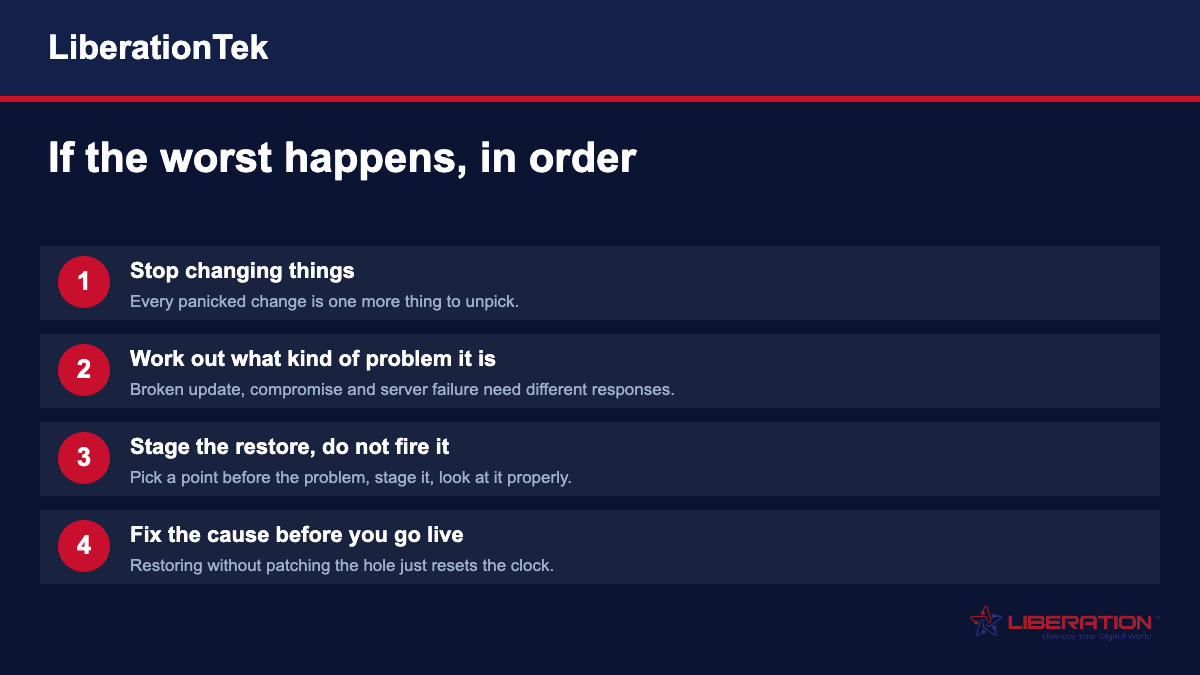
Disaster recovery in four steps: stop changing things, identify the kind of problem, stage the restore rather than firing it, and fix the cause before going live

Test a restore before you need one

This is the part everyone skips, and it is the only part that proves any of the rest works.

Stage a restore. Look at it. Confirm the database came back with the files, that images load, that a form submits. Then throw it away. Once a quarter is a reasonable rhythm; once ever is infinitely better than never.

An untested backup is a hypothesis. The first time you discover whether it works should not be the morning your site is down.

The failures that have nothing to do with data

We have watched recovery go badly more often for these reasons than for any technical one.

Nobody could get in. One person held the hosting login, the registrar login, or both, and they had left. The data was perfectly safe and completely unreachable. Two people should hold access to both, today.

The domain expired. Registered at a different company from the host, on a card that stopped working, renewal notices going to an address nobody reads. The site is fine. Nobody can reach it. No backup fixes this.

The site came back and the payment gateway did not. Third-party services have their own credentials, their own configuration and their own outages, and a restored website still has to reconnect to all of them.

The restore reinfected itself. A hacked site was restored without changing the credentials or patching the way in, and was compromised again inside a week. Fix the cause, then publish.

What to do this week

You do not need a formal plan document. You need four things written down somewhere two people can find them.

Where the hosting account is and who can log in. Where the domain is registered, who can log in, and when it renews. What your backup covers and how far back it goes. And a note of the last time somebody tested a restore.

If you cannot fill in that last one, that is the thing to do first. We are happy to walk a test restore with you — it takes about twenty minutes and it is the cheapest insurance in this entire business.

Related pages: CodeGuard website backup · SiteLock security · Uptime guarantee · Migration services · Shared Cloud hosting · VPS hosting · Dedicated Cloud · WordPress hosting · WooCommerce hosting

CodeGuard feature details are from our CodeGuard product page. Backup inclusion varies by plan — confirm what is included on yours before relying on it. Data center retention is seven days at the time of writing.