
The right hosting reseller plans match the number of client accounts you will actually host in the next six months, run on resources that can carry them, and come with branding, backups and renewal terms you can live with. Pick the smallest plan that fits that list, not the one with the biggest account count. You can always move up, and an empty plan is money spent on nothing.
This guide is for agencies, MSPs and freelance developers comparing reseller hosting plans, whether you are about to start charging for hosting or already do. It covers how to choose a reseller hosting provider in seven steps, from accounts and resources to the cost-per-account math, and it ends with a table of our five plans. If you need the basics first, read our reseller hosting guide.
Step 1: Compare accounts against resources in hosting reseller plans
What to do: When you compare hosting reseller plans, list the sites you can move in the next three to six months, then look at the CPU, memory, disk and bandwidth behind each plan’s account count. Account count alone tells you very little. A plan that allows 250 accounts on 2 vCPUs is a promise that you will not use them.
What to check: Divide the plan’s RAM and disk by its account count. Our hosting reseller plans run from 2 vCPU, 4 GB of RAM and 100 GB of NVMe storage for 5 accounts, up to 10 vCPU, 20 GB and 500 GB for 250 accounts. A busy WooCommerce store needs far more headroom than a five-page brochure site, so weigh your client mix, not just the headcount.
Common mistake: Buying for the account count you hope to reach in a year. Start where your client list is today with some room, and move up when you outgrow it.
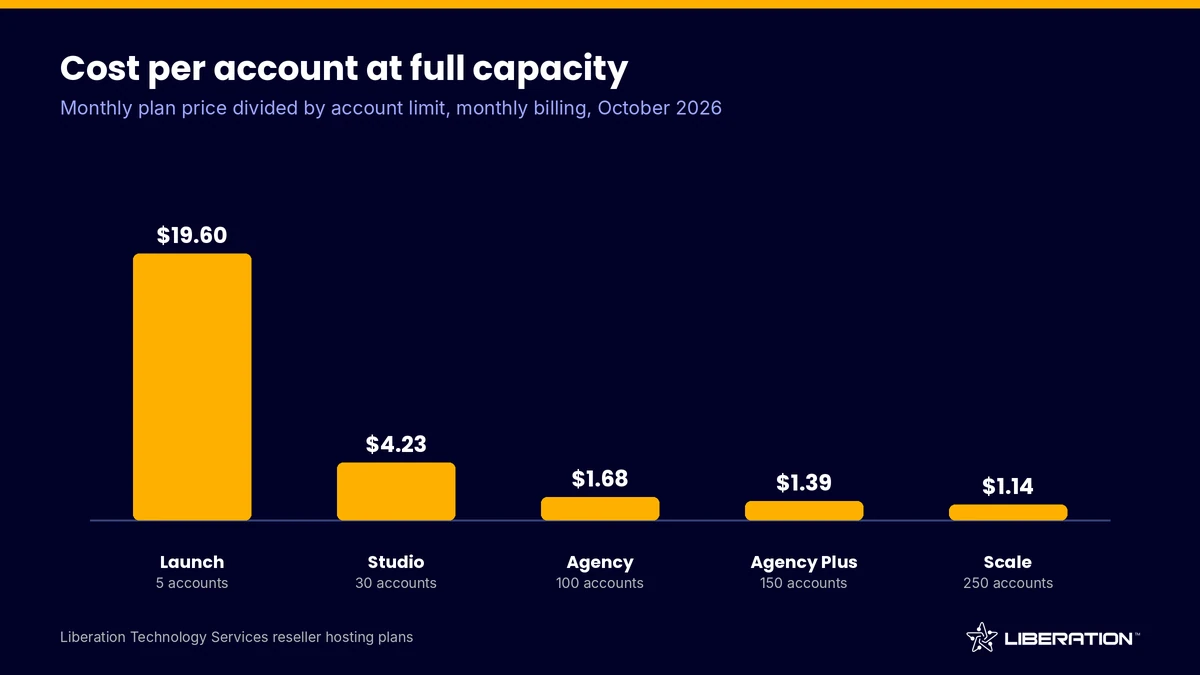
The chart below shows what each of our plans costs per account when every slot is full, using monthly list prices as of October 2026. The more accounts you can fill, the lower the server cost per client. The catch is that you have to fill them.
Step 2: Choose a private VPS or a shared reseller account
What to do: For any of the hosting reseller plans you are considering, ask the provider whether your plan runs on its own virtual server or on a machine shared with other resellers. On a shared reseller account, another reseller’s traffic spike or compromised site can slow your clients down, and you cannot fix it.
What to check: Ask where the hardware sits and who owns it. Each of our plans is a private VPS, on hardware we own in the United States, so the resources you buy are yours alone. Reseller hosting for agencies usually works best on a private server. A shared account is cheaper and can be fine for a handful of low-traffic sites. A private server makes more sense once clients are paying you for uptime. Our post on reseller hosting vs VPS goes deeper on the difference.
Common mistake: Treating “unlimited” as a resource. If a listing promises unlimited accounts or disk without naming CPU or memory, the limit exists, it is just unstated.
Step 3: Check the panel and WHM tier for cPanel reseller hosting
What to do: Confirm which control panel the plan uses and what level of server access you get. With cpanel reseller hosting, you receive a limited WHM interface where you create packages, set disk and bandwidth quotas, and manage your clients’ cPanel accounts. cPanel’s documentation describes a reseller as an account owner who also sells cPanel accounts to other users.
What to check: Ask about the WHM tier, a point many hosting reseller plans leave vague, meaning what you can and cannot do yourself. cPanel’s own documentation says resellers see only packages that carry their username unless the provider enables global packages, and it advises providers against granting privileges that let a reseller bypass resource limits. A good host explains its defaults. Also ask whether a domain reseller account is included. Ours is, along with Imunify360 malware protection and AutoSSL on every plan.
Common mistake: Picking a panel your clients do not know. Most small business owners have seen cPanel before, which cuts your support load. Our host runs cPanel and WHM only, so if you need another panel, compare that separately.
Step 4: Look at how deep white label hosting goes
What to do: Decide what your clients should see under your brand: nameservers, the control panel login, invoices and support emails. White label hosting means different things at different providers, and some reserve the good parts for higher tiers.
What to check: On our plans, private nameservers and a custom hostname come with every plan, and full cPanel branding starts at the Agency tier. Whichever provider you consider, get the branding limits in writing. Our reseller offering also includes a reseller client protection policy, which spells out how your clients are treated, so read the equivalent policy anywhere you shop.
Common mistake: Assuming branding is complete. A client who sees the host’s name on a login page may go to that host directly. For reseller hosting for agencies, the relationship with the client is the asset, so protect it.
Step 5: Test backups and migration before you commit
What to do: Ask how one client account gets restored, how many days of history exist and where the copies live. Server backups protect the provider. Account backups protect you.
What to check: Daily automated backups come with our Studio plan and above, and they are a paid add-on on Launch. You can also add CodeGuard website backup. For migration, ask whether moving client sites costs extra. We migrate client sites for free, with no per-site fees, and you can read how that works on our website transfer page. See also backup and disaster recovery for options beyond the plan.
Common mistake: Skipping a test restore. Move two or three real sites, restore one from a backup, and time it. That teaches you more than any feature list.
Step 6: Read the renewal terms, support and SLA
What to do: Find the renewal price of your chosen hosting reseller plans before you buy. A low first-term rate that jumps at renewal is the oldest trick in hosting, and it hits resellers hardest because you cannot pass a surprise bill to a client mid-contract.
What to check: Our renewals are price-locked, with increases capped at 5%. Monthly plans can be cancelled, and every plan carries a 30-day money-back guarantee. For support, we offer 24/7 US-based help by ticket and chat and publish a 99.9% uptime SLA. Test any provider the same way: send a pre-sales question, then a technical one, and time the replies. Our best reseller hosting checklist lists more questions to ask.
Common mistake: Reading the SLA headline and skipping the remedy. A 99.9% target allows roughly 43 minutes of downtime in a 30-day month, so check what the provider does when it misses.
Step 7: Run the cost-per-account math on your hosting reseller plans
What to do: Divide the plan price by the accounts you can fill, then compare it with what you charge. To find your break-even point, divide the plan price by your per-site price. The numbers below use an illustrative price of $10 per site per month and monthly billing. They ignore payment fees, domains and your time, so treat them as a floor.
- Launch ($98 for 5 accounts): break-even needs 10 sites, more than the plan holds. At $10 per site it loses money.
- Studio ($127 for 30): 13 sites to break even.
- Agency ($168 for 100): 17 sites.
- Agency Plus ($208 for 150): 21 sites.
- Scale ($286 for 250): 29 sites.
What to check: Be honest about how fast you can fill the plan. If you will have 12 clients in six months, Studio is the fit and Agency would sit mostly empty. Among our hosting reseller plans, Launch works for a test run or a few personal projects at a higher per-site price, not for a $10 hosting product. Our reseller hosting profitability breakdown works through the margins in more detail.
Common mistake: Pricing hosting like a commodity. If you also handle updates, security and support, charge for them. A plan that looks tight at $10 per site works at a price that covers the care you provide.
Here is how our five hosting reseller plans compare side by side, on monthly billing as of October 2026. Annual billing is slightly lower on Launch ($93) and Studio ($120).
| Plan | Price per month | Accounts | vCPU / RAM | Storage / transfer | Cost per account (full) |
|---|---|---|---|---|---|
| Launch | $98 | 5 | 2 / 4 GB | 100 GB NVMe / 2 TB | $19.60 |
| Studio | $127 | 30 | 4 / 8 GB | 200 GB / 4 TB | $4.23 |
| Agency | $168 | 100 | 6 / 12 GB | 300 GB / 6 TB | $1.68 |
| Agency Plus | $208 | 150 | 8 / 16 GB | 400 GB / 8 TB | $1.39 |
| Scale | $286 | 250 | 10 / 20 GB | 500 GB / 10 TB | $1.14 |
Every plan is a private VPS with cPanel and WHM, Imunify360, AutoSSL, a domain reseller account, and private nameservers. Full cPanel branding starts at Agency. If you are unsure which tier fits, ask us for a sizing review or look over the full reseller hosting plans page.
Frequently asked questions
What are hosting reseller plans?
Hosting reseller plans let you buy a block of server resources and sell individual cPanel accounts to your own clients under your brand. You set the packages and prices, and the provider keeps the hardware running. Plans differ mainly in account limits, server type, branding depth and support.
How to choose a reseller hosting provider?
Count the sites you can host in the next six months, then check the CPU, memory and disk behind each plan’s account count. Confirm the server is private, read the renewal terms and test a backup restore. Choose the smallest of the hosting reseller plans that fits, since moving up later is easier than paying for empty slots.
Is a private VPS better than a shared reseller account?
With hosting reseller plans on a private VPS, you get dedicated resources, so another customer’s traffic cannot slow your clients. A shared reseller account costs less and suits a few low-traffic sites. Most agencies selling uptime to paying clients prefer the private server.
What does white label hosting include?
White label hosting normally means your own nameservers, your brand on the control panel and your name on client emails. Providers draw the line in different places, so ask in writing. On our plans, private nameservers come with all plans and full cPanel branding starts at Agency.
Can I switch reseller plans later?
Yes. For reseller hosting for agencies, upgrades are the normal growth path, and providers generally allow them as you add clients. Full account backups plus your own DNS records make any move simpler. Ask your provider how upgrades are handled before you buy, and keep backups under your control from the first day.
Sources
- cPanel documentation, Guide to Reseller Accounts
- cPanel documentation, Feature Manager (feature lists and packages)
- Liberation Technology Services reseller hosting plans and terms, October 2026
Related reading: how reseller hosting works, WordPress hosting for agencies and VPS web hosting.