Microsoft 365's July 2026 Price Increase, Explained
Microsoft 365 price increase 2026: Business Basic rose from $6 to $7/user/month, Business Standard rose from $12.50 to $14/user/month, and Business Premium held at $22/user/month.
Moving from Microsoft 365 to Liberation
We handle the move so you can keep working.
The short answer
The Microsoft 365 price increase 2026 raised rates on two of its most common small-business 365 plans on July 1, 2026. Business Basic went from $6 to $7 per user per month — a 17% increase. Business Standard went from $12.50 to $14 per user per month — a 12% increase. Business Premium was not changed and remains $22 per user per month.
These are list prices on Microsoft’s standard monthly-billed plans; teams on an annual commitment lock in whatever rate was in effect at renewal, so the Microsoft 365 price increase 2026 timing matters for anyone renewing near July 1. A 10-seat team on Business Basic now pays an extra $120 a year from this single change alone, and a 25-seat team on Business Standard pays roughly $450 more annually.
Liberation Hub For Teams was built as a direct response to increases like this Microsoft 365 price increase 2026 — one flat per-seat rate, published up front, with no separate per-app fees layered on top of email, chat, video and file storage. If the Microsoft 365 price increase 2026 is the reason you’re comparing options, the goal here is simple: show exactly what changed, and what a flat-rate alternative actually costs by comparison.
With the Microsoft 365 price increase 2026 now in effect, Liberation Email is $1.95 per user per month for HIPAA-capable, encrypted business email, with no annual contract. Even against the pre-increase Business Basic price, it’s a fraction of the cost — and it doesn’t move on Microsoft’s renewal schedule.
What changed, plan by plan
Business Basic
$6.00 → $7.00/user/month (+17%), effective July 1, 2026.
Business Standard
$12.50 → $14.00/user/month (+12%), effective July 1, 2026.
Business Premium
No change — stays at $22.00/user/month.
Figures reflect Microsoft’s published annual-commitment pricing from its official 2026 pricing update, effective with the July 2026 change. If your team is on monthly billing or an older legacy SKU, the impact of this Microsoft 365 price increase may differ from the annual-commitment figures shown above.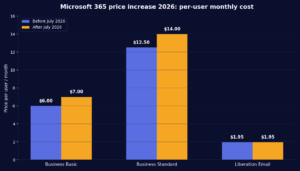
- Free migration from Microsoft 365 or any other provider, done by our team.
- No lock-in month-to-month, cancel anytime — no renewal-date price surprises.
- U.S.-owned infrastructure and support.
Beyond email
If your team also leans on Teams, SharePoint, or shared drives, Hub for Teams covers that ground at $7.49/user/month — still less than the new Business Standard price alone.
Who this affects most
Basic-plan teams
The 17% jump on Business Basic is the steepest increase of the three plans — the plan most small teams are actually on.
Growing teams
Per-seat increases compound fastest for teams that are hiring; a 10-person increase to Business Basic alone is $120/year, before growth.
Annual-contract renewals
Teams locked into an annual Microsoft agreement will see the new price at their next renewal, not immediately.
- Liberation Email $1.95/user/month, no annual commitment.
- Hub for Teams $7.49/user/month for email, drives, chat and video.
- Free migration included with any plan switch.
Priced the way a business buys
Per-mailbox pricing, billed monthly, with a written quote for larger rollouts.
- Liberation Email $1.95/user/month.
- Hub for Teams $7.49/user/month.
- WordPress hosting from $35/month for a companion website.
What It Costs
Starting prices, billed monthly unless noted. Anything larger gets a written quote.
Common questions
When did the price increase take effect?
July 1, 2026, for Business Basic and Business Standard. Business Premium was unchanged.
Will Microsoft raise prices again?
We can’t speak for Microsoft’s future pricing; this page reflects the July 2026 change as published.
Can you migrate mid-contract?
Yes — many teams migrate ahead of their Microsoft renewal date to avoid paying the new price even once. We can time the switch around your renewal.
Is there a contract with Liberation?
No. Plans are month-to-month and you can cancel anytime.
Time your switch before your renewal
Book a call and we’ll map the migration to your Microsoft renewal date so you never pay the new price.
Custom Solutions
Take your business to the next level with Liberation's full suite of services & solutions.
Custom Management
Don’t like managing? We offer managed services for hosting, ecommerce, web sites, and more.
Email and teamwork together
Mail, chat and files in one workspace.
Our Promise Of Digital Independence
Liberating Your Digital World Is Our Passion
- U.S.A. owned and based
- We own and control our entire platform
- More security to protect your data
- No Censorship Guarantee
- 100% data ownership
- Your data is NEVER shared

Global Edge Network
Liberation’s global edge network provides enhanced performance & security.
Freedom Tech News
Stay informed on the latest tech news, new products, promotions, & more!


Ready For Digital Liberation?
What the Microsoft 365 price increase means for a small business
The Microsoft 365 price increase affects every seat you pay for, so the yearly effect grows with the size of your team. A ten person office on Business Standard now pays noticeably more per year than before the change, and the difference compounds if you also add Exchange, Teams or security add-ons. Before you renew, multiply the new per-user price by your seat count and by twelve, then compare that number with what you actually use.
How to reduce the impact without disrupting your team
Start by auditing licenses. Many businesses pay for seats that belong to former employees, shared mailboxes that could be free, or plans that include features nobody opens. Moving some users to a lower tier, removing unused accounts and switching from monthly to annual billing can each lower the total. If you rely mainly on email, calendar and file sharing, a flat-rate alternative may cover everything you need for far less.
Questions to ask before you renew
Ask which features you use every week, which ones you have never opened, and how much of the bill is for the apps rather than for email. Ask whether your files and mail are easy to export if you decide to leave, and what the notice period is. Finally, ask what a move would cost in time, because the risk in changing providers is almost always the migration rather than the monthly price.
Planning a move away from Microsoft 365
Liberation offers free migration services that copy mailboxes, calendars, contacts and files to Liberation Email and Hub for Teams, test everything and switch with no downtime. You keep your own domain and your own data, and you can run both systems side by side until you are ready. You can read how the move works on our migration services page, or compare plans on our Microsoft 365 alternative page.
How to respond to a price increase sensibly
A price increase is an unwelcome prompt to do something genuinely useful, which is to find out what you are actually buying. Most organizations react either by absorbing it without looking or by switching in annoyance, and both skip the step that saves the most money: an audit of what is really in use.
Start with licences rather than prices. Count the assigned seats and compare that against the number of people who work for you. Licences still assigned to departed staff, duplicate accounts, and shared mailboxes consuming a full licence are all extremely common, and in a surprising number of cases the waste exceeds the increase. That exercise takes an hour and may end the conversation there.
Then count what each person opens in a typical week. If the honest answer is mail, a calendar, a shared folder and a word processor, you are paying for a catalogue in order to use four items from it, and a smaller tier or a different provider is worth pricing. If the answer includes applications your work genuinely depends on, the increase may simply be the cost of something you need — and switching to save a little would be a poor trade.
Before deciding, check what the suite has absorbed, because that determines the real cost of leaving rather than the per-seat figure. If file storage has become your file server, if chat holds your decisions, and if the same account signs people into third-party applications, then this is an identity migration rather than a mail migration and it should be staged: mail first, files second, identity last.
Hub For Teams gives you mailboxes, shared calendars and contacts on your own domain, with prices published rather than negotiated per customer and support based in the United States. Book a call with your licence count and what people actually use, and we will tell you plainly whether moving saves enough to be worth the disruption — including when it does not.
Cost is rarely the only factor with microsoft 365 price increase 2026. Look at setup fees, renewal pricing, add-on charges, and the time your staff spends managing the service. A plan that looks cheap but needs constant attention often costs more than a managed option with clear support and predictable billing.
Security deserves the same attention. Ask how accounts are protected, how updates are applied, and how quickly problems are fixed. For microsoft 365 price increase 2026, strong defaults such as two-factor sign-in, encrypted backups, and U.S.-based support reduce risk without adding work for your team.
Finally, think about growth. The right setup for microsoft 365 price increase 2026 should still fit when you add staff, locations, or new services. Choose a provider that can scale with you and will help you move data without downtime when the time comes.
Many customers tell us the hardest part of microsoft 365 price increase 2026 is simply getting started. We keep the first step small: a short call, a review of what you have today, and a written recommendation with clear pricing. There is no pressure and no long contract to sign before you know the plan makes sense.
Once you decide to go ahead, our team handles the heavy lifting, including migration, testing, and training. You keep control of your accounts and your data, and you always know who to contact for help with microsoft 365 price increase 2026 questions after launch.
To see how this works in practice, review our related guides, compare plans, or contact us for a quote. Whether you are replacing an existing service or starting fresh, we can help you choose microsoft 365 price increase 2026 options that fit your goals and keep your information in American hands.
Support quality is easy to overlook until something goes wrong. For microsoft 365 price increase 2026, ask how quickly a real person responds, whether support is included in the price, and how issues are tracked until they are resolved. A short response time and a clear escalation path are worth more than a long feature list.
Documentation matters as well. Good providers give you written steps, account details, and a simple checklist so your team is never locked in. If you ever need to change course with microsoft 365 price increase 2026, you should be able to take your data and records with you.
Finally, look for proof. Ask for examples, references, or a trial period so you can see how microsoft 365 price increase 2026 works in your own environment before you commit.