
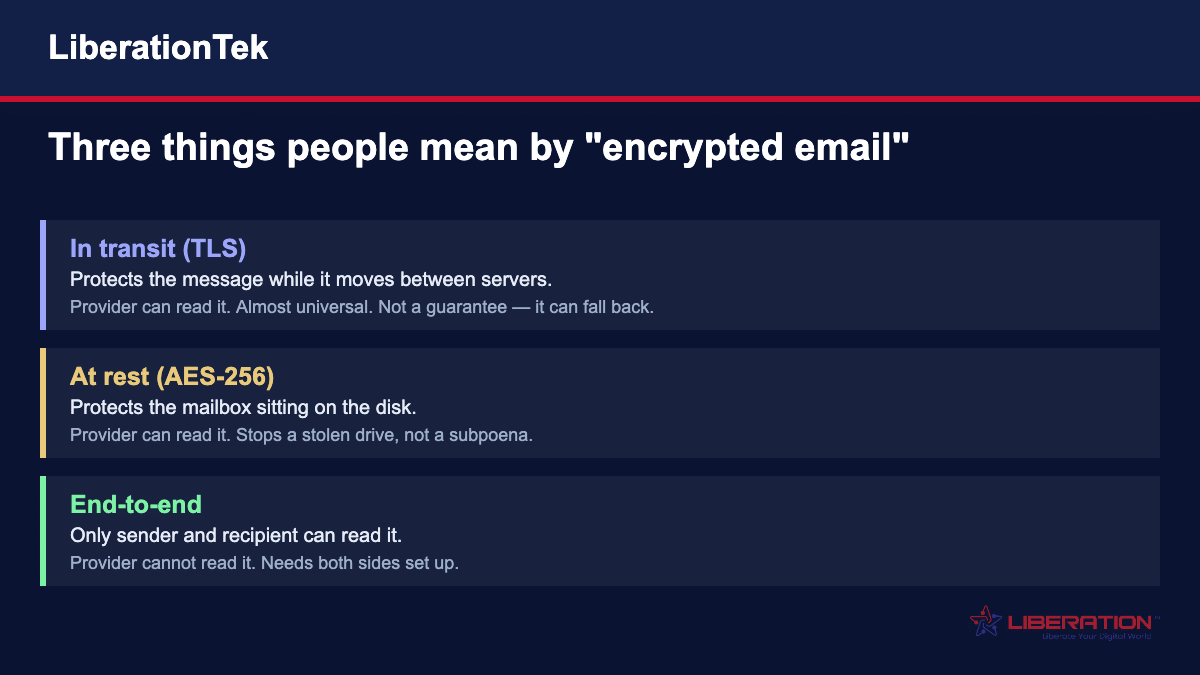
“Encrypted email” means three different things, and most arguments about it are people using the same phrase for different ideas. Your mail is almost certainly encrypted in transit and at rest already. It is almost certainly not end-to-end encrypted, which is what people usually mean when they ask. Here is the difference, when each one matters, and what to actually do.
Email encryption is a subject where the marketing has outrun the vocabulary. Providers advertise “encrypted email” while meaning wildly different things, and a business owner trying to work out whether they are covered gets no useful signal from the word alone.
So let us be precise about the three layers, because the difference decides whether your provider can read your mail.
Encryption in transit: the armoured van
When your mail server hands a message to the recipient’s mail server, that connection is normally protected by TLS — the same technology behind the padlock in your browser.
This is nearly universal now and happens without anyone thinking about it. It stops somebody intercepting the message as it crosses the internet.
Two things it does not do. It does not stop either provider reading the message, because they hold it in readable form at each end. And it is opportunistic on most mail routes: if the receiving server does not support TLS, many systems fall back to sending unencrypted rather than fail the delivery. You generally do not get told when that happens.
Encryption at rest: the locked filing cabinet
Once a message arrives, it sits on a disk in a data center. Encryption at rest — usually AES-256 — means that disk is encrypted.
This protects against a specific, real threat: somebody physically removing a drive, or getting at the raw storage. It is worth having and any serious provider does it.
It does not stop your provider reading your mail, because the system has to decrypt it to show it to you, to search it, and to filter it for spam. And it does not stop a lawful order, because the provider can comply.
A provider advertising “military-grade AES-256 encryption” is usually describing this. It is true, and it is not the thing most people are asking about.
End-to-end: the only one where the provider cannot read it
End-to-end encryption means the message is encrypted on your device before it is sent, and can only be decrypted by the recipient.
The provider stores and forwards something it cannot read. Neither can anyone who compromises the server, and neither can anyone who serves a warrant on it — there is nothing readable to hand over.
This is what people mean when they ask whether email is encrypted. For a standard Gmail, Outlook or most business mail accounts, the answer is no.
Liberation Email includes end-to-end encryption on every plan, from $1.95 per mailbox a month, alongside AES-256 at rest and TLS in transit.
Why PGP and S/MIME never took over
Two standards have existed for decades to do end-to-end email encryption, and both work. Neither is in general use, and it is worth understanding why before anyone proposes them as your answer.
PGP uses a key pair: a public key you give out and a private key you guard. Anyone can encrypt a message to your public key; only your private key opens it. The problem is everything around that. You need the recipient’s public key before you can write to them. You must keep your private key safe indefinitely — lose it and every message ever sent to you is permanently unreadable, with no reset link.
S/MIME solves the trust problem with certificates issued by a certificate authority, which makes it more manageable in a company with central IT. It is well supported in Outlook. It also means buying and renewing certificates per user, and it degrades badly when you write to anyone outside your organisation.
Both were designed by people who found key management obvious. Most businesses are not staffed by those people, which is why the modern approach hides the keys inside the platform instead.
What to do when the recipient has nothing
This is the practical problem that defeats most encryption projects. End-to-end requires both ends. Your client, your patient, your customer is on whatever they are on, and you cannot make them adopt anything.
The workable answer is a secure portal. Instead of delivering the message into their mail client, you deliver a notification, and they collect the content through a browser over an encrypted connection.
It is a compromise, and it is how essentially all healthcare and legal secure messaging works. It also has an advantage people overlook: you can see whether it was opened, and you can revoke access afterwards. An encrypted email, once delivered, is gone from your control entirely.
For documents rather than messages, a shared space with revocable access is better still. Hub for Teams does this at $7.49 per user a month.
When you are actually required to encrypt
Three situations come up repeatedly, and they are worth knowing even though your own obligations may differ.
HIPAA does not list encryption as mandatory. It treats it as an addressable specification, which is widely misread as optional. It means you either implement it or document a reasoned decision not to, along with an equivalent alternative. In practice, for email carrying patient information, most practices find encryption easier to implement than to justify avoiding.
The FTC Safeguards Rule is firmer. It requires encryption of customer information both in transit and at rest, and it covers more businesses than people expect — tax preparation firms are explicitly named. See our page on accounting and tax firm IT for what that involves.
State breach-notification laws commonly exempt encrypted data. If a laptop is stolen and the data on it was encrypted, many states do not treat it as a reportable breach. That single exemption has justified more encryption spending than any compliance mandate.
What encryption does not protect you from
This matters more than the technical detail, because it is where businesses get a false sense of safety.
Encryption does nothing about phishing. An encrypted message written by an attacker is still an attack. Encryption protects a message from the wrong readers; it says nothing about the wrong writers.
It does nothing about a compromised mailbox. If someone has your password, they are you, and they read everything in your own decrypted view of it. This is why multi-factor authentication matters more than encryption for most small businesses, and why it should be the first thing you turn on.
It does nothing about the recipient. Once they have the message, they can forward it, print it, screenshot it, or leave it in a mailbox for seven years.
And it does nothing about metadata. Even with end-to-end encryption, who emailed whom and when is generally visible. For most businesses that is fine. For some it is the sensitive part.
How to tell what your provider actually does
Marketing pages are unreliable here, so ask three questions and read the answers literally.
“Can your staff read my mail if they need to?” If the honest answer is yes — and for most providers it is — then whatever email encryption they advertise is in transit and at rest, not end-to-end. That is not a scandal, it is just a different thing.
“Is end-to-end included on my plan, or is it an upgrade?” A provider that gates email encryption behind a higher tier has told you where it sits in their priorities. It also guarantees the smallest teams, who are the most targeted, are the least protected.
“What happens if I lose my password?” This one is revealing. If they can restore access to your old mail, then they can read it. True end-to-end systems generally cannot recover your archive, which is a real trade-off you should understand before choosing one.
Two questions people ask that have uncomfortable answers
“If I switch to encrypted email, is my old mail protected?” No. End-to-end encryption applies to messages sent and received under it. Mail that already exists in your archive was delivered in whatever state it was delivered in, and importing it into a new provider does not retroactively encrypt what has already crossed the internet in clear form. What improves is everything from the switch onward.
“Does the other person need the same provider?” For end-to-end between two parties, both sides need compatible encryption. Between two accounts on the same platform this generally just works. Across platforms it depends on the standards both support, which is exactly the interoperability gap that kept PGP niche for thirty years. Where it cannot work, a secure portal is the fallback, and it is a perfectly respectable one.
The words providers use, and what they actually mean
Email encryption marketing has its own vocabulary, and several of the terms sound stronger than they are. Here is a short translation guide.
Zero-knowledge. The provider cannot read your data because they never hold the key. This is a meaningful claim and a testable one — ask what happens when you forget your password. If they can restore your mail, it is not zero-knowledge, whatever the page says.
Military-grade encryption. Almost always means AES-256, which is genuinely strong and also completely standard. Your bank uses it, your phone uses it, and so does every serious mail host. It tells you nothing about whether the provider can read your mail, which is the question that matters.
Bank-level security. Not a technical term at all. Banks are secured to a standard set by regulation and risk appetite, not by a specification anyone can check. Treat this as a mood rather than a claim.
Encrypted in the cloud. Usually encryption at rest. Useful, not end-to-end.
Secure email. Means whatever the provider wants it to mean. Always ask which of the three layers they are describing.
AES-256, RSA-2048, TLS 1.3. These are real, specific and fine. The mistake is treating the cipher name as the answer. Every mainstream provider uses strong ciphers; the differences between them are about architecture and jurisdiction, not about which algorithm they picked.
Perfect forward secrecy. A genuinely good property: if a key is compromised later, past sessions stay protected because each one used a different key. Worth having, invisible in daily use, and not a substitute for end-to-end.
Where the real risk usually sits
After all of the above, it is worth being blunt about proportion.
For a typical small business, the likeliest way confidential information leaves the company is not an intercepted message. It is a mailbox compromised through a reused password, an employee forwarding a thread to a personal account, a laptop left in a car, or somebody replying to a convincing request from an address one character different from a supplier’s.
Encryption addresses exactly one of those, and only partially. That is not an argument against it — it is an argument for getting the order right, which is what the next section covers.
The businesses that handle this well are rarely the ones with the most sophisticated cryptography. They are the ones where every mailbox has multi-factor authentication turned on, the domain is authenticated, sensitive documents do not live in email at all, and somebody knows who has access to what.
A sensible order to do this in
If you are starting from a normal small business setup, this sequence gets the most protection for the least effort.
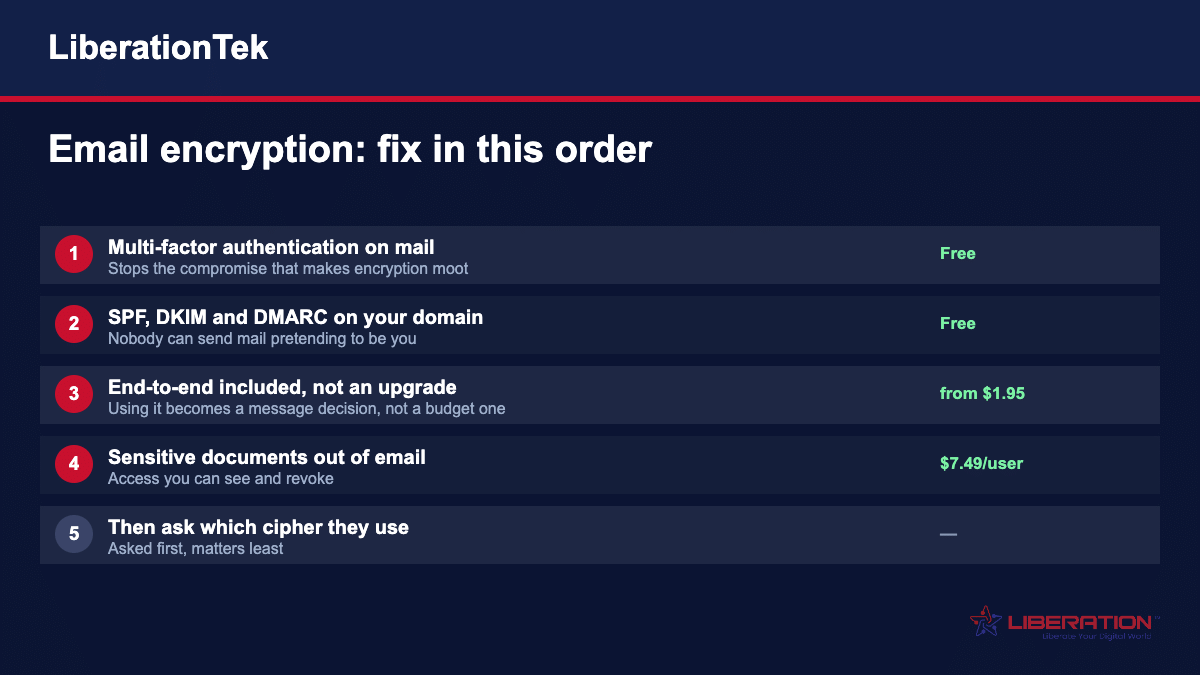
Turn on multi-factor authentication on every mailbox. Free, and it prevents the compromise that makes every other control irrelevant.
Add SPF, DKIM and DMARC to your domain so nobody can send mail pretending to be you. Also free. We cover this in SPF, DKIM and DMARC explained.
Move to a provider with end-to-end encryption included rather than sold as an upgrade, so using it is a decision about the message rather than the budget.
Move sensitive documents out of email entirely, into a space with access you can see and revoke.
Then worry about which cipher your provider uses. That question is nearly always asked first and nearly always matters least.
Frequently asked questions
Is my email already encrypted?
Partly, and probably not in the way you mean. Almost all mail today travels over TLS, which encrypts it between servers, and most serious providers encrypt mailboxes at rest. Neither stops your provider reading the message, and neither is end-to-end encryption. If someone asks whether your email is encrypted, they usually mean end-to-end, and for a standard Gmail or Outlook account the answer is no.
What is the difference between TLS and end-to-end encryption?
TLS protects the message while it moves between mail servers — an armoured van between buildings. End-to-end encryption means the message is scrambled before it leaves your device and can only be unscrambled by the recipient, so nobody in between, including both providers, can read it. TLS is nearly universal and invisible. End-to-end requires both sides to be set up for it.
Why has PGP never caught on?
Because it asks ordinary people to manage cryptographic keys. To send someone a PGP-encrypted message you need their public key first, you have to keep your private key safe forever, and if you lose it your archive is gone permanently with no reset link. It works, and it has protected a great many people, but it has never been usable enough for a business where staff turn over and nobody is a cryptographer.
Does Liberation Email include encryption?
Yes, on every plan and not as a paid add-on: end-to-end encryption, AES-256 at rest, and TLS in transit, with malware scanning. Plans start at $1.95 per mailbox a month. Encryption stops being useful the moment it is gated behind a tier the smallest team cannot afford.
Am I legally required to encrypt email?
It depends what you handle. HIPAA does not name encryption as mandatory but treats it as an addressable safeguard, which in practice means you either do it or document a defensible reason not to. The FTC Safeguards Rule, which covers tax preparers and other financial institutions, does require encryption of customer information in transit and at rest. Many state breach-notification laws also exempt encrypted data from notification requirements. Check your own obligations — this is not legal advice.
Can I encrypt an email to someone who has no encryption?
Not end-to-end, no — that needs both sides. The usual workaround is a secure portal: the recipient gets a notification and collects the message through a browser rather than receiving it in their mail client. That is how most healthcare and legal secure messaging works, and it is a reasonable compromise when you cannot control what the other person uses.
Does encryption stop phishing?
No, and this is a dangerous assumption. Encryption protects a message from being read by the wrong people. It does nothing about a message written by the wrong people. An encrypted phishing email is still phishing, and a compromised mailbox gives an attacker everything inside it regardless of how well it was encrypted in transit.
What about attachments?
Attachments travel inside the message, so whatever protects the message protects them. The gap is afterwards: the recipient saves the file to a laptop, forwards it, or leaves it in a mailbox for years. For anything genuinely sensitive, a document space with revocable access beats an encrypted attachment you lose control of the moment it arrives.