
What is reseller hosting? It is a type of web hosting where you rent server resources from a hosting company and use them to host websites for your own clients, under your brand and at prices you set. The host runs the hardware and keeps the server healthy. You create client accounts, decide what each one gets, and send the bills.
Key takeaways
- Reseller hosting lets web designers, agencies and IT consultants sell hosting as their own service without owning servers.
- You use WHM to create a separate cPanel account for each client, while the host manages the server underneath.
- Most budget reseller plans run on shared servers. Reseller hosting on a private VPS gives you your own resources, IP reputation and root access.
- Look past the intro price. Renewal terms, security, white-label options and support quality decide whether reseller hosting grows your business or drains it.

What Is Reseller Hosting, Exactly?
Think of reseller hosting as buying hosting wholesale and selling it retail. You pay a host for a block of server capacity, then divide it into separate hosting accounts for your clients. Each client gets their own control panel, files and databases, walled off from the others.
The key difference from regular web hosting is who the customer is. With shared hosting, you host your own site. With reseller hosting, you become the hosting provider. Clients pay you, contact you for help, and usually never deal with the company that owns the server.
That is why so many web designers use it. Hosting the sites you build keeps each project in one place and turns a one-time build fee into monthly income.
How Does Reseller Hosting Work?
Almost every reseller plan runs on two tools from cPanel: WHM (WebHost Manager) and cPanel. You work in WHM. Your clients work in cPanel.
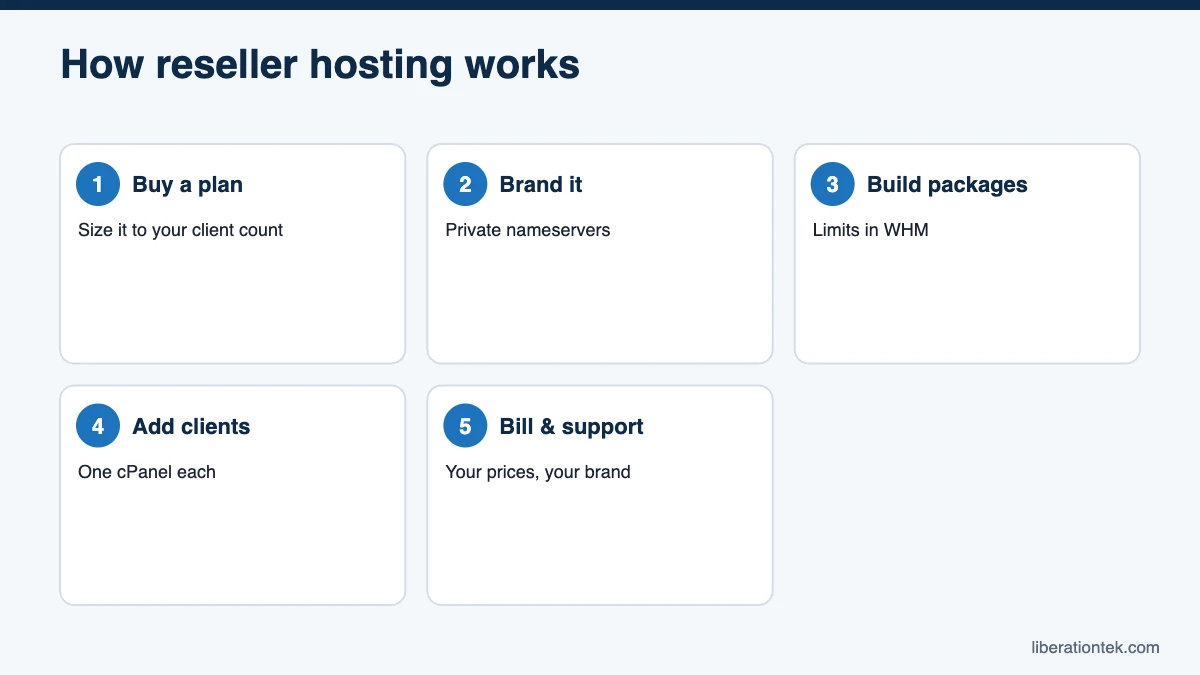
WHM: your control panel as the reseller
WHM is the admin dashboard for your side of the business. From it you create, suspend and remove client accounts, set up private nameservers and watch each client’s disk and bandwidth use.
Packages and client cPanel accounts
Before adding clients, you build hosting packages in WHM. A package is a reusable template that sets limits like disk space, monthly bandwidth, databases, email accounts and addon domains. The cPanel documentation describes the Add a Package feature as a way to create a package “that you can assign to any account on your server.” You might make a Basic package for brochure sites and a Growth package for busier WooCommerce stores.
For each new client, you pick a package, enter their domain and create the account. The client then manages files, databases and SSL in their own cPanel.
Billing your clients
You set the prices, and the difference between what you charge and what you pay is your margin. Some resellers automate invoicing with billing software like WHMCS. Others add hosting to the invoices they already send. Both work, since WHM alone can create and manage accounts.
What the hosting company handles
The host takes care of the hardware, network, data center, operating system updates and server security. On a fully managed plan, a 2 a.m. server problem is their job, not yours.
Put together, the day-to-day workflow looks like this:
- Buy a reseller plan sized to the number of client sites you expect.
- Set up private nameservers so client domains point to your brand.
- Create hosting packages in WHM for each tier you sell.
- Add a cPanel account for each client and migrate or build their site.
- Bill clients monthly or yearly and handle their first-line support.
Who Reseller Hosting Is For
Reseller hosting fits anyone already responsible for other people’s websites. Common examples include:
- Freelance web designers who build sites and want recurring income after launch.
- Digital agencies managing dozens of client sites that need one place to host, monitor and bill them.
- IT consultants and MSPs who already handle email, networks and devices for small businesses.
- Organizations that support networks, such as a denomination hosting sites for member churches or a consultant serving several nonprofits and schools.
Reseller hosting for web designers
For designers, the biggest win is control. When a client’s site lives on a host you chose, you know the PHP version, the backup schedule and the security setup before you start a redesign. And because hosting renews every month, it smooths out the feast-or-famine cash flow of project work.
Pros and Cons of Reseller Hosting
Pros
- Recurring monthly revenue from clients you already serve.
- Low startup cost compared with buying and running your own servers.
- Your brand stays in front of the client, not the hosting company’s.
- Room to bundle extras like backups, security scanning and business email.
Cons
- You become the first line of support, so clients call you when a site is slow or an email bounces.
- Your reputation depends on the host’s uptime and support quality.
- Low intro prices on some plans can jump at renewal and squeeze your margin.
- On a shared reseller server, other resellers’ clients can affect your sites’ speed and IP reputation.
Reseller vs Shared vs VPS vs Dedicated Hosting
This comparison shows where reseller hosting fits among the common hosting types.
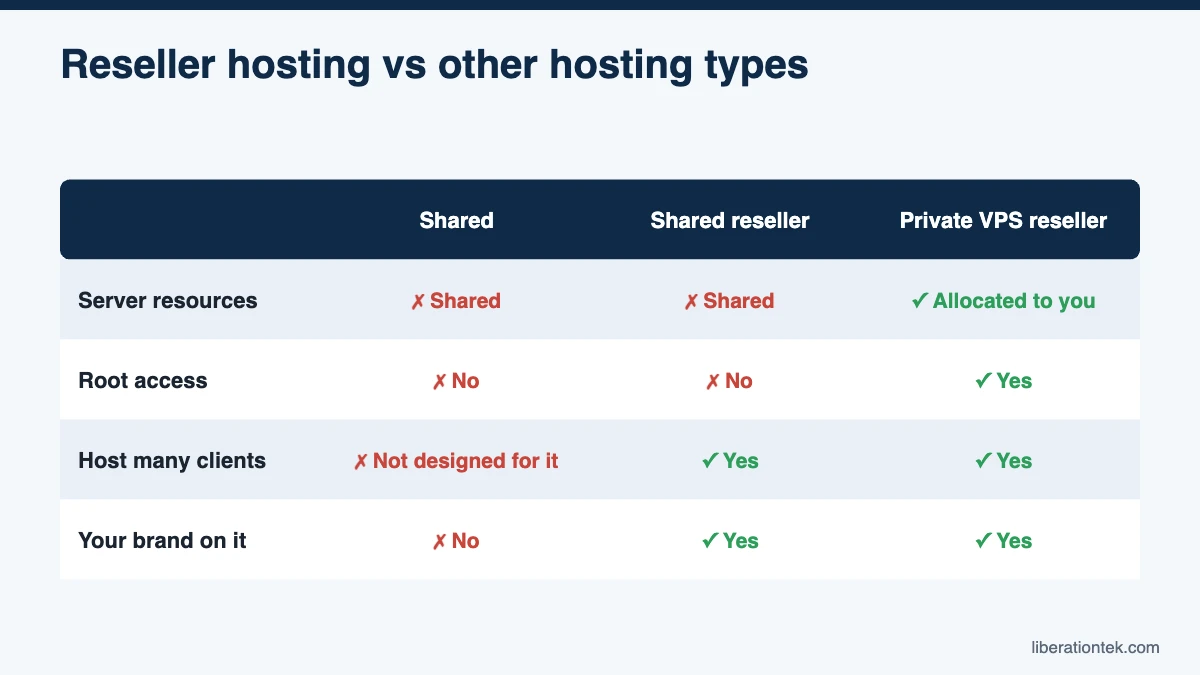
| Hosting type | Who it’s for | Server resources | Control | Host multiple clients? |
|---|---|---|---|---|
| Shared hosting | One owner with one or a few sites | Shared with many other customers | cPanel only | Not designed for it |
| Reseller hosting (shared server) | Designers starting out with a few clients | Shared with other resellers and their clients | WHM and cPanel, no root | Yes, under your brand |
| Reseller hosting (private VPS) | Designers, agencies and MSPs growing a client base | Allocated to you alone | WHM, cPanel and root access | Yes, under your brand |
| VPS hosting | Developers and growing businesses | Allocated to you alone | Root access | Possible, but you set it up |
| Dedicated server | High-traffic sites and large hosting operations | An entire physical server | Full control | Yes, with your own licensing |
If you only need to host your own business site, shared web hosting is usually enough. If you want a server for custom applications rather than client accounts, a managed VPS or a dedicated server may fit better.
cPanel Reseller Hosting on a Shared Server vs a Private VPS
When people ask what is reseller hosting, they usually picture one product, but cPanel reseller hosting comes in two very different setups. Many big-box plans place your reseller account on a shared server alongside other resellers. InMotion Hosting, for example, notes on its cPanel reseller page that resellers can host sites on “Shared Reseller Hosting servers, cPanel VPS servers, and cPanel Dedicated Servers” (as of September 2026).
Shared reseller servers keep the entry price low and can work fine for a few small sites. The trade-off is that CPU, memory and IP addresses are shared with people you do not know. A private VPS gives you your own slice of the server, so your clients’ performance and email reputation depend only on your accounts. We break down that decision in detail in our guide to VPS reseller hosting.
How Liberation’s Reseller Hosting Is Different
At Liberation Technology Services, every reseller plan runs on the reseller’s own private VPS. It is never a shared server. Here is what that includes:
- Your own private VPS, fully managed. You get root and SSH access, and we handle operating system and kernel patching on servers we own and operate in the United States.
- WHM and cPanel included. The cPanel license is sized to your plan, from cPanel Admin on Launch to cPanel Premier on Agency and up. On its pricing page, cPanel lists those licenses at $35.99 and $69.99 a month on their own.
- Imunify360 on every client account. A firewall, web application firewall, and automatic malware scanning and cleanup come standard.
- White label from day one. Every plan includes private nameservers like ns1.yourbrand.com and your own server hostname. Agency, Agency Plus and Scale add full cPanel branding with your logo and colors.
- Price-locked renewals. Your plan renews at your signup price. Any increase is capped at 5%, with notice before renewal, so your margins do not vanish in year two.
- Free migrations. We move client sites from other cPanel hosts at no per-site cost, up to your plan’s account limit.
- Your clients stay yours. We never market to, solicit or bill your end clients. We act on an account only for unlawful use under U.S. law or non-payment, never over lawful content or beliefs, and we contact you first with 15 days’ written notice, except in urgent legal or security cases.
Plans start with Launch at $98 a month for 5 client accounts and scale to 250 accounts on the Scale plan at $286 a month. Every plan includes free AutoSSL, a domain reseller account, 24/7 U.S.-based human support, a 99.9% uptime SLA and a 30-day money-back guarantee. For client mailboxes, we recommend pairing your hosting with Liberation Mail private business email, which starts at $1.95 a month per mailbox and can be resold to every client. You can compare every tier on our reseller hosting plans page.
How to Get Started
You do not need dozens of clients to begin. List the sites you already built or maintain, then pick a plan with room to grow. A designer with eight clients might start on Studio, which includes 30 cPanel accounts, 8 GB of RAM and daily backups with 7-day retention. Migrate existing clients first so you have income from day one. Our step-by-step guide on how to start a web hosting business walks through pricing, contracts and your first migrations.
Frequently Asked Questions
Do I need technical skills to start reseller hosting?
You need basic comfort with web hosting, not server administration skills. In WHM you create hosting packages, add client cPanel accounts and point domains to your nameservers. With a managed reseller plan, the host patches the operating system, runs security software and keeps the server online, so you can spend your time on client websites and support instead of the server itself.
Can my clients tell that I use a reseller host?
Not if the plan is white label. With private nameservers such as ns1.yourbrand.com and your own server hostname, clients see your brand when they look up their domain. Some plans also let you add your logo and colors inside cPanel. At Liberation, private nameservers come with every plan, and full cPanel branding is included on Agency, Agency Plus and Scale.
How do I bill clients on reseller hosting?
You set your own prices and bill clients however you already invoice them, whether that is QuickBooks, Stripe, or a monthly retainer. Many resellers add billing software like WHMCS to automate invoices and account setup. WHMCS is not included with Liberation reseller plans, but you can connect your own license. WHM by itself is enough to create and manage client accounts.
Is reseller hosting profitable for a small web design business?
It can be. Once your plan’s cost is covered, each added client account is mostly margin, and hosting creates predictable monthly income that pairs well with maintenance and support work. A designer paying $127 a month for up to 30 accounts can break even with a modest number of clients. Profit depends on your pricing, client count and the support you bundle.
Conclusion: What Is Reseller Hosting Worth to Your Business?
So, what is reseller hosting in practice? It is a way to turn the websites you already build and manage into steady monthly revenue, with your brand on the service and a host carrying the server work. A shared reseller server can get you started. A private VPS adds isolation, root access and room to grow.
If you want managed reseller hosting on your own private VPS, with cPanel, Imunify360 and price-locked renewals included, see Liberation’s reseller hosting plans. Questions about which plan fits your client list? Talk with our team.
Related reading
- VPS Reseller Hosting vs Shared Reseller Hosting for Agencies
- How to Start a Web Hosting Business in 2026: 10 Steps
- How Much to Charge for Web Hosting: 2026 Pricing Guide
- WordPress Hosting — What you are reselling, and how it is priced.
- SSL Certificates — Auto-installed and auto-renewed on client sites.
- WHMCS Automation for Resellers: 8 Proven Billing Steps — Automate client billing and provisioning.