
An email alias is a second address that delivers into a mailbox you already have, without costing another seat. Use aliases for role addresses like info@ and sales@, for keeping signups out of your real inbox, and for departments too small to need their own mailbox. Use a real mailbox when someone needs their own stored mail, their own login, or a handover when they leave.
Most small businesses buy more mailboxes than they need, because nobody explained the difference between an alias and an account. The distinction is worth ten minutes of your time: it decides what you pay every month, how cleanly a departing employee is offboarded, and whether your role addresses still work in three years.
This is the practical version, not the RFC.
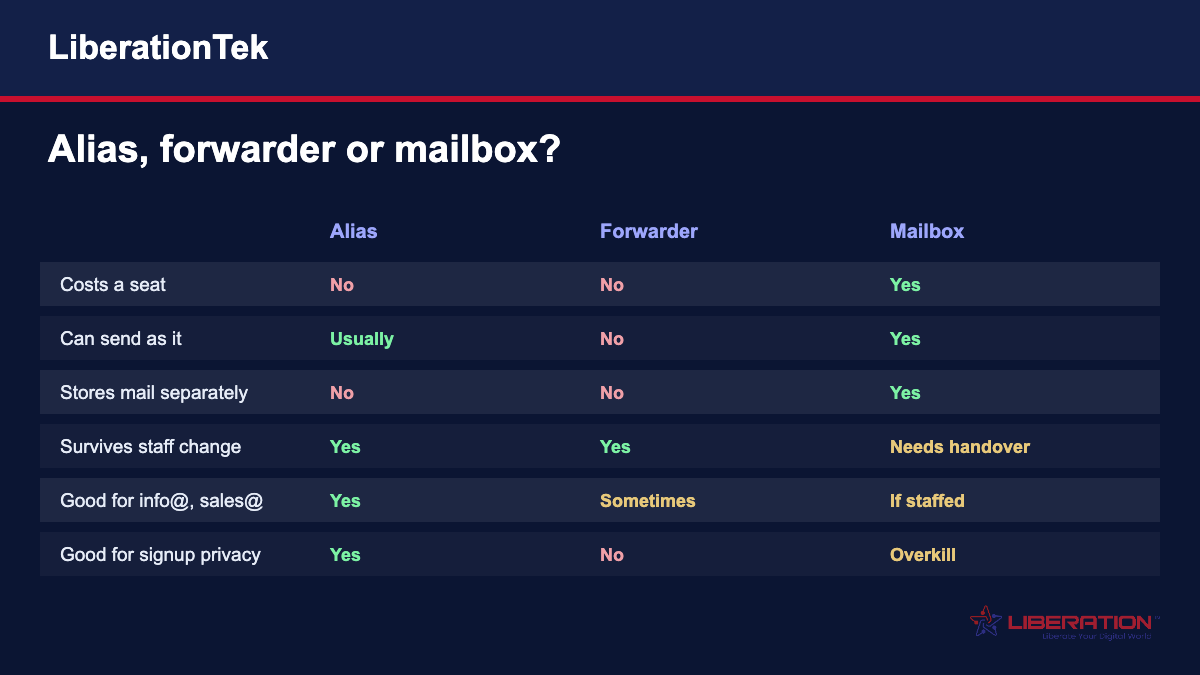
What an alias actually is
An alias is an additional address that points at an existing mailbox. Mail sent to it arrives in that mailbox. There is no separate inbox, no separate password, and nothing extra to log in to.
If your mailbox is [email protected] and you create an alias of [email protected], mail to either address lands in the same place. On most platforms, including Liberation Email, you can also send as the alias, so a reply from sales@ goes out as sales@ rather than revealing the underlying account.
The important part is what an alias is not. It is not a backup, it is not a second copy of your mail, and it is not a way for two people to have genuinely separate inboxes. It is one mailbox wearing more than one name.
Alias, forwarder, distribution list: the differences that matter
These three get used interchangeably and they are not the same thing.
An alias is a name on a mailbox that already exists on your domain. Delivery is local, the mail never leaves your server, and authentication is unaffected.
A forwarder takes mail arriving at one address and sends it somewhere else, often to an external provider. That extra hop is where forwarders cause trouble, which we will come back to.
A distribution list or group delivers one message to several recipients. Useful for team@ when five people all need to see it; overkill when one person handles the address.
Most small businesses want aliases and think they want forwarders.
Where aliases save you real money
The obvious win is role addresses. A four-person company does not need mailboxes for info@, sales@, support@, billing@, accounts@ and hello@. It needs four mailboxes and a handful of aliases pointed at the right people.
At $1.95 a mailbox that difference is small. At a larger provider charging per user for every address, it is the difference between a sensible bill and a silly one, and it is the single most common way small businesses overpay for email.
The second win is time. Adding an alias takes seconds and needs no client reconfiguration. Adding a mailbox means a new password, a new device setup, and something else to remember.
Using aliases to find out who leaked your address
This is the trick most people have not tried, and it costs nothing.
When you sign up for a service, give it its own alias. A supplier portal gets [email protected]. A trade directory gets that directory’s own address. A conference gets one too.
Six months later, when spam starts arriving at the address you only ever gave to one company, you know exactly where it came from. You delete that alias and the problem stops instantly, without changing your real address or telling anyone your contact details have moved.
For a business owner whose main address is on every invoice and every contract, this is the difference between being able to fix a leak and having to live with it.
When you genuinely need a mailbox instead
Aliases are not always the right answer, and using one where you needed an account creates a mess that is tedious to unwind.
Use a real mailbox when the person needs their own stored mail that others should not see. Two people sharing a mailbox through aliases means both see everything, which is fine for sales@ and very much not fine for two employees.
Use a mailbox when someone needs their own login — their own password, their own multi-factor authentication, their own audit trail.
And use a mailbox when there will be a handover. When an employee leaves, you want to change one password and forward their mail. If their address was an alias on someone else’s mailbox, there is no clean line between their mail and that person’s.
The forwarding problem nobody warns you about
Forwarding mail to an external address — a personal Gmail, say — breaks email authentication in a way that is invisible until it matters.
When your server forwards a message, the receiving system sees mail claiming to be from the original sender but arriving from your server. SPF checks fail, because your server is not authorised to send for that sender’s domain. Some of that mail gets marked as spam. Some of it disappears.
Worse, the mail you forward includes whatever spam arrived at the original address, and the forwarding server — yours — becomes the visible sender of it. Forward enough junk to a big provider and your domain’s reputation suffers for mail nobody at your company wrote.
If you want mail from another address, collect it properly over IMAP or POP rather than forwarding it. If you must forward, forward as little as possible and never forward an address that receives unfiltered public mail.
Role addresses that survive people leaving
This is the quiet argument for aliases that most businesses only appreciate in hindsight.
If your quotes go out from [email protected] and Sarah leaves, every customer who replies to an old thread is writing to a dead address, or worse, to whoever inherited her mailbox without context.
If quotes go out from [email protected], an alias pointed at Sarah, then when she leaves you repoint the alias. The customer notices nothing. The thread continues. Nobody has to send an awkward email explaining that Sarah no longer works here.
Put the role on the address and the person behind it, not the other way round.
How many aliases is too many
There is no technical limit worth worrying about on a normal business account, but there is a practical one.
Every alias is an address someone might send to, and every one of them needs a person who reads it. An alias nobody monitors is worse than no address at all, because a customer wrote to it and reasonably expects an answer.
Audit them once a year. For each alias, name the human who reads it. If you cannot, delete it or point it somewhere that is genuinely watched.
Setting them up without breaking anything
Three things to get right.
Decide who reads it before you create it. Not afterwards. This is the step that gets skipped and it is the one that causes unanswered mail.
Enable send-as if the alias will reply. An address that receives but cannot reply as itself pushes the conversation back to a personal address and defeats the point.
Do not alias an address you may later need as a mailbox. Converting an alias into a proper mailbox later means untangling shared mail. Think about whether the role will grow into a person.
Frequently asked questions
Does an email alias cost extra?
Not with Liberation Email — aliases are additional addresses on a mailbox you already pay for, so you are not charged a second seat. Some providers charge per address rather than per mailbox, which is why businesses on those platforms often pay for five or six accounts when they need two mailboxes and four aliases.
Can I send email from an alias?
Yes, on most platforms including ours. This matters more than people expect: an address that can receive but not reply as itself forces the conversation back to a personal address, which undoes the reason you created the role address in the first place.
What is the difference between an alias and a forwarder?
An alias is a second name on a mailbox that already exists on your domain — mail is delivered locally and nothing changes about authentication. A forwarder re-sends mail to a different address, often on another provider, and that extra hop can break SPF checks and hurt your domain reputation. Prefer aliases wherever the destination is a mailbox you already run.
Will forwarding my email to Gmail cause problems?
It can. When your server forwards a message, the receiving system sees mail that claims to be from the original sender but arrives from your server, so SPF checks fail and some of it is treated as spam. You are also re-sending any junk that arrived at the original address, under your own domain, which damages your sending reputation over time. Collect the mail over IMAP instead where you can.
Should info@ be an alias or a mailbox?
An alias, in almost every small business. Point it at whoever actually handles enquiries. Make it a mailbox only when several people need to work the same queue with their own logins, or when you need a record of that address separate from anyone’s personal mail.
Can I use aliases to see who sold my email address?
Yes, and it is one of the most useful things you can do with them. Give each service its own alias when you sign up. When spam starts arriving at an address you only gave to one company, you know the source, and deleting that alias stops it immediately without changing your real address.
What happens to aliases when an employee leaves?
Nothing breaks, which is the advantage. You repoint the alias at whoever takes over and customers replying to old threads still reach a person. That is why role addresses like estimates@ or service@ are better than personal addresses for anything customer-facing.
Should I use aliases like sales@ and support@ for a small business?
Yes. Role addresses like sales@ and support@ let customers reach the right team without exposing a person’s name, and they keep working when staff change. Set them up as aliases on existing mailboxes so you do not pay for extra seats.
Which email aliases should a small business set up first?
Start with info@, support@, sales@ and billing@. Add admin@, hr@ or jobs@ as you grow. Make sure each alias can reply as itself so conversations stay on your domain.
How do I organize email with labels and flags?
Use flags for messages that need action and labels for topics you will search for later. Read our guide to email tags, flags and labels for a simple system.
Related reading
- What Is a Professional Email Domain?
- Why Do My Emails Go to Spam? (And How to Fix It)
- Why Mailbox Security Matters More Than Ever
- Liberation Email plans
- Private Email Providers Compared