
Campaign website security means protecting the accounts, email domain and donation pages an attacker can reach, because that is where 2026 election threats are concentrated. Researchers tracking this cycle report that attackers are going after campaign systems with phishing emails, stolen fundraising logins and fake election websites. Election Day is Tuesday, November 3, 2026, which leaves about four weeks. This guide lays out the latest published data and seven fixes a small team can finish in that time.
Last reviewed: October 6, 2026. This is general security information, not legal or compliance advice.
Key takeaways
- Check Point Research found about 9,500 leaked ActBlue logins and about 6,500 leaked WinRed logins for sale as of May 2026.
- The same researchers counted roughly 4,010 new “vote” domains and 1,140 new “election” domains registered between April 13 and May 14, 2026.
- Check Point reported that 82% of malicious file attacks in the first quarter of 2026 arrived by email.
- The FEC counts 2,742 congressional candidates in its summary of January 2025 through June 2026. Each one needs a website, an email domain and a way to take donations.
- Multi-factor authentication, email authentication and a tested backup do the most for the least effort.
What the 2026 data says about political campaign cybersecurity
In a June 2026 report, CyberScoop summarized Check Point research showing that this cycle’s threats focus on campaign systems and communications. Voting machines and ballot counting are not where the activity sits. The pattern matters for any campaign, whether it is a Senate race or a county commission seat, because the targets are the tools every campaign uses.
The clearest signal is credentials. Check Point counted about 9,500 leaked ActBlue logins and about 6,500 leaked WinRed logins on criminal markets in May. Both parties’ fundraising tools appear, so this is a risk for every campaign that takes online donations. Depending on its permissions, a stolen fundraising login can expose donor details or give an attacker a way to change how money moves.
The second signal is impersonation. Between April 13 and May 14, the researchers saw about 4,010 new domains containing “vote” and about 1,140 containing “election.” Many of those will be legitimate civic projects. Check Point’s own advice, published on its blog, is to treat this cycle as an elevated-risk period for phishing, brand impersonation and credential-based attacks. For a campaign, that means a donor could land on a fake page that looks like yours.
The third signal is the delivery method. Check Point put the share of malicious file attacks arriving by email at 82% for the first quarter of 2026. Campaign phishing attacks usually look like an invoice from a vendor, a message from a “volunteer coordinator” or a request to confirm a donation. Staff open email all day, so one rushed click is enough.
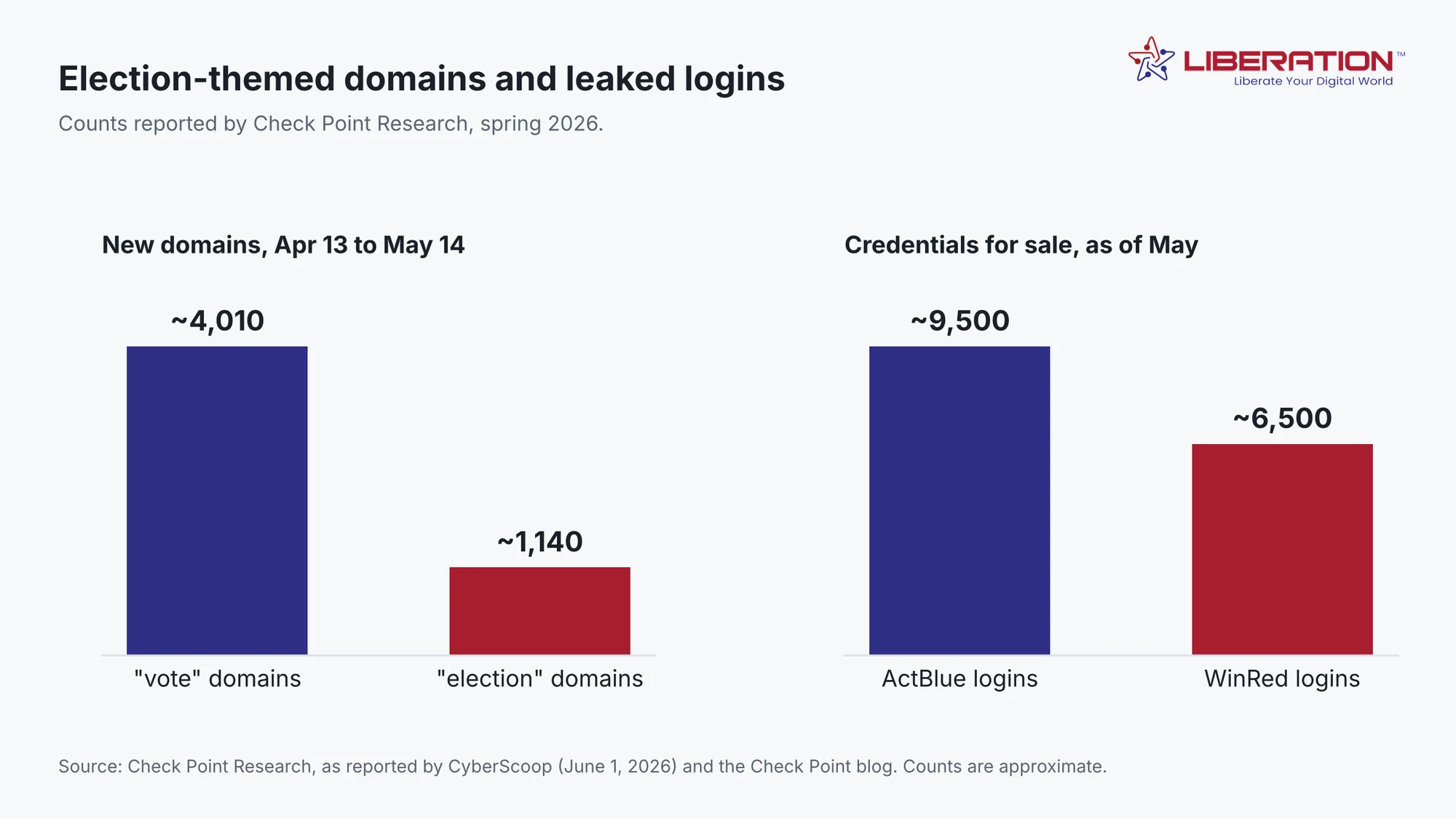
A note on the numbers. They come from one security vendor’s telemetry, they are rounded, and press coverage reports the domain-count windows slightly differently from Check Point’s own post. This article uses the figures from Check Point’s post. Read them as a measure of scale, not an exact tally. For the money side of the cycle, the FEC’s 18-month summary shows $2.8 billion raised by congressional candidates alone, which is part of why donation pages draw attention.
Why campaign sites are easy to attack
Campaign sites share a few traits that attackers like. They go live fast, they are often built by a volunteer or a small agency, and several people hold admin passwords. Many were set up months ago and have not been updated since. Traffic also arrives in bursts after a debate or a mailer, so an outage at the wrong moment costs donations and credibility.
Election website security tends to slip for the same reason: time pressure. Political campaign cybersecurity is a side job for most staff. In the last month, nobody wants to touch the website, so unpatched plugins and old accounts stay in place. A short, ordered checklist beats a long audit at this stage.
Seven fixes to protect a campaign website before November 3
The checklist below is ordered by effort and payoff. Figure 2 spreads it across the four weeks left. If you can only do three things, do the first three.
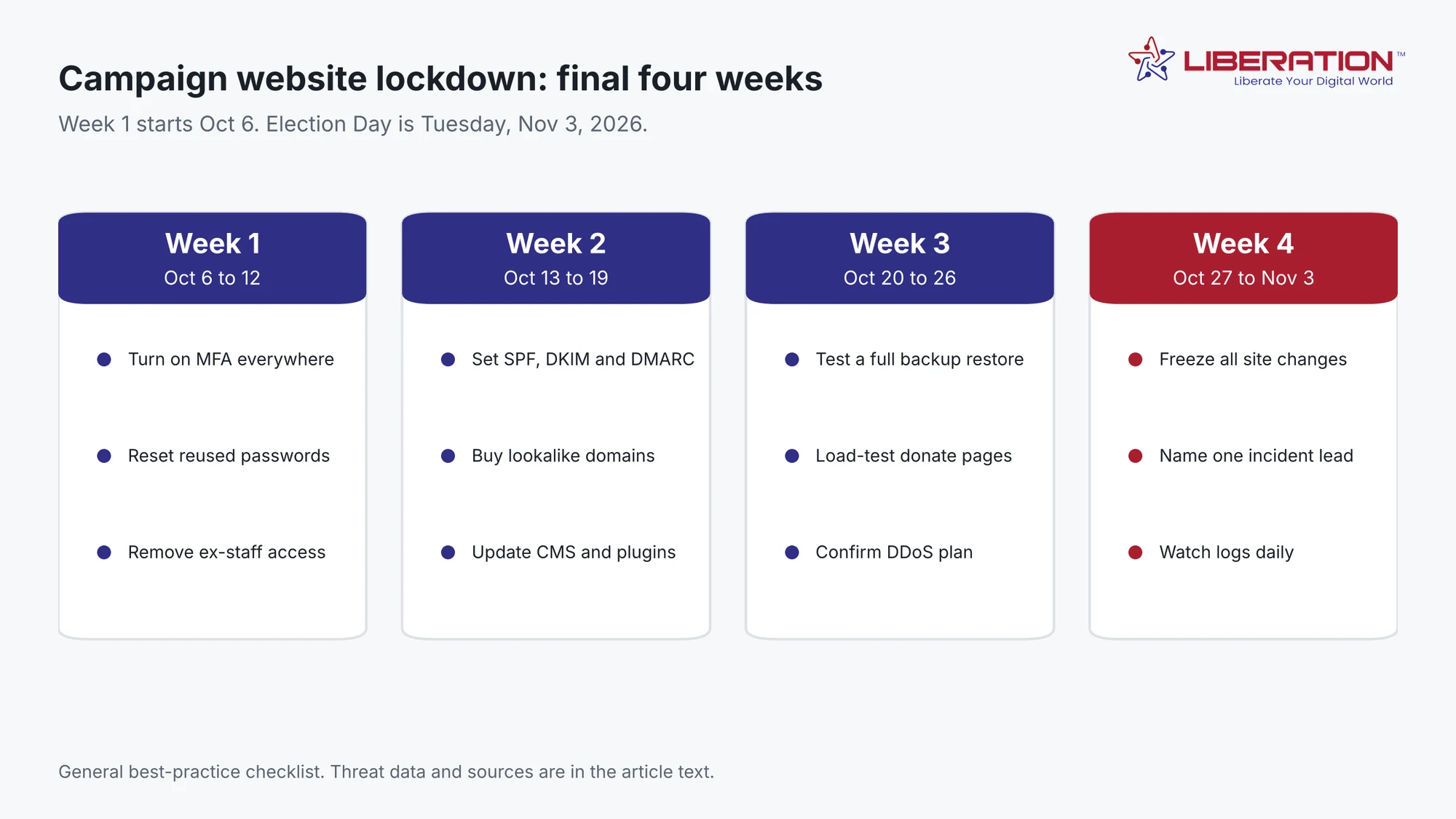
1. Turn on multi-factor authentication everywhere
List every account that touches the campaign: website admin, hosting, domain registrar, email, fundraising platform, ad accounts and social media. Turn on multi-factor authentication for each one. An authenticator app or a hardware key is stronger than a text message. Given the volume of leaked fundraising logins, this single step blocks the most likely path into a campaign.
2. Remove old access and reset reused passwords
Walk through each account’s user list and remove anyone who has left the campaign, including past consultants and volunteers. Then reset any password that is reused across tools. A password manager makes unique passwords realistic for a team that changes weekly.
3. Set up campaign email security with SPF, DKIM and DMARC
These three DNS records tell receiving mail servers which senders are allowed to use your domain, so spoofed messages are easier to block. Our guide to SPF, DKIM and DMARC walks through each record in plain terms. Start DMARC in monitoring mode, read the reports for a week, then tighten the policy. Good campaign email security also protects your real fundraising emails from landing in spam.
4. Register lookalike domains and watch for impersonators
Buy the obvious variations of your domain: common misspellings, the .org or .com version you do not own, and “vote” or “donate” versions of your candidate’s name. Search for your campaign name and “donate” once a week. When you find a fake, follow the steps in the FAQ below.
5. Update your CMS, plugins and themes, then delete what you do not use
Outdated plugins are a common way into WordPress sites. Update the core software, plugins and theme, and then remove anything inactive. Do this by week two so you have time to catch anything the updates break.
6. Plan for traffic spikes and attacks on donation pages
Ask your host what happens during a traffic surge and who you call if the site goes down at night. Load-test the donation page, and confirm that a denial-of-service attack would be filtered upstream instead of reaching your server. If you need a host that works with political clients, see our campaign website hosting page.
7. Back up, test the restore, and freeze changes in the last week
Take a full backup, restore it to a test location, and confirm the site works. In the final week, stop making design or plugin changes unless they fix a security problem. Fewer changes mean fewer chances to break the donation flow when traffic peaks.
Which threat does each fix address?
| Threat | What it looks like | Fix first |
|---|---|---|
| Phishing emails to staff | Fake invoices, volunteer requests, donation “confirmations” | Multi-factor authentication, email authentication |
| Stolen fundraising login | Unknown logins, changed payout details, odd donor exports | Multi-factor authentication, password reset, remove old users |
| Fake election or vote domain | A lookalike site asking for donations or personal data | Lookalike domains, weekly search, takedown reports |
| Site outage or defacement | Slow pages, error messages, changed content | Updates, hosting plan, tested backup |
What to do if something goes wrong
Decide before the final week who leads an incident, and write down the phone numbers for your host, registrar and fundraising platform. If an account is compromised, change its password, end all active sessions and turn on multi-factor authentication before you do anything else. Then tell your host, check the site and email settings for changes you did not make, and warn supporters through channels you know are safe. The CISA election cybersecurity toolkit lists free resources, and you can report cybercrime to the FBI’s Internet Crime Complaint Center.
Frequently asked questions about campaign website security
What is campaign website security?
Campaign website security is the set of habits and settings that keep a campaign’s website, email domain, fundraising accounts and donation pages from being hijacked, impersonated or knocked offline. It covers logins, software updates, email authentication, backups and a plan for traffic spikes.
What is the biggest cyber risk to a political campaign?
Based on Check Point Research’s 2026 findings, the most common route in is email. It reported that 82% of malicious file attacks in the first quarter of 2026 arrived by email, and it counted about 16,000 leaked ActBlue and WinRed logins for sale as of May. Phishing and stolen credentials come before any attack on voting equipment.
Do small local campaigns need to worry about this?
Yes. Attackers do not need a large target to profit from a stolen fundraising login or a convincing fake donation page. A small campaign often has fewer people watching its accounts, which makes the basics (multi-factor authentication, email authentication and backups) worth doing even on a tight budget.
How often should a campaign back up its website?
Daily backups are a reasonable minimum in the final weeks, and a restore test matters more than the schedule. A backup that has never been restored is an assumption, so run one full restore to a test location before the last week of the race.
What should a campaign do when it finds a lookalike domain?
Screenshot it, note the date, and report it to the registrar and the host. Warn staff and volunteers not to click links from it, and tell supporters through your real email list and official social accounts, which you should confirm are protected by multi-factor authentication first.
Sources
- CyberScoop, election threats are focused on campaign systems, not voting machines (June 1, 2026)
- Check Point blog, the 2026 U.S. midterms have a cyber problem, but it’s not at the ballot box
- FEC, statistical summary of 18-month campaign activity, 2025-2026 cycle (October 1, 2026)
- CISA, cybersecurity toolkit and resources to protect elections