Create, schedule and publish to all of your social accounts from one place with SocialBee.
Your Accounts Keep PostingEvery WeekSo A Busy Stretch Never Costs You Momentum.
If you are posting by hand, you are juggling tabs, apps and reminders — and the week your business gets busy is the week your accounts go quiet.
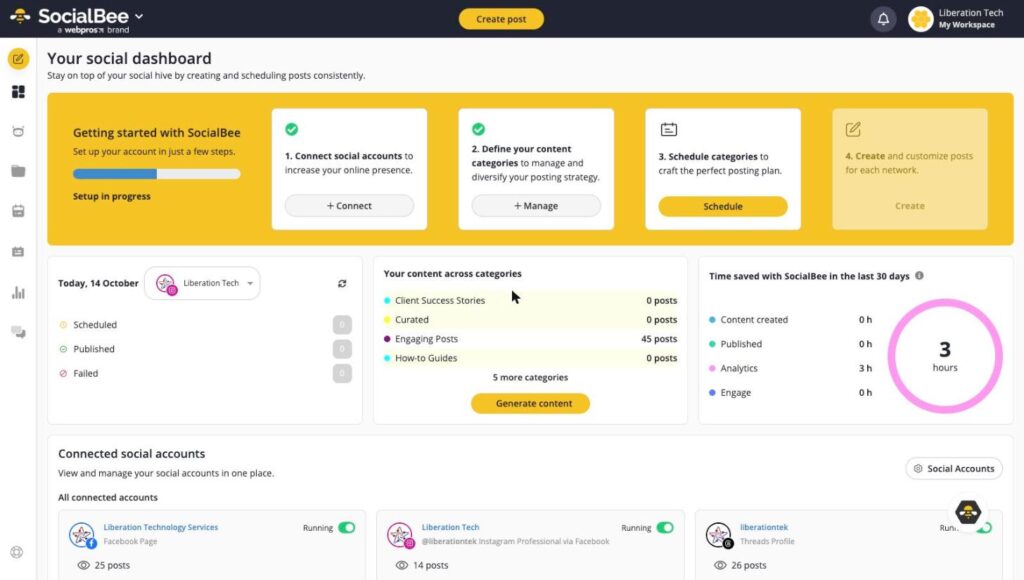
With SocialBee you write posts once, sort them into categories, set a schedule, and it publishes for you. Your accounts stay active whether or not you had time to think about them.
Facebook, Instagram, LinkedIn, X, TikTok, YouTube, Pinterest, Threads, Bluesky and Google Business Profile.
Content Categories
Group posts by theme so your feed stays varied instead of turning into one long advert.
Set It And Forget It Scheduling
Give each category its own posting times and SocialBee works through the queue for you.
AI Post Generation
Draft and rewrite posts in seconds, then edit them in your own voice before anything goes out.
Tailored Per Network
Adjust the same post for each platform so it does not read like a copy and paste job.
One Social Inbox
Read and reply to comments, mentions and messages without opening a second tab.
Analytics And Reports
See what is actually working, and export branded reports if you need to show someone.
Team Collaboration
Invite your team, leave internal notes and approve posts before they publish.
Evergreen Re-Sharing
Mark a post as evergreen and it comes back around instead of being used once and forgotten.
Why Scheduling Beats Willpower
Accounts Go Quiet When Work Gets Busy
Almost nobody stops posting on purpose. A big order lands, someone is off sick, a project runs over — and the social accounts are the first thing to slip, because they are the only task with no deadline attached. Three weeks later the last post is stale and starting again feels like a chore. Scheduling in advance removes the decision from the busy week entirely.
Categories Keep The Mix Honest
Posting ad hoc drifts towards promotion, because promotion is what you remember to post. Categories fix the ratio once: say that offers go out twice a week and useful content four times, and the balance holds by itself. You are deciding your content strategy once rather than renegotiating it every morning.
Write In Batches, Publish For Weeks
An hour spent writing ten posts goes further than ten scattered minutes. Drop them into a category, set the schedule, and SocialBee spaces them out for you. Mark the ones that stay true as evergreen and they come back around on their own, so a good post keeps earning after the week you wrote it.
Every plan includes posting to all supported networks, content categories, scheduling, the AI post editor, the social inbox and analytics. Plans differ by how many profiles, workspaces and users you get.
New to scheduling? Our SocialBee setup guides walk through connecting accounts and building your first posting schedule.
SocialBee is a social media management tool. You write your posts once, sort them into categories, set a posting schedule, and SocialBee publishes to your social accounts for you.
Facebook, Instagram, Threads, LinkedIn, TikTok, YouTube, Google Business Profile, Pinterest, X (Twitter) and Bluesky. For anything not on that list, Universal Posting sends you a reminder with the post ready to publish by hand.
Sign in to the Client Area, open My Services, click your SocialBee service, then Log in to SocialBee under Actions. It signs you straight in, so there is no second password to remember.
Each page, channel or profile counts as one. Two Facebook Pages and one Instagram account is three profiles, not two networks. Your current usage is shown at the top of the Social Accounts page inside SocialBee.
Categories are themed buckets for your posts, such as Promotional, Engaging Posts or Curated. You give each category its own posting times, and SocialBee works through that category’s queue. It is what stops a feed drifting into being all advertising.
It can draft and rewrite posts with AI, and suggest content based on what you tell it about your business. You still review and edit before anything publishes — treat it as a first draft, not an autopilot.
It is almost always an expired connection. Social networks expire their app permissions every few months. Open Social Accounts in SocialBee and click Reconnect next to the account showing the prompt. Your categories and scheduled posts are untouched.
Yes for direct posting. Instagram and Facebook require a Business or Creator account linked to a Facebook Page. If a connection fails on a personal Instagram account, switching it to a Professional account in the Instagram app usually resolves it.
Pro plans and above include workspaces. Each client gets their own workspace with separate accounts, categories and schedules, so nothing bleeds between them. Pro includes 5 workspaces, up to 30 on Pro150.
Yes. Open your SocialBee service in the Client Area and click Upgrade. Connected accounts, categories and scheduled posts carry over. If you downgrade below the number of profiles you have connected, disconnect the extras first so you choose which ones go.
Plans start at $29 a month for 5 connected profiles and run to $449 for 150. Posting, scheduling, categories, the AI editor, the social inbox and analytics are included at every tier — the plans differ by how many profiles, workspaces and users you get.
No, it is a separate subscription, but it is offered alongside our hosting, WordPress and Site Builder plans so it appears on the same invoice and in the same Client Area as everything else you have with us.