
For a reseller business, cPanel vs DirectAdmin comes down to what your clients already know and what your billing and automation stack can talk to. cPanel/WHM is the most widely recognized panel and has the deepest ecosystem. DirectAdmin has a simple three-level reseller model and flat license tiers, and Plesk adds Windows support and a dedicated reseller guide.
This post is for agencies, MSPs and freelancers choosing a control panel for resellers, or comparing providers that sell different panels. It walks through seven steps of the cPanel vs DirectAdmin vs Plesk decision, each with what to check and a common mistake, then compares the panels using their own documentation. Pricing and version details are dated October 7, 2026.
1. cPanel vs DirectAdmin: start with what your clients already know
Your clients will log in to this panel to manage email, files and databases. If they come from a host that used cPanel, they already know where things are. Every layout change becomes a support ticket.
Ask your ten largest clients which panel their current host gives them. If most say cPanel, you are choosing between familiarity and a feature you may never use. If they use no panel at all, familiarity matters less.
Common mistake: choosing a panel for your own taste. Your clients spend all their time in the client-facing interface, not you.
2. List the reseller tools you actually need
Each panel handles resellers a little differently, so write down the tasks you do weekly before you compare. Typical ones are creating accounts, setting package limits, suspending a non-paying client and setting your own nameservers.
- cPanel/WHM: WHM reseller hosting runs through WHM, the server and reseller interface. The WHM API documentation says it can administrate cPanel and WHM reseller accounts.
- DirectAdmin: it has three access levels (Admin, Reseller, User). Its feature list says resellers can create and manage accounts, create user packages, customize nameservers, assign IPs and message all users through the ticket system.
- Plesk: Plesk reseller hosting is documented in a Reseller’s Guide, and the API documentation notes that reseller accounts are managed by the Administrator and that reseller plans can be modified through the API.
Any of the three covers the basics of cPanel reseller hosting, DirectAdmin reseller hosting or Plesk hosting for resellers. In a cPanel vs DirectAdmin comparison the differences show up in less common tasks, so test those on a demo account.
Common mistake: assuming “reseller” means the same thing everywhere. If you want a refresher on the model itself, read how reseller hosting works.
3. Check automation and the WHM reseller hosting API
If you plan to sell more than a handful of accounts, you will want billing software to create, suspend and terminate accounts without you. That depends on the panel’s API and on whether your billing platform has a module for it. Here cPanel vs DirectAdmin is close, because both have documented APIs and WHMCS modules.
All three have documented APIs. WHM API 1 is served over port 2087 (secure), and the cPanel documentation says it can manage reseller accounts. DirectAdmin documents a JSON API described in an OpenAPI (Swagger) file, plus a legacy API, and supports login keys that can restrict actions or IP addresses. Plesk offers an XML API and a newer REST API, and its documentation says REST currently covers significantly fewer actions than XML.
On the billing side, the WHMCS documentation lists server modules for cPanel, DirectAdmin and Plesk. The cPanel and DirectAdmin modules cover create, suspend, terminate and package changes. The cPanel module requires a server with a valid cPanel & WHM license. Automation is a major reason resellers choose WHM reseller hosting.
Common mistake: assuming a module exists for every feature you want. Confirm your billing platform supports the exact actions you need on your chosen panel.
4. Compare WordPress tooling
Most reseller clients run WordPress, so how a panel handles it affects your support load. WP Toolkit is the tool most often used for this. WordPress.org’s server administration documentation says cPanel & WHM versions 102 and above install WP Toolkit by default, and that on Plesk it is available if the administrator installs the WP Toolkit extension.
The cPanel documentation also says WP Toolkit for WHM lets server administrators and resellers install, configure and manage WordPress sites on the server. It notes a separate Deluxe version exists, so check which edition a provider runs.
For DirectAdmin, the documentation pages we reviewed (the index, features list and API pages) do not describe a built-in WordPress management tool. Ask any DirectAdmin reseller hosting provider which installer and WordPress tooling they offer. For more on this angle, see our guide to WordPress reseller hosting.
Common mistake: picking a panel without asking about staging, cloning and update tools. Those save time when dozens of clients share a server.
5. Understand how cPanel vs DirectAdmin vs Plesk licensing differs
License cost is where cPanel vs DirectAdmin differs most in structure, and Plesk is a third model. As of October 7, 2026, the vendor pricing pages describe these models:
- cPanel: tiers by account count. The list shows Solo (1 account) at $29.99 per month, Admin (up to 5) at $35.99, Pro (up to 30) at $53.99 and Premier (up to 100) at $69.99, with additional Premier accounts at $0.49 each. Solo, Admin and Pro are listed as available on cloud and VPS only.
- DirectAdmin: three retail tiers: Personal PLUS at $5 per month (2 accounts), Lite at $15 (10 accounts) and Standard at $29 (unlimited accounts and domains), with volume discounts for multiple Standard licenses.
- Plesk: editions by domain count (Web Admin, Web Pro and Web Host, with Web Host listed as unlimited domains and aimed at hosting businesses). Plesk quotes euro prices that change at renewal, so check its pricing page.
Most resellers do not buy a panel license directly. They buy a reseller plan where the provider holds the license, so the license tier matters most to people running their own server. If you are weighing both routes, our comparison of reseller hosting vs a VPS you manage yourself covers the cost and workload trade-off.
Common mistake: comparing a per-server license price to a reseller plan price as if they cover the same thing. A license excludes hardware, security tooling, backups and support.
6. Estimate the migration effort
Moving clients is where a panel choice becomes real work. In a cPanel vs DirectAdmin switch, same-panel moves are the easiest. The cPanel Transfer Tool copies accounts, packages and configurations from one cPanel & WHM server to another, and the cPanel documentation also includes notes on account transfers from Plesk, with limits such as email addresses containing a plus sign not transferring.
Plesk Migrator lists cPanel 11.5 and later and DirectAdmin 1.51 among its supported sources. Moving into DirectAdmin from another panel was not covered in the pages we could verify, so ask the provider how they do it and who handles the work.
Ask whether a provider charges per site moved. Client moves to us are free, and the website transfer process is the same on every plan. A wider view of the model is in our guide to white label reseller hosting.
Common mistake: planning the migration as a single weekend event. Move one small client first, check email and DNS, then schedule the rest.
7. Weigh the ecosystem and operating system
The last check is what surrounds the panel: supported operating systems, security tools, plugins and people who know the panel. According to its documentation, cPanel & WHM supports AlmaLinux, CloudLinux, Rocky Linux and Ubuntu. DirectAdmin supports Red Hat Enterprise Linux and its derivatives, Debian and Ubuntu. Plesk supports Linux distributions and, uniquely among the three, Windows Server 2016, 2019 and 2022.
If your clients run ASP.NET or other Windows-only software, Plesk is the panel in this comparison that can host it. If they run PHP and WordPress, which is typical for an agency, all three run it. Support is easier when more people know the panel, and cPanel has the widest base of tutorials and integrations.
Common mistake: overlooking the operating system. If your stack needs Windows, a Linux-only panel is off the list however good the rest looks.
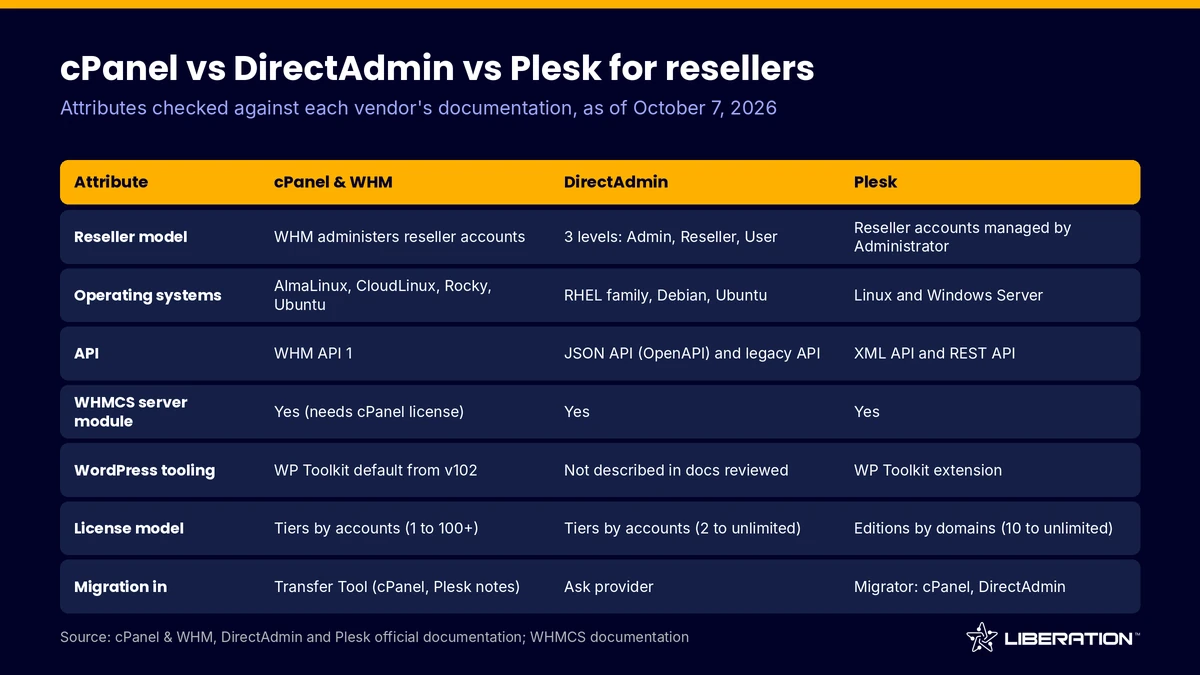
cPanel vs DirectAdmin vs Plesk at a glance
The table above sums up the checks. In the cPanel vs DirectAdmin vs Plesk comparison: cPanel/WHM has the largest ecosystem and ships WP Toolkit by default from version 102. DirectAdmin has simple flat license tiers and a documented JSON API. Plesk has the only Windows support and a dedicated reseller guide. None is right for every business.
The cPanel vs DirectAdmin decision usually follows the clients. A reseller moving agency sites off a cPanel host gets the smoothest result on cPanel. A hosting operator with Windows workloads has a clear reason to choose Plesk. Someone running their own servers on a tight budget may find DirectAdmin’s flat license tiers attractive.
Why our reseller plans run cPanel/WHM only
To be direct about cPanel vs DirectAdmin vs Plesk: Liberation Technology Services runs cPanel with WHM only. We do not offer DirectAdmin or Plesk. We chose one panel so that every plan behaves the same way and our support team knows it thoroughly.
It also matches who buys reseller hosting from us: agencies and MSPs whose clients arrive from cPanel hosts. Our five cPanel reseller hosting plans run from Launch at $98 per month (5 accounts) to Scale at $286 (250 accounts), each on a private VPS with cPanel with WHM, Imunify360, AutoSSL and private nameservers. Full cPanel branding starts on Agency. Prices are monthly billing as of October 7, 2026.
For plan details, see our reseller plans breakdown, and if you are at the very start, read how to start a reseller hosting business. If you decide cPanel suits your clients, our migration is free for client sites and we can help you plan it through our contact page.
Frequently asked questions
Which wins in cPanel vs DirectAdmin for resellers?
Neither wins for everyone. cPanel has the larger ecosystem and ships WP Toolkit by default from version 102, while DirectAdmin has a three-level model with flat license tiers. Choose based on your clients’ familiarity and what your billing tools support.
Does Plesk support reseller accounts?
Yes. Plesk documents a Reseller’s Guide, and its API documentation describes reseller accounts that the Administrator manages, along with reseller plans, which is the basis of Plesk reseller hosting.
Can WHMCS manage cPanel, DirectAdmin and Plesk servers?
Yes. The WHMCS documentation lists server modules for all three. The cPanel module requires a server with a valid cPanel & WHM license, and you should confirm that each action you need, such as changing a package, is supported.
Which control panel for resellers runs on Windows?
Of the three, only Plesk. Its documentation lists Windows Server 2016, 2019 and 2022, while cPanel & WHM and DirectAdmin list Linux distributions only.
Can I switch control panels later?
Yes, with planning. Tools exist for some paths, such as the cPanel Transfer Tool for accounts coming from Plesk and Plesk Migrator for cPanel and DirectAdmin sources, but each has limits. Test with one client before moving the rest.
Sources
- WHM API 1 overview, cPanel API documentation
- cPanel & WHM installation guide (supported operating systems)
- WP Toolkit for WHM, cPanel documentation
- Transfer Tool, cPanel documentation
- cPanel license pricing, retrieved October 7, 2026
- DirectAdmin features list
- DirectAdmin system requirements
- DirectAdmin API documentation
- DirectAdmin license pricing, retrieved October 7, 2026
- Plesk Obsidian documentation index (Reseller’s Guide)
- Software requirements for Plesk Obsidian
- Plesk API overview (XML and REST)
- Plesk Migrator supported source platforms
- Control panels, WordPress developer documentation
- WHMCS cPanel server module documentation
Related reading: how to choose the best reseller hosting, WordPress reseller hosting and white label reseller hosting.