
Most businesses shop for hosting by comparing CPU, memory and storage. Then the first big month arrives, whether it is a holiday sale, a viral post or an Easter livestream, and the invoice includes a line they never budgeted for. Cloud egress fees, the per-gigabyte charges for data leaving a provider’s network, are one of the most common billing surprises in hosting. This guide explains how they work, runs the numbers for two realistic websites and shows what “no overage fees” should actually mean.

What Are Cloud Egress Fees?
“Egress” simply means outbound data. Every time a visitor loads your home page, views a product photo, downloads a PDF or streams a video, data leaves your server and travels across the internet. Providers generally let data in for free (ingress) and many include a monthly allowance of outbound transfer. Once you go past that allowance, or if your plan has no allowance at all, each additional gigabyte is billed.
Common sources of egress for a business website include:
- Page views, including HTML, scripts, stylesheets and images.
- Digital downloads such as e-books, course files and audio.
- Self-hosted video and livestreams, which are by far the largest contributor.
- Offsite backups copied from your server to another location.
- API calls, feeds and automated bots crawling your site.
How Popular Providers Charge for Egress
Here is how several providers handle outbound data, based on their official pricing and documentation pages as of September 2026.
| Provider | Included outbound transfer | Rate beyond the allowance |
|---|---|---|
| DigitalOcean Basic Droplets | 4,000 to 6,000 GiB on the 4 to 16 GiB plans, pooled across your team | $0.01 per GiB |
| AWS Lightsail | 4 to 6 TB on the $24 to $84 Linux bundles; inbound and outbound both count toward the allowance | $0.09 per GB outbound in U.S. regions |
| AWS EC2 and other AWS services | 100 GB per month free, aggregated across AWS services | Billed per GB on tiered rates |
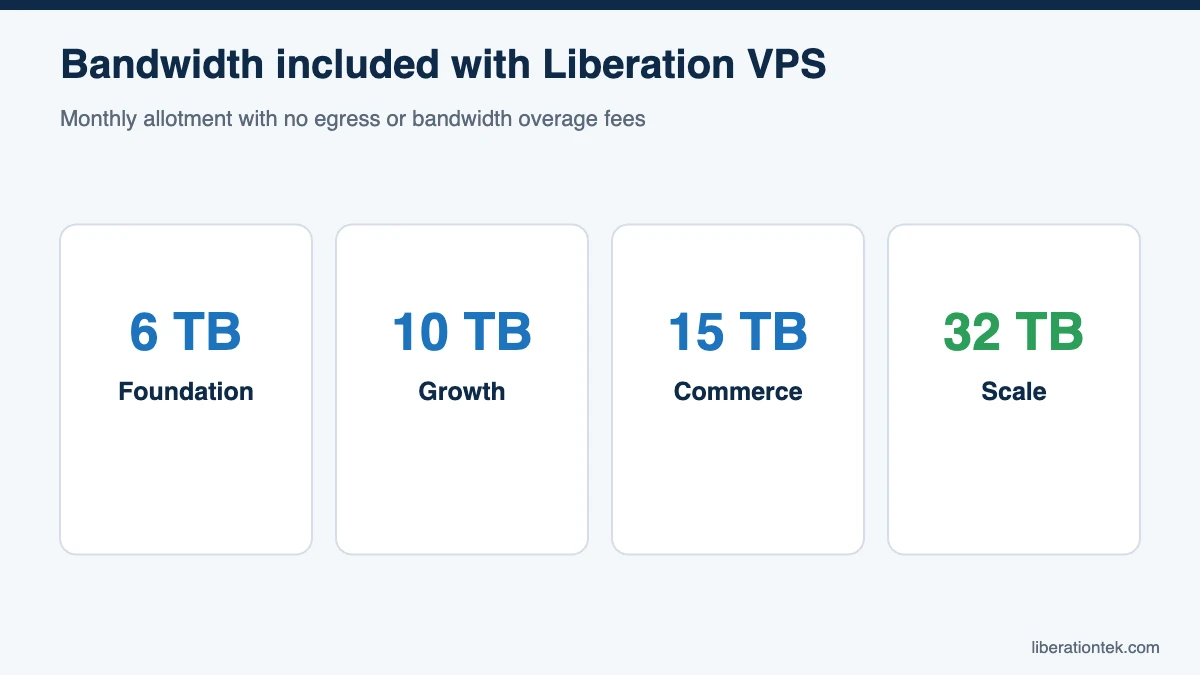
| Liberation VPS | 6 TB (Foundation), 10 TB (Growth), 15 TB (Commerce) or 32 TB (Scale) | No egress or bandwidth overage fees |
Sources: DigitalOcean bandwidth billing documentation, Amazon Lightsail data transfer FAQ and Amazon EC2 on-demand pricing. Some independent U.S. providers, such as American Cloud, also advertise zero egress fees on their self-managed virtual machines.
A quick note on units: DigitalOcean measures in GiB (1 GiB is about 1.074 GB), while Lightsail uses GB. The difference is small but worth knowing when you compare invoices.
Worked Examples: What Egress Really Costs
Example 1: A WooCommerce store
Consider a store selling physical goods and a few digital products. Our assumptions:
- 40,000 visits per month, averaging 5 pages per visit, for 200,000 pageviews.
- An average page weight of 2.5 MB (we ignore browser caching to keep the math conservative).
- 1,500 digital product downloads per month at 200 MB each.
- A 20 GB backup copied offsite every day for 30 days.
| Traffic source | Calculation | Monthly egress |
|---|---|---|
| Page views | 200,000 x 2.5 MB | 500 GB |
| Digital downloads | 1,500 x 200 MB | 300 GB |
| Offsite backups | 20 GB x 30 days | 600 GB |
| Total | 1,400 GB |
If all of that were metered at $0.09 per GB, the rate Lightsail charges for overage in U.S. regions, the store would pay $126 per month (1,400 x $0.09), or $1,512 per year, just to deliver its own website. In a holiday month where page views and downloads double, egress climbs to 2,200 GB, or $198 at the same rate. A plan with a generous included allowance changes this picture completely: 1,400 GB fits comfortably inside the 6 TB included with Liberation Foundation.
Example 2: A video-heavy church website
Video is where cloud egress fees really add up. Imagine a church that streams its weekly service and posts sermons for on-demand viewing from its own server. Our assumptions:
- 750 video views per week (live and on-demand combined), or 3,000 views in a four-week month.
- A 45-minute sermon at 720p, which we estimate at about 1.5 GB per hour, or 1.125 GB per view.
- About 125 GB per month of ordinary website traffic.
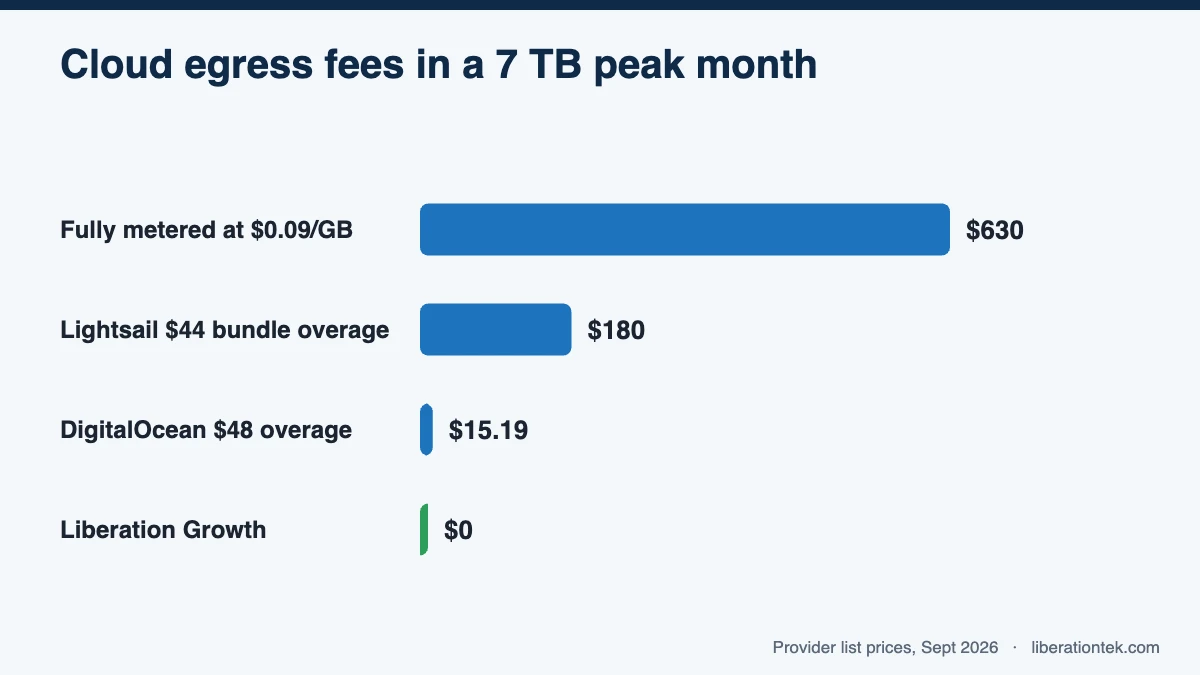
That works out to 3,000 x 1.125 GB = 3,375 GB of video, plus 125 GB of web traffic, for 3,500 GB (3.5 TB) per month. In a peak month such as Easter or Christmas, assume viewing doubles to 7,000 GB (7 TB).
| Scenario | Normal month (3.5 TB) | Peak month (7 TB) |
|---|---|---|
| Fully metered at $0.09/GB (no allowance) | $315.00 | $630.00 |
| Lightsail $44 bundle (5 TB allowance), overage at $0.09/GB | $0 overage | $180.00 overage (2,000 GB over) |
| DigitalOcean $48 Droplet (5,000 GiB allowance), overage at $0.01/GiB | $0 overage | $15.19 overage (about 1,519 GiB over) |
| Liberation Growth (10 TB included) | $0 overage | $0 overage |
A few notes on the math. For Lightsail, inbound data also counts toward the allowance, so sermon uploads would push the overage slightly higher. For DigitalOcean, 7,000 GB is about 6,519 GiB, and allowances are pooled across all Droplets on your team. The overage figures are in addition to each server’s monthly price.
The takeaway is not that every provider is expensive. It is that the same website can cost wildly different amounts depending on the rate, the allowance and whether anyone saw the peak month coming.
What “No Overage Fees” Should Mean
Liberation VPS plans have no egress or bandwidth overage fees. Each plan includes a monthly bandwidth allowance sized to the server: 6 TB on Foundation, 10 TB on Growth, 15 TB on Commerce and 32 TB on Scale. There is no per-gigabyte meter running in the background, so your invoice matches the plan price you chose. The practical advice is simple: pick the plan whose included bandwidth covers your busiest month, not your average one. For the church above, that means Growth rather than Foundation.
Whichever provider you evaluate, ask these questions before you sign up:
- What is the per-GB rate after the allowance, and does it vary by region?
- Does inbound data count toward the allowance?
- Is the allowance per server or pooled across an account?
- Do backups, snapshots or transfers between services count as egress?
- What happens at the limit: a bill, a slowdown or a conversation?
Five Ways to Reduce Your Bandwidth Use
- Compress images and serve modern formats such as WebP.
- Enable caching so returning visitors do not download the same files again.
- Lazy-load media so images and video load only when scrolled into view.
- Block abusive bots that crawl your site thousands of times a day.
- Offload very large video libraries to a dedicated streaming service when that makes sense for your audience.
If your workload needs more than a single VPS can provide, our dedicated cloud hosting may be a better fit. And if you are weighing where your data physically lives, our guide to sovereign cloud explains why that matters.
Frequently Asked Questions
What are cloud egress fees?
Cloud egress fees are charges for data leaving a provider’s network, such as web pages, images, downloads and video delivered to your visitors. Inbound data is usually free, but outbound data beyond your included allowance is often billed per gigabyte.
How much do egress fees cost per GB?
It varies widely. As of September 2026, DigitalOcean charges $0.01 per GiB beyond a Droplet’s pooled transfer allowance, while AWS Lightsail charges $0.09 per GB for outbound overage in U.S. regions. At $0.09 per GB, every terabyte over your allowance costs about $90.
Does Liberation charge egress or bandwidth overage fees?
No. Liberation VPS plans have no egress or bandwidth overage fees. Each plan includes a monthly bandwidth allowance: 6 TB on Foundation, 10 TB on Growth, 15 TB on Commerce and 32 TB on Scale. Choose the plan that fits your peak month and your invoice stays predictable.
How can I estimate my website’s monthly bandwidth?
Multiply monthly pageviews by your average page weight, then add file downloads, video views multiplied by file size, and any backups you copy offsite. The bandwidth statistics in cPanel and the pageview numbers in your analytics tool give you the inputs.
Is “no egress fees” the same as “unlimited bandwidth”?
No. “Unlimited” plans usually carry fair-use limits in the fine print, and no server has infinite capacity. A better approach is a published monthly bandwidth allotment with no per-gigabyte meter. Liberation VPS plans include 6 TB to 32 TB of monthly bandwidth, depending on the plan, with no egress or bandwidth overage fees.
Stop Paying by the Gigabyte
Cloud egress fees are easy to overlook on a pricing page and hard to ignore on an invoice. Understanding your traffic, your provider’s rate and your peak month is the best way to avoid surprises. If you would rather not think about per-gigabyte math at all, Liberation’s fully managed VPS hosting includes generous monthly bandwidth with no egress or bandwidth overage fees, on servers we own and operate in the United States. Plans also include cPanel & WHM, daily backups and 24/7 U.S.-based human support. Compare VPS plans and choose the one that covers your busiest month.
Related reading
- Where Is My Data Stored? 5 Questions Your Invoice Should Answer
- Hosted Private Cloud vs Running Your Own: The Cost Nobody Adds Up
- Does a Small Business Actually Need a Private Cloud?
- Sovereign Cloud — Infrastructure you can point at on a map.
- Cloud Computing for Small Business — The wider picture, by use case.