
Secure hosting for accounting firms matters because most of what the FTC Safeguards Rule demands technically is decided by where your systems live. Encryption, multi-factor authentication, access control, activity logging and secure disposal are all hosting and platform questions – which means choosing a provider is a documented compliance decision for an accounting firm, not just a purchase.
Secure hosting for accounting firms: the controls that come from the platform
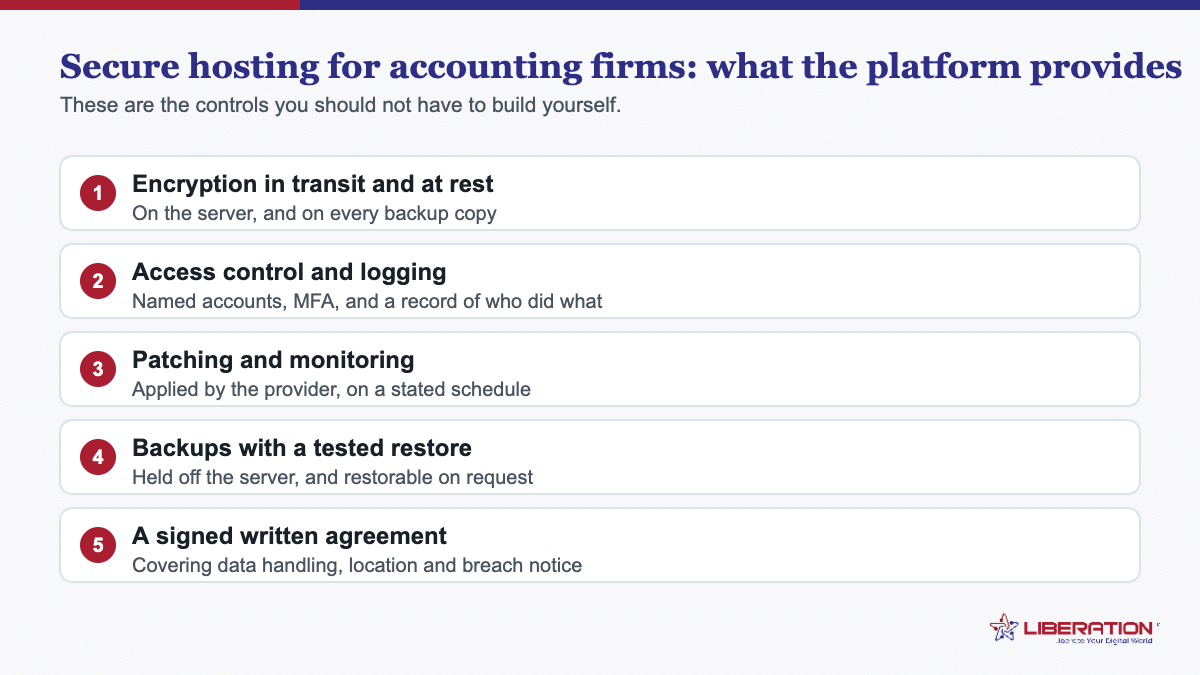
Element three of the Rule lists the concrete safeguards a covered firm must implement. Five of them are things your host either provides or does not:
| What the Rule requires | What to verify with the provider |
|---|---|
| Encryption in transit and at rest | Both, explicitly. “We use SSL” answers only half the question. |
| Multi-factor authentication | Available on every account that can reach client data, including the control panel. |
| Access controls, reviewed | Individual accounts, removable, with defined permission levels. |
| Activity logging | Logs of authorized access that you can actually retrieve when asked. |
| Secure disposal within two years | Retention settings, and confirmation of what deletion actually removes. |
If a provider cannot confirm all five, the gap becomes yours to explain.
Element six: why secure hosting for accounting firms is a documented choice
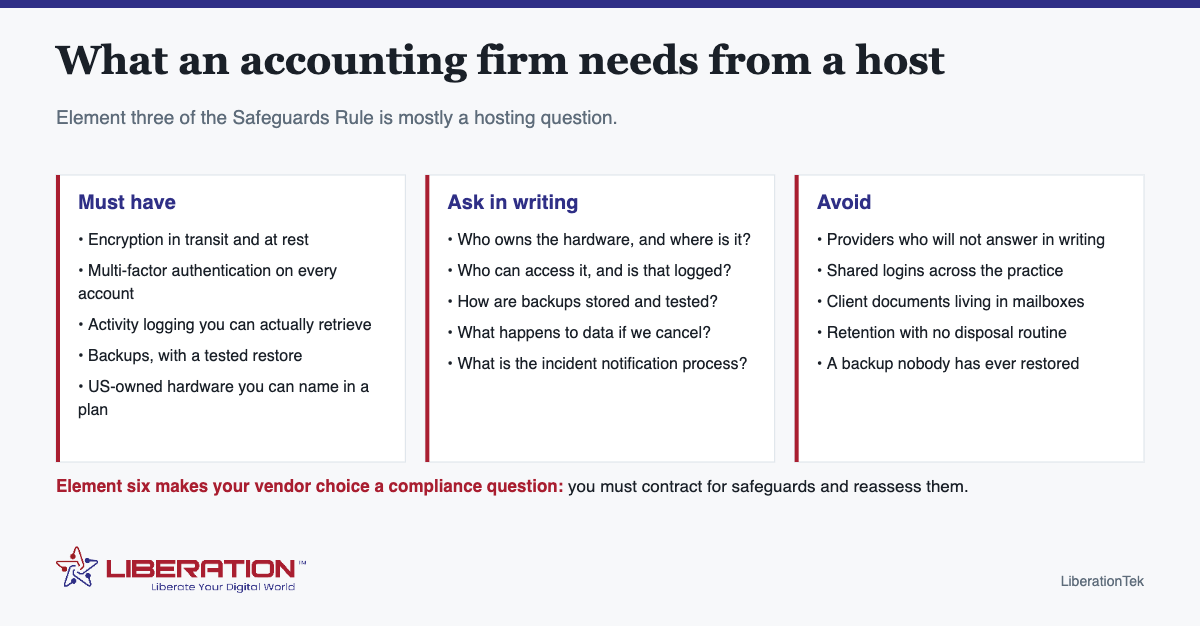
This is the part firms overlook. The Rule requires you to select service providers with the skills and experience to maintain appropriate safeguards, to spell out your security expectations in the contract, to build in a way to monitor their work, and to reassess their suitability periodically.
In practice that means you should be able to produce, on request, a written answer to each of these for every vendor touching client data:
- Who owns the hardware, and in which country does it sit?
- Who has administrative access, and is that access logged?
- How are backups stored, and when was a restore last tested?
- What is the incident notification process, and within what timeframe?
- What can we export if we leave, and in what format?
A provider that answers those in writing has given you a compliance artefact. One that will not has handed you a risk you are carrying without documentation.
Where accounting firms actually go wrong on hosting
- Client documents living in mailboxes. No logging, no expiry, no meaningful disposal. This is the biggest single gap in most practices and it is a storage decision, not a hosting one.
- Shared logins. A shared account makes activity logging worthless, because you can no longer attribute anything to a person.
- Seasonal access never removed. January hires still holding credentials in November.
- Untested backups. A backup nobody has restored is a belief. Restore one to a staging environment once a year.
- Personal cloud accounts. Someone shares a file “just once” from a personal account, and now client data sits somewhere outside every control you have documented.
What size secure hosting an accounting firm actually needs
For most practices the website is a brochure – services, team, contact, a client login link – and the sensitive work happens in practice software and file storage. Shared hosting with cPanel from $7.99 a month covers the site, with free SSL and backups included.
A larger firm running its own client portal, a document management system or anything with a real database behind it has moved into different territory, and wants guaranteed resources – a VPS, or Dedicated Cloud from $65.95 a month where the cores, memory and storage are not shared with anyone. The tier matters less than whether the controls are present and documented.
The secure hosting for accounting firms stack that fits the obligations
- Website and email on your own domain, never a free consumer address for client correspondence.
- Liberation Email from $1.95 per user per month, on hardware we own and operate in the United States, with nothing scanned for advertising or passed to a data broker.
- Hub For Teams from $7.49 per user for secure file sharing and shared inboxes, so client documents stop traveling as attachments.
- Multi-factor authentication enabled on every account, configured in cPanel for hosting and on each platform.
- A written vendor answer filed with your security plan.
We are a hosting and email provider, not a compliance firm, and will not tell you that buying a plan makes your practice compliant. What we will do is answer the element-six questions in writing so the vendor section of your plan is real rather than aspirational. Ask us.
Secure hosting questions to put to a provider, word for word
Copy these into an email. A provider that answers all six in writing has given you the vendor section of your security plan; one that deflects has told you something useful too.
- Do you own the hardware our data sits on, or do you resell capacity from another platform? If you resell, whose?
- Which country is the primary data held in, and where are backups held?
- Is data encrypted in transit and at rest? Which is which?
- Is multi-factor authentication available on every account that can access our data?
- What access logs exist, how long are they retained, and can we obtain them on request?
- What is your incident notification process and timeframe, and what can we export if we cancel?
Six questions, one email, and the answers get filed. It is the cheapest piece of compliance documentation available, and almost no small firm has it.
Separating the website from the sensitive work
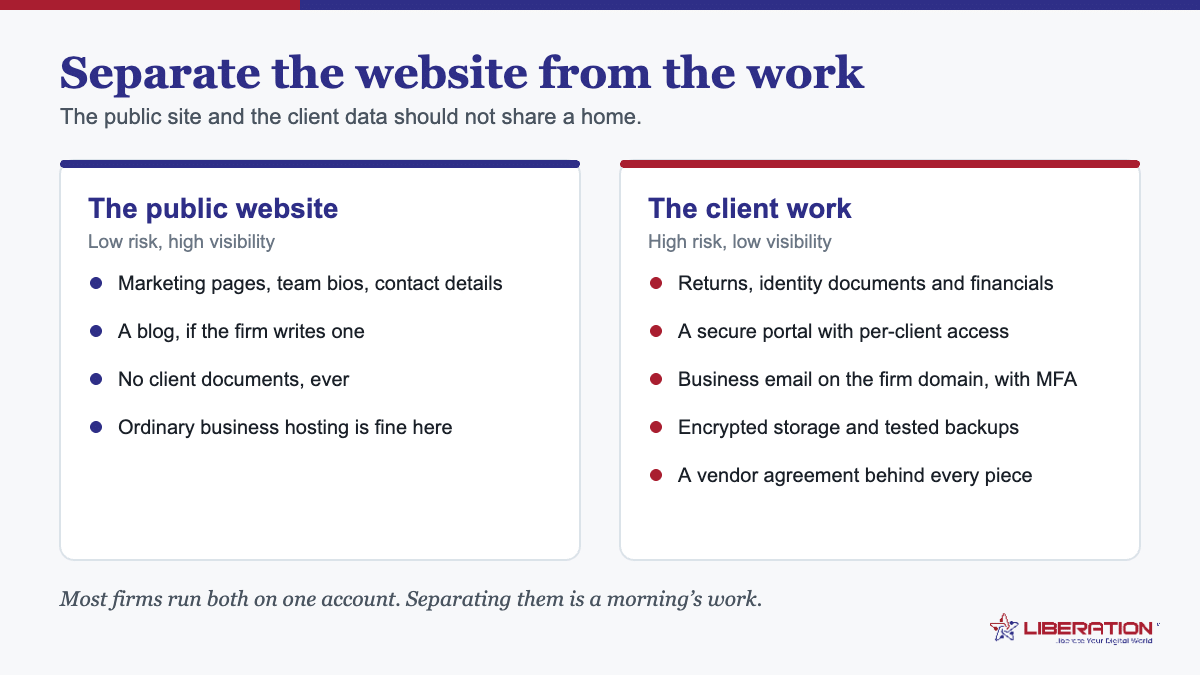
A useful principle for a small practice: the public website and the client data should not live in the same place. The website is a brochure – it is meant to be found, indexed and visited by strangers. Client documents are the opposite.
Keeping them separate means a compromise of the marketing site does not become a client data incident, and it keeps your security plan simpler to write because the two systems have different controls and different justifications. Shared hosting is entirely appropriate for the brochure; client documents belong on a platform built for access control and logging.
Backups: the hosting control everyone claims and few test
Backups appear in every hosting pitch and in every security plan, and in most practices nobody has ever restored one. That makes the control theoretical, which is the same as absent at the moment it matters.
Three things make backups real rather than nominal:
- Know what is actually backed up. Website files and databases, usually. Mailboxes, sometimes. Documents held in a third-party system, often not – that is the vendor’s responsibility and you should confirm it rather than assume.
- Know the retention window. Seven days of backups does not help with a problem discovered three weeks later, and quiet corruption is routinely discovered late.
- Restore one, once a year. To a staging environment, not over the live site. It takes an hour and it either confirms the control or reveals that it never worked – both outcomes are worth having before an incident rather than during one.
A note on practice software and secure hosting for accounting firms
Most of the genuinely sensitive data in an accounting firm sits in tax preparation and practice management software rather than on the website or in generic storage, and much of that is hosted by the software vendor. That does not move the obligation: the Rule covers customer information handled or maintained by or on behalf of your firm.
So the same six vendor questions apply to your practice software provider, and they are usually the most important set to have answered – because that is where the return data actually lives.
One secure hosting for accounting firms question to ask yourself first
Before comparing providers, write down where client data actually sits today – practice software, email, cloud storage, laptops, backups, paper. Most firms discover the website is the least sensitive system they own, which usefully changes what they should be spending attention on.
What secure hosting for accounting firms costs, and what it replaces
Firms postpone this because the phrase sounds expensive. For a practice of two to fifteen people it is usually less than the software already being paid for, and it frequently replaces something being bought twice.
Look for duplication first. A great many small firms pay for a consumer cloud storage subscription, a separate file-transfer service, a personal email plan, and hosting for the website, none of which were chosen together and several of which overlap. Consolidating onto secure hosting for accounting firms with a portal and business email often reduces the total rather than increasing it.
The website is the cheap part. A marketing site for an accounting practice has modest requirements. Paying enterprise rates for the public site while client documents sit in a consumer account is the wrong way round, and it is a surprisingly common arrangement.
Email is where the money should go. Business email on the firm’s domain, with multi-factor authentication and a provider willing to sign an agreement, is the single highest-value line in the budget, because email is where client data actually flows in a small practice.
Storage scales with retention, not with compliance. Decide how long you keep client files, size storage for that, and encrypt it. The compliance element is the agreement and the encryption, not a premium rate on the gigabytes.
Budget the written work at zero dollars and one afternoon. The risk assessment, the vendor inventory and the incident response plan cost time, not money, and the FTC expects them regardless of firm size – its Safeguards Rule guidance is short and written for small businesses.
What you should not pay for. A compliance certification for hosting, which does not exist. A consultant for a four-person firm with five vendors. Or a “secure” tier that is the standard product with a different label and no additional controls you can point at.
Priced properly, secure hosting for accounting firms is ordinary infrastructure bought deliberately from a provider that will put its obligations in writing. The expensive version is the one where client data quietly accumulates across four consumer services nobody assessed.
A 12-month plan for secure hosting for accounting firms
Nobody rebuilds a firm’s infrastructure in a week, and nobody should try to do it during filing season. Spread across a year, and timed around the quiet months, the whole thing is a series of small, unremarkable projects.
May: write the inventory. Every system that touches client data, where it lives, who can reach it. This is the foundation of everything else and the one step firms skip. An afternoon.
June: fix email. Move onto business email on the firm’s domain if you have not already, enable multi-factor authentication for everyone, and remove any shared mailbox logins. The highest-value change in the list.
July: sort the portal. Choose one, configure it, and write the two-sentence explanation clients will receive. Secure hosting for accounting firms is of limited use if documents still arrive as email attachments.
August: separate the website. Move the public marketing site onto its own ordinary hosting, away from anything holding client records. Cheap, quick, and it shrinks the surface that matters.
September: backups and a restore test. Confirm what is backed up, where the copies sit, and actually restore one file. Write the date down; that date is what an examiner or an insurer will ask about.
October: the written plan. Risk assessment, safeguards, vendor list, incident response, training log. Four pages. Sign and date it.
November: train and roll out. Walk staff through the portal and the new email rules before the season starts, and send clients their upload links.
December to April: leave it alone. Run the season on the setup you built. Note anything that annoyed people.
Repeat the following May, reviewing rather than rebuilding. Handled this way, secure hosting for accounting firms stops being a project the firm never gets to and becomes an ordinary part of how the practice runs.
What to do if the firm already has a gap
Most firms reading this will find at least one thing wrong, and the instinct is either to panic or to close the tab. Neither is warranted. Regulators and insurers are considerably more interested in whether a firm is improving deliberately than in whether it was perfect a year ago.
Write the gap down before you fix it. A list of known gaps with a date next to each is evidence of a functioning process. An undocumented gap that somebody quietly fixed is worth less, because nothing shows the firm was paying attention.
Rank by data, not by effort. Fix the thing holding the most client data first, even if it is the hardest. A shared login on the system holding every return matters more than an unencrypted laptop used for nothing sensitive.
Do not wait for the whole plan. Enabling multi-factor authentication this afternoon is worth more than a perfect written policy next quarter. Secure hosting for accounting firms is built incrementally, and partial progress is genuinely protective rather than merely cosmetic.
Tell your insurer the truth. Cyber liability applications increasingly ask specific questions about controls. Answering optimistically on a form and accurately in reality is the wrong way round, and it is the sort of discrepancy that surfaces at claim time.
Get the agreements you are missing. If a vendor holding client data has never signed anything, ask now. Most send a standard form the same day, and the exchange itself becomes part of your vendor oversight record.
A firm that finds five gaps, writes them down, fixes two this month and schedules the rest is in a considerably stronger position than one that found none because it never looked. Secure hosting for accounting firms is a direction of travel, not a certificate, and starting late is still starting.
Frequently asked questions
What should an accounting firm look for in web hosting?
Encryption in transit and at rest, multi-factor authentication on every account, retrievable activity logs, tested backups, and a provider that will state in writing who owns the hardware and where it sits. Those map directly onto the technical safeguards the FTC Safeguards Rule requires.
Does hosting make an accounting firm compliant?
No. Hosting can carry specific technical controls the Rule names, but the firm still has to designate a Qualified Individual, write the security program, train staff and keep it current. Any provider claiming to make you compliant is describing something the Rule does not recognize.
Why does the Safeguards Rule care which vendors we use?
Element six requires firms to select providers capable of maintaining appropriate safeguards, spell out security expectations in the contract, build in a way to monitor their work, and reassess them periodically. Vendor choice is a documented compliance decision.
Where should client files be stored?
On a platform with access controls, logging and retention settings – not in mailboxes and not on individual laptops. Email cannot satisfy the logging or secure-disposal requirements.
Do small firms need dedicated hosting?
Usually not. Shared hosting with cPanel covers a brochure site from $7.99 a month. What matters more than the tier is whether the controls are present and whether the provider will answer vendor questions in writing.
Related reading
- Encrypted Email for CPAs: 4 Simple Options Compared
- FTC Safeguards Rule for Tax Preparers: 9 Essential Steps
- IRS Publication 4557: A Plain-English Checklist for Tax Practices
- How to Protect Your Business Online — The wider security picture for a small firm.
- Business Email Setup — Email on your own domain, with the agreement in place.