
Hosting providers love to list “SSD storage” as if all solid-state drives were the same. They are not. NVMe VPS hosting uses drives that connect directly to the processor over PCIe, while many budget plans still run on SATA SSDs that use an interface designed for spinning hard disks. For a WordPress site, a WooCommerce store or any application that leans on a database, that difference shows up as faster server responses and snappier page loads. Here is what NVMe actually changes, where it matters most, and what else you need to get right for real page speed.

NVMe vs. SATA SSD: What Is the Difference?
Both NVMe and SATA drives use flash memory, so neither has moving parts. The difference is how they talk to the rest of the server.
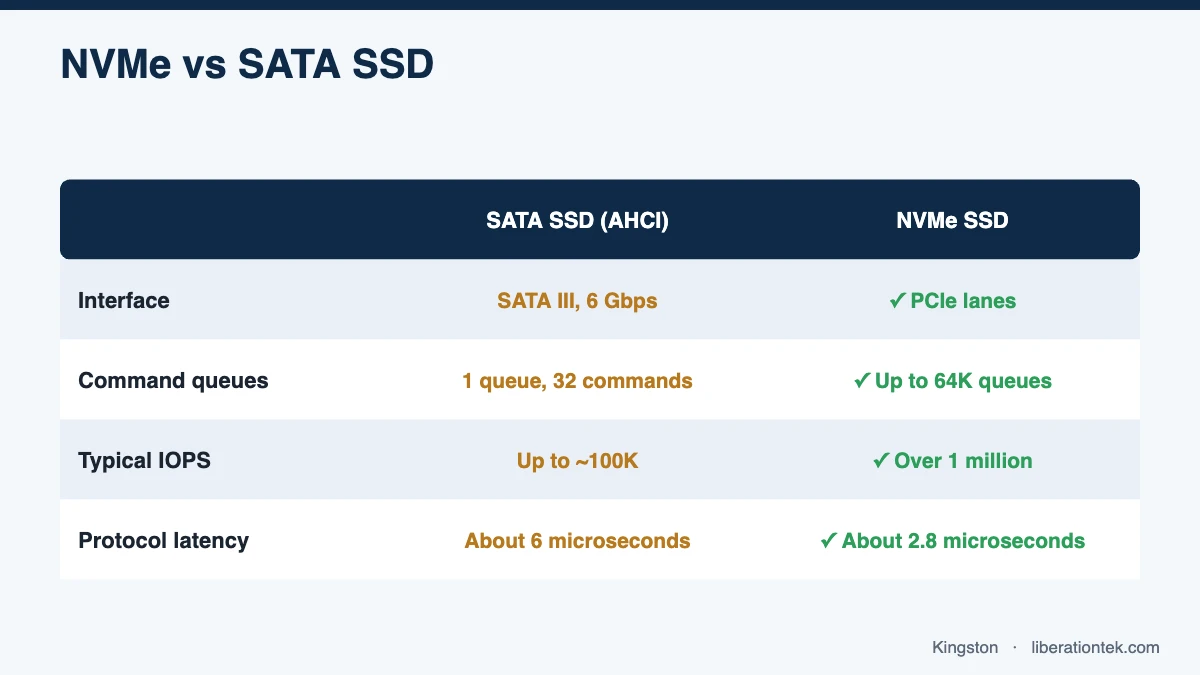
- SATA SSDs use the AHCI protocol and the SATA III interface, which tops out at 6 Gbps, or roughly 600 MB/s in practice.
- NVMe SSDs use the NVM Express protocol over PCIe lanes, which offers far more bandwidth and a much shorter path to the CPU.
Raw throughput gets the headlines, but for websites two other measurements matter more: how many operations a drive can handle at once, and how long each one takes.
IOPS and queues
IOPS (input/output operations per second) measures how many small reads and writes a drive can complete. According to Kingston’s technical overview of NVMe, AHCI supports a single command queue of 32 commands, while NVMe supports up to 64K queues with up to 64K commands each. Kingston cites AHCI at up to about 100K IOPS and NVMe at over 1 million. On a busy server, where dozens of PHP processes and database threads request data at the same moment, those extra queues keep requests from lining up behind each other.
Latency
Latency is the delay before a single operation completes. Kingston’s same overview lists about 6 microseconds of protocol latency for AHCI versus about 2.8 microseconds for NVMe, because NVMe skips the SATA controller and talks to the CPU directly. A few microseconds sounds trivial, but a single uncached page can trigger hundreds of small database reads, and on a busy server those delays compound.
| Characteristic | SATA SSD (AHCI) | NVMe SSD |
|---|---|---|
| Interface | SATA III, up to 6 Gbps | PCIe lanes |
| Command queues | 1 queue, 32 commands | Up to 64K queues, 64K commands each |
| Typical IOPS (per Kingston) | Up to about 100K | Over 1 million |
| Protocol latency (per Kingston) | About 6 microseconds | About 2.8 microseconds |
Keep in mind that these are drive-level figures. On a virtual server, real-world results also depend on the host hardware, how many customers share it and how the storage is configured.
Why NVMe VPS Hosting Matters for Database-Heavy Sites
A static brochure page, once cached, barely touches the disk. Dynamic sites are different. Every time a visitor loads an uncached page, the application asks the database for content, settings, user sessions and more. That is why database-heavy sites see the biggest gains from NVMe VPS hosting:
- WooCommerce and other online stores, where carts, checkouts and stock updates cannot be fully cached.
- Membership sites and learning platforms, where logged-in users see personalized pages.
- Large WordPress sites with thousands of posts, heavy search or complex filtering.
- Forums, directories and booking systems that write to the database constantly.
- Agencies hosting many sites on one server, where storage requests from every site pile up together.
Backups and restores benefit too. Copying hundreds of gigabytes of files and databases is an input/output-heavy job, and faster storage shortens the window when it competes with live traffic.
How Storage Speed Connects to Core Web Vitals
Google’s Core Web Vitals measure real-user experience. Storage does not affect every metric, but it has a direct line to the first one in the chain.
Time to First Byte (TTFB)
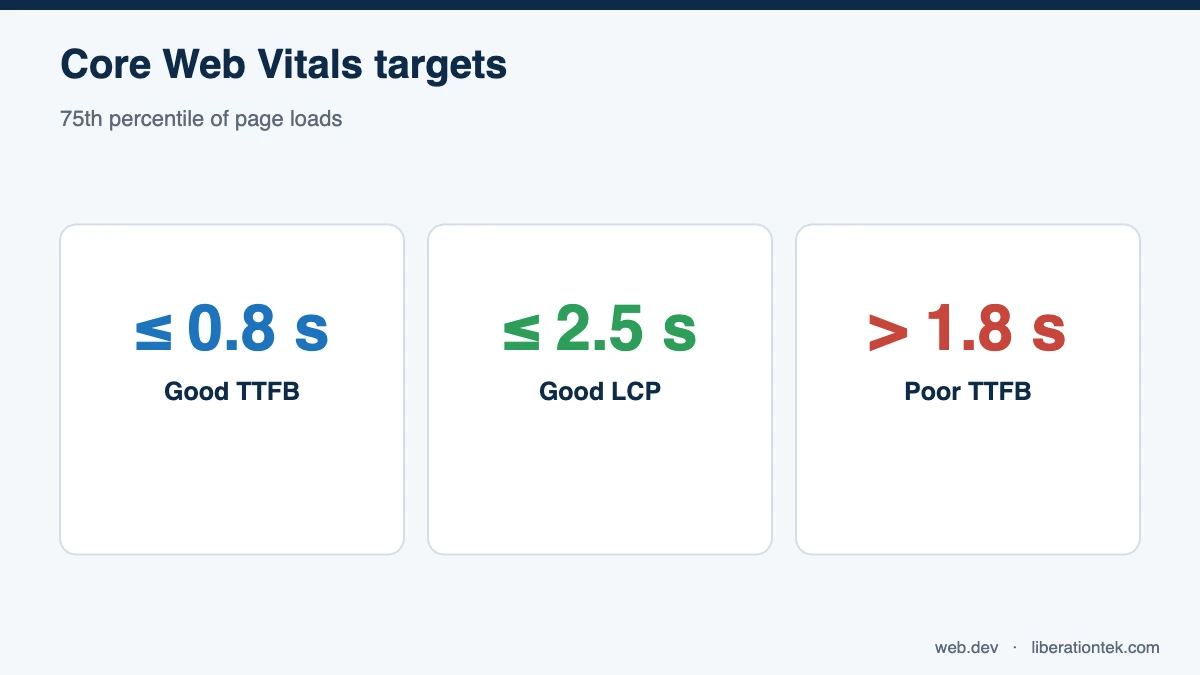
TTFB, as explained on web.dev, is the time between starting navigation and the first byte of the response arriving. It includes DNS, connection setup and TLS, plus the time your server spends building the page. web.dev considers 0.8 seconds or less good and more than 1.8 seconds poor. When a page is not cached, slow database reads inflate the server portion of TTFB, and that is exactly where NVMe helps.
Largest Contentful Paint (LCP)
LCP measures how long the main content takes to appear, and web.dev recommends 2.5 seconds or less at the 75th percentile of page loads. Because the browser cannot start rendering until the HTML arrives, every millisecond of TTFB is also a millisecond of LCP. Faster storage will not shrink a 3 MB hero image, but it gives the rest of your optimizations a head start.
What Else Matters for Page Speed
NVMe is a strong foundation, not a silver bullet. The fastest sites combine good hardware with good configuration:
- Caching. Page caching serves ready-made HTML, object caching (Redis or Memcached) keeps frequent database results in memory, and OPcache keeps compiled PHP ready to run.
- A current PHP version. Newer PHP releases are generally faster and receive security fixes. Test your site on the latest version your themes and plugins support.
- A CDN for static files. Serving images, CSS and JavaScript from edge locations reduces load on your server and distance to your visitors.
- Image and script hygiene. Compress images, use modern formats, lazy-load below-the-fold media and trim third-party scripts.
- Enough CPU and RAM. Fast disks cannot help if PHP workers are starved for processor time or the database has no room to cache in memory.
This is where a fully managed plan pays off. With Liberation’s fully managed VPS hosting, the operating system, kernel and cPanel are kept patched and stable, hardware and uptime are monitored 24/7, and U.S.-based support is available around the clock, so your team can focus on the site itself. If you are coming from shared hosting, our guide to how shared hosting works explains where it runs out of room.
NVMe Storage on Every Liberation VPS Plan
Every Liberation VPS runs on NVMe SSD storage with high-frequency vCPUs, on servers Liberation owns and operates in the United States:
| Plan | vCPU / RAM | NVMe storage | Monthly / billed annually |
|---|---|---|---|
| Foundation | 4 vCPU / 8 GB | 200 GB | $79 / $59 per month |
| Growth | 8 vCPU / 16 GB | 350 GB | $129 / $99 per month |
| Commerce | 12 vCPU / 24 GB | 500 GB | $199 / $159 per month |
| Scale | 16 vCPU / 32 GB | 750 GB | $289 / $239 per month |
Each plan includes a cPanel and WHM license, daily automated backups with 7-day retention, free website migration and no egress or bandwidth overage fees.
Frequently Asked Questions
Is NVMe really faster than a SATA SSD for websites?
For database-driven websites, yes. NVMe drives talk to the CPU over PCIe with far more parallel command queues and lower latency than SATA SSDs, so the many small reads and writes a CMS or store generates finish sooner. For a small static site that is fully cached, the difference is smaller because the disk is rarely the bottleneck.
Will NVMe VPS hosting improve my Core Web Vitals?
It can improve Time to First Byte, which feeds into Largest Contentful Paint, especially on uncached, database-heavy pages. It will not fix oversized images, render-blocking scripts or slow third-party tags, so treat fast storage as one part of a broader performance plan.
What is a good TTFB for a website?
Google’s web.dev guidance describes a TTFB of 0.8 seconds or less as good and more than 1.8 seconds as poor. Fast storage, caching, a current PHP version and a nearby server all help you stay in the good range.
Do all Liberation VPS plans use NVMe storage?
Yes. Every Liberation VPS plan, from Foundation (200 GB) to Scale (750 GB), runs on NVMe SSD storage with high-frequency vCPUs, and each plan includes cPanel and WHM, daily backups and free migration.
Conclusion: Faster Storage, Faster Pages
NVMe VPS hosting removes one of the most common hidden bottlenecks on dynamic websites: slow, queued storage. It helps most where it matters most, on uncached, database-heavy pages, and it strengthens the TTFB and LCP numbers that shape how visitors experience your site. Combine it with caching, a CDN, a current PHP version and enough CPU and RAM, and your site has what it needs to feel fast. Explore Liberation’s NVMe VPS plans and let our team move your site for free, backed by a 99.9% uptime SLA and a 30-day money-back guarantee.
Related reading
- How to Host WooCommerce on a VPS Without Slowdowns
- cPanel License Prices in 2026 (and Why Ours Are Included)
- The True Cost of a Cheap VPS: cPanel, Backups and Admin Time Added Up
- How to Choose a Web Host — The decision framework, without the spec sheet.
- WordPress Hosting — Managed WordPress priced on visitors.