
Reseller hosting security means protecting every client site on your reseller account, because one weak site can put the rest at risk. Good reseller hosting security combines a well-run server (firewall, malware scanning, patching, backups) with habits you control, like updates, 2FA, least-privilege access and clean offboarding. Use the checklist below to split the work between you and your host.
Key takeaways
- On a reseller account, security is shared: one outdated plugin can affect your other clients, your mail reputation and your brand.
- Liberation includes Imunify360 (firewall, WAF, malware scanning and cleanup), OS patching and AutoSSL on every plan. Daily backups with 7-day retention come on Studio and above.
- You still own WordPress updates, 2FA, user access, SPF/DKIM/DMARC records and offboarding.
- If a threat appears, Liberation contacts you first and takes the narrowest action possible, such as isolating one site.

The shared-risk problem with reseller hosting
When you host 20 or 100 client sites, you’re not protecting one website. You’re protecting a group of sites that share the same server, the same IP address and the same brand: yours.
That shared setup is what makes reseller hosting efficient, and it’s also what makes it risky. A single abandoned WordPress install with an old plugin can be used to send spam, which can hurt the sending reputation of the server’s IP address. A compromised site can burn server resources and slow down every other client. And when a client’s site gets defaced, they don’t blame the plugin author. They call you.
Many big-box reseller plans add another layer of shared risk by placing your accounts on a shared reseller server alongside other resellers’ clients. You inherit their security habits too. Every Liberation reseller plan is your own private VPS, so the only sites on your server are the ones you put there. You can read more about that model in our guide to VPS reseller hosting.
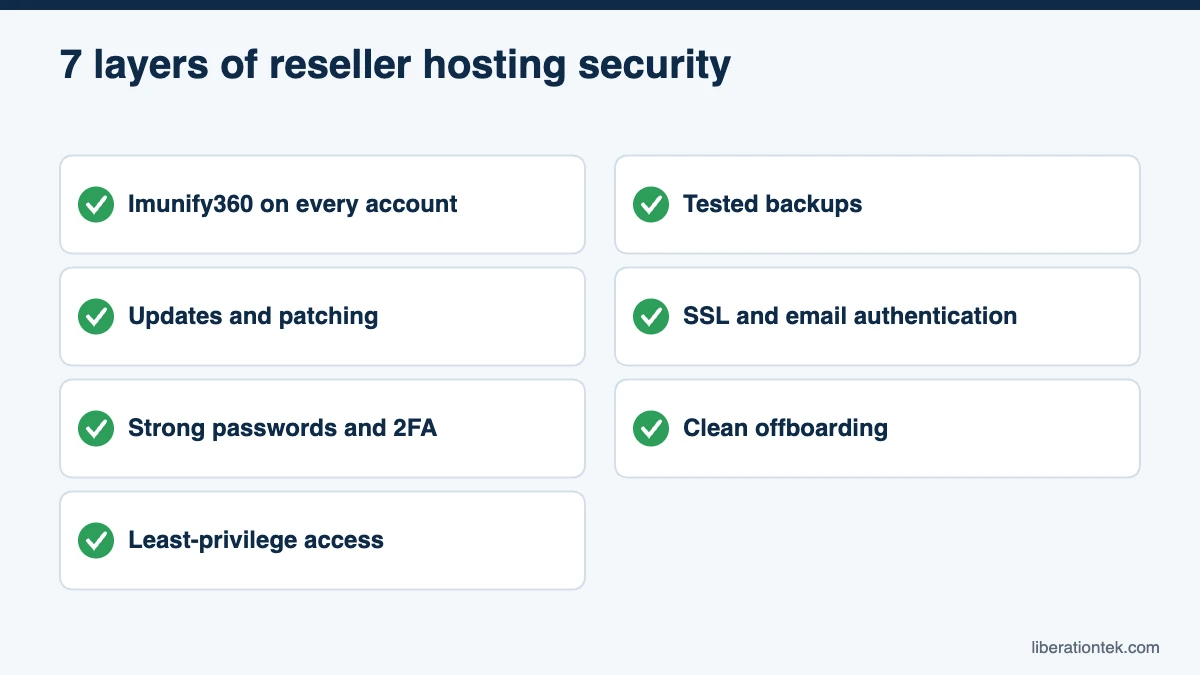
Layer 1: Server-level protection with Imunify360
The first layer is the one clients never see: the tools running on the server itself. Liberation includes Imunify360 on every client account on every plan. According to Imunify360’s product overview, it provides:
- A network firewall backed by threat data collected across a large network of protected domains.
- A web application firewall (WAF) that inspects incoming traffic and blocks common attacks such as SQL injection and cross-site scripting.
- Malware scanning of files on the server, in real time and on demand.
- Malware cleanup that can neutralize malicious code automatically when it’s detected.
For WordPress security for agencies, this matters because most attacks target the application layer: login pages, vulnerable plugins and file uploads. A WAF and malware scanner catch much of that before you ever get a support ticket. They don’t replace updates, though. They buy you time.
Layer 2: Updates and patching
Patching happens at two levels, and it helps to be clear about who owns each one.
Server updates: handled by Liberation
Every Liberation reseller plan is fully managed, which includes operating system and kernel patching. You don’t need to schedule maintenance windows or track Linux security advisories.
Application updates: handled by you
WordPress core, plugins and themes live inside each client’s cPanel account, so they’re yours to manage. A simple routine works well:
- Update plugins and themes weekly, and apply security releases as soon as they’re announced.
- Remove plugins and themes that aren’t active. Deactivated code can still be attacked.
- Replace plugins that haven’t been updated in a year or more.
- Keep a staging copy or a fresh backup before major updates.
Our overview of common cyber security threats covers the kinds of attacks these updates help prevent.
Layer 3: Strong passwords and 2FA for WHM and cPanel
Your WHM login is the key to every client site, so treat it like one. Use a long, unique password stored in a password manager, and turn on two-factor authentication.
In cPanel & WHM, 2FA is enabled server-wide first and then set up by each user. The cPanel documentation on two-factor authentication for WHM explains the process: once the security policy is on, WHM users configure 2FA for their own login, and cPanel users configure it in their own cPanel. You can’t switch it on for a client from WHM, so include a short 2FA setup step in your client onboarding.
Also add 2FA to WordPress admin accounts and to your domain registrar. A stolen registrar login lets an attacker redirect a domain no matter how secure the server is.
Layer 4: Least privilege access
Least privilege means every person gets only the access they need, and nothing more. On a reseller setup, that looks like this:
- Keep WHM and root to yourself. Liberation plans include root and SSH access. Use SSH keys instead of passwords, and never share root credentials with clients or contractors.
- Give clients cPanel only. Each client gets their own cPanel account, never a WHM login.
- Use packages and feature lists. In WHM, packages and the Feature Manager let you limit what each account can do, so a brochure site doesn’t need the same tools as a store.
- Create separate logins for helpers. Give freelancers their own FTP or WordPress accounts with the lowest role that works, and delete them when the job is done.
Layer 5: Backups you’ve actually tested
Backups are your last line of defense against malware, bad updates and accidental deletions. On Liberation, Studio, Agency, Agency Plus and Scale include daily backups with 7-day retention. The Launch plan doesn’t include server backups, so add CodeGuard website backup, which you can also resell to clients as a separate line item.
A backup you’ve never restored is only a hope. Once a month, restore one site to a test location and make sure it loads. If a client needs longer history than 7 days, such as an online store or a site with legal records, add CodeGuard for that client as well.
Layer 6: SSL and email authentication
Every Liberation plan includes free SSL through cPanel’s AutoSSL. According to cPanel’s AutoSSL documentation, it automatically installs domain-validated certificates for users’ domains and runs for all users as part of the nightly update. Your job is to make sure each domain’s DNS points to your server so the certificate can validate.
Email is the other half. Spoofed mail from a client’s domain can land your client in trouble and your server on blocklists. Set up SPF, DKIM and DMARC records for every client domain that sends email. Google’s email sender guidelines require all senders to Gmail accounts to use SPF or DKIM, and bulk senders to use SPF, DKIM and DMARC.
For mailboxes, keep client email off the web server. Liberation Mail private business email starts at $1.95 per mailbox per month, and you can attach it to every client and resell it.
Layer 7: Offboarding clients and contractors
Security gaps often open when someone leaves. When a client moves on or a contractor finishes a project:
- Remove their FTP, SSH, WordPress and cPanel logins.
- Change any shared passwords they had access to.
- Take a final backup, hand over the site files if agreed, and then terminate the cPanel account instead of leaving it idle.
- Update DNS so no records point to a site you no longer maintain.
Incident response: how Liberation handles threats
Even with every layer in place, something will eventually go wrong. What matters is how your host responds, and whether you’re kept in the loop.
Liberation’s Client Protection Promise is reseller-first. Liberation contacts you, not your end client. Normally, Liberation gives 15 days’ written notice with a chance to fix any problem before taking action. An active security threat, such as malware, a compromised account or an attack, is one of the exceptions where faster action may be needed. In those cases, Liberation takes only the narrowest action that stops the threat, such as isolating one site, and notifies you as soon as legally permitted.
That means one infected site doesn’t take down your whole reseller account, and you don’t learn about a problem from an angry client. Liberation’s 24/7 U.S.-based support can help you investigate, and you stay the one who talks to your client. For more on keeping your brand front and center, see our guide to white label hosting.
Reseller hosting security checklist
Use this table as your recurring routine. It shows which tasks Liberation handles and which ones stay with you.
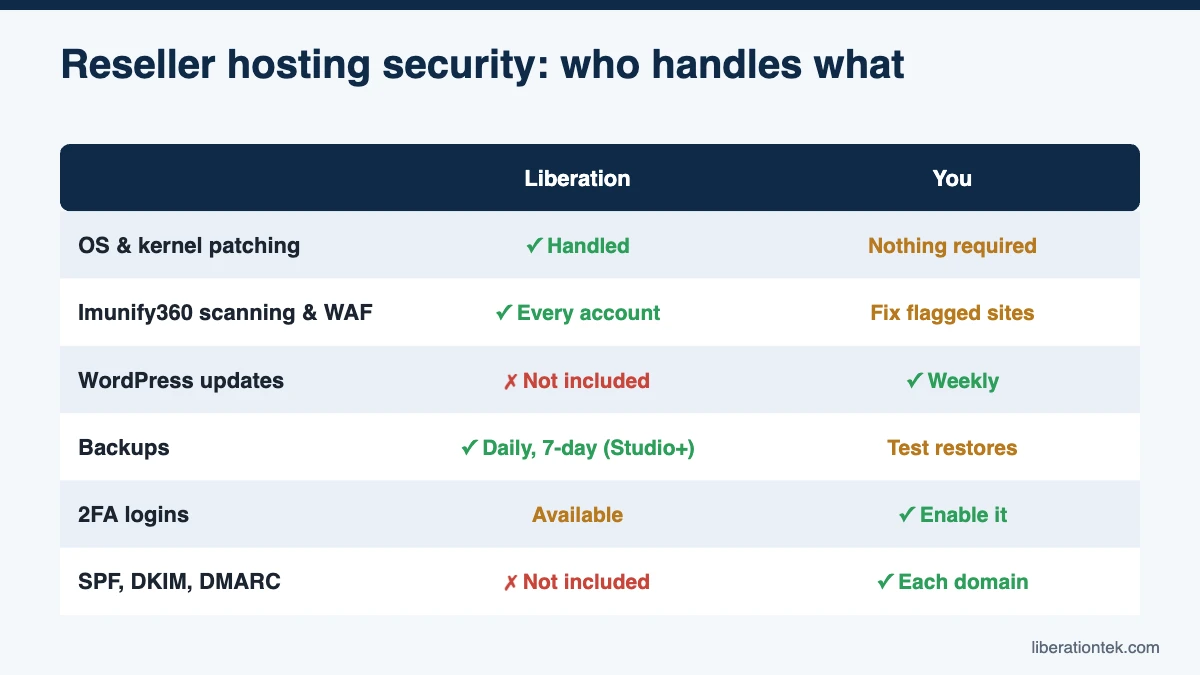
| Task | Frequency | Liberation | You |
|---|---|---|---|
| OS and kernel patching | Ongoing | Handled (fully managed) | Nothing required |
| Firewall, WAF, malware scanning and cleanup | Continuous | Imunify360 on every account | Fix the root cause on flagged sites |
| WordPress core, plugin and theme updates | Weekly | Not included | Update, remove unused code |
| Backups | Daily | 7-day retention on Studio and above | Add CodeGuard on Launch; test a restore monthly |
| SSL certificates | Automatic | AutoSSL included | Keep DNS pointed at your server |
| 2FA on WHM, cPanel and WordPress | At setup, review quarterly | Available in cPanel & WHM | Enable it; add it to client onboarding |
| User and password audit | Quarterly | Not included | Remove old logins, rotate shared passwords |
| SPF, DKIM and DMARC records | Each new domain | Not included | Add DNS records for sending domains |
| Client offboarding | When a client leaves | Not included | Revoke access, back up, terminate |
| Incident response | As needed | Narrowest action, notifies you first | Clean up, restore, inform your client |
For extra coverage on high-risk sites, SiteLock website security is another add-on you can resell.
Frequently Asked Questions
Is reseller hosting secure enough for client websites?
It can be, if the server is set up well and you follow a routine. The biggest factors are who else shares the server, whether malware protection runs on every account, how often sites are updated and whether backups exist. A private VPS with Imunify360, daily backups and 2FA on every login is a strong base for agency client sites.
What does Imunify360 do on a reseller server?
Imunify360 is a security suite for Linux web servers. According to its developer, it combines a network firewall, a web application firewall that blocks attacks such as SQL injection and cross-site scripting, real-time malware scanning and automatic cleanup. On Liberation reseller plans it runs on every client cPanel account at no extra cost, so you don’t need to buy or configure a separate license.
Who is responsible for WordPress updates on a reseller plan?
You are, or your client if that is what your agreement says. Liberation’s reseller plans are fully managed at the server level, which covers operating system and kernel patching. WordPress core, plugins and themes live inside each client’s cPanel account, so the reseller decides when and how they are updated. Many agencies bundle weekly updates into a monthly care plan.
What happens if one of my client sites gets hacked?
On Liberation, an active security threat is one of the few cases where action can happen without the usual 15 days’ notice. Even then, Liberation takes the narrowest step that stops the threat, such as isolating the one affected site, and notifies you, the reseller, as soon as legally permitted. You then clean up, restore from backup if needed and talk to your client.
Make reseller hosting security part of your service
Reseller hosting security isn’t a one-time setup. It’s a routine: a secure server underneath, updates every week, 2FA on every login, tested backups and a host that tells you first when something goes wrong. Done well, it’s also something you can sell, because clients will pay for a site that stays up and stays clean.
If you want your own private VPS with Imunify360, fully managed patching and a reseller-first approach to incidents, explore Liberation’s secure reseller hosting plans. Every plan comes with WHM, cPanel, AutoSSL and 24/7 U.S.-based support, backed by a 30-day money-back guarantee. Compare plans and pricing to find the right fit for your client list.
Related reading
- What Is Reseller Hosting? A Plain Guide for Web Designers
- VPS Reseller Hosting vs Shared Reseller Hosting for Agencies
- How to Start a Web Hosting Business in 2026: 10 Steps
- WordPress Hosting — What you are reselling, and how it is priced.
- SSL Certificates — Auto-installed and auto-renewed on client sites.