
If you want to know how to start a web hosting business, the short answer is that you do not need a data center. You rent a fully managed reseller server with WHM and cPanel, put your own brand on it, build a few hosting packages, and move the clients you already serve onto it. Most web designers and IT consultants can launch for about $100 a month in hosting costs and grow from there.
Key takeaways
- Start with a niche you already serve, such as churches, nonprofits, or local businesses, and a one-page plan.
- Choose a managed reseller host on a private VPS so you are not stuck managing servers or sharing one with strangers.
- Brand everything (domain, private nameservers, hostname), then build WHM packages and a simple billing process.
- Recurring add-ons like business email, backups, and security turn hosting into steady monthly revenue.

Why Add Hosting as a Business Line in 2026?
Most designers already “own” their clients’ hosting in practice. When a site goes down, the client calls you, not the host. A reseller hosting business simply lets you get paid for that responsibility.
Hosting also brings recurring revenue that project work does not. A build pays once. A hosting and care plan pays every month and keeps you in touch with clients who will need a redesign or a second site. You also gain control over the server, security, and backups instead of inheriting a bargain plan a client picked years ago. That is why learning how to start a web hosting business is worth a weekend of planning.
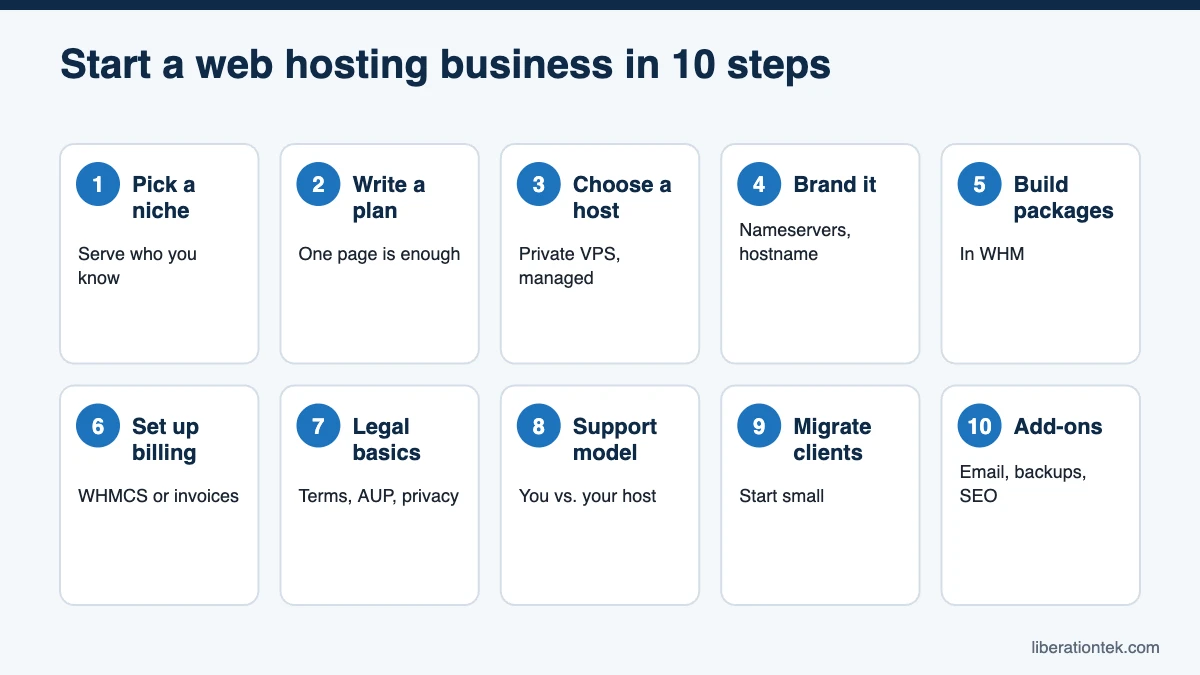
Step 1: Pick a Niche You Already Understand
New hosting companies struggle when they try to serve everyone. Focus on a group whose needs you already know:
- Churches and ministries that need sermon archives, calendars, and giving pages. See how Liberation frames its tech services for churches.
- Nonprofits that need reliable donation pages and volunteer forms on a tight budget.
- Local businesses such as contractors, dental offices, and restaurants that want someone local to call.
Your niche shapes your packages, support hours, and add-ons.
Step 2: Write a One-Page Web Hosting Business Plan
You do not need a 40-page document. The U.S. Small Business Administration describes a lean startup plan that fits on one page and covers your value proposition, customer segments, channels, cost structure, and revenue streams. That format suits a hosting business well.
Your web hosting business plan should answer five questions:
- Who are your first 5 to 10 clients, by name?
- What will you charge, and what is included at each price?
- What does your server cost per month, and how many clients cover it?
- Who answers support requests, and when?
- Which add-ons will you offer in year one?
Step 3: Choose a Host for Your Reseller Hosting Business
If your host is slow, your clients blame you. Use this checklist when comparing providers:
- Private or shared server? Many big-box reseller plans put you on a shared server with other resellers. A private VPS keeps your resources yours.
- Fully managed? Confirm who patches the operating system and kernel, and who responds at 2 a.m.
- cPanel license tier. It limits how many client accounts you can create.
- Security on every account: firewall, web application firewall, and automatic malware scanning.
- White-label options: private nameservers, your own hostname, and full cPanel branding.
- Backups: how often, how long they are kept, and whether they cost extra.
- Free migrations with no per-site fees.
- Renewal pricing. Intro prices that jump at renewal can erase your margin.
- Support and policies: who you reach, and when the host can suspend an account.
Liberation built its managed VPS reseller hosting plans around that list. Every plan is your own fully managed private VPS with WHM and cPanel, Imunify360 on every client account, free AutoSSL, and a 99.9% uptime SLA. Renewals are price-locked, with any increase capped at 5% and announced in advance.
Liberation’s Client Protection Promise is one more factor. Liberation acts on an account only for unlawful use under U.S. law or non-payment, never over lawful content or beliefs, and gives you 15 days’ written notice first, except where law, an active security threat, or resource abuse requires faster, narrowly limited action.
To be fair, if you only host one or two sites, a single VPS or shared plan may fit better for now. Reseller hosting pays off once you have several clients.
Step 4: Set Up Your Brand
Clients should see your company name, not your host’s. Set up these pieces before your first migration:
- Your domain: your existing business domain or a new one for your hosting brand.
- Private nameservers. Create ns1.yourbrand.com and ns2.yourbrand.com, with glue records at your registrar pointing to your server’s IP addresses. In WHM they are set under Basic WebHost Manager Setup, and cPanel notes you must specify nameservers before you can create accounts.
- Server hostname, such as server1.yourbrand.com.
- cPanel branding. Private nameservers and hostnames come with every Liberation plan. Full cPanel branding with your logo and colors requires the Premier license, included on Agency, Agency Plus, and Scale.
- Business email. Liberation Mail private business email starts at $1.95 a month per mailbox, and you can resell it to clients too.
Step 5: Build Hosting Packages in WHM
A WHM package is a template you assign to client accounts. Per cPanel’s Add a Package documentation, it sets disk quota, bandwidth, databases, addon domains, subdomains, and feature lists. Package names cannot be changed later, so leave prices out of them.
Start with three packages. Storage and bandwidth are shared across all client accounts on your plan, so leave headroom.
- Starter: one site, modest disk quota, a few databases. Good for brochure sites.
- Business: more storage, addon domains, more databases. Good for WordPress sites with blogs and forms.
- Organization: generous quotas for media-heavy church or nonprofit sites.
Our companion guide on how much to charge for web hosting walks through cost-per-account math and example care plans.
Step 6: Set Up Billing
You have two good options. The first is billing software built for hosts. WHMCS automates signups, invoices, and provisioning; its self-hosted Plus license lists at $34.95 a month for up to 250 active clients, per WHMCS pricing as of September 2026. WHMCS is not included with Liberation plans, but you can connect your own license.
The second option is recurring invoices in the accounting software you already use. WHM alone is enough to create and manage client accounts, so many small resellers skip WHMCS at first. Either way, offer annual billing for better cash flow and less churn.
Step 7: Cover the Legal Basics
Your host’s terms protect your host. You need documents of your own that protect you and set client expectations.
- Terms of service covering payment, cancellation, and late invoices.
- Acceptable use policy that lines up with your host’s rules.
- Privacy policy explaining what client data you collect and why.
- Service levels you can keep. Never promise more uptime than your host guarantees.
Templates help, but have a licensed attorney in your state review your documents. Our guide to reseller hosting terms of service covers what to look for in your host’s terms, too.
What It Costs to Start a Web Hosting Business
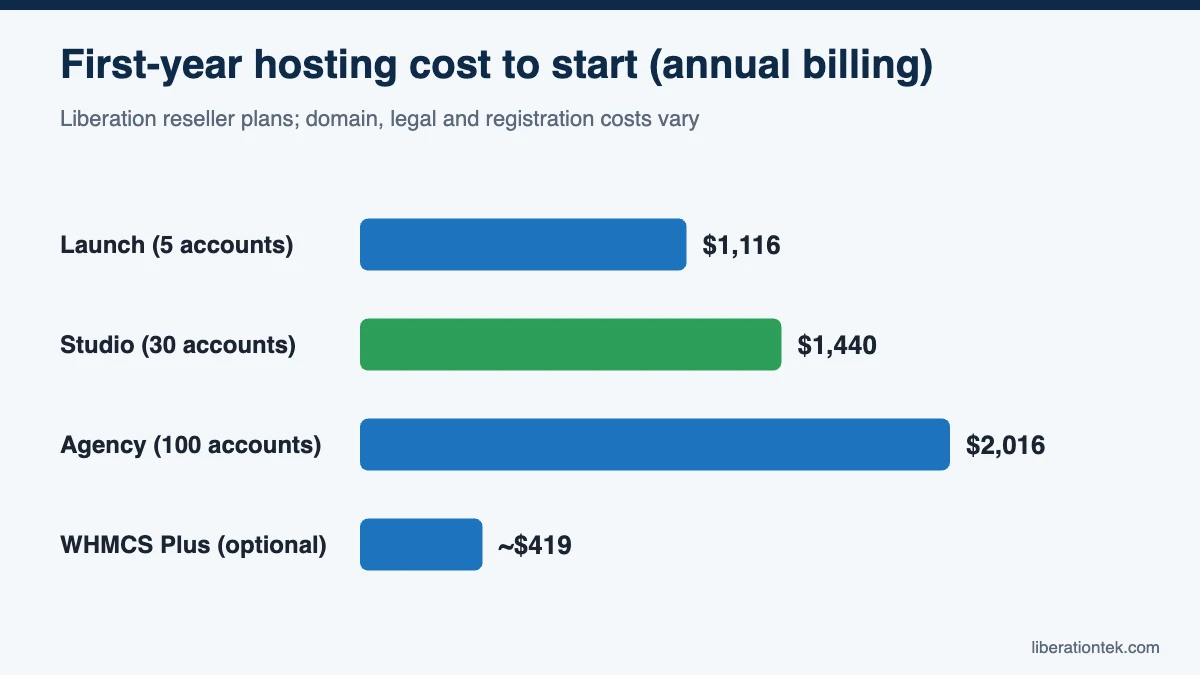
The good news about how to start a web hosting business on a reseller plan is that there is no hardware to buy. Here are first-year costs using Liberation plans. Non-Liberation items vary.
| Item | Monthly | Annual | Notes |
|---|---|---|---|
| Liberation Launch (5 cPanel accounts) | $98 | $1,116 ($93/mo) | Backups are an add-on (CodeGuard) |
| Liberation Studio (30 cPanel accounts) | $127 | $1,440 ($120/mo) | Daily backups, 7-day retention |
| Liberation Agency (100 cPanel accounts) | $168 | $1,908 (price-locked) | Full cPanel branding (Premier) |
| Domain for your brand | Varies | Varies by extension | Skip if you already own one |
| WHMCS Plus (optional) | $34.95 | About $419 | Not included; bring your own license |
| Liberation Mail for your support inbox | From $1.95 | From $23.40 | Per mailbox |
| Attorney review of terms | n/a | Varies | One-time; get a quote |
| Business registration | n/a | Varies by state | Check your state’s requirements |
For example, Studio billed annually plus one support mailbox costs about $1,465 in year one, before optional software and legal fees. At an example price of $35 a month per client, four clients cover the plan.
Step 8: Decide Your Support Model
Support is where small hosting companies win or lose. Split it into two layers:
- You handle client-facing requests: WordPress questions, content changes, and DNS updates.
- Your host handles the server: patching, security, performance, and outages.
Put your hours and response times in your terms. Behind you, Liberation provides 24/7 U.S.-based human support by ticket and chat, and it contacts you, not your client, about any account issue. Your clients stay yours; Liberation never markets to or bills them.
Step 9: Migrate Your First Clients
Start with a friendly client and a simple site. Lower the DNS TTL a day ahead, copy and test the site, then switch nameservers during a quiet window. Liberation includes free client migrations from other cPanel hosts with no per-site fees, up to your plan’s account limit (5 on Launch, 30 on Studio, 100 on Agency, 150 on Agency Plus, and 250 on Scale). Learn more about transferring your website to Liberation.
Step 10: Add Recurring Revenue With Add-Ons
Hosting alone is a thin product. The profit is in what you bundle with it. Liberation offers add-ons you can resell under your brand:
- Liberation Mail private business email from $1.95 a month per mailbox.
- Website Backup (CodeGuard), essential on Launch, where backups are an add-on.
- Website Security (SiteLock) for clients who want extra scanning and a trust seal.
- SEO tool for clients who want to track rankings and fix on-page issues.
Bundle these into monthly care plans with updates and support hours, and hosting becomes a real revenue line.
Frequently Asked Questions
Do I need to be a server expert to start a web hosting business?
No. With a fully managed reseller plan, the host patches the operating system and kernel, runs security, and keeps the server online. You work in WHM to create packages and client accounts, and your clients use cPanel. You still need to be comfortable with DNS, domains, and basic WordPress troubleshooting, which most web designers and IT consultants already handle.
How much does it cost to start a web hosting company?
Your main cost is the reseller server. At Liberation, plans start at $98 a month for 5 cPanel accounts (Launch) or $127 a month for 30 accounts (Studio), with 5% off when paid annually. Add a domain for your brand, optional billing software such as WHMCS, and a one-time attorney review of your terms. Studio billed annually plus one mailbox runs about $1,465 for the first year.
Do I need WHMCS to run a reseller hosting business?
No. WHM alone lets you create, suspend, and manage client cPanel accounts. WHMCS automates signups, invoices, and provisioning, which helps once you have many clients, but it is optional. Liberation does not include WHMCS; you can connect your own license or keep billing clients through the invoicing or accounting software you already use.
Who owns the clients if I resell hosting through Liberation?
You do. Under Liberation’s Client Protection Promise, end clients belong to the reseller. Liberation never markets to, solicits, or bills your clients. If one of your clients contacts Liberation directly, Liberation notifies you and gives you first right to do the work. Liberation also contacts you, not your client, about any account issue.
Now You Know How to Start a Web Hosting Business
Learning how to start a web hosting business comes down to a few decisions: a niche, a plan, a reliable managed host, your brand, and a support model you can keep. Get those right, and hosting becomes steady income that deepens every client relationship.
When you are ready to launch, compare Liberation’s reseller hosting plans and pick the one that fits your client list today. Every plan comes with a 30-day money-back guarantee, and you can upgrade anytime as you grow.
Related reading
- What Is Reseller Hosting? A Plain Guide for Web Designers
- VPS Reseller Hosting vs Shared Reseller Hosting for Agencies
- How Much to Charge for Web Hosting: 2026 Pricing Guide
- WordPress Hosting — What you are reselling, and how it is priced.
- SSL Certificates — Auto-installed and auto-renewed on client sites.