
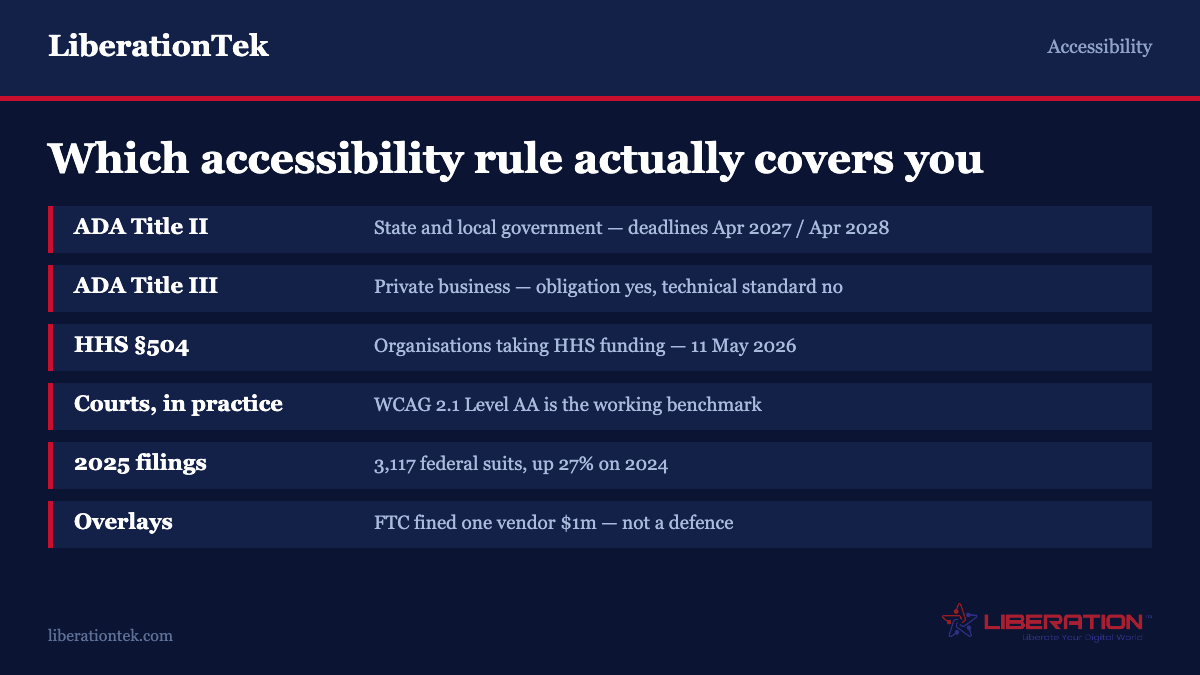
Small business accessibility is governed by ADA Title III, which has no federal regulation setting a technical standard. The April 2027 and 2028 deadlines you have read about belong to Title II — state and local government. That is the good news. The bad news is that 3,117 federal website accessibility lawsuits were filed in 2025, and courts in practice measure sites against WCAG 2.1 Level AA. An overlay widget will not protect you. Fix the eight things that cause almost every complaint instead.
If you have searched for website accessibility rules in the last year, you have probably seen a deadline. April 2026, or April 2027, or April 2028, depending on which article you landed on, usually attached to a warning about penalties.
Most of that is aimed at the wrong audience. The deadlines are real, but they belong to a rule that does not cover private businesses. Meanwhile the thing that genuinely creates exposure for a small business gets far less attention, because it does not come with a date on a calendar.
This is what applies to you, what does not, and what to do about it.
The short answer on small business accessibility
There is no federal regulation that tells a private business which version of WCAG its website must meet. The Department of Justice says so directly. Its web accessibility guidance states that the Department “does not have a regulation setting out detailed standards,” and that businesses “can currently choose how they will ensure that the programs, services, and goods they provide online are accessible to people with disabilities.”
That flexibility is not a loophole. The same guidance is clear that businesses still must ensure the goods and services they provide to the public, including online, are accessible to people with disabilities. You are obligated. You are simply not handed a checklist and a deadline.
In the absence of a regulation, plaintiffs and courts have converged on WCAG 2.1 Level AA as the working benchmark. Settlement agreements name it. Consent decrees name it. If you are going to aim at something, aim at that.
Why everyone thinks there is a deadline
In 2024 the DOJ issued a rule under ADA Title II covering state and local governments — city websites, public school districts, county services, public universities. That rule does name a standard, WCAG 2.1 Level AA, and it does have dates.
Those dates have since moved. Entities serving populations of 50,000 or more now have until April 26, 2027. Smaller entities and special districts have until April 26, 2028. A great deal of content published in 2025 still quotes the original April 2026 date, which is one reason the advice you find is contradictory. If you are a public entity rather than a business, our guide to the ADA Title II deadline covers those obligations in detail.
Title II is not Title III. If you run a bakery, a law practice, a contracting business or an online store, you are Title III, and the 2027 and 2028 deadlines are not yours.
There is one exception worth knowing about. Healthcare organisations receiving funding from the Department of Health and Human Services face a separate Section 504 obligation dated May 11, 2026. If federal healthcare dollars touch your organisation, that one is real and close. If you are unsure which obligations attach to your business generally, our guide to which compliance framework applies is a useful starting point.
The risk that is actually real
The absence of a deadline has not produced an absence of litigation. Federal website accessibility filings in 2025 came to 3,117 lawsuits, a 27% increase over the 2,452 filed in 2024, and the second highest annual total on record. Three states account for the overwhelming majority: New York with 1,021 cases, Florida with 961, and Illinois with 585.
Two things about that distribution matter. First, these are federal filings, so a business in one state can be sued over a website reachable from another. Second, the growth is not driven by any change in the law. It is driven by how cheap the cases are to bring — no site visit is required, the evidence is a screen recording, and a single firm can file dozens.
Demand letters never reach a court docket, so the real volume of contact is considerably higher than 3,117. Most small businesses that get caught up in this see a letter, not a lawsuit, and settle for a few thousand dollars plus a remediation commitment. The letter is the thing to plan for.
The overlay trap
When a business receives one of those letters, the first search result is usually an accessibility overlay: a snippet of JavaScript you paste into your site that promises to make it compliant automatically. They advertise for exactly this moment.
They do not work, and this is a documented finding rather than an opinion. In January 2025 the Federal Trade Commission ordered accessiBe to pay $1 million over deceptive claims that its AI product could make websites compliant with accessibility guidelines. The final order was approved that April, and the FTC wrote the episode up in its own business guidance as a cautionary tale for other vendors.
Beyond the marketing question, overlays fail on the merits. They sit on top of the page and try to infer meaning the underlying code never provided — guessing what an unlabelled button does, or what an image contains. Screen reader users have said for years that overlays frequently make sites harder to use, and hundreds of businesses running them have been sued regardless. A widget in the corner of the page is, if anything, a signal to a plaintiff that you knew about the issue and chose the cheap option.
Spend the money on the underlying markup instead.
What WCAG actually is
The Web Content Accessibility Guidelines are published by the W3C, not by any government. The versions in circulation are 2.0 (2008), 2.1 (2018) and 2.2 (2023). Each is backwards compatible, so meeting 2.2 means you have met 2.1.
Each version has three conformance levels. Level A is the floor — failures here make content genuinely unusable for some people. Level AA is the level regulators and courts reference, and the level to target. Level AAA includes criteria the W3C itself says cannot be satisfied for all content, and is not a sensible goal for a business site.
The guidelines are organised under four principles, abbreviated POUR. Content must be perceivable, meaning people can register it through some sense; operable, meaning they can drive the interface; understandable, meaning the content and the interface behave predictably; and robust, meaning assistive technology can parse it reliably. Every success criterion sits under one of those four.
WCAG 2.1 Level AA is around fifty success criteria. That sounds daunting until you look at which ones actually get cited.
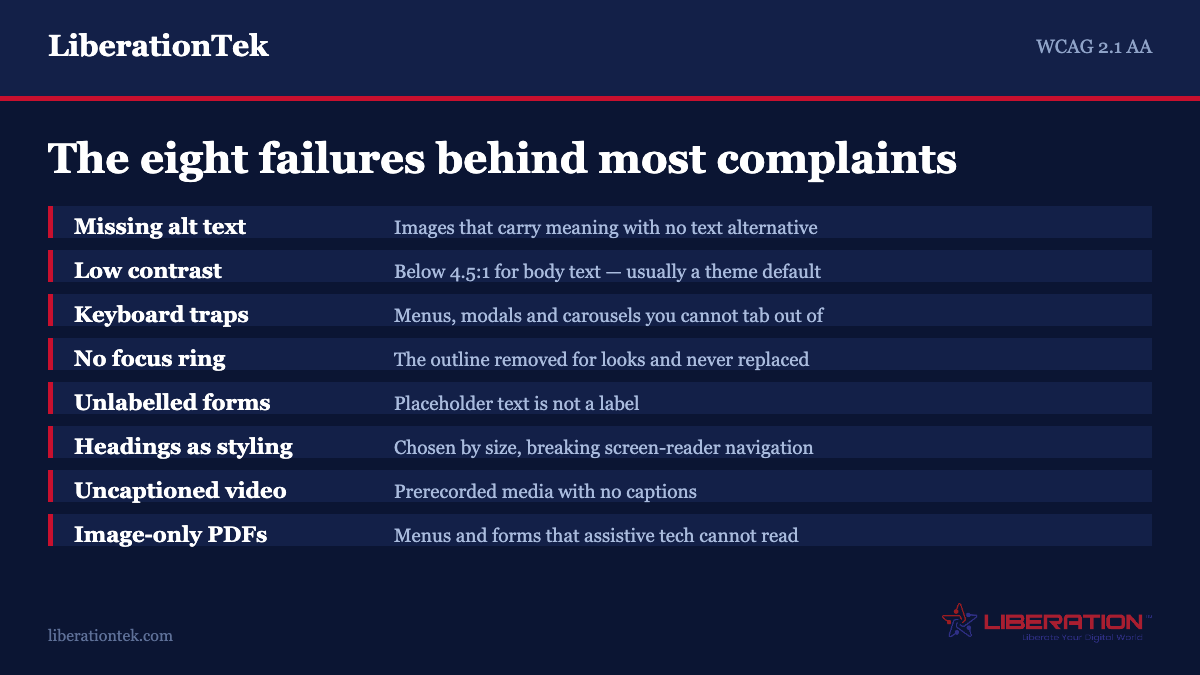
The eight failures behind almost every complaint
Accessibility audits on small business sites find the same handful of problems repeatedly. Fix these and you have addressed the substance of most demand letters.
1. Images without alternative text. Every image that conveys information needs a text alternative describing what it conveys. Decorative images need an empty alt attribute so screen readers skip them rather than announcing a filename.
2. Insufficient colour contrast. Level AA requires at least 4.5:1 for normal text and 3:1 for large text and interface components. Light grey body text on white is the most common failure on a modern business site, and it is almost always a theme default nobody changed.
3. Content that cannot be reached by keyboard. Unplug your mouse and try to complete a purchase or submit a contact form using only Tab, Shift+Tab, Enter and the arrow keys. Custom dropdowns, carousels, modals and mega menus are the usual culprits. If you can get into something but not out of it, that is a keyboard trap and a Level A failure.
4. No visible focus indicator. As you tab through a page the focused element must be visibly marked. A depressing number of themes remove the browser default outline for aesthetic reasons and replace it with nothing, which makes keyboard navigation impossible to follow.
5. Form fields without labels. Placeholder text is not a label — it disappears the moment someone types, and screen readers treat it inconsistently. Every input needs a properly associated label, and error messages need to be announced rather than only coloured red.
6. Headings used for styling. Screen reader users navigate by heading the way a sighted reader skims. If your headings were chosen for how big they looked rather than what they structure, that navigation breaks. One H1 per page, then a logical hierarchy with no skipped levels.
7. Video and audio without captions. Prerecorded video needs captions and, depending on content, an audio description. If you have testimonial videos or a product walkthrough on the homepage, this applies to you.
8. Inaccessible PDFs. Scanned menus, price lists, forms and brochures posted as image-only PDFs are unreadable to assistive technology. This catches restaurants, clinics and professional services constantly. Where you can, publish the content as an HTML page instead.
How to test without hiring anyone
You can find most of the above yourself in an afternoon.
Automated scanners. axe DevTools, WAVE and Google Lighthouse are free and run in your browser. They reliably catch missing alt text, contrast failures and unlabelled fields. Understand the ceiling: automated tools detect roughly a third of WCAG issues. A clean scan is a starting point, not a clearance.
The keyboard test. Described above, and the highest-value fifteen minutes available to you. It needs no tooling at all.
A screen reader. VoiceOver ships with macOS and iOS, Narrator with Windows, and NVDA is free. Listening to your own homepage read aloud is uncomfortable and extremely informative.
Zoom to 200%. Text must remain readable and functional without horizontal scrolling. This overlaps almost entirely with good mobile design, so a site that genuinely works on a phone usually passes.
What automated tools cannot judge is whether your alt text is useful, whether your headings describe what follows them, or whether an error message tells someone how to fix the problem. Those need a person.
Accessibility on a WordPress site
WordPress itself is reasonably well behaved. The problems on a WordPress business site almost always come from the theme, the page builder or a plugin.
Themes. The WordPress.org theme directory applies an accessibility-ready tag to themes that have passed a review covering keyboard navigation, contrast and form labelling. Filtering by it before choosing a theme saves an enormous amount of remediation later.
Page builders. Visual builders make it easy to produce heading levels out of order, because you pick headings from a dropdown based on how they look. They also generate deeply nested markup that assistive technology has to wade through. Neither is disqualifying, but it means being deliberate about structure rather than trusting the output.
Plugins. A slider, popup, cookie banner or booking widget can undo careful work everywhere else — modal dialogs that trap focus are the classic example. Our guide to vetting a WordPress plugin covers how to assess this alongside the security questions.
Content practice. Most ongoing accessibility work is editorial rather than technical. Write alt text when you upload an image. Use real headings. Write link text that makes sense out of context — a page of links that all say “click here” is useless to someone tabbing through a list of them.
A sensible order of work
If you are starting from nothing, do it in this sequence.
First, scan your five most important pages — homepage, main service or product page, contact, checkout or booking, and one blog post. Fix everything flagged. This is usually a day of work and removes the failures most likely to appear in a demand letter.
Second, do the keyboard test on the path a customer takes to give you money. If someone cannot book, buy or contact you without a mouse, nothing else you fix matters as much.
Third, write an accessibility statement. Say what standard you are working towards, acknowledge known gaps, and give a real monitored contact address for accessibility problems. It is not a legal shield, but it demonstrates good faith and gives a frustrated visitor somewhere to go other than a lawyer. Do not claim full conformance unless you have been audited and can support it — an inaccurate claim is worse than no claim.
Fourth, build the editorial habits so the site does not drift back. Accessibility is not a project that finishes.
Fifth, if you operate in a regulated sector, take federal money, or sell to government, get an audit from someone who does this professionally. The stakes are different and the standard you will be held to is higher.
Where we fit
Accessibility is not a product you buy. It is a property of how a site is built and maintained, which means the useful thing a host or a builder can do is stay out of the way and make fixes easy to ship.
Liberation Site Builder starts from templates with sane contrast, real heading structure and keyboard-navigable components, so you are not remediating defaults out of the box. For WordPress sites, ongoing maintenance is what keeps an accessible site accessible — a plugin update that breaks focus handling is much easier to catch on a staging site than in a demand letter. And if your site currently lives somewhere that makes changes painful, we will move it for free.
What we will not do is sell you a widget and tell you the problem is solved. As the FTC action made clear, that is not a service.
Frequently asked questions
Does the April 2027 accessibility deadline apply to my small business?
No. The April 26, 2027 and April 26, 2028 deadlines come from the Department of Justice rule under ADA Title II, which covers state and local government entities — city and county websites, public school districts, public universities and special districts. Private businesses are covered by Title III, which has no regulation setting a technical standard or a compliance date. The obligation to be accessible still applies to you; that particular deadline does not.
Which version of WCAG should a small business target?
WCAG 2.1 Level AA. No federal regulation requires it of a private business, but it is the standard named in the Title II rule, in most settlement agreements and consent decrees, and in state procurement requirements. WCAG 2.2 is current and backwards compatible, so meeting 2.2 Level AA means you have met 2.1 Level AA. Level AAA is not a realistic target and the W3C does not recommend it as a general policy.
Will an accessibility overlay or widget protect me from a lawsuit?
No. In January 2025 the Federal Trade Commission ordered accessiBe to pay $1 million over deceptive claims that its AI product could make websites compliant with accessibility guidelines, and approved the final order that April. Hundreds of businesses running overlays have been sued regardless. Overlays work by guessing at meaning the underlying code never supplied, and many screen reader users report they make sites harder to use.
How many website accessibility lawsuits are actually filed?
3,117 federal website accessibility lawsuits were filed in 2025, up 27% from 2,452 in 2024 and the second highest annual total recorded. New York with 1,021, Florida with 961 and Illinois with 585 accounted for most of them. That figure counts only cases reaching a federal docket — demand letters, which is how most small businesses first encounter this, are far more numerous and are not tracked publicly.
What is the single highest-value accessibility fix?
Make sure the path a customer takes to give you money works with a keyboard alone. Unplug your mouse and try to complete a booking, purchase or contact form using only Tab, Shift+Tab, Enter and the arrow keys. Keyboard traps and unreachable controls are Level A failures, they affect real customers immediately, and they are cited constantly in complaints. After that, fix colour contrast and add alt text.
Does having an accessibility statement help?
It is not a legal defence, but it is worth publishing. A statement naming the standard you are working towards, acknowledging known gaps and giving a monitored contact address demonstrates good faith and gives a frustrated visitor a route to you rather than to a plaintiff attorney. Do not claim full conformance unless you have been audited and can support it, because an inaccurate claim is worse than none.
Sources
Three primary references, all worth reading before you pay anyone to interpret them for you.
- Guidance on Web Accessibility and the ADA — ADA.gov. The Department of Justice position on private businesses.
- FTC order requiring accessiBe to pay $1 million — Federal Trade Commission, January 2025.
- How to Meet WCAG (Quick Reference) — W3C Web Accessibility Initiative. Every success criterion, filterable by level.