
WordPress multisite makes sense when you run many similar sites that share a plugin set and are managed by one team — franchise locations, campus departments, a client portfolio you maintain. It hurts when the sites are genuinely different, when clients need to install their own plugins, when you might sell or spin off a site later, or when you simply want to save on hosting. The shared core is the whole point and also the whole risk: one bad update, one compromise, or one runaway site affects everything on the network.
Multisite has a strong gravitational pull. You are running four WordPress installations, updating each separately, paying for each separately, and somebody points out that WordPress can run all four from a single install. It sounds like an obvious efficiency.
Sometimes it is. Multisite powers WordPress.com, which is proof enough that the architecture scales. But the feature was built for a specific shape of problem, and most of the pain people report comes from using it for a different shape.
The useful question is not whether multisite is good. It is whether the thing that makes it efficient — one set of core files, one set of plugins, one database, one team — describes your situation or fights it.
What WordPress multisite actually is
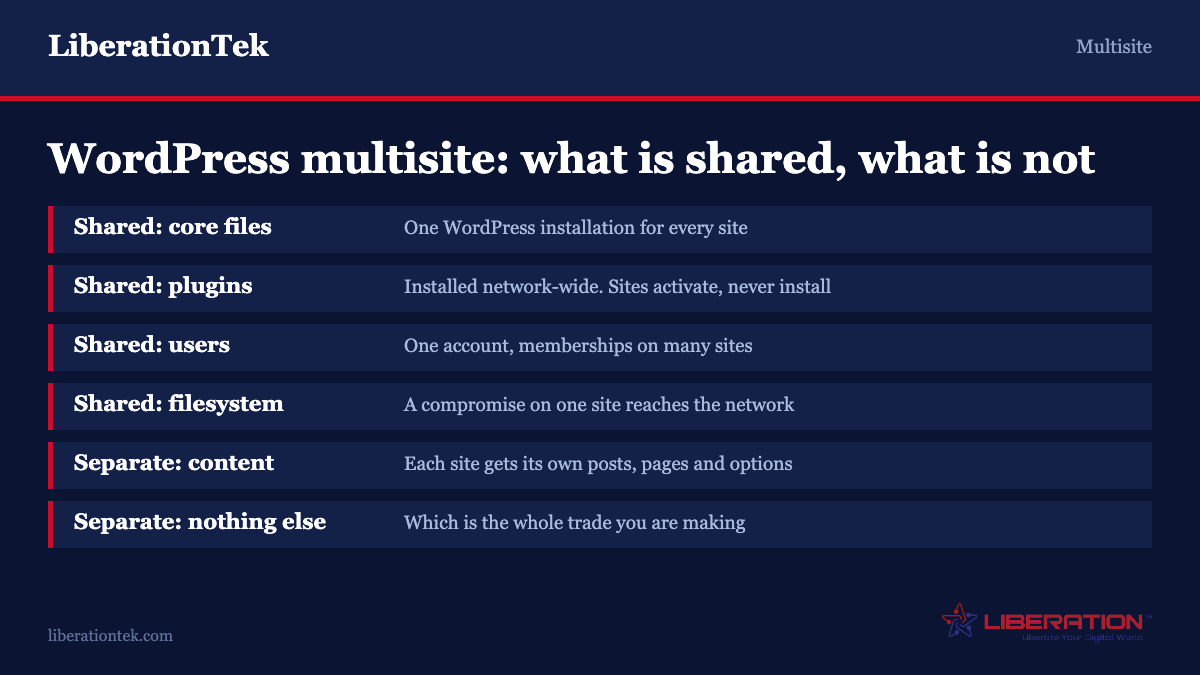
A multisite network is one WordPress installation serving many sites. There is one copy of core, one wp-content directory, one database and one user table. Each site gets its own set of database tables for posts, pages and options; everything else is shared.
Sites are addressed either as subdomains (store.example.com) or subdirectories (example.com/store). You choose at setup and changing later is painful. Separate top-level domains are possible — domain mapping is in core now — but still need DNS and certificate work per domain.
The defining constraint sits in the WordPress documentation itself: each individual site on a network can activate plugins and themes, but can install neither. Installation is a network-level action. That single sentence determines most of whether multisite will work for you.
One other thing trips people up: users belong to the network, not to a site. A person is one user account with memberships on one or more sites, each carrying a role. If the same person works on four sites, that is one account, not four. Our guide to WordPress user roles and permissions covers how the capability model shifts on a network.
Where multisite is genuinely the right answer
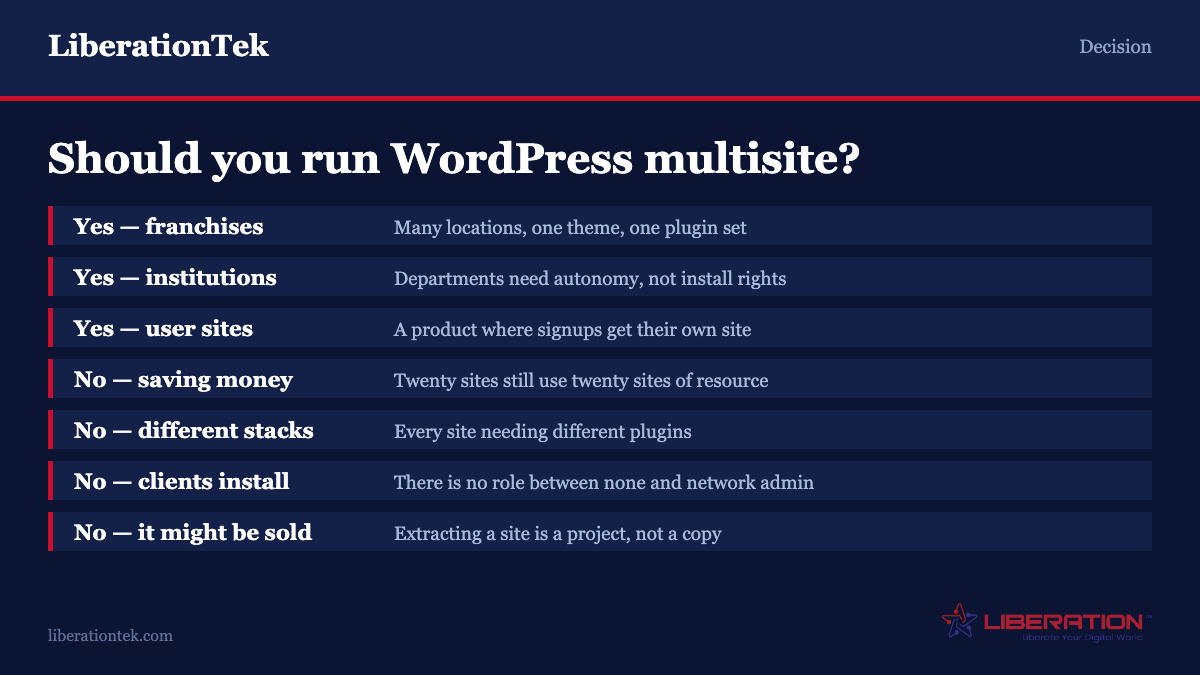
Franchise or multi-location businesses. Twenty locations, each with their own page, hours, staff and local content, all running the same theme and the same booking plugin. Corporate controls the design and the plugin set; each location manages its own content. This is the case multisite was built for.
Universities, school districts and large nonprofits. Departments want editorial independence without the ability to install whatever they find. The multisite permission model delivers exactly that: a site Administrator has full control of their content and settings but cannot install code. For a central IT team, that boundary is the feature.
An agency portfolio of similar client sites. If you maintain thirty small business sites running the same stack, a network means one update cycle instead of thirty. This works well right until a client asks for something the others do not have.
Genuine regional or language variants. One brand, several markets, largely parallel content. Worth comparing against a multilingual plugin on a single site first — that is often simpler — but at enough scale and divergence, separate sites win.
A membership or community product where users create sites. The original use case. If you are building something where signups get their own site, multisite is the architecture.
The common thread: many similar sites, one team deciding what runs on them. If both halves describe you, multisite is probably right.
Where it will hurt
You want to save money on hosting. The most common bad reason. A network with twenty active sites uses roughly the resources of twenty sites — the traffic, database queries and storage do not disappear because they share a wrapper. What you save is management overhead, not capacity. Running a network on an underpowered plan produces one slow thing instead of twenty fast ones.
The sites are genuinely different. Different themes, different plugin requirements, different functionality. You can do this on a network, but you end up with a wp-content directory carrying every plugin any site needs, all loaded and updated together. The maintenance burden grows rather than shrinks.
Clients need to install their own plugins. They cannot, unless you make them Super Admins — and a Super Admin controls the entire network, not just their site. There is no middle setting. If your clients expect to add plugins, multisite is the wrong architecture and no configuration will fix it.
You might sell, spin off or hand over a site. Extracting one site from a network is real work: exporting its tables, remapping IDs, untangling shared users and uploads. It is doable and tools exist, but it is a project rather than a copy. If a site might need to leave, keep it separate from the start.
One site is much bigger than the others. A high-traffic store sharing a network with nineteen brochure sites means that store’s load affects all of them. Isolation is usually worth more than consolidation here.
You need per-site security boundaries. Sites on a network share a filesystem and a database user. A compromise on the weakest site is a compromise of the network. If one site handles sensitive data and another is a marketing microsite maintained by an intern, that shared fate is a problem.
The failure modes nobody mentions upfront
Plugin compatibility is not guaranteed. A large number of WordPress plugins are written and tested against single-site installs. On a network they may store settings globally when they should be per-site, fail to clean up when a site is deleted, or simply break. There is no reliable indicator on a plugin listing — you find out by testing, which is one more reason to run a staging copy of the network.
Backups and restores get harder. Restoring one site from a network backup means extracting that site’s tables and uploads from a shared structure without disturbing the others. Plenty of tools handle whole-network backups; far fewer handle a clean single-site restore. Confirm your tooling can do it before you need it, not after. Our backup and disaster recovery page covers how restores work on our platform.
Updates become all-or-nothing. The efficiency of updating once is also the risk. A plugin update that breaks something breaks it on every site simultaneously. On separate installs you would have found out on the first one. Staging is not optional on a network.
The admin is genuinely confusing. The WordPress documentation says so itself — that the location and behaviour of Network Administration can be confusing even for experienced users. Some settings live in the network admin, some in the site admin, and which is which is not always intuitive. Budget time for your team to learn it.
Search and analytics need thought. Core search does not span sites. Neither does most analytics configuration by default. If users expect to search across the network, or you want consolidated reporting, that is additional work.
SEO is not automatic. Subdirectory networks consolidate domain authority, which is a real benefit. Subdomain networks largely do not — search engines treat subdomains as substantially separate. Choose deliberately, because you cannot change it later without a redirect project.
A decision framework
Work through these in order. A no at any point is a strong signal against multisite.
1. Do the sites share a plugin and theme set? If each needs a materially different stack, stop. The shared wp-content is the mechanism, and it only helps when it is genuinely shared.
2. Does one team decide what gets installed? If site owners expect to install their own plugins, stop. There is nothing between “cannot install anything” and “controls the whole network.”
3. Will any site need to leave? If a site might be sold, spun off or handed to another provider, keep it separate.
4. Are the sites similar in scale? If one will carry ten times the traffic of the others, isolate it.
5. Do you have staging and a tested restore? Multisite raises the cost of a bad update and of a bad restore. If you do not have both, build them first.
6. Is the count high enough to matter? Below about five sites the management saving rarely justifies the complexity. At twenty or more it usually does.
What to do instead
Most people reaching for multisite actually want one of these.
A management layer over separate installs. Tools exist that update plugins, run backups and monitor uptime across many independent WordPress sites from one dashboard. You get the operational benefit — one place to work — without the shared fate. For an agency with a portfolio of dissimilar client sites, usually the better trade.
A reseller hosting account. If the goal is many sites cleanly separated with per-site resource limits and the ability to hand one over, reseller hosting gives you that directly. Each site is its own account with its own backups and credentials.
A multilingual plugin. If the driver is language variants of largely the same content, a single site with a translation plugin is simpler than a network in almost every case.
A starter template you clone. If the appeal is spinning up consistent new sites quickly, a documented base install gets you most of the way with none of the coupling.
Custom post types. If the “sites” are really content groupings on one brand — locations, programmes, product lines — a custom post type with an archive is far less machinery than a network.
Planning the exit before you build
This is the step almost nobody takes and the one that costs most when skipped. Before creating a network, write down how a site would leave it.
The mechanics are knowable. A site’s content lives in numbered tables — wp_7_posts, wp_7_options and so on. Its uploads live in a subdirectory under the shared uploads folder. Its users are rows in a network-wide table with a membership record rather than rows belonging to that site. Extracting it means exporting those tables, renaming them to a single-site prefix, copying the uploads, recreating the users, and fixing every absolute URL in the content.
None of that is exotic, and export tools handle much of it. What makes it expensive is discovering the requirement under time pressure — a client leaving, a business unit being sold, a department insisting on its own provider. An hour spent documenting the process now, while you still remember how the network was assembled, turns a fortnight into an afternoon.
Two decisions make exit dramatically easier if you take them at setup. Keep uploads organised per site rather than letting plugins scatter files into shared locations. And avoid network-wide plugins that write into a single shared table for all sites, because unpicking one site’s rows from a shared analytics or forms table is the part that genuinely does not automate.
If you cannot describe how a site would leave, you have not finished designing the network.
If you are going to do it, do these things first
Back up everything. The WordPress documentation puts this first for good reason: enabling multisite alters the database and is not a one-click reversal.
Confirm pretty permalinks work on the existing single install. Network setup assumes it.
Deactivate all plugins before creating the network, then reactivate deliberately at the level — network or site — where each belongs.
Choose subdomains or subdirectories carefully. Subdirectories consolidate SEO authority and need no wildcard DNS. Subdomains feel more like separate properties and need a wildcard DNS record and a wildcard certificate. Changing later is a redirect project.
Plan hosting for the total, not the average. Size for the combined traffic and storage of every site you expect to run, plus headroom.
Build staging before you build the network, not after.
Verify single-site restore. Take a backup, then actually restore one site into a test environment. Find out now whether your tooling can do it.
Understand the changed permission model. Site administrators lose the ability to install plugins and themes, update core, manage users and post unfiltered HTML — all of that moves to the Super Admin.
Frequently asked questions
Does WordPress multisite save money on hosting?
Rarely, and it is the most common bad reason to build one. Twenty sites on a network consume roughly the resources of twenty sites — traffic, database queries and storage do not shrink because they share a WordPress installation. What multisite saves is management time: one update cycle, one set of credentials, one place to work. If the plan is to fit more sites onto a smaller plan, the result is usually one slow network rather than twenty responsive sites.
Can each site on a multisite network install its own plugins?
No. Plugins and themes are installed at network level only; individual sites can activate what the network has installed but cannot install anything themselves. The only role that can install is Super Admin, which controls the entire network rather than one site. There is no setting in between. If your site owners or clients expect to add their own plugins, multisite is the wrong architecture for you.
Should a multisite network use subdomains or subdirectories?
Subdirectories keep everything on one domain, which consolidates search authority and needs no extra DNS. Subdomains feel more like separate properties and are right when sites should be perceived as distinct, but they require a wildcard DNS record and a wildcard TLS certificate, and search engines treat them as substantially separate sites. You choose at setup and changing afterwards is a redirect project, so decide deliberately.
Can you remove one site from a WordPress multisite network?
Yes, but it is a project rather than a copy. You export that site’s numbered database tables, rename them to a single-site prefix, copy its uploads out of the shared directory, recreate users who belong to the network rather than the site, and fix absolute URLs. Tools help with much of it. The practical implication is planning: if a site might ever be sold or handed to another provider, keep it as its own installation from the start.
Is multisite less secure than separate WordPress installs?
It concentrates risk. Sites on a network share a filesystem, a database user and a plugin set, so a compromise on the weakest site is a compromise of the network, and a plugin vulnerability affects every site at once. Separate installs contain a breach to one site. Multisite is not insecure by design — the permission model is actually stronger, since site administrators cannot install code — but the blast radius of any single failure is larger.
How many sites justify running multisite?
Below about five, the added complexity rarely pays for itself and separate installs with a management dashboard are simpler. At twenty or more similar sites managed by one team, the saving in update cycles and consistency is substantial. The count matters less than the shape: five near-identical franchise sites are a better fit than fifty sites that all need different plugins.
Sources
The official documentation is unusually candid about the trade-offs here and is worth reading in full before you commit.
- Before You Create a Network — WordPress Developer Docs. The prerequisites and the decisions you cannot reverse.
- Create a Network — WordPress Developer Docs. The installation procedure itself.