
Headless commerce means running your storefront as a separate application that talks to WooCommerce through its API. It genuinely helps if you are selling through several channels at once, have a design your theme cannot express, or have hit performance limits caching cannot solve. It hurts everywhere else: you lose most of the plugin ecosystem, the page builder, and the ability to change anything without a developer. For most stores under a few hundred orders a month, a well-tuned WooCommerce install on good hosting is faster to build, cheaper to run and faster to load than a badly executed headless one.
Headless commerce has been the recommended architecture in ecommerce conference talks for about five years. The pitch is consistent: decouple your storefront from your backend, serve a fast modern frontend, publish to any channel you like.
The pitch is not wrong. What it usually leaves out is the bill — not just the build, but the permanent change in how your store gets maintained, and the long list of things that used to be a plugin and are now a project.
This is the version with the costs in it.
What headless commerce actually means
A standard WooCommerce store is one application. WordPress renders the pages, WooCommerce handles products, cart and orders, your theme controls how it looks, and it all runs in the same PHP process against the same database.
Headless commerce splits that in two. WooCommerce keeps doing the commerce — products, inventory, cart, checkout, orders, payments — but stops rendering anything. The storefront becomes a separate application, usually built in a JavaScript framework, that requests data through WooCommerce’s REST or GraphQL API and renders pages itself.
The word to hold onto is boundary. Everything that used to happen in one place now happens across an API call. That boundary is what gives you freedom, and it is where all the new costs come from.
There is a middle option people often miss. WooCommerce Blocks and full site editing let you rebuild the storefront substantially without leaving WordPress, and modern caching can deliver near-static performance for anonymous visitors. If the motivation is speed or layout control, try that before splitting the stack.
The three reasons that actually justify it
1. You are genuinely selling through multiple channels. A website, a native mobile app, in-store kiosks, a marketplace integration, a partner site embedding your catalogue. When several surfaces need the same product and inventory data, one API serving all of them is straightforwardly right. This is the original case for headless and it remains the strongest.
Note the word genuinely. “We might build an app one day” is not this. Build the app when you build the app.
2. Your design cannot be expressed in a theme. Some storefronts need interaction a WordPress theme cannot deliver — a complex product configurator, a real-time visualiser, a highly interactive catalogue. If you have tried and the theme layer is the actual constraint, headless removes it.
Be honest about whether you have tried. “The theme does not look how we want” is usually a design and CSS problem, not an architecture problem.
3. You have hit a performance ceiling caching cannot lift. Full-page caching makes anonymous browsing fast on almost any WooCommerce store. Where it stops helping is personalised, logged-in, high-traffic browsing — large catalogues with faceted search, customer-specific pricing, real-time stock across many locations. If that is your load profile and you have already tuned the database and the hosting, headless is a legitimate answer.
If you have not already tried better hosting, object caching and a CDN, you have not hit a ceiling. You have hit a configuration.
What you give up
This is the part the architecture talks skip.
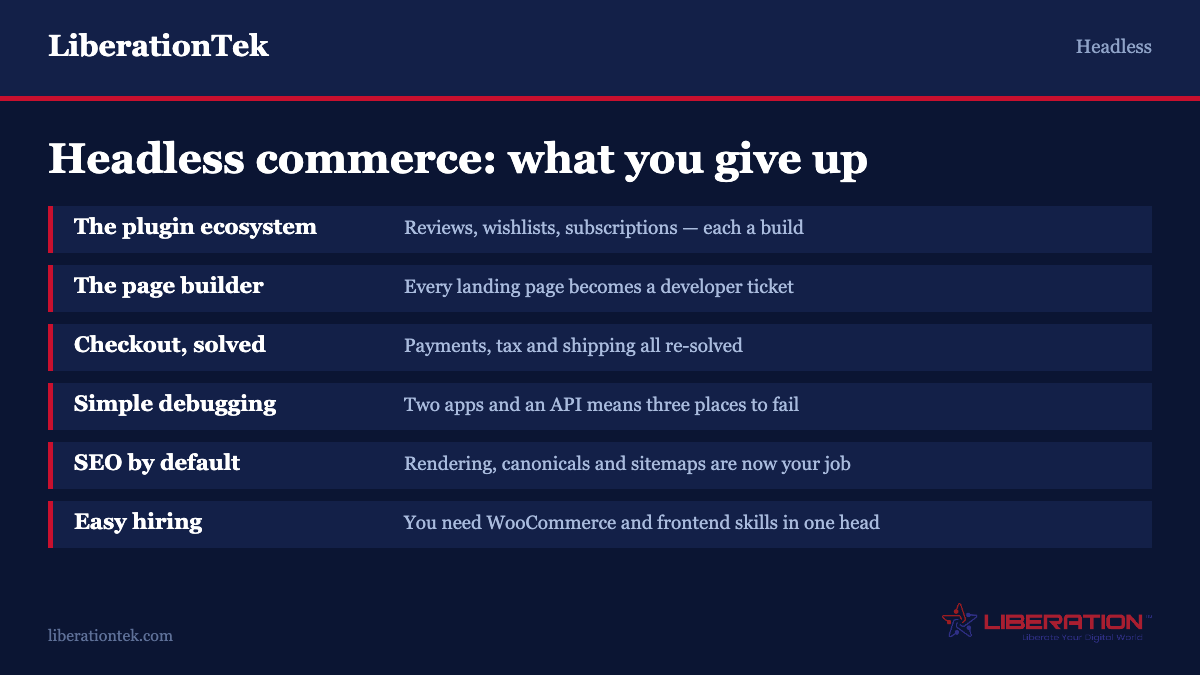
The plugin ecosystem, mostly. WooCommerce’s real advantage is that thousands of plugins exist for it, and nearly all assume they can render something on the frontend. A reviews plugin, a wishlist, a subscription box, an upsell widget, a currency switcher — on a headless storefront each either has a headless-compatible version or has to be rebuilt in your frontend. Most do not have one. Every feature you used to buy for $79 becomes a development ticket.
The page builder. Whoever currently edits your landing pages by dragging blocks around will not be doing that any more. Content changes that took five minutes now require either a headless CMS layered in as well, or a developer. This is the single change that most often causes regret, because it hits the marketing team daily and nobody priced it.
Checkout as a solved problem. WooCommerce’s checkout is battle-tested across millions of stores, with payment gateways, tax calculation, shipping rates and fraud tooling integrated. Rebuilding it headless means re-solving all of that. Many teams end up handing checkout back to WooCommerce and running headless only for browsing — a sensible compromise, and worth planning for deliberately rather than discovering.
Simple troubleshooting. One application has one place for things to go wrong. Two applications with an API between them have three, and the interesting failures live at the boundary. Debugging goes from a WordPress skill to a distributed-systems skill.
SEO that works by default. A server-rendered WordPress page is crawlable out of the box. A JavaScript storefront requires deliberate server-side rendering or static generation, correct canonical tags, working structured data and a valid sitemap — none of which come free. Headless stores can rank well. They just do not do it accidentally.
Being able to hire easily. WordPress and WooCommerce developers are plentiful and affordable. Developers strong in a modern JavaScript framework and ecommerce and WooCommerce’s API are neither. This is a permanent staffing commitment, not a one-off build.
The cost, honestly
Precise figures depend on scope and who builds it, but the shape is consistent and it is the shape people get wrong.
The build is a multiple, not an increment. A headless storefront is a custom application. Compared with configuring a quality WooCommerce theme, expect the initial build to be several times the cost — and the gap widens with every feature that would have been a plugin.
Hosting becomes two bills. WooCommerce still needs somewhere to live and the frontend needs its own hosting or platform. Modest individually, but two things to pay for and two things to keep running.
Maintenance never stops. This is the cost that gets missed. A standard WooCommerce store can be maintained by an agency on a monthly plan or, at small scale, by a competent owner. A headless store needs someone who can work on the frontend application, available on an ongoing basis, for as long as the store exists. Framework versions move, dependencies need updating, and the API contract between the two halves has to be maintained.
Every change has a developer in it. New landing page, seasonal banner, changed product layout — on standard WooCommerce these are self-service. Headless, they are tickets. Multiply by how often your marketing changes something and that is the real annual cost.
The practical test: if you cannot commit to a developer or agency relationship for the lifetime of the store, do not go headless. A headless storefront whose developer has moved on is significantly harder to rescue than an unmaintained WordPress site.
The speed argument, examined
Speed is the most cited reason for going headless and the most frequently disappointing result.
The theory is sound: a static or server-rendered JavaScript frontend on a CDN can be extremely fast. The practice is that a well-configured WooCommerce store with full-page caching, an object cache, optimised images and a CDN is also extremely fast for anonymous visitors — which is most of your traffic and all of your search crawling.
Meanwhile headless introduces its own performance risks. A large JavaScript bundle can produce a page that paints quickly but does not respond to taps for another second, which is exactly what Interaction to Next Paint measures and exactly what a customer experiences as a broken button. Plenty of headless storefronts score worse on real-world Core Web Vitals than the WooCommerce sites they replaced, because the team optimised for the metric that is easy to win.
If speed is the goal, spend on hosting, caching, image handling and removing plugins first. That is a fraction of the cost and it is reversible. Our guide to the ecommerce metrics that matter covers measuring speed where it counts — on the product, cart and checkout templates, using field data rather than a lab score.
A decision framework
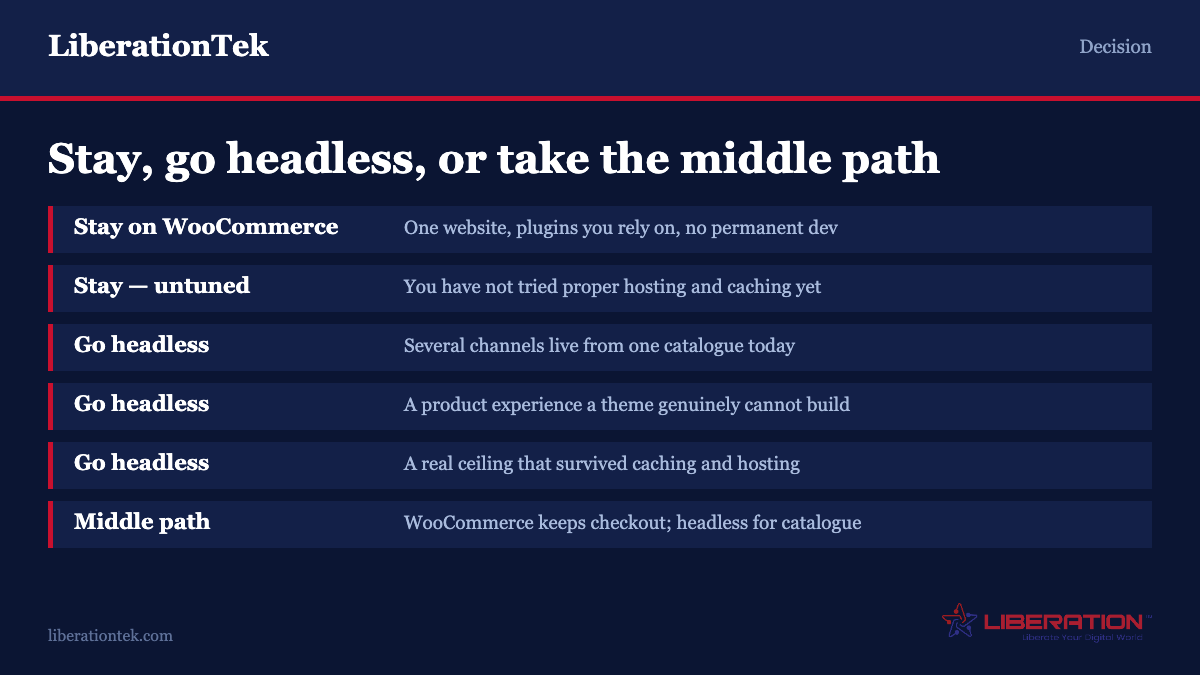
Stay on standard WooCommerce if: you sell through one website; your catalogue is manageable in size; your team edits pages themselves; you rely on plugins for reviews, subscriptions, bookings or similar; you do not have a permanent developer; or you have not yet tried proper hosting and caching.
Consider headless if: you are actively serving several channels from one catalogue; you have a product experience a theme genuinely cannot deliver; you have exhausted caching and hosting on a real performance problem; you have an in-house team or long-term agency; and your content team is comfortable working in a headless CMS.
Consider the middle path if you want most of the benefit and little of the risk: keep WooCommerce rendering checkout and account pages, and go headless only for the catalogue and content. You keep the hardest part solved, you get frontend flexibility where it is visible, and you can reverse it.
The question to sit with is not “is headless better?” It is “what specifically can I not do today, and is headless commerce the cheapest way to be able to do it?” If you cannot name the thing, you are buying an architecture to solve a feeling.
If you are staying, get the basics right
Most stores that consider headless would get more from a week of tuning than from a six-month rebuild.
Host it properly. WooCommerce is database-heavy and does poorly on cheap shared hosting with aggressive resource limits. Adequate PHP workers, a real object cache and a database not shared with four hundred other sites matter more than anything in your theme.
Cache aggressively, and correctly. Full-page caching for anonymous visitors, object caching for everything else, and exclude cart, checkout and account pages from the page cache. Getting those exclusions wrong causes the worst class of ecommerce bug: one customer seeing another’s cart.
Audit your plugins. The slowest WooCommerce stores are almost always carrying fifty plugins, several loading scripts on every page for a feature used on one. This is usually where the seconds are. Our notes on vetting a WordPress plugin cover how to assess the cost before you install.
Fix images. Correct dimensions, modern formats, lazy loading below the fold. Unoptimised product photography is the most common single cause of a slow catalogue page.
Measure where it counts. Core Web Vitals from real visitors, on product, cart and checkout, on mobile. Not a lab score for your homepage.
If your store currently lives somewhere that makes any of this impossible, we will move it for free and set the caching up properly on the way in.
If you do go, go in phases
The headless commerce projects that fail tend to fail the same way: everything is rebuilt at once, launch day replaces a working store with an unfamiliar one, and the team spends three months recovering functionality nobody had catalogued.
Inventory what the current store actually does first. Not what it looks like — what it does. Every plugin, every automated email, every tax rule, every shipping condition, every integration with accounting or fulfilment. This list is always longer than expected, and it is the real scope of the project. A store that has been running for four years has accumulated behaviour nobody remembers configuring.
Start with the least risky surface. Blog and content pages, then category and product pages, then cart, then checkout last if at all. Each stage can go live independently, each is reversible, and each teaches you something about the API before you bet the checkout on it.
Keep the old storefront reachable during the transition. Being able to route a percentage of traffic to the new frontend, or fall back within minutes, converts a launch into a rollout. It is worth the routing complexity.
Plan the URL structure before you write a line of frontend code. If product and category URLs change, every one needs a 301 to its new location, and getting this wrong loses rankings that took years to build. Map the old structure to the new one in a spreadsheet, keep the paths identical wherever you can, and treat any URL change as a decision requiring a reason.
Decide who owns content editing on day one. This is the question that derails headless projects six weeks after launch, when marketing discovers they cannot change the homepage hero. Either layer in a headless CMS with a real editing interface, or accept and staff for the fact that every content change is a deployment. Both are workable. Discovering the question late is not.
Budget for the second year. Framework major versions, dependency updates, API changes on the WooCommerce side. A headless storefront is software you now own, and software has running costs. If the business case only works because year two was assumed to be free, the business case does not work.
Frequently asked questions
What is headless commerce in simple terms?
It means separating the part of your store customers see from the part that handles products, carts and orders. In a standard WooCommerce store both live in one WordPress application. Headless keeps WooCommerce doing the commerce but stops it rendering pages — a separate storefront application requests data through WooCommerce’s REST or GraphQL API and draws the pages itself. That boundary gives you flexibility and is also where the added cost and complexity come from.
Is headless WooCommerce faster than standard WooCommerce?
Not automatically, and often not at all. A well-configured WooCommerce store with full-page caching, object caching, optimised images and a CDN is very fast for anonymous visitors, which is most traffic and all search crawling. Headless storefronts can ship large JavaScript bundles that paint quickly but stay unresponsive to taps, which shows up in Interaction to Next Paint and feels like a broken button. Tune hosting and caching before rebuilding the architecture.
How much does headless commerce cost compared to WooCommerce?
The build is a multiple rather than an increment, because a headless storefront is a custom application rather than a configured theme, and every feature that would have been a plugin becomes development work. Hosting becomes two bills. The cost most often missed is permanent: a headless store needs an available developer for its whole life, and routine changes like a new landing page become tickets rather than self-service edits.
Can you still use WooCommerce plugins with a headless store?
Mostly not. WooCommerce’s biggest advantage is its plugin ecosystem, and nearly all of those plugins assume they can render something on the frontend. Reviews, wishlists, subscriptions, upsells and currency switchers each need a headless-compatible version, and most do not have one, so they get rebuilt in your frontend. Any plugin that is purely backend — shipping rate calculation, tax, inventory sync — generally continues to work fine.
When should a small store go headless?
When it is actively selling through more than one channel from a single catalogue, when the product experience genuinely cannot be built in a theme, or when a real performance ceiling has survived proper hosting and caching. All three assume a permanent developer relationship. For a store under a few hundred orders a month selling through one website, standard WooCommerce on good hosting is faster to build, cheaper to run and usually faster to load.
Is there a middle option between headless and standard WooCommerce?
Yes, and it is underused. Keep WooCommerce rendering checkout, cart and account pages — the parts hardest to rebuild and riskiest to get wrong — and go headless only for the catalogue and content pages where design flexibility is visible to customers. You get most of the frontend benefit, you keep payments, tax and shipping as a solved problem, and the decision is reversible.
Sources
Two references behind the technical claims above — the API a headless WooCommerce storefront actually talks to, and the metric that catches heavy JavaScript bundles.
- WooCommerce Store API — WooCommerce developer documentation. The customer-facing API a headless storefront uses.
- Interaction to Next Paint — web.dev. What INP measures and why a fast-painting page can still feel broken.