
Most businesses do not stay on hosting that is slow or overcrowded because they like it. They stay because moving feels risky. What if the site breaks, email stops arriving or customers see an error page? A free VPS migration handled by an experienced team takes most of that risk off your plate. This guide walks through exactly what a managed move looks like, step by step, and makes clear which parts Liberation handles and which parts need a few minutes of your time.

What a Free VPS Migration Includes
Every Liberation plan of fully managed VPS hosting includes free website migration for 1 to 30 sites, depending on the plan. For cPanel-to-cPanel moves, accounts can usually be copied with their files, databases and email intact using cPanel’s built-in tools. If your site is on a hosted site builder rather than a traditional host, Liberation can transfer content from most site-builder platforms; see our website transfer page for details.
The move lands on a server with cPanel and WHM already included, NVMe storage, daily automated backups with 7-day retention, and 24/7 U.S.-based human support if questions come up after launch.
Website Migration to VPS: The Step-by-Step Timeline
Every website migration to VPS follows the same basic sequence. The exact timing depends on how many sites you have, how large they are and how quickly DNS changes can be made, but the order rarely changes.
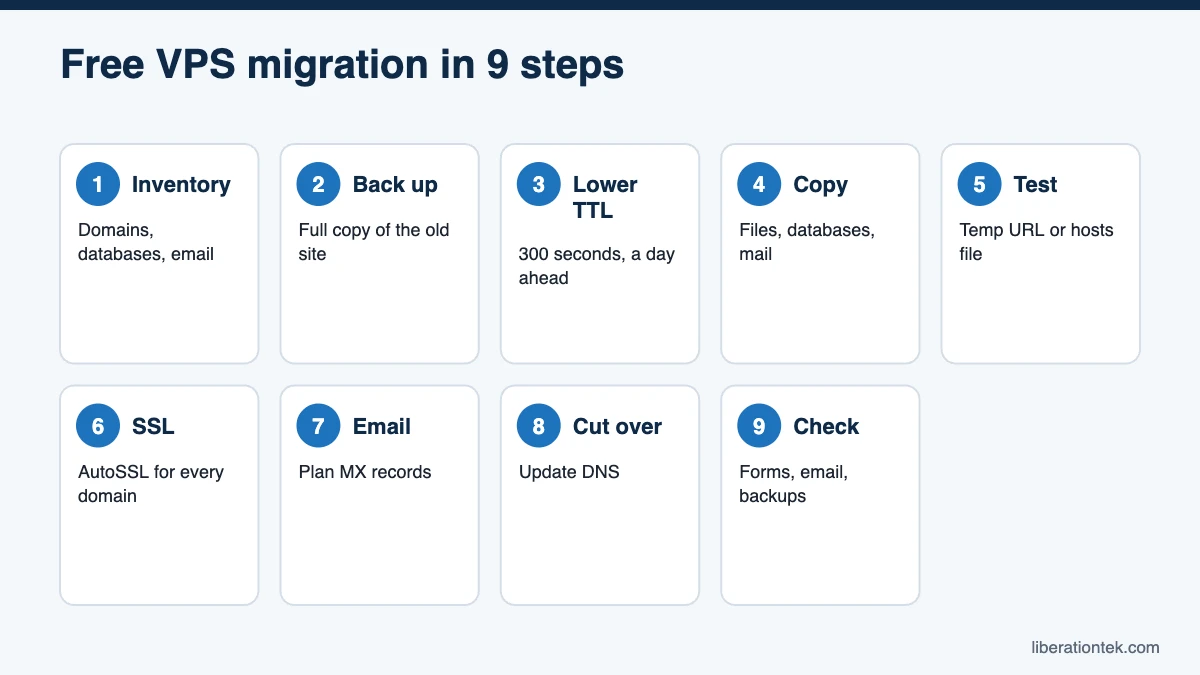
Step 1: Inventory everything
Before anything is copied, list what needs to move. A good inventory prevents the classic “we forgot about that subdomain” surprise:
- Every domain, subdomain and add-on domain
- Databases, including any not tied to WordPress
- Email accounts, forwarders and mailing lists
- Scheduled tasks (cron jobs), custom PHP settings and SSL certificates
- Third-party connections such as payment gateways, CRMs, form services and analytics
- Where DNS is managed (your registrar, your current host or another DNS provider)
Step 2: Back up the current site
Take a full backup on the old host before any work begins and store a copy somewhere other than that host. This is your safety net if anything unexpected happens.
Step 3: Lower the DNS TTL
TTL, or time to live, tells DNS resolvers how long to cache a record before asking for a fresh copy, as Cloudflare’s TTL explainer describes. If your records use a 24-hour TTL (86,400 seconds), some visitors could keep reaching the old server for up to a day after the switch. Lowering the TTL to 300 seconds (5 minutes) at least 24 hours before cutover shrinks that window dramatically.
Step 4: Copy files, databases and email
The migration team copies site files, databases and mailboxes to the new VPS. For cPanel sources, WHM’s Transfer Tool can copy one or more cPanel accounts, packages and configurations from a source server to a destination server, which keeps settings consistent.
Step 5: Test before anyone sees it
The new copy is tested while the old site stays live. You can preview it through a temporary URL or by editing your computer’s hosts file so that only your machine loads the site from the new server. Click through key pages, submit forms, log in to the admin area and, for stores, run a test checkout.
Step 6: Prepare SSL
Visitors expect the padlock. cPanel’s AutoSSL can issue certificates for your domains once they resolve to the new server, and any purchased certificates can be reinstalled. Confirm that every domain and subdomain loads over HTTPS without warnings after cutover.
Step 7: Plan for email
Email is where most migrations stumble, so treat it deliberately. If your mailboxes live on your current host, they move along with the site, and your MX records point to the new server at cutover. If email is hosted elsewhere, leave your MX records untouched. It is also a natural time to consider private business email; Liberation Email is a Google and Microsoft alternative built for teams.
Step 8: Cut over
Once testing is complete, DNS records are updated to point at the new VPS. For stores or membership sites, a short content freeze followed by a final database sync ensures that no orders, comments or sign-ups made during the move are lost.
Step 9: Post-move checks
After DNS propagates, run through a final checklist:
- Load the site from a phone on cellular data, not just your office network.
- Send and receive test emails from each important mailbox.
- Submit contact and donation forms and confirm notifications arrive.
- Confirm scheduled tasks run and that the first daily backup completes.
- Watch error logs and uptime for a few days before canceling the old host.
Who Does What in a cPanel Migration
A cPanel migration goes fastest when responsibilities are clear from day one. Here is how a typical managed move divides the work:
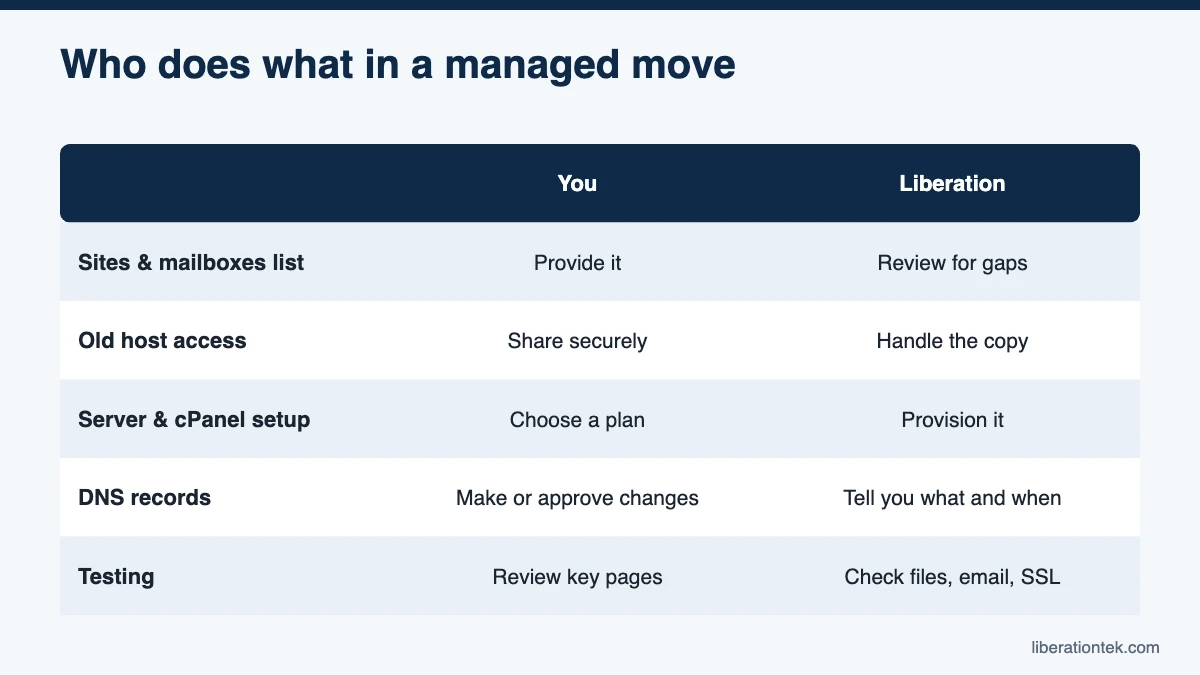
| Task | You | Liberation |
|---|---|---|
| List sites, domains and mailboxes | Provide the list | Review it and flag anything missing |
| Access to the old host | Share login or backup files securely | Handle the technical copy |
| VPS and cPanel setup | Choose a plan | Provision the server and cPanel accounts |
| DNS TTL and records | Grant registrar access or make changes with our guidance | Tell you exactly which records to change and when |
| Testing | Review key pages, forms and checkout | Check files, databases, email and SSL |
| Cutover and follow-up | Approve the go-live time | Coordinate cutover and help with post-move issues 24/7 |
Exact scope varies with your plan and where your site is coming from, so confirm the details with our team before you schedule a move.
Common Migration Mistakes to Avoid
- Canceling the old host too early. Wait until the new site has been live and verified for several days.
- Forgetting DNS TTL. A long TTL turns a clean cutover into a day of split traffic.
- Ignoring email. Mismatched MX records are the most common post-move problem.
- Skipping a content freeze on stores and busy sites, which can leave orders behind on the old server.
- Not testing forms. Contact and donation forms often rely on mail settings that change with the server.
Why Some Hosts Charge for Website Migration
A careful migration takes real technical time, so charging for it is not unreasonable on its own. But a fee also adds friction at the exact moment you are deciding whether switching is worth the effort. Liberation includes free VPS migration with every plan to remove that barrier.
What We Need From You to Start a Free VPS Migration
- Access to your current hosting account, or a full backup your current host can provide.
- Access to your domain registrar or DNS provider for the cutover step.
- Any special details about your site: custom settings, scheduled tasks, or anything unusual about how it is set up.
From there, our team handles the technical work and schedules the DNS cutover with you to keep downtime to a minimum.
Frequently Asked Questions
Is the VPS migration really free?
Yes. Every Liberation VPS plan includes free website migration, covering 1 to 30 sites depending on the plan you choose. Our team can also transfer content from most site-builder platforms. Ask us about your specific setup before you start so we can confirm what is covered.
Will my website go down during the migration?
A well-planned move should involve little or no visible downtime. Your old site stays live while we copy and test the new one, and lowering your DNS TTL ahead of time keeps the switchover window short. Stores and membership sites may need a brief content freeze so that no orders or sign-ups are missed during the final sync.
What happens to my email when I move to a VPS?
If your email is hosted with your current web host, mailboxes need to move too, and your MX records need to point to the new server at cutover. If your email runs on a separate service, you can leave your MX records alone. Either way, check that email sends and receives correctly right after the switch.
When should I cancel my old hosting?
Not until the new site has been live and verified for several days. Keep the old account active until DNS has fully propagated, forms and email work, and you have downloaded a final backup from the old host for your records.
What if my current host makes it hard to get access?
It happens more often than you might think. Our team has experience working with slow or uncooperative previous hosts, and we will walk you through exactly what we need, such as a full cPanel backup or temporary login details, so the move stays on schedule.
Does free migration cover very large or complex sites?
Free migration is included with every Liberation VPS plan, covering 1 to 30 sites depending on the plan. For unusually large or complex sites, our team will review the details with you first so there are no surprises about scope or timing.
Conclusion: Move Once, Move Right
A free VPS migration should feel boring, and that is the point. With a clear inventory, a fresh backup, a lowered TTL, careful testing and a planned cutover, your visitors never notice the switch; they just notice a faster site. Liberation handles the heavy lifting on servers we own and operate in the United States, backed by a 99.9% uptime SLA and a 30-day money-back guarantee. Choose your managed VPS plan or contact our team to schedule your free VPS migration.
Related reading
- NVMe VPS Hosting: What Faster Storage Means for Page Speed
- How to Host WooCommerce on a VPS Without Slowdowns
- cPanel License Prices in 2026 (and Why Ours Are Included)
- How to Choose a Web Host — The decision framework, without the spec sheet.
- WordPress Hosting — Managed WordPress priced on visitors.