
If you are asking why do my emails go to spam, the answer is almost always authentication, not wording. If your domain has no SPF record, no DKIM signature and no DMARC policy, receiving servers cannot confirm the mail really came from you, and filter accordingly. Fix those three first. Subject lines and trigger words matter far less than most advice suggests.
The instinct when mail starts landing in spam is to rewrite the message: soften the subject line, cut the exclamation marks, avoid the word “free”. That is almost always the wrong place to start, because filters make most of their decision before reading a word of it.
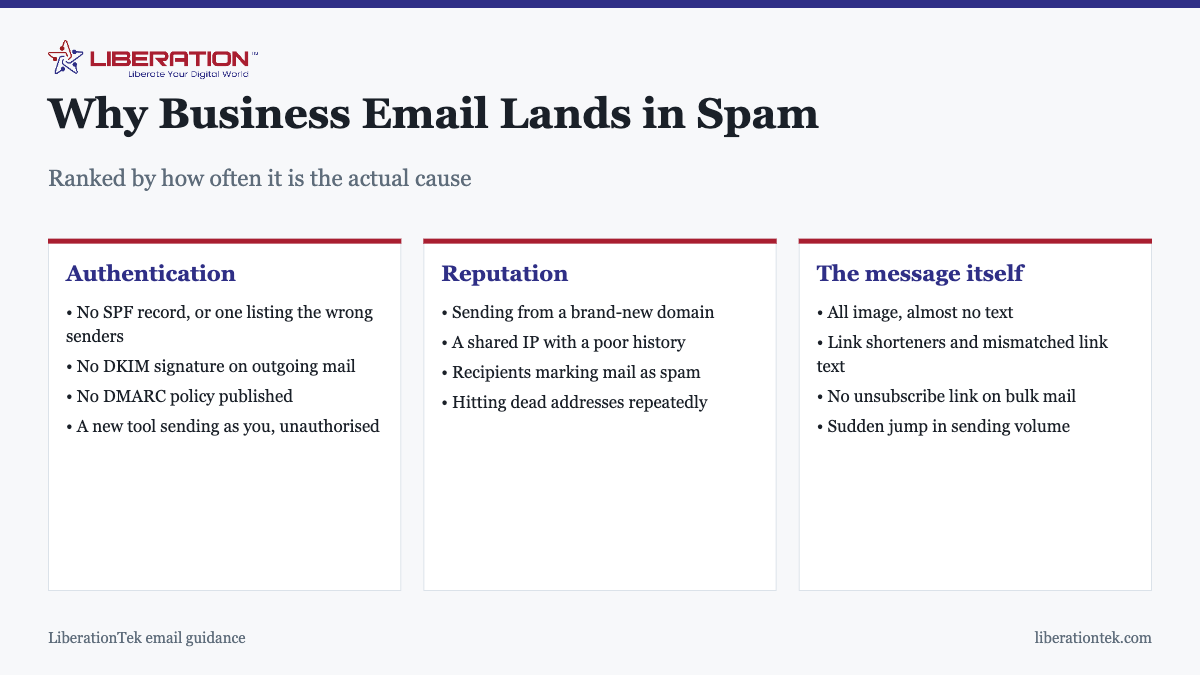
The three checks that happen before your content is read
When a receiving server accepts a message, it asks three questions about the sender. They are answered by DNS records you publish for your domain, and they are the first thing to verify when mail is being filtered.
| Record | Question it answers | If missing |
|---|---|---|
| SPF | Is this server allowed to send as this domain? | Anyone can claim to be you |
| DKIM | Was this message altered in transit, and is the signature valid? | No proof of integrity |
| DMARC | What should happen when SPF or DKIM fails? | Each provider guesses differently |
All three are DNS records. None requires changing how you write. Publishing correct versions of all three resolves the majority of business deliverability problems, and it is a one-off task.
The mistake almost everyone makes with SPF
An SPF record has to list every service that sends mail using your domain, not just your mail provider. That typically includes your website, if it sends contact form notifications or order confirmations, plus your CRM, invoicing software and any marketing platform.
Adding a new tool without updating SPF is the single most common cause of mail that suddenly starts being filtered when nothing obvious has changed. It is also one of the easiest to overlook, because the tool appears to be working fine from your side.
Reputation, which builds slowly and falls quickly
Beyond authentication, providers track how recipients respond to your mail. The main factors:
- Domain age and sending history. A brand-new domain has no reputation and is treated cautiously. Ramp volume up over weeks rather than starting with a large send.
- Complaint rate. Recipients clicking “mark as spam” is the strongest negative signal available. A small number does real damage.
- Bounce rate. Repeatedly sending to addresses that no longer exist signals a poorly maintained list.
- Engagement. Mail that is opened and replied to helps. Mail that is consistently ignored gradually stops reaching the inbox.
- Shared IP history. On shared infrastructure you inherit some of the neighborhood’s reputation, which is a reason to use a provider that polices its own network.
What actually matters in the message
Content is not irrelevant, it is just secondary. The things that genuinely affect placement:
- Image-only emails. A single large image with no meaningful text is a classic spam pattern. Keep real text in the message.
- Link shorteners, which hide the destination and are heavily abused.
- Mismatched links, where the visible text says one address and the link goes somewhere else.
- No unsubscribe option on bulk mail. Required in most jurisdictions and expected by filters.
- Sending from noreply@, which discourages replies, and replies are a positive engagement signal.
- Sudden volume spikes. Going from twenty messages a day to five thousand looks exactly like a compromised account.
What does not matter much any more is the old list of trigger words. Filters weigh authentication and reputation far more heavily, and no amount of careful phrasing will rescue mail from a domain that fails authentication.
The special case of transactional mail
Order confirmations, password resets, booking receipts and invoices behave differently from both personal and marketing mail, and they fail in a way that hurts more, because the recipient is actively waiting for the message and will usually blame you rather than their spam folder.
These are almost always sent by a system rather than by a person: your website, your invoicing tool, your booking platform. That means the sending server is frequently one nobody thought to authorize in SPF, and the From address is often a noreply@ nobody monitors, so bounces and complaints go unseen.
Three things worth doing specifically for transactional mail:
- Keep it on a separate sending path from marketing where your platform allows it, so a poorly received campaign cannot damage delivery of password resets.
- Use a monitored From address, or at minimum set a Reply-To that reaches a real inbox. Customers reply to these messages whether or not you intended them to.
- Test each one after any change to your website or DNS. Transactional mail breaks silently, and the first report usually comes from a customer who did not receive something important.
If customers occasionally say they never received a confirmation, that is not an isolated glitch. It is a deliverability problem presenting itself politely, and it is worth running the diagnostic sequence above before assuming it was a one-off.
A diagnostic order that works
- Send test messages to accounts at several different providers and note where each lands. The pattern tells you a great deal.
- Look at the message headers on a received test and find the SPF, DKIM and DMARC results. Each will say pass or fail. Any fail is your answer.
- List every system that sends as your domain and confirm each is authorized in SPF.
- Publish a DMARC policy with a reporting address, start in monitoring mode, and read the reports. They show exactly which senders are failing and from where.
- Check your domain against the common blocklists if authentication is clean but mail is still filtered.
- Only then look at content and volume.
Working in that order, most businesses find the problem in the first two steps.
Where your provider fits
A good email host makes this considerably easier: SPF and DKIM configured correctly from the start, sensible DNS defaults, and a network where abuse is dealt with rather than tolerated. LiberationTek Email starts at $1.95 per user per month on standard IMAP and SMTP, with no long-term contract and full export whenever you want.
If you are moving providers, deliverability is a good reason to plan the DNS side carefully rather than only the mailboxes. The sequencing is covered in what email migration means.
Why Emails Go to Spam Even When Everything Looks Fine
It is frustrating when emails go to spam and your records all look correct. Passing authentication gets you through the door, but it does not guarantee the inbox. Mailbox providers also watch how recipients treat your mail over time.

If your emails go to spam only at one provider, the cause is usually reputation there rather than a broken record. If your emails go to spam everywhere, start with authentication.
How to Stop Your Emails Going to Spam: A Simple Routine
Treat the problem as a short routine, not a one-off fix. Work through it in order and change one thing at a time so you know what helped.
- Send a test message to an address you control at a few major providers.
- Open the original message and read the authentication results in the headers.
- Fix any SPF, DKIM or DMARC failure in your DNS records.
- Send again and confirm the results now pass.
- Watch replies and complaints for two weeks before changing anything else.

When emails go to spam after you switch providers or add a new sending tool, the new service usually needs its own entry in your records. Our guide to SPF, DKIM and DMARC explained walks through each record. If you are moving mailboxes, read what email migration involves first, and see how Liberation Email handles setup for you.
The Internet Engineering Task Force publishes the standard behind sender checks in RFC 7208. It is technical, but it explains exactly what a receiving server looks for when emails go to spam or pass.
Habits That Keep Emails From Going to Spam
- Send from one consistent address and name.
- Remove addresses that bounce.
- Include a clear unsubscribe link on bulk mail.
- Increase sending volume gradually.
- Ask important contacts to reply or mark your mail as not spam.
Most of the time emails go to spam for a reason you can find and fix. Check the records first, then reputation, then the message.
Common Reasons Emails Go to Spam for Small Businesses
Small teams often find that emails go to spam after a change they did not think mattered. A new website form, a newsletter tool or a billing system can all start sending as your domain.
- Emails go to spam when a new tool sends as your domain without being listed in SPF.
- Emails go to spam when a contact form sends from a free mailbox address.
- Emails go to spam when a mailing list has old, unengaged addresses.
- Emails go to spam when your sending volume jumps overnight.
Ask who sends mail on your behalf, then check each sender against your DNS. If emails go to spam for only one sender, that sender is the place to start. This is general guidance, and results vary by provider.
Frequently asked questions
Why do my emails go to spam?
The most common cause is missing or incorrect email authentication: no SPF record, no DKIM signature, or no DMARC policy. Without these, receiving servers cannot verify that mail claiming to come from your domain actually did, and treat it with suspicion. Fix authentication first, because it explains more spam placement than message content does.
How do I stop my emails going to spam?
Publish correct SPF, DKIM and DMARC records for your domain, and make sure every service that sends on your behalf is authorized in them. Then send from a real named address rather than noreply@, keep a reasonable ratio of text to images, include an unsubscribe link on bulk mail, and remove addresses that bounce.
Why do my emails go to spam only for some recipients?
Different providers weight signals differently, and each recipient organization has its own filtering rules and its own history with your domain. Microsoft 365 and Gmail in particular apply quite different thresholds. Consistent delivery to one provider and spam placement at another usually points at authentication gaps rather than content.
Does the word “free” really send emails to spam?
Not on its own. Modern filtering weighs sender authentication and reputation far more heavily than individual words, and the trigger-word lists circulating online are largely obsolete. Content still matters at the margins, but no amount of careful wording will rescue mail from a domain that fails authentication checks.
Can a new domain cause deliverability problems?
Yes. A domain with no sending history has no reputation, and filters treat unknown senders cautiously. If you have just moved or registered a domain, increase volume gradually over a few weeks rather than sending a large campaign immediately, and make sure authentication is correct before the first send.
Does my website contact form count as email I send?
Yes, and it is a frequently missed one. If your website sends notifications or autoresponders using your domain in the From address, that server must be authorized in your SPF record. An unauthorised web host sending as your domain is one of the most common reasons a business suddenly finds its mail filtered.
How do I check if my emails are being marked as spam?
Send a test to accounts at a few different providers and see where it lands. Check the message headers for the SPF, DKIM and DMARC results, which appear as pass or fail. If you have published a DMARC policy with a reporting address, the reports will tell you which senders are failing authentication and from where.