
A website migration means copying a site’s files and database to a new host, testing it there, then pointing your domain at the new server. For a normal small-business site the work takes a few hours and the switchover itself is near-instant. What makes migrations go wrong is almost never the copy — it is DNS, email and SSL, in that order.
This guide covers what actually breaks, the order to do things in, and when it is worth paying someone else to do it.
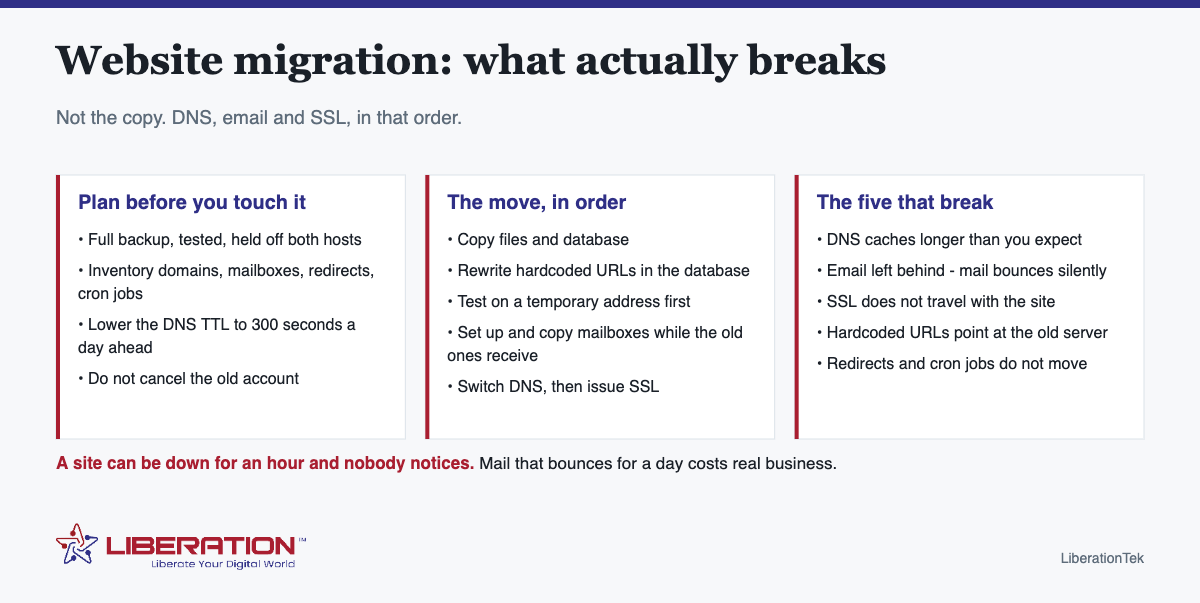
A website migration is mechanical work with one genuinely dangerous step, and knowing which one it is changes how you plan the day.
The five things that actually break
- DNS takes longer than you think. Records cache for as long as their TTL says, so some visitors keep hitting the old server for hours after you switch. Lower the TTL before the move, not during it.
- Email gets left behind. This is the big one. If your mailboxes are on the old host and you change the nameservers, mail stops arriving — and mail sent in that window is usually gone rather than delayed. Email has to be planned as its own migration, not as a side effect of moving the site.
- SSL does not come with you. Certificates are issued to a server, not to a domain in the abstract. The new host has to issue a new one, and until it does, visitors see a security warning.
- Hardcoded URLs. WordPress databases are full of absolute links and file paths written by page builders. Copy the database without rewriting them and half your images point at the old domain.
- Redirects are forgotten. Any redirect rules living in the old host’s control panel or
.htaccessdo not travel automatically. Neither do cron jobs.
Before you start a website migration
- Take a full backup you have actually tested — files and database, downloaded somewhere off both hosts.
- Write down what is on the old account: every domain and subdomain, every mailbox, forwarders, redirects, scheduled tasks, SSL certificates, and anything sending mail through the server (contact forms, order confirmations).
- Collect the logins you will need — the old hosting control panel, and the domain registrar. The registrar matters more than the host, because that is where the switch actually happens.
- Lower your DNS TTL to 300 seconds at least a day ahead. This single step turns a day-long cutover into a five-minute one.
- Do not cancel anything. The old account stays live and paid for at least two weeks after the move.
The move, in order
- Copy files and database to the new host.
- Rewrite the URLs in the database so nothing still points at the old server.
- Test on a temporary address before any DNS changes. Click through the real pages: checkout, forms, logins, anything behind a password.
- Set up mailboxes on the new host and copy the mail across, while the old ones are still receiving.
- Switch DNS — nameservers, or the A record and MX records if you are moving in stages.
- Issue the SSL certificate on the new host as soon as DNS resolves.
- Verify: site loads over HTTPS, a test order or form submission arrives, email sends and receives both ways.
- Wait two weeks, then cancel the old account.
Email is the part people regret
Most migration horror stories are email stories. A site can be down for an hour and nobody notices; mail that silently bounces for a day costs real business, and the sender usually assumes you ignored them.
Two rules make it survivable. Keep the old mailboxes alive and receiving until the new ones are confirmed working, and move the mail itself — the archive, not just the addresses — before you change the MX records. If your mail is currently bundled with your old hosting account, treat moving the email as a separate project with its own checklist.
Doing it yourself, or having it done
| Doing it yourself | Managed migration | |
|---|---|---|
| Sensible when | One small site, no e-commerce, mail already elsewhere | A store, a members area, multiple domains, or mail on the old host |
| Real time cost | Half a day if nothing surprises you | A form and a wait |
| Where it goes wrong | Email and SSL, usually discovered by a customer | Handing over credentials, so use a provider you can call |
What a managed migration costs here
Straight answer, because the industry is vague about this:
- Free with a VPS plan — managed migration of one site is included as standard on VPS hosting, not sold back to you as an add-on later.
- From $250 otherwise. Migrations are quoted after the team reviews the site, and start at $250 unless migration is already included with your plan.
- An active hosting account is required first. We cannot migrate a site to an account that does not exist yet.
The Migration Team moves sites from GoDaddy, Squarespace, Wix and more than 25 other platforms. The process is simple: send the site details and logins through the migration form, we review and quote, the team migrates and tests, then your domain is pointed at the new server. There is usually no downtime; where there is any, it is minimal and scheduled off-peak.
We also recommend moving the domain registration across at the same time. It is not required, but it removes the step where you have to go back to an old registrar for authorization codes at the worst moment.

Why people move to us specifically
Two reasons come up repeatedly. The first is ownership: the hardware is ours, operated in the United States, and nothing in your account is scanned for advertising or sold on. The second is that there is a person to call — migrations are where that matters most, because something unexpected always turns up in an old hosting account.
If you are moving because a host removed your site rather than because you outgrew them, say so when you submit the form. That changes the order we do things in, and speed matters more than tidiness in that situation.
What to check a week after the move
Most migration problems surface in week two, once the unusual things have had a chance to happen. Run through these seven days in:
- Every form on the site – submit each one yourself and confirm the notification arrives.
- Scheduled tasks. Backups, imports and any cron job set up on the old host. These do not travel, and nobody notices a missing backup until they need it.
- The SSL certificate – confirm it renewed or is set to renew automatically.
- Search Console for a spike in crawl errors, which usually means a redirect or a missing file.
- Anything with a login – members areas, client portals, staff tools.
- Analytics, to confirm the tracking code survived the move and traffic looks normal.
- Email, once more, in both directions, including from a phone.
If all seven pass, the move is finished and the old account can be canceled on schedule.
Planning a Website Migration You Can Finish in a Weekend
A small website migration does not need to be dramatic. Most sites are a handful of files, a database and some DNS records. What makes a website migration stressful is doing it in a hurry, so give yourself a quiet window and a clear order of work.

What to write down first
- Where the domain is registered and who has the login.
- Where DNS is managed today, and a copy of every record.
- Which email addresses run on the same domain.
- Any plugins, forms or payment tools that talk to outside services.
- A recent full backup, stored away from the old host.
This list is the backbone of a safe website migration. If you lose track of a record, the site may load while email quietly stops, which is the problem people regret most. Our website migration checklist has the full step-by-step version.
Keeping Search Visibility Through a Website Migration
If your page addresses stay the same, search engines usually follow the site to its new server without trouble. If addresses change, each old page needs a permanent redirect to the matching new page. Google documents the process in its guide to site moves with URL changes, and it is worth a read before any website migration that changes URLs.
After the switch, spend a few minutes each day for a week:
- Open your most visited pages and confirm they load correctly over HTTPS.
- Send a test message from your contact form and make sure it arrives.
- Check that old links still land on the right pages.
- Watch Search Console for crawl errors and fix them quickly.
Lower the DNS time-to-live value a day before cutover so changes spread faster, and keep the old hosting account until you are sure everything works. We cannot promise zero risk on any website migration, but a careful order of work keeps visitors on a working site the whole way through.
LiberationTek offers free migration from another provider, with servers in the United States. If you would rather not do it alone, the transfer your website page explains how we handle a website migration for you, and our guide on migrating without losing rankings covers the search side in more detail.
Frequently asked questions
How long does a website migration take?
The copy and test usually take a few hours for a small business site. The DNS switch itself is near-instant if you lowered your TTL beforehand, though some networks can keep using cached records for up to 24 hours. Plan for a day end to end, and keep the old host running for two weeks.
Will my website go down during migration?
There is usually no downtime, because the site is built and tested on the new server before the domain is pointed at it. Where any interruption is unavoidable, it is minimal and scheduled outside business hours.
Does website migration affect SEO?
A migration between hosts, keeping the same domain and the same URLs, should not affect rankings. Problems come from changing URLs without redirects, losing pages, or leaving the site slower than it was. Keep the URL structure identical and there is nothing to recover from.
What happens to my email when I move hosts?
Nothing automatically — and that is the danger. If your mailboxes live on the old hosting account, changing nameservers stops mail reaching them. Set up the new mailboxes, copy the existing mail across, and only then change the MX records, keeping the old mailboxes receiving until the new ones are confirmed.
How much does it cost to have a website migrated?
Managed migration of one site is included free with LiberationTek VPS plans. On other plans, migrations are quoted after a review of the site and start at $250. An active hosting account is required before a migration can begin.
Can you move a site from GoDaddy, Wix or Squarespace?
Yes. The Migration Team works with GoDaddy, Squarespace, Wix and more than 25 other platforms. Send the site details through the migration form and you will get a quote after review.
Should I transfer my domain as well as my website?
It is not required, but it makes the migration simpler and avoids having to obtain authorization codes from an old registrar mid-move. Many people move the site first and the domain a few weeks later, once everything is confirmed working.