
Website migration rankings are safe when you control three things: the URLs, the downtime and the indexing settings. This guide shows how to keep them that way.
Changing web hosts does not cost you rankings. Google ranks pages, not servers. Rankings drop during a migration for three specific reasons: URLs changed without redirects, the site was down for an extended period, or a noindex tag came across from staging. Avoid those three and a host move is invisible in search.
A website migration without losing rankings is mostly a matter of avoiding those three mistakes, yet the fear of losing search traffic keeps a lot of businesses on hosting they have outgrown. It is worth separating the real risks from the imagined ones, because the imagined ones cause more harm: people stay on bad hosting for years, or they rush a move without the one precaution that actually matters.
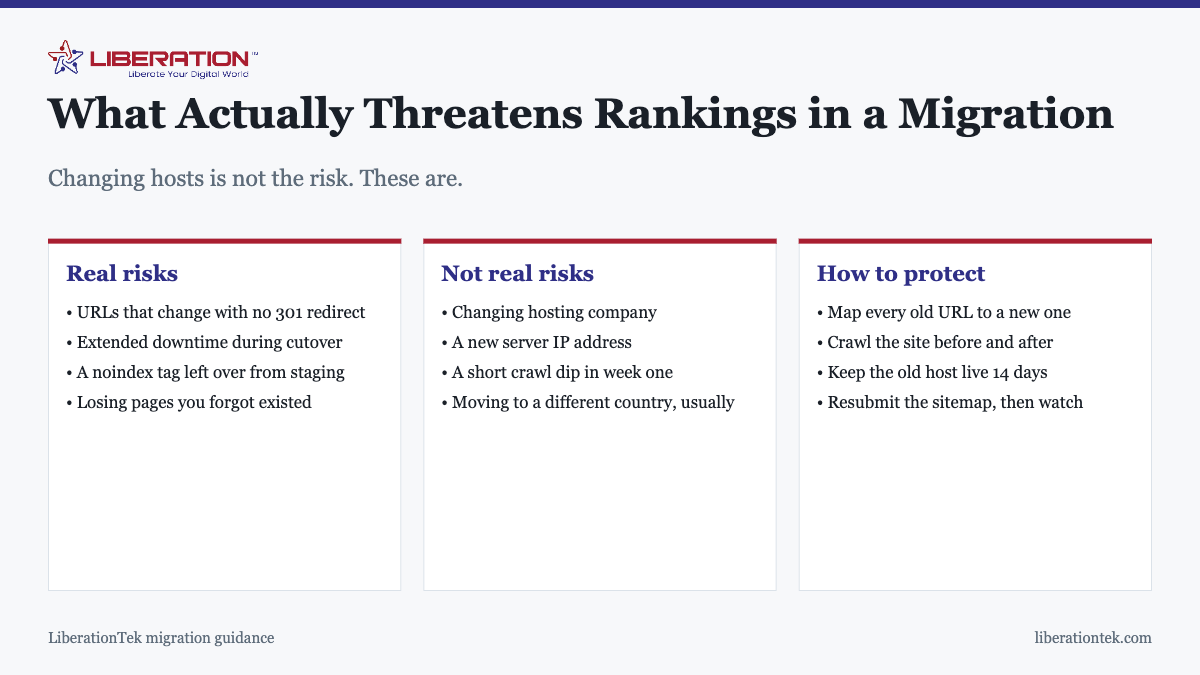
What puts website migration rankings at risk
Changed URLs with no redirects
This is the cause of most migration ranking losses, by a wide margin. Every ranking you have is attached to a specific URL. If that URL stops resolving, the ranking has nowhere to go. A 301 redirect passes the signals to the new address; without one, you start over on that page.
This most often happens when a migration is combined with a redesign or a platform change, and the new system uses a different URL pattern. It rarely happens on a straight host-to-host move, which is one reason a straight host-to-host move is the safe kind.
Extended downtime
A short outage is harmless. Google retries, and brief unavailability is treated as transient. Sustained downtime over days is different and can cause pages to drop from the index. This is the reason the old host stays online through the DNS change instead of being canceled at cutover.
A noindex left over from staging
Test environments are usually blocked from crawling, correctly. The failure is forgetting to unblock at launch, which quietly tells Google to remove every page on the site. It is the single most damaging migration mistake and also the easiest to prevent: check the live site’s robots directives on cutover day, and again the day after.
What does not threaten website migration rankings
Just as useful to know, because these are what people actually worry about:
- The hosting company changing. Google has no interest in who your provider is.
- A new IP address. Routine and expected. The only caveat is shared hosting with genuinely abusive neighbors, which argues for choosing a reputable host, not for staying put.
- A brief crawl dip in week one. Normal while Google recrawls. If it persists past three or four weeks, something is broken and needs investigating.
- Server location, for most sites. Relevant for international targeting at the margins, not for a business serving one country.
How to protect website migration rankings in 7 steps
1. Crawl the site and record your website migration rankings
Get a complete list of every URL that currently resolves, along with its title and status code. This is your reference. Without it you are guessing about what existed, and you will not notice the twelve pages that quietly failed to come across.
2. Keep the URL structure identical
On a host-to-host move this is usually automatic, and the goal is to keep it that way. If the new environment forces a change, for example in how trailing slashes or uppercase characters are handled, map every old URL to its new equivalent before the move rather than discovering it afterwards.
3. Do not redesign at the same time
Move hosts, confirm stability for a few weeks, then redesign. Doing both at once means that if traffic falls, you have no way to tell which change caused it, and no clean way back. This is the most commonly ignored piece of migration advice and the one that costs the most when ignored.
4. Test on the new server before changing DNS
Use a hosts file entry so your machine sees the new server while the world still sees the old one. Check pages, forms, checkout, logins and outbound email. Nothing should go live until this passes.
5. Keep the old host running for two weeks
DNS caches persist, and some visitors and crawlers keep reaching the old server after cutover. If it is still serving the site correctly, they see no difference. If it has been canceled, they see nothing at all.
6. Crawl again and compare website migration rankings
Run the same crawl after the move and compare against your reference list. You are looking for URLs that returned 200 before and now return 404 or 500, redirect chains longer than a single hop, and any page that has picked up a noindex. This comparison is where problems surface while they are still cheap to fix.
7. Resubmit the sitemap and watch website migration rankings
Submit a fresh sitemap in Search Console and monitor the coverage report for a few weeks. Rising “not found” counts point at missing redirects. Rising “excluded by noindex” counts point at a staging directive that came along for the ride.
A realistic timeline for website migration rankings
| When | What to expect | What to do |
|---|---|---|
| Day 0, cutover | Traffic splits across both servers | Keep both live; verify HTTPS and forms |
| Days 1-3 | DNS finishes propagating | Crawl and compare; fix 404s immediately |
| Week 1 | Crawl rate may dip; rankings largely stable | Resubmit sitemap; watch coverage |
| Weeks 2-3 | Crawling normalizes | Cancel old hosting once clean |
| Week 4+ | Back to baseline | If still down, investigate: this is not normal |
If website migration rankings do drop
Work through the likely causes in order of probability rather than panicking. Check for a stray noindex on the live site. Crawl for 404s on URLs that used to rank. Check that HTTPS resolves properly and that HTTP redirects to it in one hop rather than several. Confirm the sitemap lists live URLs and not staging ones. Check Search Console for a spike in server errors, which points at the new host struggling under real traffic rather than at anything you did wrong in the move.
Nearly every post-migration ranking loss traces to one of those five. All are fixable, and fixing them generally restores rankings within a few weeks.
Getting help with website migration rankings
A managed migration exists largely so the steps above happen in the right order without you having to hold them all in your head. LiberationTek includes a free migration of one site with VPS plans and quotes other migrations from $250, covering more than 25 source platforms. The step-by-step process is in how to move a site to a new host without downtime, and the preparation steps are in the website migration checklist. Plan details are on the website transfer page, and if you are moving because your current host is slow, managed VPS hosting is usually the step up that fixes it.
Website migration rankings checklist
Use this short list to protect website migration rankings before, during and after the move.
- Keep every URL the same. Google states that permanent redirects do not cause a loss in PageRank, and its guide to site moves with URL changes explains how to map old addresses to new ones.
- If any address does change, add a permanent 301 redirect for it. Google’s page on redirects and Google Search describes the options.
- Moving to a new domain as well as a new host? Use Google’s Change of Address tool. It does not apply to a host change alone.
- Check the noindex setting on the new server before you switch DNS. A leftover staging setting is the most common way website migration rankings disappear.
- Watch Search Console for two weeks after the switch. Early crawl errors are the first sign that website migration rankings are slipping.
Want someone else to carry the risk? See our website migration service, read the website migration checklist, or talk to our team about protecting website migration rankings on your site.
Frequently asked questions
Will changing web hosts hurt my SEO?
Changing hosts by itself does not hurt SEO. Google ranks pages, not servers. Rankings drop during a migration when URLs change without redirects, when the site is down for an extended period, or when a noindex tag is carried over from a staging environment. Move carefully and rankings stay where they were.
How do I protect website migration rankings?
Keep the URL structure identical wherever possible, 301 redirect anything that has to change, test the new server fully before pointing DNS, keep the old host running for two weeks, and resubmit your sitemap afterwards. Crawl the site before and after so you can compare the two lists of URLs directly.
Does my server IP address affect my rankings?
Not in any way that matters for a normal business site. A new host means a new IP, and that is routine. The one exception worth knowing is shared hosting where neighboring sites are engaged in spam, which is a reason to choose a reputable host rather than a reason to avoid migrating.
How long does it take for rankings to recover after a migration?
If the migration was clean, there is usually nothing to recover from beyond a brief crawl fluctuation in the first week or two. If rankings are still down after three to four weeks, that is a signal something is actually broken, most often missing redirects or an accidental noindex, and it needs investigating rather than waiting out.
Should I change my URLs during a migration?
No. Change hosts or change URLs, but not both at once. If you do both and rankings drop, you cannot tell which change caused it. Move the site first, confirm it is stable for a few weeks, then restructure URLs as a separate project with its own redirect map.
Do I need to tell Google I moved hosts?
Not for a host change on the same domain. There is nothing to notify, because the address has not changed. Resubmitting your sitemap is worthwhile so new crawling starts promptly. The Search Console change of address tool is for moving to a different domain, which is a different project entirely.
Will downtime during migration affect my rankings?
A few minutes will not. Google retries and a brief outage is treated as transient. Sustained downtime measured in days is a different matter and can cause pages to drop out of the index. This is exactly why the old host stays online through the DNS change rather than being switched off at cutover.
Related reading
- Choose the Right Secure Hosting for Peace of Mind | No 1
- Bluehost Alternative: Hosting That Does Not Double At Renewal
- Website Migration Checklist: What to Do Before, During and After Switching Hosts
- Website Migration: How to Move a Site to a New Host Without Downtime
- How Much Do SEO Services Cost?
- Free Website Migration Checklist (Download)