
Accounting firm IT support means more than fixing laptops. For a tax or accounting practice it means running the technical safeguards the FTC Safeguards Rule requires: a named Qualified Individual, a written risk assessment, a written security plan, multi-factor authentication, encryption, access controls, vendor oversight and an incident response plan. This guide walks through each step in order.
It is written for owners and office managers at CPA firms and tax preparation shops who want tax preparer security that holds up under scrutiny. We cover what the rule says (checked against ftc.gov and irs.gov in October 2026) and what to do, check and avoid at each step. Our accounting firm IT support page covers the service side.
What accounting firm IT support must cover under the FTC Safeguards Rule
Tax preparers and accountants count as “financial institutions” under the Gramm-Leach-Bliley Act, so the FTC Safeguards Rule applies to client data you hold. The IRS says so in Publication 4557, Safeguarding Taxpayer Data (revised June 2024), and points to Publication 5708 for the written information security plan, or WISP (revised August 2024).
The FTC’s guidance lists the core duties. You designate a Qualified Individual, assess risks in writing, put safeguards in place, test them, train staff, oversee service providers, keep the program current and keep a written incident response plan. Since May 2024 you must also tell the FTC within 30 days of discovering a breach that involves the unencrypted information of at least 500 consumers (FTC, accessed October 2026).
The rule has a carve-out. Firms that keep customer information on fewer than 5,000 consumers are exempt from a few provisions, including the written risk assessment requirement, continuous monitoring or penetration testing, the written incident response plan and annual board reporting (16 CFR 314.6, accessed October 2026). Confirm your status with your attorney.
The figure below maps each requirement to the practical control you would put in place.
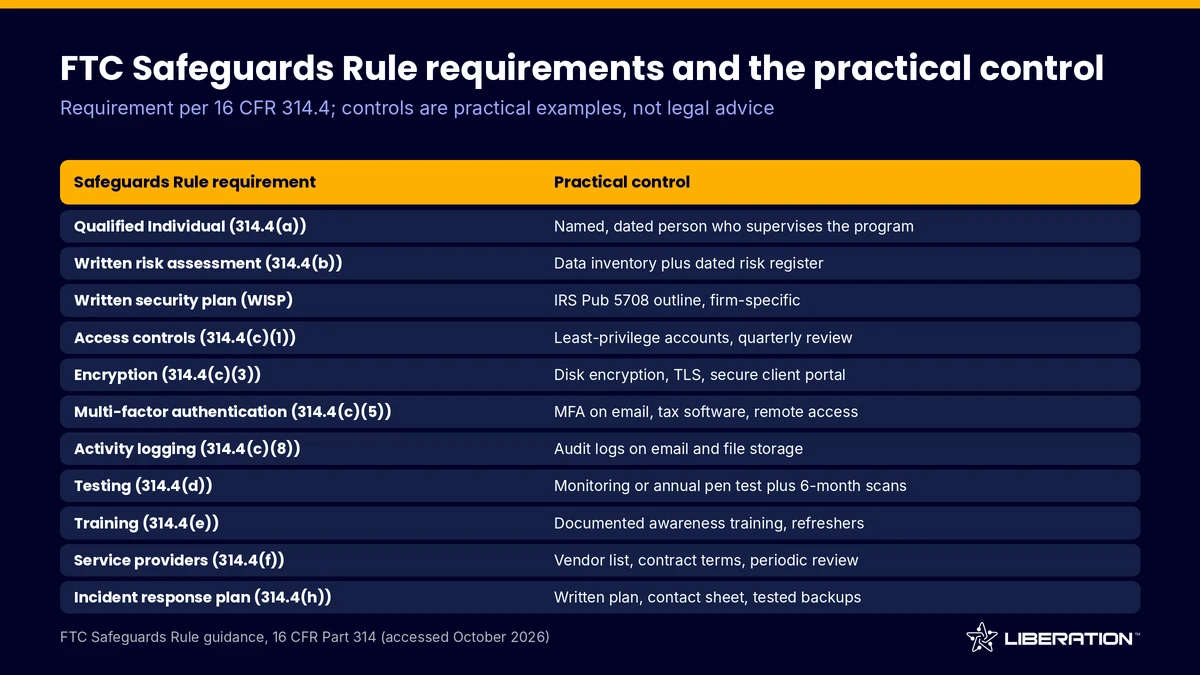
One boundary matters before we start. Our accounting firm IT support covers the technical work only. We do not act as your Qualified Individual, we do not write your WISP and we do not certify that your firm is compliant. Those responsibilities stay with you and your advisors.
Step 1: Name a Qualified Individual before you buy accounting firm IT support
The rule requires you to designate one person to implement and supervise the information security program. That can be a partner, an office manager, an affiliate or an outside provider. If you use an outside provider, a senior member of your firm must still oversee them, according to the FTC.
What to check: the name is written down and dated, and the person can approve spending. The Qualified Individual also reports in writing to the owners at least once a year.
Common mistake: assuming the IT vendor is the Qualified Individual by default. If your accounting firm IT support provider says it will take the role, ask what oversight you keep. We do not take that role. We work for the person you name.
Step 2: Inventory your data and write the risk assessment
You cannot protect client data you cannot find. List every place tax returns, W-2s and Social Security numbers live: practice software, file servers, laptops, phones, scanners, email and cloud storage.
Then write down the foreseeable risks to each, internal and external. A stolen laptop, a phished password and a former employee who still has access are common entries. For each, record how likely it is, what it would expose and which control addresses it.
What to check: the assessment is dated, covers hardware and software, and has a review date. The FTC expects reassessment when operations change.
Common mistake: leaving out informal tools, such as personal phones that read work email.
Step 3: Build a WISP for tax preparers from your risk assessment
A WISP is the written description of how your firm protects client information. IRS Publication 5708 is a free template and outline for it. The outline covers the plan’s purpose and scope, the Qualified Individual, the risk assessment, a hardware inventory, the safety measures you use, an implementation clause and attachments (IRS Pub 5708, Rev. 8-2024).
The strongest plan is specific to the firm. It names real systems and people, and it matches what you actually do. A plan that describes controls you do not have documents a gap.
Your IT provider can supply technical facts such as devices and backup schedules. The writing and sign-off belong to you. We do not write the WISP for any client.
Common mistake: downloading the template, filling in the firm name and filing it. Keep it in a place the whole staff can reach and update it when something changes.
Step 4: Turn on MFA and tighten access in your accounting firm IT support
The rule requires multi-factor authentication for anyone accessing any information system, unless your Qualified Individual approves in writing a reasonably equivalent or more secure control (16 CFR 314.4(c)(5)). That covers email, the tax software, remote access, the cloud drive and the practice management system. Start with admin accounts and email.
Access controls come next. Each person should reach only the client data their job needs. A seasonal preparer does not need the firm’s payroll files, and a bookkeeper does not need admin rights on every machine. Remove access the day someone leaves, and review the list quarterly.
The rule also asks you to log authorized users’ activity. In practice, turn on audit logs in email, file storage and tax software, and decide who reads them.
What to check: sign in from a new device with a correct password. If no second factor is requested, MFA is not enforced.
Common mistake: shared logins for seasonal staff, which cannot be logged to a person.
Step 5: Use encrypted email for accountants and a secure client portal
The rule requires encryption of customer information both in transit over external networks and at rest, unless your Qualified Individual approves an alternative in writing (FTC, accessed October 2026). At rest, that means full-disk encryption on every laptop and desktop and encrypted server or cloud storage. In transit, it means TLS everywhere and a deliberate policy for email.
Email is the weak point. Standard email is not a safe place for a Social Security number or a full return. Many firms use encrypted email for accountants for messages that must travel by email, and a portal for the documents themselves. A portal replaces the attachment with a login, keeps files off personal inboxes and gives you an access log showing who opened what and when.
On the Liberation side, Liberation Email starts at $1.95 per user per month, and Hub for Teams starts at $7.49 per user per month for secure document exchange with clients (list prices as of October 2026). Confirm what encryption each plan applies before you cite it in your WISP.
Common mistake: buying a portal and leaving clients free to keep emailing returns. Tell clients in writing that the portal is how you receive documents.
Step 6: Add backups and an incident response plan to accounting firm IT support
Ransomware can stop a tax season. Backups need to be encrypted, kept off-site, separated from the network they protect and tested. Test restores on a schedule. Our backup and disaster recovery page describes the options. Confirm exactly which systems each backup covers, because website backups and workstation backups are different things.
The rule also requires a written incident response plan. The FTC says it should cover goals, internal processes, roles and responsibilities, internal and external communications, how systems get corrected, documentation, and a review afterward. Add a contact sheet listing your IT provider, insurer and attorney.
For breach notice, remember the 30-day FTC clock for events involving the unencrypted information of at least 500 consumers. Many states have their own notice rules, so ask counsel.
Common mistake: a plan nobody has read. Walk staff through a pretend incident once a year, such as a lost laptop on a Friday evening. Good accounting firm IT support includes that drill, and sound tax preparer security depends on it.
Step 7: Oversee vendors, train staff and keep accounting firm IT support current
You must select service providers that can maintain appropriate safeguards, put those expectations in a contract and reassess them periodically (FTC, accessed October 2026). That includes your IT provider, tax software vendor, cloud storage, e-signature tool and any outsourced preparers. Keep a simple vendor list with what data each one touches and the date you last reviewed them.
Staff are the other half. The rule calls for security awareness training with regular refreshers. Document attendance, because the record is part of your program.
Testing closes the loop. The rule calls for continuous monitoring or, failing that, annual penetration testing plus vulnerability assessments at least every six months (16 CFR 314.4(d)(2)). Firms under the 5,000-consumer threshold are exempt from that item, but a periodic scan is still sensible.
Finally, the rule expects you to dispose of customer information you no longer need, generally within two years of last use unless a business or legal reason applies. Check your retention schedule with your advisors.
Who does what: your firm and your IT provider
| Task | Your firm | IT provider (LTS) |
|---|---|---|
| Qualified Individual | Names and supervises | Does not serve in the role |
| Risk assessment and WISP | Writes, approves, signs | Supplies technical inventory and facts |
| MFA, encryption, access setup | Approves policy | Configures and manages |
| Client portal and secure email | Requires clients to use it | Provides and manages |
| Compliance sign-off | Yours, with counsel | We do not certify compliance |
If you want us to run the technical side of your accounting firm IT support, we start with a free consultation call, then send a custom plan and quote before work begins. Setup, data migration and ongoing management follow. Pricing depends on scope. Custom IT solutions explains the process, and you can contact us to book the call.
New to outsourcing IT? Start with managed IT services for small business.
Frequently asked questions
Does the FTC Safeguards Rule apply to my small tax practice?
Yes, in general. The IRS states that tax preparers are financial institutions under the rule, and it applies regardless of firm size. Firms with customer information on fewer than 5,000 consumers are exempt from a few provisions, so ask your attorney.
What is a WISP for tax preparers?
A WISP is a Written Information Security Plan that describes how your firm protects client data. IRS Publication 5708 provides an outline and template for tax professionals. Your plan should reflect your actual systems and be reviewed whenever your operations change.
Can my IT company be my Qualified Individual?
The rule allows an outside service provider in that role, but a senior member of your firm must still oversee it. Liberation Technology Services does not serve as a client’s Qualified Individual. We handle the technical work under the person you name.
Is regular email acceptable for sending tax returns?
The rule requires encryption of customer information in transit, and ordinary email attachments often fall short of that. Encrypted email for accountants or, better, a secure client portal keeps returns out of inboxes. A portal also records who accessed each file.
What does accounting firm IT support cost?
It depends on your users, devices and systems. We price custom IT work by scope after a free consultation and publish no rates. You get a quote before work starts.
Sources
- FTC, The FTC Safeguards Rule: What Your Business Needs to Know (accessed October 2026)
- eCFR, 16 CFR Part 314, Standards for Safeguarding Customer Information (accessed October 2026)
- IRS Publication 4557, Safeguarding Taxpayer Data (Rev. 6-2024)
- IRS Publication 5708, Creating a Written Information Security Plan for Your Tax and Accounting Practice (Rev. 8-2024)
Related reading: law firm IT support, managed IT services for healthcare and managed IT services for nonprofits.