
Law firm IT support starts with knowing where client data lives, then putting a small set of controls around it: secure email and a client portal, multi-factor authentication, tested backups, a wire verification routine and a clean offboarding process. Do those in order and you can show a regulator, a malpractice carrier or a client that you made reasonable efforts to protect confidential information.
This guide is for solo lawyers, small firms and the office managers who run IT for them. It walks through eight steps for setting up law firm IT support, with what to do, what to check and the mistake we see most often at each step. If your firm is still deciding whether to hire help, our overview of managed IT services for small business covers the basics first.
1. Take inventory of your client data
You cannot protect what you have not listed. Start with a plain spreadsheet: every place a client’s information can sit, who can reach it and how it gets in and out. Good law firm IT support begins with this list. Include the obvious systems (email, practice management, document storage) and the quiet ones (phones, scanners, a paralegal’s home laptop, the shared drive nobody has cleaned since 2019).
What to check: for each location, record the owner, the people with access, whether it is backed up and whether it is covered by multi-factor authentication. Common mistake: listing only the systems IT installed. Personal email forwarding, consumer file-sharing links and text messages with clients are where data actually leaks.
2. Document reasonable efforts for law firm cybersecurity (ABA 477R)
ABA Formal Opinion 477R, issued May 11, 2017 and revised May 22, 2017, says lawyers must make reasonable efforts to secure communications that contain client information. It states that what is reasonable “is not susceptible to a hard and fast rule” and depends on a set of factors: the sensitivity of the information, the likelihood of disclosure without added safeguards, the cost of those safeguards, how hard they are to implement, and how much they interfere with representing the client.
The opinion also lists seven considerations: understand the threat, understand how client information is transmitted and stored, use reasonable electronic security measures, decide how client communications should be protected, label confidential information, train lawyers and staff, and run due diligence on technology vendors.
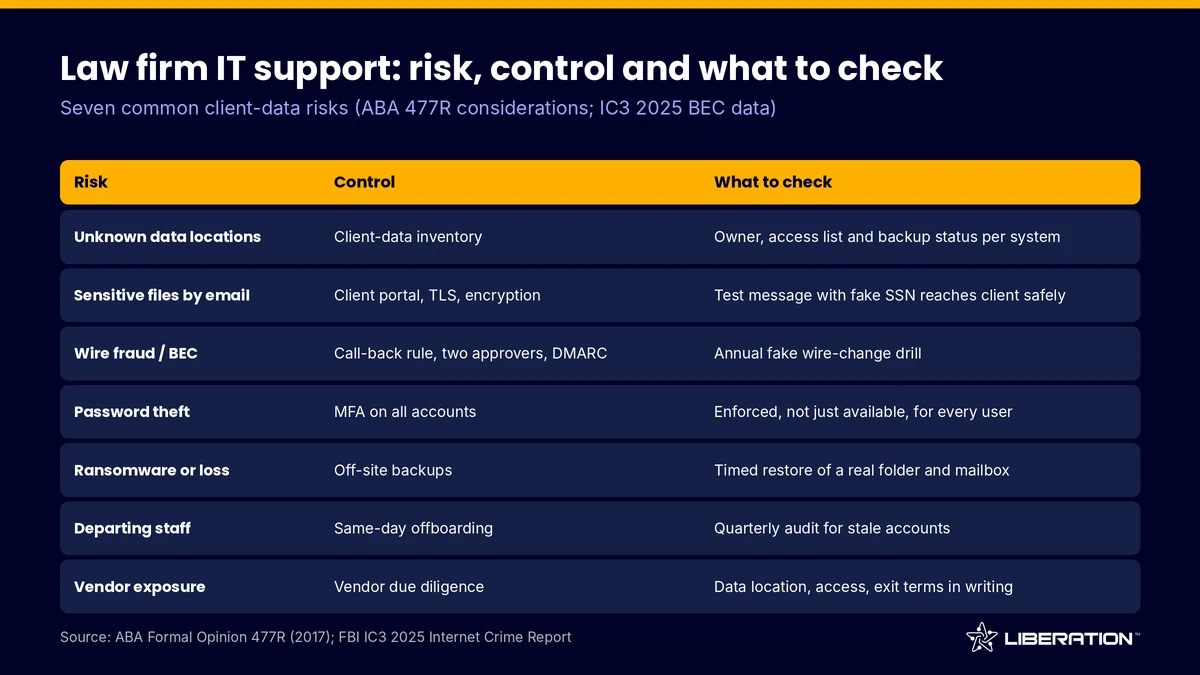
What to check: write down, for each factor, what you decided and why, and date it. A one-page memo is enough. Common mistake: treating the opinion as a product checklist. It is a standard of judgment, and state rules differ, so confirm your obligations with your state bar or ethics counsel. Nothing here is legal advice.
3. Use secure email for lawyers, law firm email encryption and a portal
Email is still the default channel, and the ABA Journal’s May 2017 summary of the opinion notes that lawyers may generally use unencrypted email for routine client communication. The same summary says higher-risk matters and sensitive industries can call for more. Treat that as a floor, not a target, and write your choice into your law firm IT support plan.
Secure email for lawyers means three things. Use TLS between mail servers, require MFA on every mailbox, and consider law firm email encryption for messages that carry sensitive attachments. For the attachments themselves, a client portal is safer than email: the client signs in, downloads the file, and you can see who opened it. Our Liberation Email plans start at $1.95 per user per month (Mail Starter, 5 GB), with Mail+ at $4.95 (15 GB) and Mail Pro at $7.95 (25 GB), and Hub for Teams starts at $7.49 per user per month for secure client document exchange. Prices are monthly list prices as published in October 2026.
What to check: send a test message with a fake Social Security number to an outside address and confirm what actually protects it. Common mistake: emailing a portal link along with the password in the same message.
4. Add wire-fraud and business email compromise controls
Business email compromise (BEC) is when a criminal impersonates a lawyer, client or title company to redirect a payment. The FBI’s Internet Crime Complaint Center (IC3) 2025 Internet Crime Report counts 24,768 BEC complaints with reported losses of $3,046,598,558 for 2025, compared with $2.77 billion in 2024. The same report describes a homebuyer who wired more than $449,000 after an email impersonating their attorneys.
Law firms are targets because trust accounts hold large sums and closings run on deadlines. Put these rules in writing:
- Never change wire instructions based on an email alone. Call a phone number you already had on file.
- Require two people to approve any outgoing wire from a trust account.
- Tell clients at intake, in writing, that your firm will never change payment details by email.
- Turn on SPF, DKIM and DMARC for your domain so criminals cannot easily send mail that looks like yours.
What to check: run a drill once a year. Send a fake “updated wiring instructions” message to your own staff and see who calls to verify. Common mistake: verifying by replying to the same email thread. If the mailbox is compromised, the reply goes to the criminal.
If a bad wire does go out, the IC3 report says time is of the essence: contact your bank immediately to request a recall, then file a complaint at ic3.gov with the full transaction details. In 2025 its Financial Fraud Kill Chain process froze about $679 million of $1.16 billion in attempted theft across 3,900 incidents, a 58% rate.
5. Turn on MFA everywhere it is offered
Stolen passwords drive most mailbox takeovers, and multi-factor authentication stops many of them. Any law firm IT support plan should enforce it. Enable it on email first, then on practice management, document storage, remote access, banking and the domain registrar. Prefer an authenticator app or hardware key over text messages where the service allows it.
What to check: pull a user list from each system and confirm that MFA shows as enforced, not just available. Common mistake: exempting a senior partner because the prompt is annoying. Attackers pick the most senior mailbox first.
Law firm cybersecurity also means limiting who can do what. Give staff the access their job needs, keep administrator accounts separate from daily accounts, and review the list every quarter.
6. Set up backups and test the restore
A backup you have never restored is a hope, not a control. Keep at least one copy off-site and separate from your main systems, so a ransomware infection or a failed server does not take both. Decide how far back you need to go: some matters, such as estate files, have long retention periods under your state’s rules.
Our backup and disaster recovery page describes the services we offer, and CodeGuard website backups start at $2.09 per month, which is useful for the firm’s public site. Whatever law firm IT support provider or tool you use, restore a real folder and a real mailbox on a schedule. We recommend testing restores quarterly.
What to check: time how long a restore takes and who can do it when the IT person is away. Common mistake: backing up the server but not the laptops, the cloud mailbox or the phone photos of signed documents.
7. Offboard access the day someone leaves
Departures are a quiet source of exposure. A former associate with a live mailbox, a shared password and a synced laptop still has your clients’ files. Build a short law firm IT support checklist and run it the same day:
- Change shared passwords and disable the user’s sign-in.
- Forward the mailbox to a supervising attorney and set an automatic reply.
- Export or reassign their files and matters.
- Remove them from the portal, practice management, VPN and any third-party tools.
- Wipe or collect firm data from phones and personal devices.
What to check: audit your systems every quarter for accounts that belong to people no longer at the firm. Common mistake: disabling email but forgetting the cloud storage and the e-signature account.
8. Review every vendor in your law firm IT support stack
Opinion 477R asks lawyers to conduct due diligence on technology vendors, and that includes whoever delivers your law firm IT support. Ask each vendor where client data is stored, who can access it, how it is encrypted, what happens at termination and how you get your data back.
What to check: keep a vendor list with the contract renewal date, the data the vendor touches and the person at your firm responsible for it. Common mistake: assuming a large brand name replaces the review.
Our own law firm IT support page explains how we build around the “reasonable efforts” standard. We are US-owned and run on hardware we own in the United States, and you can read more about custom IT solutions if your firm needs something specific.
Choosing law firm IT support and managed IT services for law firms
Many small firms handle steps 1 to 8 in-house for a year, then hand them off as the work grows. Managed IT services for law firms make sense when nobody at the firm owns IT, when you have more than a handful of users, or when a client’s outside counsel guidelines ask for proof of controls. Legal IT support should leave you with documentation you can show a client, not just a working network.
For a custom plan, we start with a free consultation call, send a quote before any work begins, and then handle setup, data migration and ongoing management. Pricing depends on scope. If your firm also runs a website, contact us and ask about free migration.
Frequently asked questions
What does law firm IT support include?
Law firm IT support covers email, devices, backups, security tools, user access and vendor management for a legal practice. The best arrangements also produce written records of your decisions, such as the data inventory and the dated reasonable-efforts memo.
Do lawyers have to encrypt email?
Not always. The ABA Journal’s May 2017 summary of Opinion 477R says lawyers may generally use unencrypted email for routine client communication, but sensitive matters may need more. Check your state’s ethics rules and use a portal or law firm email encryption for high-risk files.
How much does legal IT support cost?
It depends on the number of users, devices and systems. Building blocks have published prices, such as secure email from $1.95 per user per month as of October 2026. A managed arrangement is quoted by scope, so get a written quote.
How do I prevent wire fraud at my firm?
Verify payment instructions by phone using a number you already had, require two approvers on trust account wires and set up SPF, DKIM and DMARC. Warn clients in writing that you do not change instructions by email.
Is a client portal better than email attachments?
For sensitive files, yes, and most law firm IT support plans should offer one. A portal requires sign-in, can log access and avoids leaving copies in inboxes. Secure email for lawyers still has a place for routine messages.
Sources
- FBI Internet Crime Complaint Center, 2025 Internet Crime Report (BEC figures and Financial Fraud Kill Chain guidance, retrieved October 7, 2026)
- ABA Journal, ethics opinion on securing client communications (May 11, 2017)
- American Bar Association, Cybersecurity for Attorneys: Employing Competent and Reasonable Safeguards (December 2023)
- Liberation Technology Services law firm IT support
Related reading: managed IT services for small business, backup and disaster recovery and accounting firm IT.