
Healthcare managed IT services work when the provider signs a Business Associate Agreement (BAA), helps you document a HIPAA risk analysis, and runs access control, encrypted email, backups and logging on your behalf. You still own compliance, because HHS keeps the covered entity responsible even when a vendor does the work. The nine steps below show how a small practice can evaluate and onboard a provider without guessing.
This guide is for practice managers, physicians and owners of clinics, dental offices and therapy groups who are shopping for medical practice IT support for the first time or replacing a provider that is not working out. It covers what to inventory, what to ask for, and what to check after the contract is signed. It is general information, not legal advice, so confirm specifics with your compliance officer or counsel. Throughout, “managed IT services for healthcare” means a provider that runs your systems under a BAA. The rules cited here were checked on hhs.gov in October 2026.
Step 1: Inventory your PHI before shopping for managed IT services for healthcare
You cannot protect data you have not found. Before you talk to any vendor, list every place your practice creates, receives, stores or sends protected health information (PHI): the EHR, billing software, patient portal, scanned documents, shared drives, email, voicemail, text messages, laptops, phones, copiers and backup drives.
HHS guidance says a risk analysis must cover all electronic PHI that an organization creates, receives, maintains or transmits, across all media and locations (HHS, as of October 2026). A simple spreadsheet works: system, what data it holds, who can reach it, where it is hosted, and which vendor touches it.
Common mistake: forgetting the “side doors.” Staff photos of insurance cards, personal email forwarding and old laptops in a closet all hold PHI more often than owners expect.
Step 2: Understand what the HIPAA Security Rule asks of you
The Security Rule applies to covered entities (including health care providers that transmit health information electronically) and to their business associates. It sorts required protections into three groups: administrative, physical and technical safeguards (HHS Security Rule summary, reviewed by HHS August 2026).
That list is your yardstick for any provider conversation about managed IT services for healthcare. A vendor that can only talk about firewalls and antivirus is covering one slice of one group. The table below turns each group into questions you can ask.
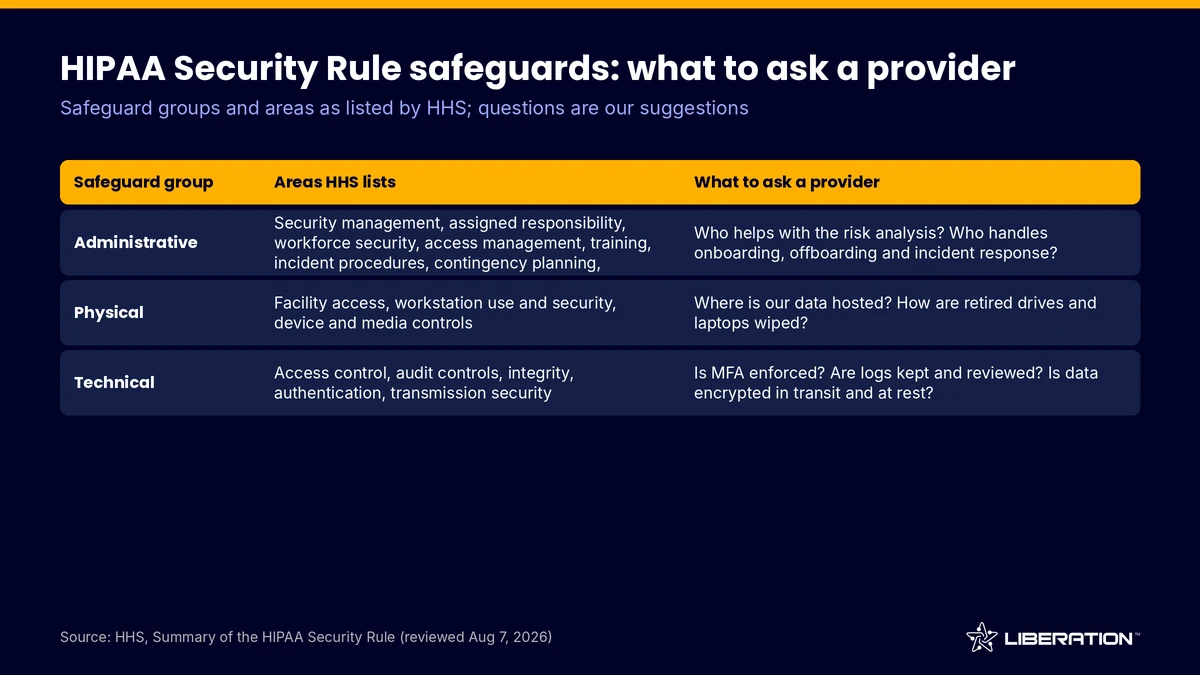
| Safeguard group | Areas HHS lists | What to ask a provider |
|---|---|---|
| Administrative | Security management, assigned responsibility, workforce security, access management, training, incident procedures, contingency planning, evaluation | Who helps with the risk analysis? Who is named responsible? How do you handle onboarding, offboarding and incident response? |
| Physical | Facility access, workstation use and security, device and media controls | Where is our data hosted and who can enter that facility? How are retired drives and laptops wiped? |
| Technical | Access control, audit controls, integrity, authentication, transmission security | Is MFA enforced? Are access logs kept and reviewed? Is email and data encrypted in transit and at rest? |
Step 3: Start with a HIPAA risk analysis, not a product demo
A HIPAA risk analysis is the foundation of everything else. HHS describes it as an accurate and thorough assessment of the risks and vulnerabilities to the confidentiality, integrity and availability of electronic PHI. Its guidance lists the parts: scope, data collection, threats and vulnerabilities, current security measures, likelihood, impact, risk levels and documentation, repeated as technology or operations change (HHS, as of October 2026).
Ask any candidate for managed IT services for healthcare how they support this work. Good answers include producing the system inventory, reporting on current configurations and tracking fixes to completion. A provider can supply facts and effort, but the practice signs off on the analysis and the decisions in it.
Common mistake: treating a one-time scan as the risk analysis. A scan finds technical flaws. The analysis also covers people, paper, vendors and processes.
Step 4: Get a signed Business Associate Agreement
If a managed provider can touch your PHI, it is a business associate, and you need a written business associate agreement before it starts. HHS states that a covered entity may disclose PHI to a business associate if it obtains satisfactory assurances, in a contract or other written arrangement, that the information will be appropriately safeguarded (HHS business associate guidance, as of October 2026).
HHS also says a cloud provider that stores PHI is a business associate even if it holds only encrypted data and has no decryption key (HHS cloud computing guidance, as of October 2026). So a vendor who says “we never see your data” still needs a BAA if it hosts or stores it.
Read the agreement. It should describe the permitted uses of PHI and prohibit other use or disclosure. If you learn of a pattern of material breach by the vendor, HHS expects you to take reasonable steps to cure it or end the arrangement. Liberation Technology Services states on its healthcare solutions page that it signs a BAA, which is the baseline to expect from any provider of healthcare managed IT services, and from managed IT services for healthcare in general.
Step 5: Lock down access control and multi-factor authentication
Technical safeguards start with who can log in. Every user should have a unique account, access limited to what the role needs, and multi-factor authentication (MFA) on email, the EHR, remote access and admin tools.
When you evaluate managed IT services for healthcare, ask how accounts are created, reviewed and removed, and whether administrators use separate accounts. Ask about remote access too, since HIPAA managed IT should cover it, not just office workstations. A VPN or Zero Trust approach beats exposing a desktop or server directly to the internet.
Common mistake: shared logins at the front desk. They save seconds and destroy your ability to say who viewed a record.
Step 6: Encrypt email and the data it carries
Email is where PHI leaks most easily, through misaddressed messages, forwarded threads and attachments sitting in inboxes for years. The Security Rule’s transmission security area addresses guarding against unauthorized access to electronic PHI sent over a network (HHS Security Rule summary).
Ask whether the provider offers encrypted email, how patients receive protected messages, and whether the mail platform is covered by the BAA. Our Liberation Email page covers business mailboxes, and the healthcare page lists encrypted email among the practice offerings. Ask every vendor for a plain-English description of exactly when a message is encrypted.
Step 7: Test backups and recovery, not just backup jobs
Contingency planning is one of the administrative safeguards HHS lists, and HHS cloud guidance points to backup and data recovery as something agreements should address, including recovery from a ransomware attack or other emergency. A green checkmark in a backup dashboard proves a job ran. It does not prove you can get a chart back.
Ask where copies are stored, whether they are encrypted, how long they are kept, and how long a full restore takes. Then schedule a test restore and time it. Our backup and disaster recovery service uses encrypted off-site copies, and we recommend testing restores quarterly.
Common mistake: backing up the server but not the laptops, cloud apps or the scanner folder where intake forms land.
Step 8: Turn on audit logs and review them
The Security Rule lists audit controls as a technical safeguard, and HHS risk analysis guidance expects organizations to review records of system activity. Logs answer the questions a breach investigation asks first: who accessed what, from where and when.
Ask your managed IT services for healthcare provider which systems produce logs, how long they are kept, and who looks at them. Request a sample report during evaluation. A log nobody reads is only storage cost.
Step 9: Plan offboarding and incident response before you need them
Employee departures are a routine source of risk, and any provider of healthcare managed IT services should have a written process for them. Write a checklist: disable accounts the same day, collect devices, remove MFA tokens, revoke vendor portal access and change shared passwords. Ask the provider to follow it and send confirmation each time. A good fit among managed IT services for healthcare treats this as routine.
For incidents, agree on who calls whom, how a suspected breach is escalated, and who decides whether notification is required. HHS breach notification rules require covered entities to notify affected individuals without unreasonable delay and no later than 60 days after discovery, and a business associate must notify the covered entity within the same outer limit (HHS breach notification rule, as of October 2026). Your BAA may set a shorter window, so read it.
What to look for in managed IT services for healthcare
With the steps above done, comparing managed IT services for healthcare becomes concrete. Strong candidates answer by safeguard group, offer a named person who knows your practice, put their obligations in writing, and are willing to show a restore working. Be wary of anyone who says they will make you “HIPAA certified.” Compliance stays with the covered entity, and no provider can take that responsibility over for you.
Liberation Technology Services is US-owned and runs its own hardware in the United States. Pricing for custom IT work depends on scope, and the process starts with a free consultation call, a custom plan and a quote before work begins. If you want HIPAA managed IT built around a named engineer rather than a rotating queue, see the healthcare solutions page or contact us. For a wider look at what a managed contract includes, read our guide to managed IT services for small business. Professional practices with similar confidentiality duties are covered in our law firm IT support guide. If your practice also has a website, our custom IT solutions page shows how that fits in.
Frequently asked questions
What are managed IT services for healthcare?
Managed IT services for healthcare are ongoing IT management for medical practices: monitoring, support, security, email, backups and compliance help, delivered under a BAA. The provider does the technical work, and the practice stays responsible for HIPAA compliance.
Do I need a business associate agreement with my IT provider?
Yes, if the provider creates, receives, maintains or transmits PHI for you, or can access it. HHS requires satisfactory written assurances before a covered entity discloses PHI to a business associate.
How often should a small practice do a HIPAA risk analysis?
HHS says the analysis should be ongoing and repeated when technology or operations change. Many practices also schedule a full review once a year. Confirm the cadence with your compliance advisor.
Can an IT provider make my practice HIPAA compliant?
No. A provider can implement safeguards and supply documentation, but compliance is the covered entity’s responsibility. Treat any promise of certification or guaranteed compliance as a warning sign.
How much does medical practice IT support cost?
It depends on the number of users, devices, systems and the scope of security work. Liberation Technology Services does not publish set rates for custom IT work and provides a quote after a free consultation.
Sources
- HHS, Summary of the HIPAA Security Rule (reviewed August 7, 2026; accessed October 2026)
- HHS, Guidance on Risk Analysis (accessed October 2026)
- HHS, Business Associates (accessed October 2026)
- HHS, Guidance on HIPAA and Cloud Computing (accessed October 2026)
- HHS, Breach Notification Rule (accessed October 2026)
Related reading: Managed IT services for small business | Law firm IT support | Backup and disaster recovery