
Nonprofit managed IT services means paying an outside team to run your accounts, email, website, backups and security on a steady schedule, so a small staff can stay on the mission. To set it up, you inventory what you own, protect donor data, take control of your website and donation tools, fix email and backups, plan for volunteer turnover, and then pick a provider that fits your budget.
This guide to managed IT services for nonprofits is for executive directors, board members and the one person who “does the computers” at a small nonprofit. It walks through eight steps in order. Each step says what to do, what to check and a mistake we see often.
What nonprofit managed IT services actually cover
A managed provider takes over the routine work that nobody on staff has time for. That usually means accounts, device updates, email, hosting, backups, security monitoring and help when something breaks.
Managed IT services for nonprofits differ from a commercial setup in a few ways. Staff turn over more, volunteers need access to some systems but not others, budgets come from grants with strict categories, and the data you hold (donor names, addresses, giving history) is exactly what a criminal would want. Good nonprofit IT support accounts for all four.
For a wider view of the model, see our guide to managed IT services for small business. The steps below apply the same ideas to a nonprofit.
Step 1: Inventory every account, device and data store
You cannot manage what you cannot list. Before you hire anyone for nonprofit managed IT services, start a simple spreadsheet with one row per system: domain registrar, website host, email, donation platform, donor database, accounting software, social media, cloud storage, laptops and phones. For each row, record who owns it, who has admin access, where it is billed and where the data lives.
Check that the organization, not a person, owns each account. If the domain is registered to a former board member’s personal email, fix that first, because registrar access decides who controls your website and email.
Check the card statement for forgotten subscriptions. The table below shows the areas worth covering, the main risk in each and a first step you can finish this month.
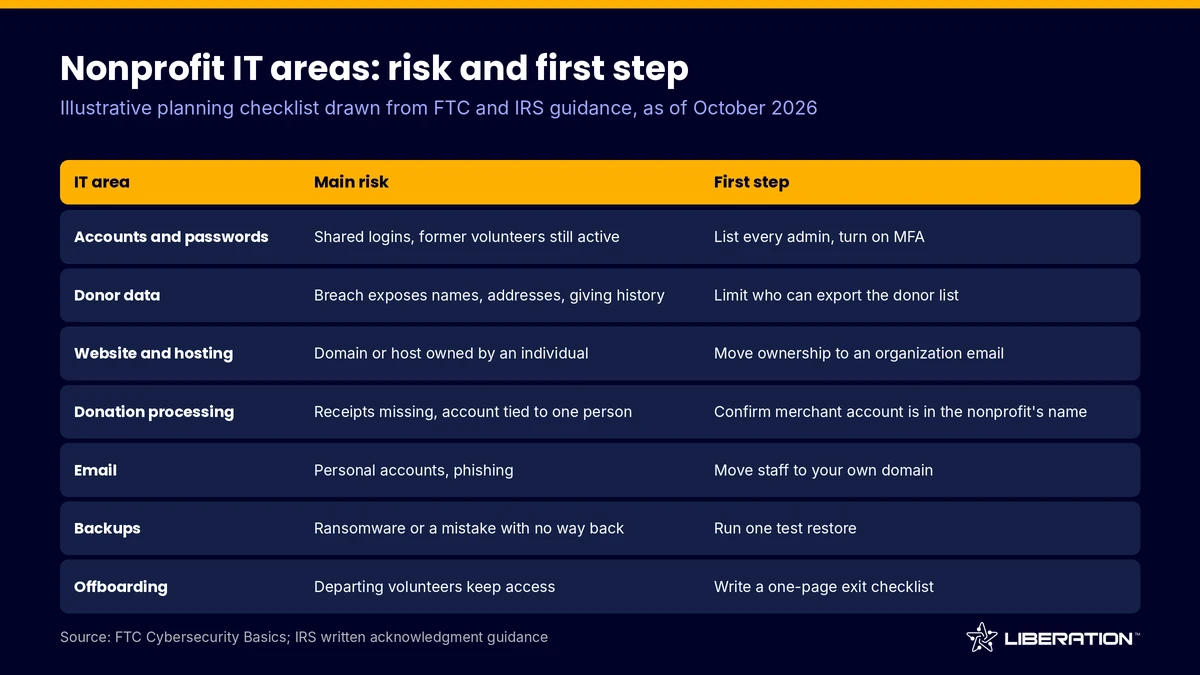
| IT area | Main risk | First step |
|---|---|---|
| Accounts and passwords | Shared logins, former volunteers still active | List every admin and turn on multi-factor authentication |
| Donor data | Breach exposes names, addresses, giving history | Limit who can export the donor list |
| Website and hosting | Domain or host owned by an individual | Move ownership to an organization email |
| Donation processing | Receipts missing, funds tied to one person’s account | Confirm the merchant account is in the nonprofit’s name |
| Free personal accounts, phishing | Move staff to addresses on your own domain | |
| Backups | Ransomware or a mistake with no way back | Run one test restore |
| Offboarding | Departing volunteers keep access | Write a one-page exit checklist |
This inventory is the base of every nonprofit managed IT services engagement, so finish it before you talk to a vendor.
Step 2: Protect donor data security first
Donor data security deserves the first slice of your effort because a breach damages trust, which a nonprofit cannot afford to lose. Start with the basics the FTC lists for small organizations (as of October 2026): keep software updated, back up important files, require passwords on devices, encrypt devices that hold sensitive information and use multi-factor authentication.
The FTC also recommends passwords of at least 12 characters and says not to reuse or share them over phone, text or email. A password manager makes that practical. Shared logins to the donor database are a common problem. Give each person a named account instead.
What to check: who can export the full donor list. The usual mistake is treating donor data as a spreadsheet anyone may copy. Any provider of nonprofit managed IT services should help you keep it in the donor system and share reports, not raw lists.
Have a response plan too. The FTC’s data breach guide (August 2023) says to secure your systems, fix the vulnerabilities and notify the right parties, and notes that every US state has a breach notification law. Confirm your obligations with counsel.
Step 3: Own your website and nonprofit website hosting
Donors check your website to see that you are real, so nonprofit website hosting should be reliable and under your control. Confirm that the domain name, the hosting account and the website admin login all belong to the organization. A developer or volunteer can hold a login, but they should not hold the only copy of ownership.
Check how updates are handled. WordPress core, themes and plugins need regular updates. Ask who applies them and what happens if one breaks a page. Our guide to secure WordPress hosting covers the server-side protections worth looking for.
The mistake to avoid is a site built by a friend with no documentation. Ask for a short handover note covering hosting, key plugins, backups and who to call. If the site has outgrown its host, we offer free website migration.
Nonprofit managed IT services should never leave your organization without admin access to its own site and accounts.
Step 4: Set up nonprofit donation processing you control
Nonprofit donation processing should run through an account in the organization’s name, with receipts that go out automatically. The IRS says that for a single gift of $250 or more, the donor needs a written acknowledgment from the charity that states the organization’s name, the cash amount and whether any goods or services were given in return (IRS, checked October 2026). Your donation platform should generate this without anyone typing it.
Check which legal entity receives the money, who can change the payout bank account (a favorite fraud target) and whether someone besides the person who set it up can see recurring gifts and refunds.
Many small nonprofits start on a free donate button and later find the data is stuck there. Look for a setup where gifts and donor records sit in your own system. On our nonprofit IT solutions page, we describe websites with a donor CRM, recurring donations, memberships and volunteer management, with payment processing through our partner PayHarmony. Processing rates are given in writing, so ask for them before you commit.
Step 5: Fix nonprofit email hosting
Free personal addresses make a nonprofit look temporary and make offboarding painful. Good nonprofit email hosting gives every staff member a mailbox on your own domain, controlled by the organization, so you can add and remove people in minutes.
Check that the domain has SPF, DKIM and DMARC records. They tell receiving servers which messages really come from you, which protects your fundraising emails from landing in spam and makes it harder for someone to impersonate your director. Then turn on multi-factor authentication for every mailbox, since email is the key to resetting every other password.
The usual mistake is letting program leads use personal Gmail for donor conversations, which puts donor records outside your control. Our Liberation Email plans start at $1.95 per user per month (Mail Starter, 5 GB), with larger tiers listed on the page, and give you named mailboxes on your own domain.
For board packets, Hub for Teams (from $7.49 per user per month) beats email attachments.
A provider of nonprofit managed IT services should be able to show you a restore, not only describe one.
Step 6: Back up everything and test a restore
Any plan for managed IT services for nonprofits should include backups, because they separate a bad afternoon from a lost year of records. Back up the website, the donor database, accounting files and shared drives, and keep at least one copy off-site and separate from the systems it protects. The FTC lists backing up important files as a core practice for small organizations.
Check that a backup has actually been restored at least once. A backup you have never tested is a hope. We recommend testing restores quarterly, with a named person responsible.
Backups usually protect files and databases, not a lapsed domain, a lost login or data held in a third-party service. Our backup and disaster recovery page explains what we back up and what falls outside it.
Ask how your nonprofit managed IT services plan handles volunteers who come and go.
Step 7: Offboard volunteers and staff on a checklist
Volunteers come and go, and each departure is a chance for access to linger. Write a one-page checklist and use it every time: disable or remove the account, change any shared passwords that person knew, forward their mailbox to a manager, export files they own, and remove them from the donation platform, the website admin and social media.
Check the list against your inventory from Step 1. If a system is not on the inventory, it will not be on the checklist, and that is where old access survives. The common mistake is offboarding the email but forgetting the donor database or the website login.
Give volunteers the least access they need. A person who helps at events does not need the donor export. Strong nonprofit managed IT services build that into the account setup, and our guide to managed IT services for healthcare shows the same idea for sensitive records.
Keep the checklist above in hand when you compare nonprofit managed IT services quotes.
Step 8: Budget, grants and choosing a provider for managed IT services for nonprofits
Budget for managed IT services for nonprofits as a recurring operating cost, not a one-time purchase. Some funders cover general operating support and some fund specific technology or security upgrades. Check each grant’s allowable-cost rules, and write the request around a concrete risk such as protecting donor data, not just “computers”.
When you compare providers of managed IT services for nonprofits, ask the same questions of each:
- Who owns the accounts, domains and data at the end of the contract?
- Do you get a named person or a rotating queue?
- What is the onboarding process, and what does it cost to migrate your data?
- How are backups tested and what is not covered?
- Will the quote and scope be written down before work begins?
The mistake is picking on monthly price alone, since a plan that excludes backups or offboarding moves the work back to your staff. We start with a free consultation call, then a custom plan and quote before any work, followed by setup, data migration and ongoing management. Pricing depends on scope, and we do not publish rates for custom work, so you will get a quote in writing. Start on the custom IT solutions for nonprofits page or contact us.
Frequently asked questions
What are managed IT services for nonprofits?
They are ongoing IT operations handled by an outside provider: accounts, email, website, backups, security and support. The goal is fewer single points of failure, such as one volunteer who knows every password.
How much do managed IT services for nonprofits cost?
It depends on staff count, systems and the scope you need, so no single number fits every organization. Ask for a written quote that lists what is included.
Do small nonprofits need nonprofit IT support?
If the organization holds donor records, takes online gifts or runs a website, yes, even with three staff. The risk comes from the data you hold and the accounts you rely on, not from your size.
What is the first step to donor data security?
List where donor data lives and who can access it, then turn on multi-factor authentication for those systems. The FTC recommends multi-factor authentication, current software and backups as basic protections for small organizations.
Should a nonprofit own its website and donation account?
Yes. The domain, hosting, website admin and merchant account should be in the organization’s name, with at least two authorized people, so a departure never locks you out.
Sources
- FTC, Cybersecurity Basics (checked October 2026)
- FTC, Data Breach Response: A Guide for Business (August 2023)
- IRS, Charitable contributions: written acknowledgments (checked October 2026)
- NIST, Small Business Cybersecurity Corner (checked October 2026)
Related reading: managed IT services for small business, law firm IT support and managed IT services for healthcare.