
WordPress hosting requirements are modest: a current PHP 8 release, a recent MySQL or MariaDB database, HTTPS, and enough PHP memory for your plugins. Almost any competent shared plan meets that. What actually separates hosts is resources under load, how backups work, and whether the specifications are kept current for you.
“WordPress hosting” is mostly ordinary hosting with WordPress preinstalled and caching configured. That is useful, but it is not a separate category of product, and treating it as one is how people end up paying more for the same thing. Here is what to check.
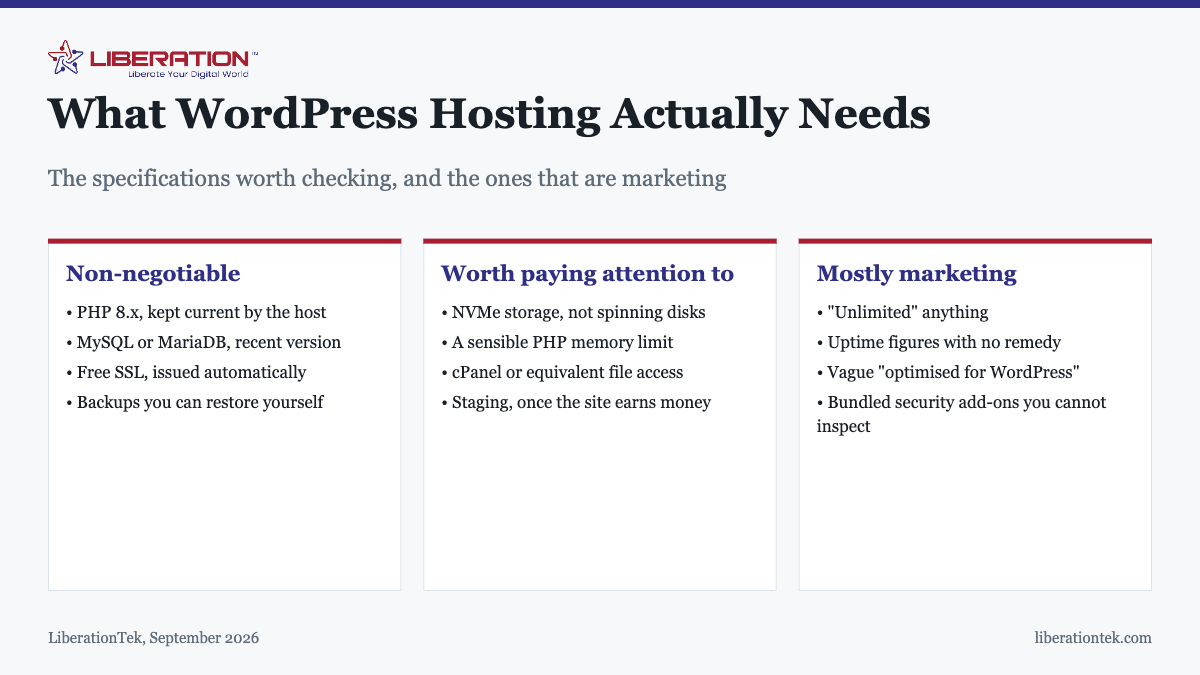
The specifications that genuinely matter
| Requirement | What to look for | Why |
|---|---|---|
| PHP version | A current 8.x release, updated by the host | Older versions stop receiving security fixes and run slower |
| Database | Recent MySQL or MariaDB | Everything on your site is stored here |
| HTTPS | Free SSL, issued and renewed automatically | Browsers flag sites without it |
| PHP memory limit | Enough headroom for your plugin set | Hitting it produces white screens |
| Storage type | NVMe | WordPress is database-heavy; disk speed shows up directly |
| File access | cPanel or equivalent | You should not need a support ticket to see your own files |
| Backups | Automatic, and restorable by you | A backup you cannot restore yourself is not a backup |
The PHP version is the one most worth asking about specifically. A host that leaves customers on an unsupported release is telling you how it handles maintenance generally, and sites running end-of-life PHP are both slower and unpatched.
The security division nobody explains
This causes more trouble than any specification, because the split is rarely stated plainly.
Your host is responsible for the operating system, the web server, PHP itself, network-level filtering, and the isolation between accounts on shared infrastructure. Server-level patching is theirs.
You are responsible for WordPress core, your theme, every plugin, your user accounts and passwords, and what you install. Nobody updates those for you unless you have specifically bought a managed service that says so.
This matters because the overwhelming majority of compromised WordPress sites are compromised through an outdated plugin or a weak administrator password, both firmly on your side of the line. Buying better hosting does not address either. The signs to watch for are in how to tell if your site has been hacked, and the wider picture in is shared hosting safe.
What good hosting contributes
- Account isolation, so a neighboring site cannot reach your files.
- Current server software, patched without you asking.
- Free automatic SSL, so certificates never lapse.
- Backups you can restore without a ticket.
- A network where abuse is dealt with rather than tolerated, which protects the shared IP reputation your email depends on.
That is the floor. It is worth having, and it is not a substitute for updating your own plugins.
What secure WordPress hosting actually provides
“Secure WordPress hosting” is a phrase used loosely, so it is worth setting out what a host can genuinely provide and what no hosting plan can do for you.
What the host can do
- Account isolation. Each account runs under its own system user, so a compromised site elsewhere on the server cannot read your files or reach your database. This is the foundation, and on a properly configured server it holds.
- Server-level patching. The operating system, web server and PHP kept current without you asking. An unpatched PHP release is a genuine risk and entirely the host’s responsibility.
- Automatic SSL. Certificates that issue and renew without intervention, so they cannot lapse and take the site out of HTTPS.
- Network filtering. Blocking obvious attack traffic before it reaches your site, and rate-limiting login attempts at the server rather than leaving every request to WordPress.
- Abuse enforcement on the network. Removing accounts that send spam or host malware, which protects the shared IP reputation your own email delivery depends on.
- Backups you can restore yourself, without raising a ticket and waiting.
What no host can do
This is the part the phrase tends to obscure. No hosting plan, at any price, will:
- Update your plugins and themes. Unless you have specifically bought a managed service that says it does, this is yours, and outdated plugins are the leading cause of compromised WordPress sites by a wide margin.
- Choose a strong administrator password for you, or stop you reusing one from a service that has been breached.
- Turn on two-factor authentication on your accounts.
- Remove the developer account that has been sitting there with full access since a project finished two years ago.
- Notice that a plugin you depend on was abandoned by its author and has not been patched since.
Every item on that second list is a more likely route into your site than anything on the first. This is why “upgrade to more secure hosting” is usually the wrong advice: it addresses the least probable cause while leaving the most probable one untouched. Good hosting raises the floor. It does not do the work.
What to ask a host about security
- How are accounts isolated from each other on shared infrastructure?
- Which PHP version will I be on, and how are upgrades handled?
- Is SSL free and automatic, including renewal?
- What is the backup retention, and can I restore without a ticket?
- What happens if a neighboring account is compromised or starts sending spam?
- Is there login rate-limiting at the server level, or is that left entirely to me?
Concrete answers to those six tell you considerably more than any “secure hosting” badge. Vague answers are themselves an answer.
Claims worth discounting
“Unlimited” storage or bandwidth. It means unmetered, not infinite. The real limits appear further down the terms as inode counts, CPU seconds, concurrent processes, or a fair-use clause. Unlimited storage paired with a low inode limit is a common shape, and inodes are what a WordPress site with a media library actually consumes.
Uptime percentages with no remedy attached. A figure means little unless the agreement says what happens when it is missed.
“Optimized for WordPress”, unspecified. Ask what that means concretely. Server-level caching and a current PHP release are real answers. Nothing else is.
Bundled security products you cannot inspect. A security add-on in the plan is not necessarily doing anything for the risks that actually affect you, which are your plugins and your passwords.
Resource limits, which is where plans actually differ
Two shared plans can list identical PHP and database versions and behave completely differently under load, because the specifications everyone advertises are not the ones that constrain a real site. The limits that matter are usually further down the page:
- Inodes. A count of files, not their size. A WordPress site with a media library generates a great deal of them, because every uploaded image produces several resized copies. Hitting an inode limit stops uploads and can break backups, and it is the limit people meet first without knowing it exists.
- CPU seconds or entry processes. How much work your account may do, and how many requests it may handle at once. This is what decides whether the site slows down when several people visit together.
- Database connections and size. Relevant once a site has been running for years, and particularly for stores.
- Execution time. A low limit causes imports, backups and migrations to time out halfway, which is a frequent cause of failed plugin-based migrations.
None of these appear on the comparison chart. All of them determine whether the plan is adequate. If a host publishes them plainly rather than burying them, that is a useful signal about how the rest of the relationship will go.
Matching the plan to the site
Most sites need less than they are sold. The genuine dividing line is concurrent visitors and database work rather than page count.
- Brochure sites, blogs, small business sites. Shared hosting is correct. LiberationTek shared hosting is $7.99 a month with cPanel, NVMe storage, free SSL and room for up to nine sites.
- Stores, membership sites, anything with sustained traffic. A VPS, because carts and logged-in sessions cannot be cached and every transaction hits the database. Managed VPS hosting keeps cPanel and WHM and includes a free migration of one site.
- Specific server configuration needs. Particular PHP extensions or custom cron behavior push you to a VPS regardless of traffic.
Starting on shared hosting and moving up on evidence is cheaper than provisioning for traffic you do not have. Moving up should be a change of plan, not a change of company.
Before you buy
- Ask the renewal price, not the introductory one. This changes the comparison more than any specification.
- Ask what the restore process looks like, not just whether backups exist.
- Ask which PHP version you will be on and how upgrades are handled.
- Find the real resource limits behind any unlimited claim.
- Confirm SSL is included and automatic. Paying separately for it is the most common unnecessary hosting charge, as covered in SSL certificate cost.
- Check whether migration is included. Free with VPS here, otherwise quoted from $250.
Shared, reseller and VPS plans carry a 30-day money-back guarantee for first-time customers, which makes the decision reversible. The wider cost picture is in how much website hosting costs.
Frequently asked questions
What are the minimum requirements for WordPress hosting?
WordPress needs PHP, a MySQL or MariaDB database, and HTTPS. In practice you want a host running a current PHP 8 release, a recent database version, free SSL issued automatically, and enough PHP memory for your plugins. Any competent shared hosting plan meets this; the differences between hosts are mostly about resources and support.
Do I need special WordPress hosting?
No. WordPress runs on any standard hosting that provides PHP and MySQL, and “WordPress hosting” is usually ordinary hosting with WordPress preinstalled and some caching configured. That can be convenient, but it is not a different category of product. Judge the plan on its actual specifications rather than the label.
How much PHP memory does WordPress need?
WordPress itself runs in very little, but a real site with a theme and a dozen plugins needs considerably more, and WooCommerce more again. If you see white screens or “allowed memory size exhausted” errors, that is the limit being hit. It is worth checking what your plan allows before you need it rather than after.
Is shared hosting enough for WordPress?
For most sites, yes. A brochure site, a blog, or a small business site with modest traffic runs comfortably on shared hosting. The point at which it stops being enough is concurrent visitors and database work: a busy store, a membership site, or sustained traffic peaks are what justify moving to a VPS.
What does “unlimited” hosting actually mean?
It means unmetered rather than infinite. There is always a real limit, usually expressed elsewhere in the terms as inode counts, CPU seconds, concurrent processes or a fair-use clause. Unlimited storage with a low inode limit is a common shape. Read the resource limits rather than the headline claim.
Does my host handle WordPress updates and security?
Usually only at the server level: patching the operating system, PHP and the web server. Your WordPress core, themes and plugins remain yours unless you have bought a managed service that explicitly includes them. Assuming otherwise is one of the most common reasons sites end up months out of date.
What should I check before buying WordPress hosting?
The PHP version and whether the host keeps it current, whether SSL is included and automatic, what the backup and restore process is, the real resource limits behind any “unlimited” claim, whether you get cPanel or equivalent access, and the renewal price rather than the introductory one.