
You should not give a developer your WordPress password, and you do not need to. There is a safe way to give a developer WordPress access and it takes five minutes. WordPress has a user system built for exactly this: create them their own account, give the lowest role that does the job, and remove it when the work ends. Sharing your own login hands over more than the task requires and destroys any record of who did what.
Why sharing a password is worse than it looks
Three separate problems, and only the first is the obvious one.
- It grants everything. Your account can do anything on the site, including changing the administrator email – which is the step that turns a routine job into losing control of your own website.
- It destroys attribution. If two people use one login, nobody did anything. When something breaks, you cannot tell whether it was the developer, a plugin update or you.
- It does not end. Passwords get stored, reused, and kept in notes long after a project finishes. An account you delete is gone; a password you shared is somewhere you cannot see.
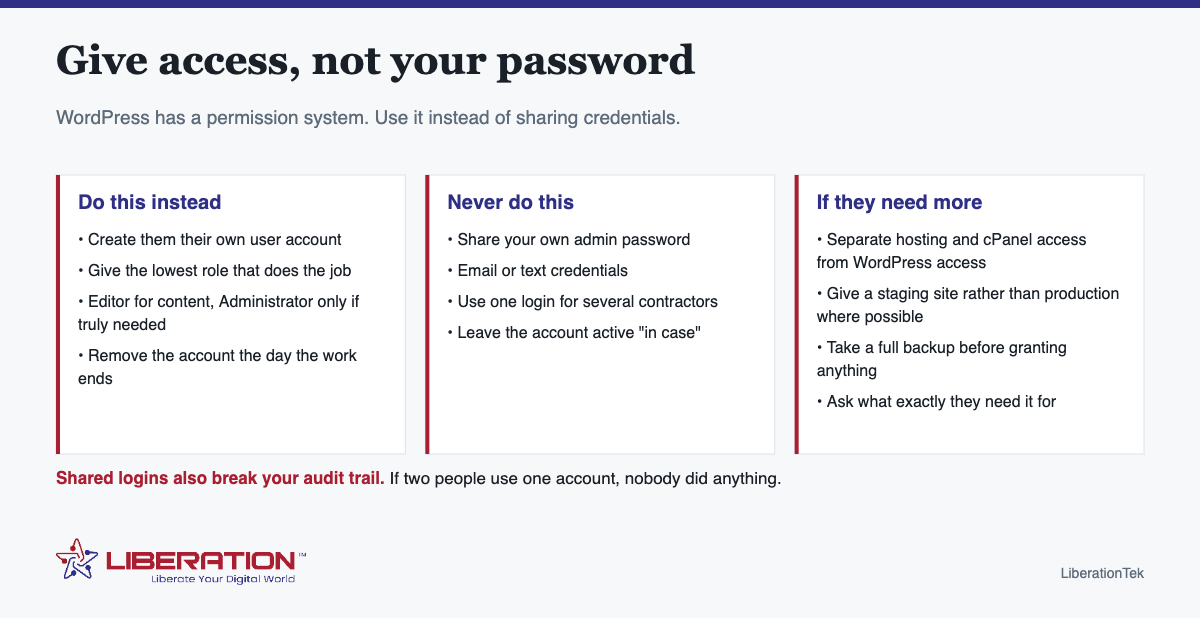
Give developer WordPress access safely in five minutes
- Take a full backup first – files and database – and confirm you can restore it. This is the step that makes everything else low-risk.
- Create a new user in WordPress under Users → Add New, with their own email address.
- Choose the lowest role that works. Editor covers content. Administrator is genuinely needed for plugins, themes and settings, which is most development work – but it should be their Administrator account, not yours.
- Write down what you granted and when, and put a removal date in your calendar.
- Turn on two-factor authentication for your own account while you are there.
Developer WordPress access: roles, briefly
| Role | Can do | Use for |
|---|---|---|
| Author / Contributor | Their own posts only | A writer |
| Editor | All content, no settings or plugins | Content work, copy changes |
| Administrator | Everything, including users and plugins | Development, theme and plugin work |
There is no useful role between Editor and Administrator, which is why most development work needs the top one. That is fine – the protection comes from it being a separate, temporary, named account rather than from withholding capability they need.
Developer WordPress access is not hosting access
WordPress access and hosting access are different things, and granting one does not require the other. Migrations, server configuration and some performance work genuinely need cPanel or SFTP. Much of what developers do does not.
When it is needed: grant it for the period required, prefer a staging copy over the live site, and change the password afterwards. Never hand over the account you also use for billing and email.
The questions worth asking first
- What exactly do you need access to, and why? A straightforward answer is a good sign. Vagueness is not.
- Can you work on a staging copy? Most work can be, and it removes the risk of a live site breaking mid-afternoon.
- Will you install anything? Ask to be told what and why, rather than discovering six new plugins later.
- How long will you need it for? This sets the removal date.
Remove developer WordPress access when the work is finished
- Delete or deactivate their user account – on the day the work ends, not eventually.
- Revoke hosting or cPanel access and change any password that was shared.
- Check what was left behind. Extra user accounts you did not create, plugins you did not ask for, scheduled tasks, and any code added to the theme.
- Confirm the administrator email is still yours. Thirty seconds, and it is the one that matters most.
- Take another backup, so you have a clean post-project restore point.
None of this implies the developer is untrustworthy. It is the same principle as taking back an office key – ordinary practice that protects both sides, and a professional will expect it.
Why developer WordPress access deserves care
Most small business websites accumulate logins nobody has reviewed: an agency from three years ago, a contractor who did one job, a former employee. Each is a route in that you are not watching.
Twice a year, open Users in WordPress and your hosting account and remove anyone who should not be there. It takes ten minutes and it is one of the highest-value security habits available to a small business – considerably more useful than most of what gets sold as website security.
While you are at it: multi-factor authentication on your hosting control panel, on WordPress, on your email, and on the domain registrar. The registrar is the one people forget and the one with the widest consequences.
What developer WordPress access allows at each role level
Roles are the whole mechanism here, so it helps to know what you are actually granting. WordPress ships with five, and only two are sensible answers when you give a developer WordPress access.
| Role | Can do | Use for |
|---|---|---|
| Administrator | Everything, including deleting the site and removing you | You, and nobody else by default |
| Editor | All content, all pages, other people’s posts | A content person or agency writer |
| Author | Publish and manage their own posts only | A regular contributor |
| Contributor | Write, but not publish | A freelance writer you review |
| Subscriber | Read, manage own profile | Customers on a membership site |
A developer doing genuine development work will need Administrator, because installing plugins and editing themes requires it. That is legitimate. What is not legitimate is being asked for your Administrator login instead of their own Administrator account. The distinction is not pedantic. It is the whole point.
Why a separate account matters even at the same permission level
If they need Administrator anyway, why not just hand over yours? Four reasons, none of them about mistrust:
- The audit trail. With separate accounts, the activity log shows who changed what. With a shared login, every action is attributed to you, including the one that broke the site.
- Revocation is one click. Deleting their account ends their access instantly. Ending access to a shared password means changing it and updating everywhere you used it.
- Password reuse. If your WordPress password is also your email password, or close to it, you have just handed over rather more than site access.
- Two-factor. A shared login makes 2FA unworkable, so it gets disabled, which removes the single most effective protection on the account.
A developer who objects to having their own account is telling you something useful about how they work. Professionals expect this and often ask for it unprompted.
What to do while the work is in progress
Access granted is not the end of it. A few habits keep the risk low without getting in anyone’s way:
- Take a backup before they start, and confirm you can restore it yourself. Not their backup. Yours.
- Agree what is out of scope. Changing DNS, altering email routing, or installing anything that sends mail on your behalf should be discussed first, not discovered later.
- Keep your own Administrator account active and do not let it become the one nobody uses. If you are ever locked out, this is how you get back in.
- Watch for new user accounts. A developer adding a second account for a colleague is normal; being told about it afterwards is not.
Ending developer WordPress access properly
The end of a project is when access gets forgotten, and dormant administrator accounts are one of the most common ways small business sites are later compromised. The closing checklist is short:
- Delete or demote their WordPress user account, and reassign their content to your account rather than deleting it.
- Remove any hosting or cPanel users created for them, and any SSH keys.
- Change the hosting account password if you shared it at any point.
- Remove them from the domain registrar and from any DNS management.
- Review the full user list and remove anyone else who no longer needs to be there.
- Confirm you hold every login: domain, hosting, WordPress, and any premium plugin licenses bought for the project.
If the developer is building the site from scratch rather than editing an existing one, our web development team works this way as standard, and you keep ownership of the site and its accounts either way. The related question of whose name the hosting should be in is covered in who should own your domain and hosting.
That last item is worth a specific ask. Plugin licenses bought on the developer’s account renew on their card and stop working when the relationship ends, which is a surprise best avoided while the site is live.
Developer WordPress access: a short checklist
Good developer WordPress access is boring on purpose. The steps below take a few minutes, and they work for a freelancer, an agency or a volunteer.
- Create a named user for the developer. Developer WordPress access should never run through your own account.
- Pick the lowest role that fits the job. The WordPress roles and capabilities documentation lists what each role can do, so you can match developer WordPress access to the task.
- Use a strong, unique credential and turn on two-factor sign-in for every account with developer WordPress access. The WordPress hardening guide covers strong credentials and least-privilege thinking.
- Take a backup before any work starts, so you can roll back if the job goes wrong.
- Write down an end date. Developer WordPress access should expire when the project does.
If you want a second pair of hands, our team can set up developer WordPress access for you, or review who can already reach your site. Our guide to website backups explains the backup step in more detail.
Frequently asked questions
Is it safe to give my WordPress password to a developer?
No, and you do not need to. WordPress has a built-in user system – create a separate account with the lowest role that lets them do the work, and remove it when the job finishes. Sharing your own password gives away more access than the task requires and destroys your ability to tell who changed what.
What WordPress role should I use for developer WordPress access?
The lowest that does the job. Editor covers content work. Administrator is needed for plugins, themes and settings, so most development work does require it – but it should be their own Administrator account, created for the project and removed afterwards.
What should I do before giving anyone access to my site?
Take a full backup of files and database and confirm you can restore it. Then create their account, note what you granted and when, and diary the removal date.
Do developers need hosting and cPanel access too?
Sometimes – migrations, server configuration and some performance work need it. Treat it as a separate decision, grant it only for the period required, and change the password afterwards. Where possible, give access to a staging copy rather than the live site.
How do I remove a developer’s access when the work is done?
Delete or deactivate their WordPress user account, revoke hosting access, change any shared passwords, and check for anything left behind – extra accounts, unexpected plugins, or scheduled tasks. Do it on the day the work ends.
Does a developer need Administrator access to WordPress?
For real development work, yes. Installing plugins, editing themes and changing site settings all require Administrator. The important distinction is that they should have their own Administrator account, not your login. Same permissions, but the activity is attributable and you can revoke it with one click.
What should I do if I already gave out my WordPress password?
Change it now, and change it anywhere you reused it, particularly your email. Then create a separate account for the developer at the level they actually need, review the user list for accounts you do not recognize, and turn on two-factor authentication for your own account. None of this requires an awkward conversation; it is just normal practice.