
The single largest exposure in most tax practices is not the server or the software. It is a return, a W-2 or a K-1 sitting as an attachment in two mailboxes, copied onto phones and backups, with no expiry, no way to revoke it and no record of who opened it. Encrypted email for CPAs is really a question about delivery mechanism, and the fix is straightforward.
Encrypted email for CPAs: why the attachment is the problem
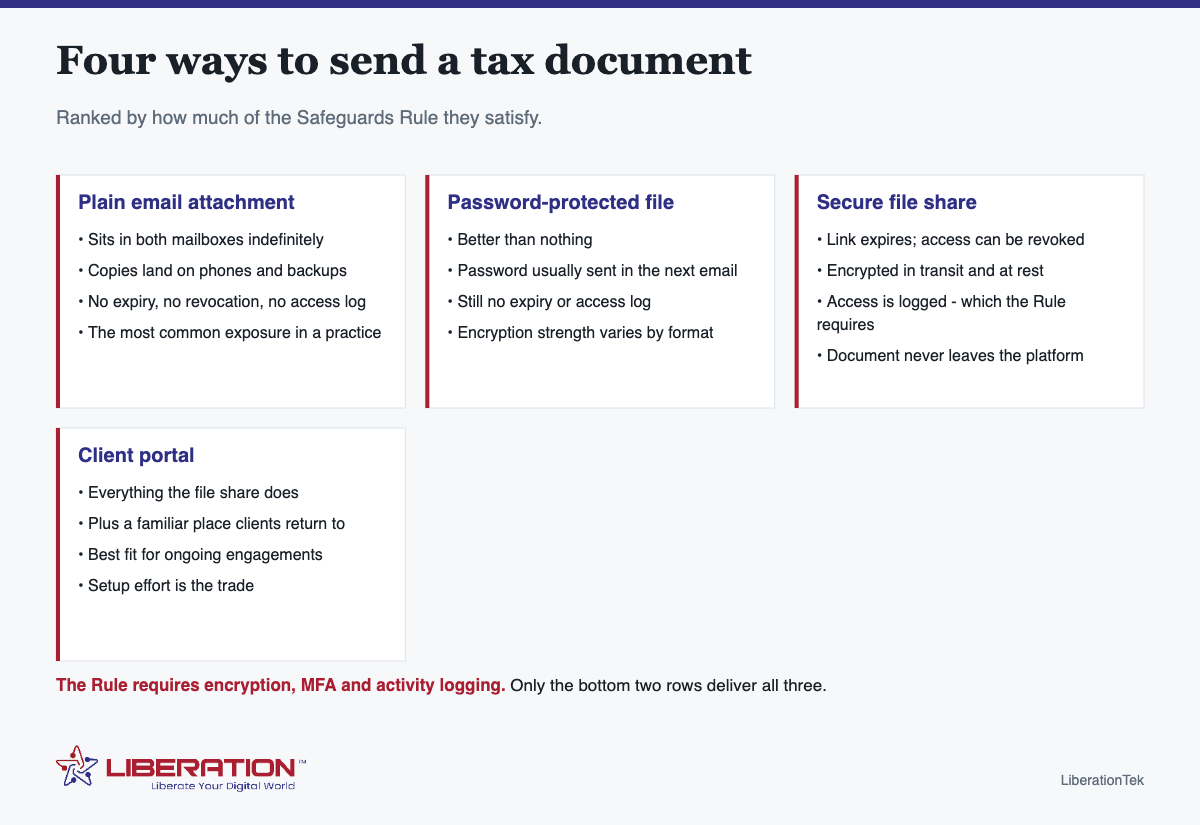
Email was not designed to be a document repository, but that is what it becomes. Once a file is attached and sent:
- It exists permanently in your sent items and in the client’s inbox.
- It is copied to every device either of you syncs mail to.
- It is captured in both parties’ backups, indefinitely.
- It can be forwarded onward without your knowledge.
- There is no record of who opened it, when, or from where.
Set that against what the FTC Safeguards Rule requires for customer information – encryption in transit and at rest, multi-factor authentication for anyone accessing it, secure disposal within two years of last use, and logging of authorized user activity – and the gap is obvious. You cannot securely dispose of a document that lives in six mailboxes, and you cannot log access to a file you no longer control.
What “encrypted email for CPAs” actually means
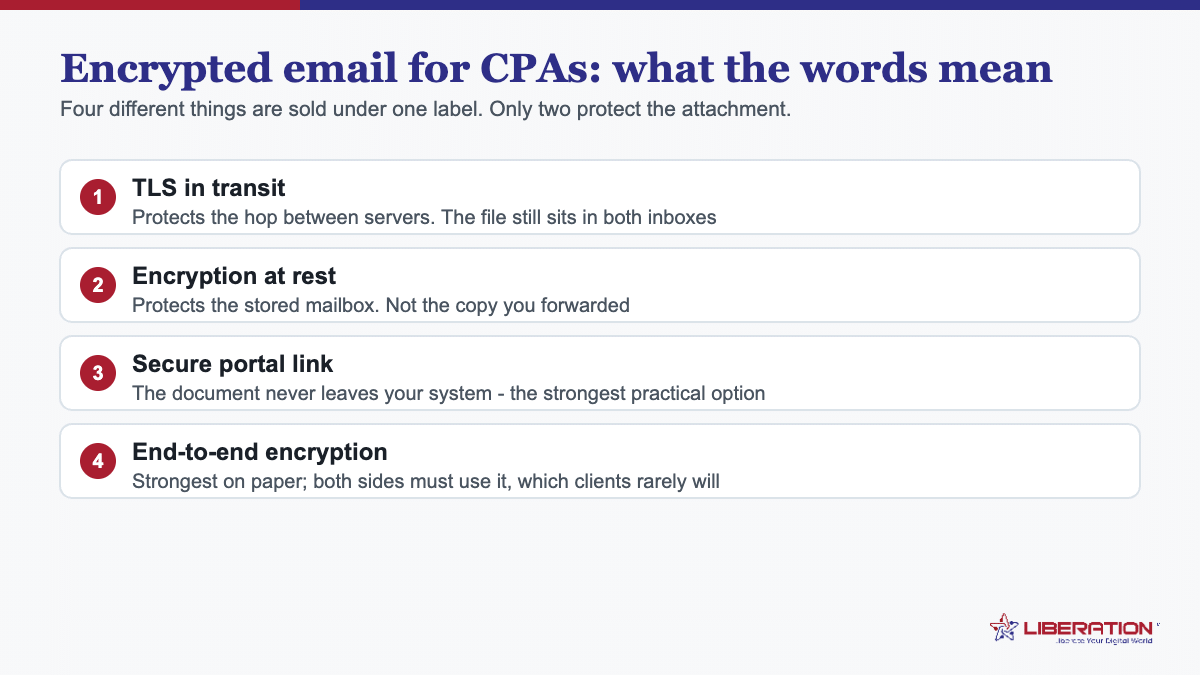
The phrase covers two quite different things, and conflating them is why firms think they are covered when they are not.
Transport encryption protects the message while it travels between mail servers. It is standard on any competent mail platform, it is invisible, and it does nothing about the copy sitting in the mailbox at either end.
Secure delivery keeps the document on a platform and sends the recipient a link. The file never enters a mailbox. That is what gives you expiry, revocation and an access log – the three things the attachment can never provide.
For client documents, the second is what a practice needs. Transport encryption is table stakes; it is not a control you can point to in a security plan.
The practical encrypted email for CPAs setup
- Put mail on your own domain, with multi-factor authentication on every mailbox. A free consumer address for client correspondence fails several elements of the Rule before you even open it.
- Use a secure file share for every document going out, and an upload link for everything coming in.
- Set expiry on links so access ends when the engagement does, which also helps with the two-year disposal requirement.
- Never send a password in a following email. If a file must be password-protected, the password goes by a different channel entirely – a phone call is fine.
- Write it into the engagement letter so clients know what to expect and you have a documented process.
- Repeat it in January. Clients revert to attachments unless reminded, every single season.
The direction nobody controls: clients sending to you
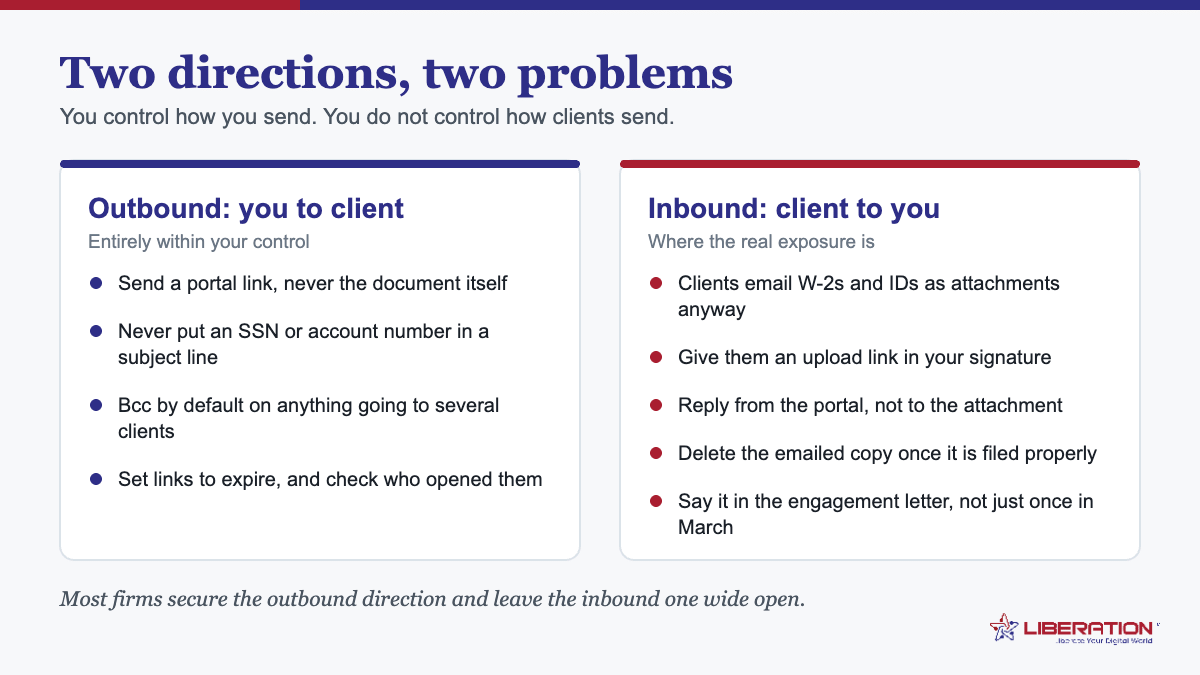
Most practices solve outbound and ignore inbound, yet inbound is where the volume is. A client will photograph a W-2 and email it unless you give them somewhere better to put it.
Two things work. Give every client an upload link at the start of the engagement, and put it somewhere they will find it again – in the engagement letter, in your email signature, and on the website. And when something does arrive as an attachment, move it to proper storage and delete the email rather than leaving it as the system of record.
Retention: the encrypted email problem that bites later
The Safeguards Rule requires secure disposal of customer information no later than two years after the most recent use in serving that customer, unless there is a legitimate business need or legal requirement to keep it. Email makes that nearly impossible to honor, because nobody deletes mail and search makes hoarding costless.
Documents held on a platform with retention settings can actually be disposed of on schedule. Documents held as email attachments cannot, in any meaningful sense – which is a second, quieter argument for getting them out of the mailbox.
What we provide, stated narrowly
Liberation Email from $1.95 per user per month puts your mail on your own domain, on hardware we own and operate in the United States. It speaks IMAP, SMTP, CalDAV and CardDAV so Outlook and Apple Mail work unchanged, nothing is scanned for advertising or used to train a model, and there is a full export whenever you want one.
Hub For Teams from $7.49 per user adds the part that actually solves this problem: secure file sharing and document storage alongside the mailbox, so returns travel as links rather than attachments, and shared inboxes so a client’s message to the practice is not trapped in one person’s mail.
We are not a compliance firm and cannot certify your practice. What we can do is answer the service-provider questions your written plan has to document – where data sits, who can reach it, how it is encrypted, what happens in an incident – in writing.
Comparing the encrypted email for CPAs options honestly
| Method | Encrypted in transit | Encrypted at rest | Expiry and revocation | Access log |
|---|---|---|---|---|
| Plain attachment | Usually, server to server | Only if the mailbox is | No | No |
| Password-protected file | Usually | Partially, varies by format | No | No |
| Secure file share | Yes | Yes | Yes | Yes |
| Client portal | Yes | Yes | Yes | Yes |
Only the bottom two rows produce the access log the Safeguards Rule asks for, and only they let you actually dispose of a document within the two-year window.
What to tell a client who keeps emailing attachments
Most clients are not resisting – they are doing the thing that is in front of them. Three sentences fix it, used consistently:
- Give them the link every time. “Here is your secure upload link” works better than “please don’t email documents”.
- Explain it once, briefly. “We keep your return off email so copies don’t sit in inboxes” is enough. Nobody needs the regulation cited at them.
- Do not make an exception “just this once”. The exception becomes the habit, and it will be the one document you wish had not been in a mailbox.
Put the link in the engagement letter, in your email signature, and on the website, and the behavior follows the path of least resistance rather than fighting it.
Retention, in practice rather than principle
Deciding a retention period is easy; making deletion actually happen is not. Three habits make it real.
- Put documents where deletion means something. A file removed from a platform with retention settings is gone from the copies that platform controls. A file deleted from an inbox is still in the sent folder, the client’s inbox, two phones and a backup.
- Diarise it rather than trusting memory. One afternoon a year, in the summer, working through what is past its retention period.
- Write down the exceptions. The Rule allows retention where there is a legitimate business need or legal requirement. If you are keeping something for one of those reasons, record which – otherwise it looks identical to simply never having deleted anything.
The underlying point is that data you no longer need cannot earn the practice anything and can still be stolen. Disposal is the only control that reduces risk permanently.
Rolling out encrypted email for CPAs without a client revolt
The technical part of this is a weekend. The part that decides whether it works is how you introduce it to clients, and firms that skip that step end up with a portal nobody uses and staff quietly emailing attachments again by the second week of February.
Roll it out in the autumn, not in February. Introducing a new process during filing season guarantees resistance, because everybody involved is at their least patient. Late summer or early autumn gives you a quiet quarter to work out the awkward cases before volume arrives.
Put it in the engagement letter. One paragraph: how documents will be exchanged, what you will not send by ordinary email, and what to do if they cannot use the portal. A client who agreed to it in writing in September rarely argues about it in March. This also satisfies the part of the FTC Safeguards Rule that expects your safeguards to be written rather than assumed.
Send the link before you need it. Give every client their upload link once, early, with a two-sentence explanation. The commonest failure is that the first time a client encounters the portal is the moment they are already frustrated and trying to send something urgently.
Have a fallback that is not “email it anyway”. Some clients will not manage the portal – the elderly, the technologically reluctant, the one who always replies from a phone. Decide in advance what those clients do: drop documents at the office, post them, or use a one-time secure link you generate for them. Without a stated fallback, the fallback becomes an attachment, which is the outcome you were trying to avoid.
Train staff on the reply, not just the process. When a client emails a W-2 anyway, what does the preparer do? The answer should be automatic: save it properly, delete the email, reply with the upload link and a friendly line. Write that reply once, keep it as a saved response, and it takes ten seconds rather than becoming a judgement call under pressure.
Measure it in March. Count how many documents arrived by portal versus by attachment. If the portal share is low, the problem is almost never the software – it is that clients were never told clearly, or that staff never had a script. Both are fixable before the next season.
Done this way, encrypted email for CPAs stops being a compliance box and becomes the ordinary way the firm works, which is the only version that survives a busy March.
To summarise the whole page in a sentence: encrypted email for CPAs is less about encryption than about never putting the document in an email in the first place. Send a link, ask clients to upload, write it into the engagement letter, and encrypted email for CPAs becomes a solved problem rather than an annual worry.
Frequently asked questions
Is it safe to email tax documents to clients?
A plain email attachment is the weakest option available. The document stays in both mailboxes indefinitely, copies propagate to phones and backups, and there is no expiry, no revocation and no access log. The FTC Safeguards Rule requires encryption, multi-factor authentication and logging of who accessed customer information – which an ordinary attachment cannot provide.
What is encrypted email for CPAs?
In practice it means one of two things: transport encryption between mail servers, which is standard and largely invisible, or secure delivery where the document sits on a platform and the recipient receives a link. For client documents the second is what firms need, because it adds expiry, revocation and an access log.
Does password-protecting a PDF satisfy the Safeguards Rule?
Not on its own. The password is usually sent in a following email, there is still no expiry, revocation or access log, and encryption strength varies by format and tool. The Rule’s requirements for logging and access control are not met by a password on a file.
How should a tax practice send a return to a client?
Through a secure file share or client portal where the link expires, access can be revoked, the file is encrypted in transit and at rest, and access is logged. Send the notification by email and the document by link.
What about documents clients send to us?
The same problem in reverse, and harder because you do not control the client’s habits. Give clients an upload link rather than asking them to attach files, say so in the engagement letter, and repeat it at the start of every season.
Related reading
- FTC Safeguards Rule for Tax Preparers: 9 Essential Steps
- IRS Publication 4557: A Plain-English Checklist for Tax Practices
- WISP for Tax Preparers: The 9 Elements You Must Write
- How to Protect Your Business Online — The wider security picture for a small firm.
- Business Email Setup — Email on your own domain, with the agreement in place.