

Move From WP Engine To Liberation
A person moves your WordPress site, tests everything before it goes live, and schedules the cutover around your schedule, not ours.
How the move from WP Engine works
We handle each step so you can keep working.
The short answer
Moving off WP Engine means moving your WordPress site — files, database and everything on it — to a new host. WP Engine doesn’t host email, so if you run mail through Google Workspace, Microsoft 365 or elsewhere, that side is unaffected; this covers the website itself. The move happens as one free migration, handled by a person on our team rather than a self-service import tool.
Most single-site migrations complete within a few business days of you approving the plan, with a scheduled cutover window so there’s no unexpected downtime.
What actually happens
We copy, we don't cut over yet
Your WP Engine site stays live and untouched while we build the copy on Liberation’s servers.
We test on our servers first
The migrated copy is checked against the live WP Engine site — pages, forms, plugins — before anything is pointed at it. Anything WP Engine’s platform restricted gets a standard WordPress equivalent.
We schedule the cutover with you
DNS changes happen at a time you choose, and we monitor for propagation issues after the switch.
You keep your domain name and your content — what changes is the platform underneath, from WP Engine’s managed environment to real cPanel hosting you control directly.
- Free migration no setup fee, no migration fee, no surprise line on the first invoice.
- No downtime cutover DNS changes are scheduled and monitored, not left to chance.
- U.S.-owned infrastructure and support, not outsourced overseas.
Why teams leave WP Engine
The most common reasons: visit and storage caps that trigger overage charges — WP Engine’s own published figures work out to roughly $1–2 per extra 1,000 monthly visits beyond your plan’s limit — a proprietary environment instead of standard cPanel, and restrictions on which plugins you’re allowed to run. See the full price comparison on our WP Engine Alternative page if that’s what’s driving the move.
What moves, what doesn't have to
WordPress sites
Files, database, plugins and themes move as-is; we flag anything incompatible with our servers before the cutover, not after.
WP Engine doesn’t host email, so mailboxes elsewhere — Google Workspace, Microsoft 365 or otherwise — aren’t affected by this move. If you’d rather consolidate onto Liberation Email or Hub for Teams, we can move those too.
Domain registration
You can keep your domain registered wherever it is now and just point it at us, or transfer registration too — either works.
- WordPress hosting from $35/month.
- Liberation Email $1.95/user/month.
- Free migration included with any plan switch.
Priced the way a business buys
Starting prices, billed monthly. Migration itself is free regardless of which plan you choose.
- WordPress hosting from $35/month.
- Liberation Email $1.95/user/month.
- Hub for Teams $7.49/user/month.
What It Costs
Starting prices, billed monthly unless noted. Anything larger gets a written quote.
Step-by-step: export your WP Engine site and switch DNS
We copy, we don't cut over yet
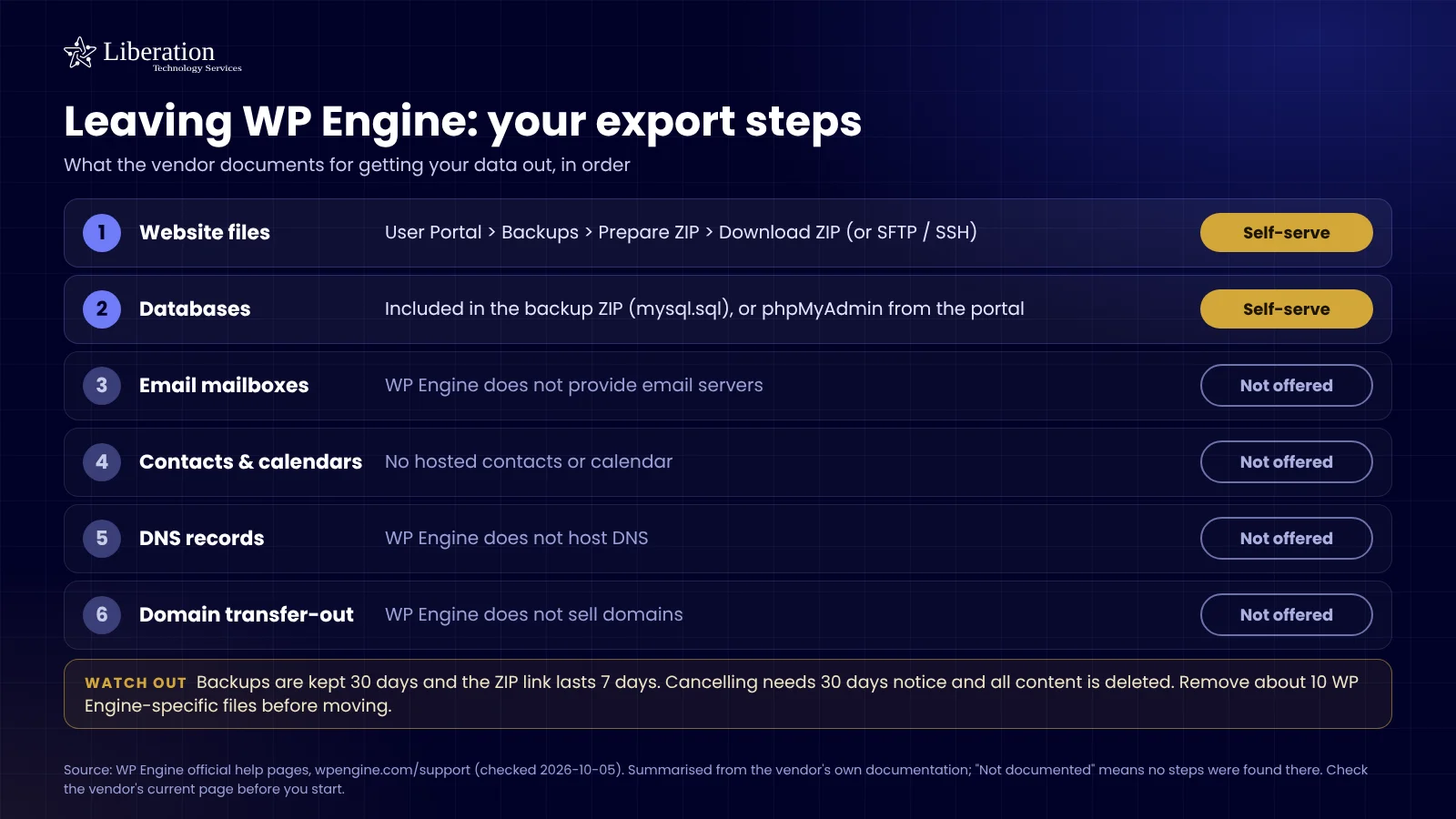
- Log in to the WP Engine User Portal and open the site you’re moving.
- Go to its Backups tab and create a new backup point, then use the download link to get a full site and database export — or, if you’d rather work directly, use the SFTP/SSH access listed under that site’s Servers tab.
- Note your domain’s current DNS records before anything changes — we’ll send you Liberation’s once your new site is built and tested.
- Once we’ve confirmed your new site is working, update your domain’s nameservers (or the individual records we send you) to point at Liberation.
- Save and confirm. Changes usually show within an hour; full worldwide propagation can take up to 48 hours, and we keep both versions available during that window so nothing gets lost.
We test on our servers first
The migrated copy is checked against the live WP Engine site — pages, forms, plugins — before anything is pointed at it.
We schedule the cutover with you
DNS changes happen at a time you choose, and we monitor for propagation issues after the switch.
You keep your domain name and your content — what changes is the platform underneath. See the full WP Engine vs. Liberation comparison →
Leaving WP Engine: your export steps
What the vendor documents for getting your data out, in order.
Common questions
Accordion Title
Accordion Title
Accordion Title
Accordion Title
Ready to leave WP Engine?
Book a call and tell us what you’re running — we’ll give you a migration timeline and a written quote, no obligation.
Custom Solutions
Take your business to the next level with Liberation's full suite of services & solutions.
Custom Management
Don’t like managing? We offer managed services for hosting, ecommerce, web sites, and more.
Our Promise Of Digital Independence
Liberating Your Digital World Is Our Passion
- U.S.A. owned and based
- We own and control our entire platform
- More security to protect your data
- No Censorship Guarantee
- 100% data ownership
- Your data is NEVER shared

Global Edge Network
Liberation’s global edge network provides enhanced performance & security.
Freedom Tech News
Stay informed on the latest tech news, new products, promotions, & more!
Ready For Digital Liberation?
Why businesses move from WP Engine
If you want to move from WP Engine, you are usually reacting to one of three things: monthly visit caps, storage and bandwidth overage fees, or a renewal price that keeps climbing. Liberation hosts WordPress on flat-rate cPanel servers, so the bill stays the same whether your traffic spikes or not. Our team handles the whole migration, from the first backup to the final DNS change, so you never have to touch a server setting.
What a WP Engine migration includes
Every move from WP Engine starts with a full copy of your files, database, plugins and themes. We rebuild the site on our servers, test pages, forms, checkout and logins against the live version, and only then schedule the cutover. Your live WP Engine site stays untouched the entire time, which means there is no downtime and a safe fallback if anything looks wrong.
Before you start, it helps to have your WP Engine User Portal login, your domain registrar login, and a list of any plugins that rely on WP Engine specific features such as their page caching or staging environment. If you are not sure what depends on what, we will audit it for you at no charge before any work begins.
How to export your WP Engine site yourself
Some owners prefer to handle the first step themselves. In the WP Engine User Portal, open your environment, go to Backups and create a new backup point. Download the full site and database archive, or connect over SFTP and copy the wp-content folder along with a database export. Send us that archive and we will do the rest. The official WordPress backup guide explains what a complete backup should contain, and it is a useful checklist if you want to double check your export.
What happens to your email and domain
WP Engine does not host email, so your mailboxes at Google Workspace, Microsoft 365 or another provider are not affected by moving your website. You can keep your domain registered where it is now and simply point it to Liberation, or transfer the registration to us. If you want to consolidate, we can also move your mailboxes to Liberation Email.
After you move from WP Engine
Once DNS points to our servers, we monitor the site for propagation problems, confirm that SSL is active, and keep both versions available for up to 48 hours so nothing gets lost. You get the same WordPress dashboard you already know, plus flat monthly pricing starting at $35 per month for WordPress hosting.
Ready to switch? Browse all of our migration services, or book a call and we will give you a written quote for your move from WP Engine.
What actually makes leaving WP Engine hard
WP Engine is less a WordPress host than a platform with WordPress inside it, and the platform features are the part that does not travel. Page caching happens above the site rather than in a plugin you can copy. WordPress’s own scheduler is disabled and replaced with theirs. Redirect rules live in their dashboard rather than in the site’s configuration. A straight file-and-database copy brings none of it.
The redirects are the item that costs money if missed. Years of URL changes may be configured in that dashboard, invisible from inside WordPress, with nothing in a database export mentioning them. They have to be read out deliberately and rebuilt on the new host. Discovering this after cutover means a week of dead links on pages that used to rank.
Scheduled work is the second item. Because WordPress’s built-in scheduler is replaced, anything time-based — scheduled posts, backups, follow-up emails, a plugin’s nightly job — is running on their infrastructure. On an ordinary host that work returns to WordPress’s own scheduler, and it has to be switched back on and watched actually firing rather than assumed.
Then the environments. Most accounts carry development, staging and production, and it is common for the live site to have drifted from whatever anyone remembers building. Establish which environment is genuinely serving the public before migrating, and move that one. Copying staging because it was easier to reach is a real and surprisingly common failure.
How we handle it: we export the redirect rules from the dashboard, document what their scheduler is running, copy the live environment rather than the convenient one, re-enable scheduled work on our side and verify it runs, then test on a temporary address before DNS moves. Website Migration is included with hosting, email and Hub plans. If you are not on a plan, or you want a one-off move, it is $250. Book a call and we will go through the dashboard with you.