
US-based hosting should mean three things: your website, email and files sit on servers in the United States, the company running them is American, and the people who answer your call are too. Many providers promise only the first, and some promise less than they appear to. The strongest choice for a small business, church, nonprofit or campaign is a provider that owns its own U.S. servers, so there is no reseller layer between you and your data. That is how LiberationTek is built: we run servers we own in the United States, not capacity resold from Big Tech.
This guide explains what “hosted in the U.S.” does and does not guarantee, what to ask before you sign, which type of hosting fits which organization, and what U.S. hosting costs.
TL;DR
- “Hosted in the United States” describes where a primary server sits. It does not automatically cover backups, support staff, or subcontractors.
- Ask where your data, backups and administrator access live, and get the answer in writing.
- Server location and company ownership are two different questions. A provider that owns its U.S. hardware answers both.
- Match the hosting type to your workload: shared for simple sites, managed WordPress for busy sites and stores, private cloud for sensitive data or heavy traffic.
- Healthcare practices and law firms need a signed agreement and clear security terms, not just a U.S. address.
Table of Contents
- What “US-based hosting” actually promises
- Server location versus company ownership
- Questions to ask any U.S. hosting provider
- Which type of U.S. hosting fits your organization
- Industry-specific checks
- What U.S. hosting costs and what moves the price
- How to switch without losing mail or traffic
- LiberationTek: U.S.-owned, on servers we own
- FAQ
- Sources
What “US-based hosting” actually promises
When a hosting company says your site is hosted in the United States, it is describing one thing: the physical machine that serves your pages. That is useful. It affects how fast pages load for American visitors, and it tells you which country’s courts and laws apply to the hardware.
But the phrase leaves a lot unsaid. A provider that says “hosted in the United States” has not necessarily promised that every kind of data, every subcontractor system and every administrator login stays in the country. A single declared region may hold your main site while backups, disaster-recovery copies, usage logs or vendor support activity live somewhere else.
Public-sector buyers already treat this carefully. Georgia’s state technology standard, for example, requires state data to be processed, stored, transmitted and disposed of only on servers within the United States, and it bars offshore access to state systems unless an exemption is approved. Note what that rule covers: not just where the site sits, but who can reach it. A small organization can borrow the same logic with a short list of questions.
Server location versus company ownership
Two questions get mixed together, and they have different answers.
Where is the data? This is data residency: the physical place where information is stored or processed.
Who controls it, and which laws and courts govern it? This is data sovereignty. The UK trade body techUK separates the two ideas and recommends checking legal ownership, where data and backups sit, where operations and support staff work, and what legal and technical controls are in place.
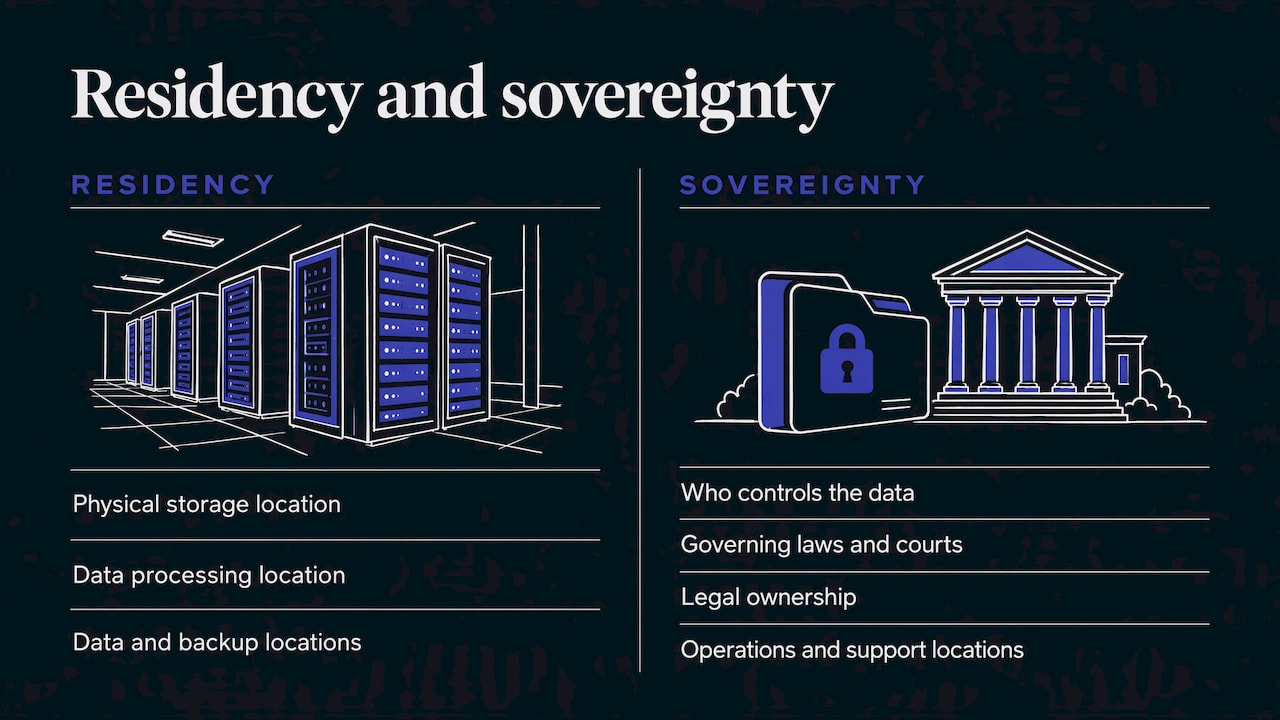
The same article explains that the U.S. CLOUD Act, passed in 2018, lets American authorities compel providers under U.S. jurisdiction to hand over data in their control, even if it is stored abroad. For a U.S. organization, the practical takeaway is simple: know which legal system governs your provider. If your provider is American, owns its servers in the United States and has American staff, you are dealing with one country’s rules, and the answer to “who has my data?” is easy to state. Mixed arrangements, where an American brand rents space from another company’s cloud, make that answer harder to give.
This is the reason LiberationTek owns and operates its own servers in the United States. Customer data stays under the customer’s control, and we do not track or share it. If you want to read more on this topic, our piece on managing sovereign data risks goes deeper.
Questions to ask any U.S. hosting provider
You do not need to be technical to ask these. You only need to get answers you can keep on file.
- Who owns the servers? Does the company run its own hardware, or rent space from a larger cloud company? Renting is not wrong, but it adds another party that can see or touch your data.
- Where are backups stored? Primary servers in the U.S. mean little if backup copies are elsewhere.
- Who can log in as an administrator, and from where? Support staff location matters as much as server location.
- Which subcontractors handle your data? Ask for a list.
- What happens when a government agency requests your data? A good provider has a written procedure.
- How long is data kept after you cancel? Ask for a retention schedule.
The security team at one training-platform company suggests asking for a data-flow diagram, subprocessor list, data processing agreement and written government-request procedure. A very small organization may not need every document, but asking the questions in plain email and saving the replies is a sensible habit.
On security, the U.S. Department of Labor’s guidance on hiring service providers advises looking for annual third-party audit reports covering information security, availability, processing integrity and confidentiality. It also recommends contract terms on confidentiality, how quickly you are told of a breach, compliance with privacy and security laws, and insurance. Reading such reports and contract terms is easier when you know the basics of website security and customer trust.
Which type of U.S. hosting fits your organization
Hosting types differ mainly in how much of the machine you share and how much work is done for you.
Shared cloud hosting
Your site lives on a server alongside other sites. It is the right starting point for a church website, a local business brochure site or a small nonprofit. Mailboxes can use the same disk allowance as your site, so plan for mail growing over time. Our Shared Cloud Hosting runs with cPanel, a common control panel that lets you manage domains, email and files from one screen. Plans are Starter at $14.99 per month, Ramping Up at $19.99 per month and Growth at $29.95 per month. See Shared Cloud Hosting for what each includes.
Managed WordPress and WooCommerce hosting
If your site runs on WordPress, or you sell online, managed hosting takes routine server work off your plate. WP Starter is $35 per month, WP Growth is $69 per month and Commerce is $129 per month. Our guide to what to check in WordPress hosting lists the requirements worth confirming, and the plans are on the managed WordPress hosting page.
Private cloud
A private cloud gives your organization dedicated resources instead of a shared pool. It suits workloads with serious security, integration or data-volume needs. A white paper from a large chip maker describes this split between private and public clouds: private suits sensitive, steady workloads, while public suits demand that spikes and falls. For a law firm, a medical practice or a campaign with a donor database, steady and sensitive is usually the description.
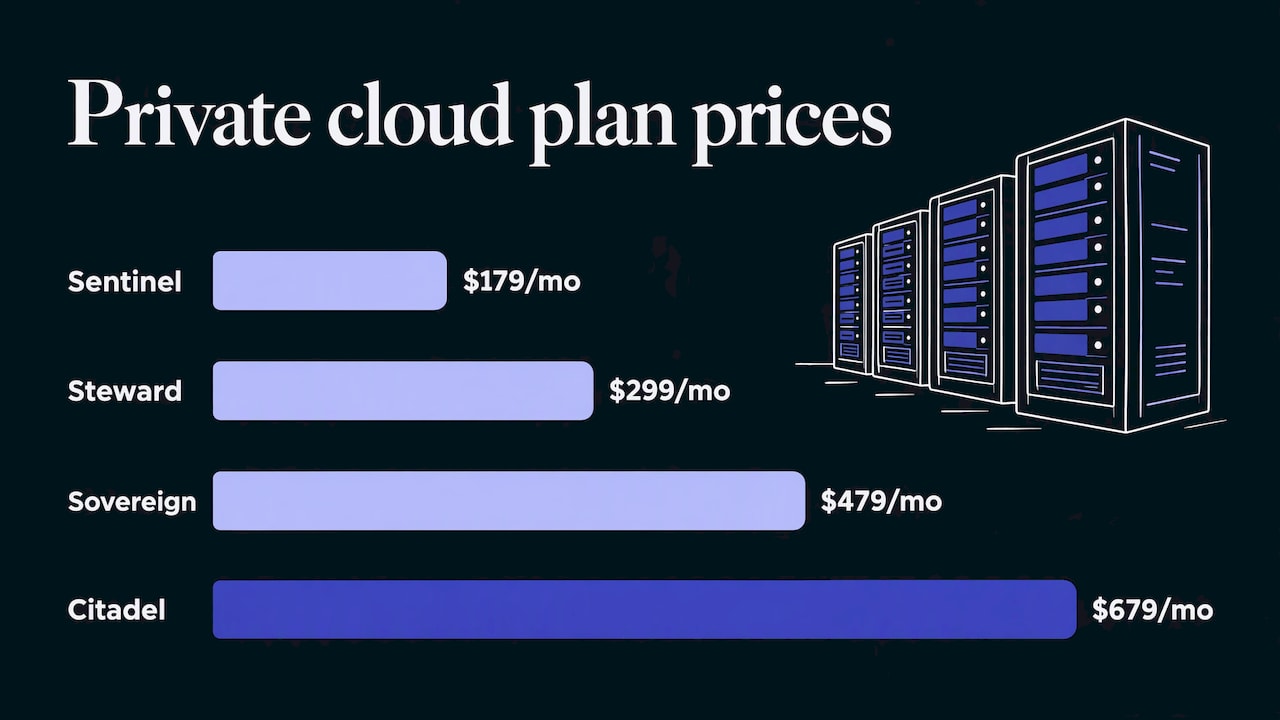
LiberationTek Private Cloud Hosting comes in four plans: Sentinel at $179 per month, Steward at $299 per month, Sovereign at $479 per month and Citadel at $679 per month. Private Cloud includes unmetered monthly data transfer with no egress fees, which means no per-gigabyte charge when data leaves the server. Compare the tiers on the Private Cloud page, or read public versus private cloud first. If none of the tiers fits, Build Your Own is a custom option, described on our dedicated cloud page.
Email and collaboration
Hosting is not only websites. Email and shared workspaces hold your most private conversations, so where they run matters too. Liberation Email is private, ad-free business email with end-to-end encryption: Mail Starter is $1.95 per month per user, Mail+ is $4.95 and Mail Pro is $7.95. Hub for Teams combines email, files, office apps, chat, video and projects in one workspace, as an alternative to Google Workspace and Microsoft 365. It runs $7.49 per user per month for Teams Starter, $9.75 for Teams+ and $14.95 for Teams+ Talk. Details are on the Liberation Email page and the Hub for Teams page.
Quick comparison
| Need | Good fit | Starting price |
|---|---|---|
| Simple site, small mailbox count | Shared Cloud Hosting | $14.99 per month |
| Busy WordPress site or online store | Managed WordPress, WooCommerce | $35 per month |
| Sensitive data, heavy traffic | Private Cloud Hosting | $179 per month |
| Private business email | Liberation Email | $1.95 per month per user |
| Email, files, chat and video together | Hub for Teams | $7.49 per month per user |
Industry-specific checks
Healthcare practices
If your practice stores or sends patient information, your hosting company is part of your compliance picture. The U.S. Department of Health and Human Services states that a cloud provider that handles electronic protected health information on your behalf is a business associate under HIPAA, and that you need a business associate agreement with it. That holds even if the provider only stores encrypted data and has no key. A U.S. server address does not replace that agreement. Before moving patient-related systems, confirm the contract requirements with your compliance officer or healthcare attorney.
Law firms
Client confidentiality is the core concern. Ask where email and documents are stored, who at the provider can open them, and how requests from outside parties are handled. Encrypted email and a private cloud with an owned-server model give a firm clear answers to those questions. Your state bar’s ethics guidance on technology is the place to confirm your professional duties.
Churches, ministries and nonprofits
Donor and member lists are personal. Choose a provider that does not track or share customer data, and ask about discounts: LiberationTek gives churches and nonprofits a 15% discount.
Campaigns, Second Amendment businesses and local government
These groups often worry about being deplatformed or having data reach parties they did not choose. Owning the servers, keeping them in the United States and answering to American law and customers shortens the chain of people involved. Fire districts and local governments can also use the state-style questions above to build a simple procurement checklist.
What U.S. hosting costs and what moves the price
Prices differ because the work differs. These are the main factors:
- Shared or dedicated resources. The more of the machine that is yours alone, the higher the monthly price.
- Managed or do-it-yourself. Managed hosting includes routine upkeep and support.
- Number of mailboxes. Email is usually priced per user, so a 20-person office costs twenty times a single mailbox.
- Traffic and storage. Stores and media-heavy sites need more.
- Support. Having a real person in the U.S. answer is part of what you pay for.
- Setup costs. Moving from another provider can cost time or money. We offer free migration from another provider.
A worked example: a 10-person office wants a website and private email. Shared Cloud Hosting Starter at $14.99 per month plus ten Liberation Email Mail Starter mailboxes at $1.95 each is $19.50, for a total of $34.49 per month. Moving to Mail+ for all ten users would be $49.50 for email, for a total of $64.49 per month. Plan prices are listed on each product page, so you can check them against your own headcount.
How to switch without losing mail or traffic
Moving is easier than most owners expect.
- List what you have. Domains, websites, mailboxes, forms, and any connected tools.
- Choose the plan that matches your current use plus room for growth.
- Copy before you switch. We migrate content and mail from another provider for free, so your current setup keeps running until the new one is ready.
- Check DNS records. MX records tell the world where to deliver mail, and SPF and DKIM records help receiving servers trust it. Good setup protects deliverability.
- Cut over and monitor for a few days.
Every plan carries a 30-day money-back guarantee, and support comes from people based in the U.S. If you are leaving a large suite, see our overview of cloud hosting alternatives.
LiberationTek: U.S.-owned, on servers we own
LiberationTek was founded in 2021 and is based in Seminole, Florida. We run hosting, email and collaboration on servers we own in the United States. Customers include small businesses, churches, ministries, nonprofits, healthcare practices, law firms, campaigns and local government. If you want a place to start, our secure American cloud provider checklist is a good companion to this article, and you can see everything we offer at liberationtek.com.
Tell us what you run today and we will point you to the plan that fits. Moving is free, support is American, and the 30-day money-back guarantee applies to every plan.
FAQ
Is US-based hosting the same as hosting on U.S. servers?
Not quite. U.S. servers describe where the machines sit. U.S.-based can also mean the company, its staff and its support are in the U.S. Ask about backups and administrator access, because those can sit elsewhere even when the main server is American.
Does U.S. hosting make my site faster?
It helps for visitors in the U.S., because the data travels a shorter distance to reach them. Speed also depends on your plan, your site’s design and traffic, so no provider can promise unlimited speed.
Do I need a business associate agreement for a medical practice website?
If the hosting or email provider handles patient information for you, HHS says it is a business associate and a written agreement is required. A plain marketing website with no patient data is a different situation. Confirm with your compliance officer.
What does hosting with U.S. servers cost for a small organization?
Shared hosting at LiberationTek starts at $14.99 per month, managed WordPress at $35 per month and private cloud at $179 per month. Email is priced per user, starting at $1.95 per month.
Sources
- Adaptive Security: data residency guide
- Georgia Technology Authority: Data Location and Access (SS-15-002)
- techUK: Is your cloud hosting solution truly sovereign?
- U.S. Department of Labor EBSA: Tips for hiring a service provider with strong security practices
- Intel: Optimal workload placement for public, hybrid and private clouds
- HHS: Guidance on HIPAA and cloud computing