
WordPress vs WooCommerce hosting is a question about capacity, not about software. WooCommerce is a free plugin that runs on WordPress, so any WordPress host can run it, but a store needs more PHP workers, an object cache, cart-safe cache rules and a clear payment security plan than a typical site does.
This post is for business owners deciding where to host a shop, and for developers explaining the bill to a client. It covers seven differences, clears up whether WooCommerce is a hosting platform, and shows a side-by-side table. For deeper specs, see our WooCommerce hosting requirements guide.
If you search for woocommerce hosting vs wordpress hosting, you will find pages that treat them as two products. They are one product at two different sizes, and the sections below show where the size matters.
1. WooCommerce is a plugin, not a host
People often ask, “does WooCommerce have hosting?” and “is WooCommerce a hosting platform?” The answer to both is no. According to the WordPress.org plugin directory, WooCommerce is a free, open-source e-commerce plugin for WordPress. It adds products, carts and checkout to a site, and it needs a server to run on.
That server comes from a hosting provider. When you see “WooCommerce hosting” on a plan page, it means WordPress hosting that has been sized and tuned for a store. It is a marketing label for a configuration, and the software underneath is still WordPress.
The same logic explains why the WordPress vs WooCommerce hosting gap is mostly about resources. Both run the same WordPress code, but a store sends far more requests to PHP and the database for each sale than a blog does for each visit.
So the real comparison is between general WordPress hosting plans and plans tuned for commerce. Our guide to WordPress hosting explains the baseline if you are new to it.
2. WordPress.com and WordPress.org change the answer
There is one nuance that trips people up. WordPress.com and WordPress.org are different things. Per the WordPress.com support guide, WordPress.com includes managed hosting with its paid plans, while WordPress.org is the open-source software you host yourself with a provider you choose.
On WordPress.com, you can install plugins on paid plans, and it offers its own commerce plan for online stores. On the self-hosted route, you install WooCommerce yourself and pick any host.
Neither route is wrong. The choice depends on how much control and customization you want, and on whether you would rather run the server side yourself or have a provider handle it. For many businesses that grow past a starter store, self-hosted WordPress hosting for WooCommerce ends up cheaper per order and easier to tailor, because you can tune the hosting to the store.
The trade-off is control. A bundled platform is simpler to start. Self-hosted WordPress hosting for WooCommerce gives you a choice of provider, server resources and tools, and you keep your own store data.
3. WordPress vs WooCommerce hosting: the base requirements are similar
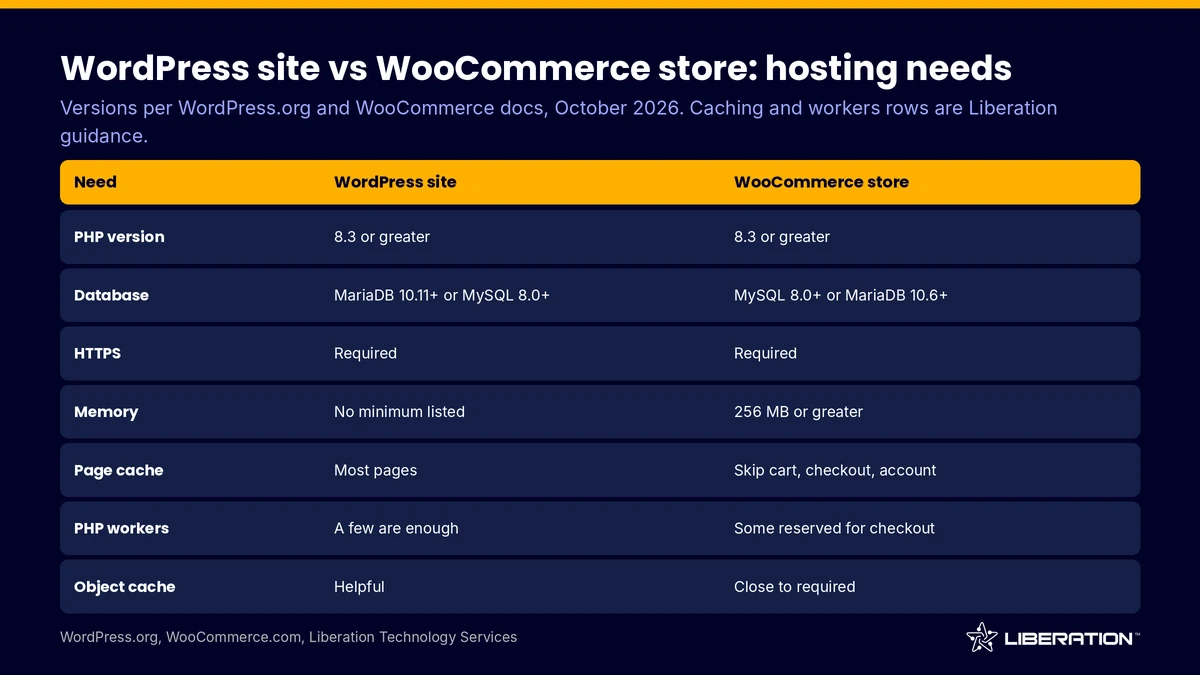
On paper, the two are close. The WordPress.org requirements page recommends PHP 8.3 or greater, MariaDB 10.11 or greater or MySQL 8.0 or greater, and HTTPS. The WooCommerce server requirements ask for PHP 8.3 or greater, MySQL 8.0 or greater or MariaDB 10.6 or greater, WordPress 6.9 or greater, HTTPS and at least 256 MB of memory (checked October 2026).
Notice what is missing from the WordPress side: it lists no memory minimum, while WooCommerce asks for 256 MB. That small gap hints at the bigger one. A site that only serves posts is light, and a store loads more code, more plugins and more database queries on every request, so WordPress vs WooCommerce hosting starts to split on memory before it splits on anything else.
If your host meets those versions, WooCommerce will install. The differences show up under load, which is where the next four sections come in.
4. PHP workers matter far more for a store
A PHP worker handles one uncached request at a time. A blog post is cached once and served to many visitors, so a handful of workers goes a long way. A cart or checkout is built for one person, so every request needs a worker.
That is why WordPress hosting for WooCommerce is judged on worker counts. Our WP Growth plan includes 4 workers, our Commerce plan reserves 6 for checkout, and Commerce Scale reserves 10.
When a store runs out of workers, shoppers see slow pages or errors at the worst moment. If this sounds familiar, read why WooCommerce is slow.
5. Object caching and cart exclusions
This is where WordPress hosting for WooCommerce either works or fails. Caching is the main reason a blog feels fast, and the same trick can break a store if it is applied without care.
A normal WordPress site relies on page caching. A store needs two more things.
The first is an object cache such as Redis, which keeps repeated database results in memory and speeds up carts, sessions and account pages. Our plans run a Redis object cache alongside MAx Cache, AccelerateWP and a Cloudflare CDN.
The second is cache exclusion. Cart, checkout and my account pages must never be served from a page cache, or one customer could see another’s data. A host that understands WooCommerce excludes those pages and handles cookies correctly, with no plugin work from you.
6. Payment security and PCI responsibility
A brochure site rarely handles payments. A store does, and that brings PCI DSS into the picture. The PCI Security Standards Council says the standard is intended for entities that store, process or transmit payment account data, and it does not enforce compliance itself. Payment brands and acquirers set those requirements.
In practice, responsibility is shared. The host provides a hardened, firewalled environment. Your payment gateway handles card data, and you configure the store correctly. Be wary of any provider that promises PCI compliance for you without detail, and ask exactly what it covers.
Our plans include Imunify360 and Patchstack, which add a server firewall and vulnerability protection. For the wider picture, see our guide to secure WordPress hosting.
7. Staging, backups and price
For a store, a backup is a record of money. Restoring last Tuesday’s database after a bad update means every order since then must be recovered by hand, so frequent backups and a tested restore process are part of the WooCommerce hosting plans you should compare, and they matter less on a brochure site.
Stores change every minute, so in any WordPress vs WooCommerce hosting comparison, backups and staging carry more weight. Test plugin updates on a staging copy, and make sure publishing back to live does not overwrite new orders. Our staging supports selective publish-back for that reason.
Daily backups with long history matter too. Our Commerce plans keep 30 days and WP Growth keeps 14. If a problem goes unnoticed for a week, you still have a clean copy.
Price follows capacity, so the WordPress vs WooCommerce hosting price gap is really a resource gap. Our annual prices are $29 per month for WP Starter, $59 for WP Growth, $109 for Commerce and $179 for Commerce Scale (as of October 2026). The commerce tiers cost more because they reserve workers and keep backups longer. Our WordPress hosting cost breakdown shows how to compare plans by cost per visit.
WordPress vs WooCommerce hosting at a glance
| Area | WordPress hosting | WooCommerce hosting |
|---|---|---|
| Main workload | Cached pages and posts | Uncached carts, checkout and accounts |
| PHP workers | A few are usually enough | More, with some reserved for checkout |
| Object cache | Helpful | Close to required |
| Cache rules | Cache nearly everything | Exclude cart, checkout, account |
| Payments and PCI | Rarely relevant | Shared responsibility with the gateway |
| Staging | Nice to have | Needed, with selective publish-back |
| Backups | Daily is fine | Daily with long retention |
Use this table as a checklist. It also shows why a plan labeled for WordPress vs WooCommerce hosting can look almost identical on the pricing page and behave very differently under checkout load.
If your site sells things, Read down the right-hand column and make sure your host can answer each row.
Which should you choose, WordPress vs WooCommerce hosting?
The WordPress vs WooCommerce hosting decision is easiest if you start from revenue. If an hour of downtime costs you orders, buy for the store. If it only costs you a few page views, a general plan is fine.
Choose standard WordPress hosting when you run a blog, a brochure site or a lead generation site. Our WordPress hosting plans fit those jobs. Choose WooCommerce hosting plans when carts, checkout and recurring orders are part of the business, and look at our WooCommerce hosting range.
A small store with a few orders a week can run on a general plan, and you can upgrade as it grows. We migrate sites for free, done by a person, so the move is low-risk. If you are unsure, contact our team and we will help size it.
Frequently asked questions
Does WooCommerce have hosting?
No, WooCommerce does not have hosting of its own. WooCommerce is a free, open-source plugin for WordPress, so the hosting comes from a provider you choose. WordPress.com bundles hosting with its paid plans, which is a separate route.
Is WooCommerce a hosting platform?
No, it is e-commerce software that runs on WordPress. WooCommerce is not a hosting platform in any sense of the word. A hosting platform supplies the servers, and WooCommerce uses them.
What is the difference between WordPress vs WooCommerce hosting?
The WordPress vs WooCommerce hosting difference is capacity. WooCommerce hosting is WordPress hosting with more PHP workers, an object cache, cart-safe caching and store-focused backups and staging. The WordPress software is the same.
Can I use WordPress hosting for WooCommerce?
Yes, for a small store, as long as the host meets the WooCommerce server requirements. As orders and traffic grow, move to a plan with reserved checkout capacity.
Are WooCommerce hosting plans more expensive?
Usually, because the resources behind them are larger. On our annual billing, WP Growth is $59 per month and Commerce is $109 (as of October 2026).
Sources
- WordPress.org plugin directory, WooCommerce
- WordPress.org, recommended requirements
- WooCommerce documentation, server requirements
- WordPress.com support, WordPress.com vs WordPress.org
- PCI Security Standards Council, about PCI DSS
Related reading: WooCommerce hosting services guide, managed WooCommerce hosting and managed WordPress hosting.