
Why Collaboration Tools Matter More Than Ever
With teams working across time zones and continents, collaboration tools are no longer optional—they’re essential. The best platforms reduce email overload, clarify communication, and ensure everyone stays aligned and productive.
Choosing the right tool depends on your team size, work style, and integration needs. While giants like Microsoft Teams and Slack continue to dominate, platforms like Hub for Teams, ClickUp, Notion are proving that innovation and independence can offer a better fit for modern teams seeking security and flexibility.
As we head deeper into 2026, here are the top 10 best online collaboration tools for teams—featuring both well-known names and rising stars.
1. Hub for Teams
LiberationTek Hub for teams has quickly become a favorite among agile teams in 2026. This platform combines messaging, project tracking, file sharing, and video conferencing into a single, easy-to-use interface. Its independence from major tech ecosystems gives teams greater control over their data—an important advantage in a privacy-conscious world.
Teams love its customizable workflows, clean dashboard, and seamless integration with other apps. Hub for Teams is especially valuable for businesses looking for collaboration tools that are secure, flexible, and cost-effective.
2. Slack
Still a giant in the space, Slack remains one of the most widely used online collaboration tools. With features like threaded messaging, app integrations, and workflows, it’s ideal for real-time communication. In 2026, Slack continues to improve with AI-driven summarization and voice-to-text capabilities.
3. Microsoft Teams
Microsoft Teams holds its ground as a dominant collaboration tool for organizations already using Microsoft 365. It integrates effortlessly with Word, Excel, PowerPoint, and OneDrive, creating a seamless work environment. The 2026 updates include smarter scheduling, co-authoring in real time, and improved whiteboard features.
4. Zoom Workplace
Zoom has evolved beyond video conferencing into a complete collaboration platform. With Zoom Workplace, users can chat, share documents, manage projects, and hold immersive video calls. It’s one of the most streamlined collaboration tools for virtual teams looking for an all-in-one solution.
5. Notion
Notion has grown into a full-featured collaboration tool for teams that want flexibility and structure. It’s perfect for building shared knowledge bases, managing projects, and coordinating content. In 2026, new AI tools have made Notion even more powerful for brainstorming, content generation, and task automation.
6. Trello
Trello remains one of the most user-friendly online collaboration tools for visual project management. Its Kanban-style boards make tracking tasks and deadlines simple. Recent updates include AI task suggestions and better automation to help teams work faster.
7. ClickUp
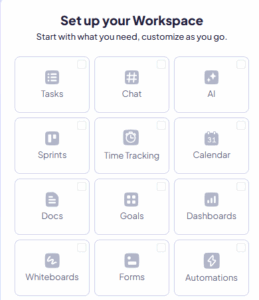
ClickUp is one of the fastest-growing collaboration tools in 2026. It offers comprehensive project and task management, docs, chat, and goal tracking—all in one place. ClickUp’s flexibility makes it suitable for both startups and large enterprises.
8. Asana
Asana continues to be a go-to platform for teams focused on productivity and project tracking. With clear task assignments, timelines, and progress tracking, it remains a strong contender in the online collaboration tools space.
9. Miro
For visual thinkers and creative teams, Miro is a top choice. It offers an interactive whiteboard that supports brainstorming, planning, and mapping out complex workflows. In 2026, Miro is increasingly used as a supplemental collaboration tool alongside traditional task managers.
10. Basecamp
Basecamp sticks to simplicity and team alignment. It avoids feature bloat and focuses on what matters: to-do lists, messages, schedules, and file sharing. It’s an ideal collaboration tool for small businesses and remote-first teams.
In 2026, the range of online collaboration tools available is more diverse and capable than ever before. Whether you’re managing a fully remote team or just looking to improve internal communication, investing in the right collaboration tools will lead to faster decision-making, better project outcomes, and happier teams.
If you’re exploring new solutions, give Liberation’s Hub for Teams a try—you may find it’s exactly what your team needs to work smarter and more securely.
Collaboration Tools in Brief: Quick Answers
- What do collaboration tools do? They give teams shared places to chat, meet, plan work and store documents.
- How many do you need? Usually one for messaging, one for meetings, one for tasks and one for documents. An all-in-one workspace can cover several.
- What matters most in a choice? Fit with how your team works, ease of adoption, integrations, security controls and data ownership.
- What causes tool sprawl? Each team picking its own app without a shared standard.
- How do you avoid regret? Pilot with a small group, set usage rules and confirm you can export your data.
Collaboration Tools Compared by Primary Use
The tools in this list overlap, but each has a center of gravity. The table below groups them by the job they are best known for, so you can shortlist by need instead of by brand. It describes general categories and should be confirmed against each vendor’s current features.
| Tool | Best known for | Good fit when | Consider |
|---|---|---|---|
| Hub for Teams | Team workspace with a focus on privacy and independence | You want control over your data and a simple shared hub | Review integrations with tools you already use |
| Slack | Channel-based team chat | Fast conversation and many app integrations matter | Notification overload without channel rules |
| Microsoft Teams | Chat and meetings inside a productivity suite | Your company already uses that suite | Complexity for small teams |
| Zoom Workplace | Video meetings and related communication | Meetings are your main collaboration format | Pair with a tool for tasks and documents |
| Notion | Documents, wikis and lightweight databases | You need a shared knowledge base | Setup discipline to keep it organized |
| Trello | Visual boards for task tracking | Simple workflows and small projects | Limited depth for complex projects |
| ClickUp and Asana | Task and project management | You need timelines, assignments and reporting | Learning curve and configuration time |
| Miro | Online whiteboarding | Workshops, brainstorming and planning sessions | Ideas need a home in a task tool afterward |
| Basecamp | Simple project communication | You prefer a calm, opinionated structure | Less flexibility than customizable tools |
An 8-Step Guide to Choosing Collaboration Tools
- Describe how your team works. Note how you communicate, share files, assign tasks and run meetings today.
- List your pain points. Identify lost messages, unclear ownership, duplicate files and missed deadlines.
- Set requirements. Separate must-haves such as permissions and mobile access from nice-to-haves.
- Shortlist by category. Use the table above to choose two or three candidates.
- Check security and privacy. Review access controls, encryption, audit logs and where data is stored.
- Pilot with a small team. Run a real project for a few weeks and gather honest feedback.
- Write usage rules. Decide which channel or space is used for which type of message.
- Review after three months. Retire what is unused and adjust the rules.
Security and Privacy in Collaboration Tools
These platforms hold conversations, files and client information, so security belongs in the buying decision. Require multi-factor authentication for every user; CISA explains how in its guide to turning on MFA. Use least-privilege sharing, review external guests regularly and confirm what happens to data when someone leaves. Read our guide on how to optimize team collaboration tools for security and privacy and our overview of password managers for shared credentials.
Making Collaboration Tools Work Day to Day
Software does not create good collaboration on its own. Agree on response expectations, such as answering direct messages the same day and using threads for side conversations. Keep one source of truth for every project so people do not hunt through chat history. Record decisions in a shared document rather than in a call. When you evaluate options, compare our Hub for Teams workspace, read our overview of team collaboration tools and see how it fits alongside the tools you already use. Teams that want independence from a single vendor can also read our guide to breaking free from vendor lock-in.
Common Mistakes When Adopting Collaboration Tools
- Adopting too many apps. Every extra tool adds context switching and cost.
- Skipping training. People use only a small share of features unless shown how.
- No usage rules. Without norms, chat channels and boards turn into noise.
- Ignoring security settings. Default sharing can expose sensitive files.
- Choosing by popularity. The most popular tool is not always the best fit for your workflow.
- Locking in without an exit. Confirm you can export messages, files and tasks.
Selection Checklist
- Requirements and pain points are written down.
- Two or three tools are piloted with real work.
- Multi-factor authentication and sharing controls are enabled.
- Usage rules are published to the team.
- Data export options are confirmed.
- A three-month review is scheduled.
Frequently Asked Questions About Collaboration Tools
What are the best collaboration tools for small teams?
Small teams often do well with a simple chat tool, a shared documents space and a light task board. Choose the smallest set that covers your daily work.
Should we use an all-in-one platform or separate apps?
All-in-one platforms reduce switching and administration, while separate apps can offer more depth. Decide based on team size, budget and how specialized your needs are.
How do we keep collaboration tools secure?
Use multi-factor authentication, restrict sharing, review guest access and train staff on phishing. Choose vendors with clear data policies.
How do we get the team to actually use a new tool?
Start with a real project, provide short training and set clear rules for what goes where. Leadership should use the tool visibly.
Can we switch tools later?
Yes, if the platform lets you export your data. Check export options before you commit.
Related reading
- What are the Top Personal Project Management Contenders?
- What are the Best Project Management Tools?
- The Best Collaboration Tools in the Modern Workplace
- Best 5 Alternatives to Zoom – Communication Tools That Are Leading the Way
- Best Business Collaboration Tools in 2026: A Buyer’s Guide
- Top 5 Alternatives to Zoom in 2027