
Business email without Microsoft 365 needs two things: a domain you own, and a mailbox plan attached to it. Microsoft 365 bundles that mailbox with desktop Office, SharePoint and Teams, priced as a license tier per user. If your team opens mail, a calendar, a shared folder and a video call, you are buying a suite to obtain four things – and mailbox hosting on your own domain starts at $1.95 per user per month.
This is an honest account of what changes, what does not, and when staying put is the right answer.
The test that settles it in ten minutes
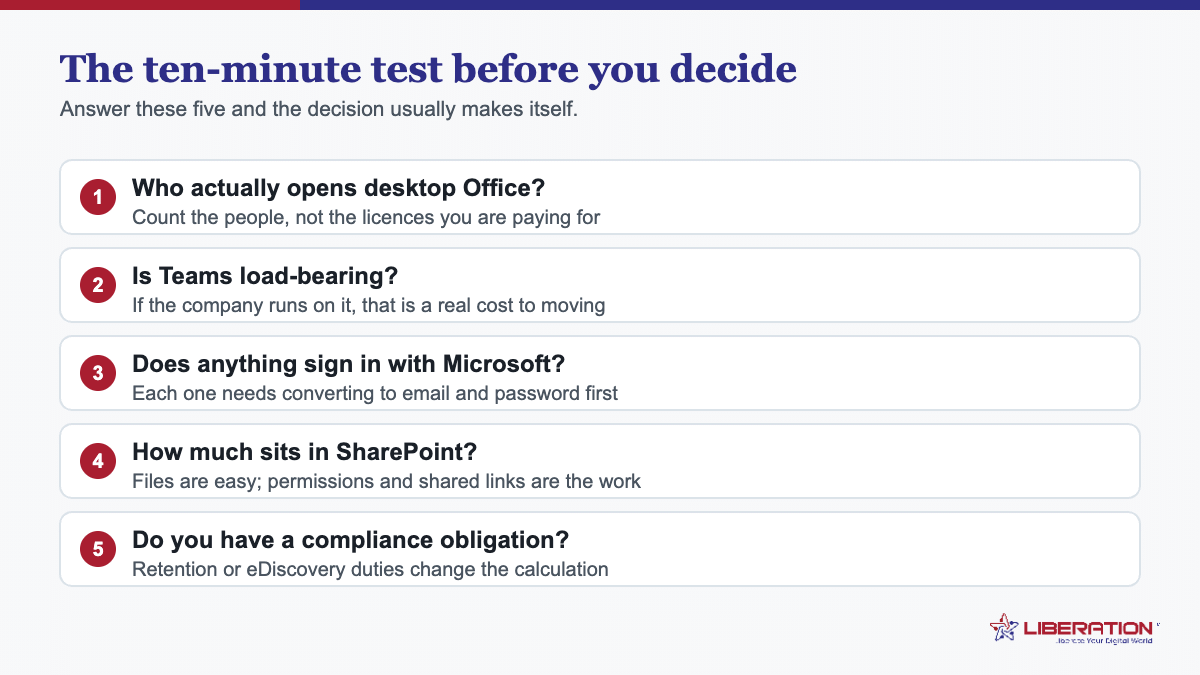
Ignore the feature comparison and count what your team actually opens in a normal week. Not what the license includes – what people use.
| If the week looks like… | Then |
|---|---|
| Email, calendar, a shared folder, video calls | Move. You are paying for a suite to get four things. |
| The above plus occasional documents and spreadsheets | Probably move, after checking your heaviest files convert acceptably. |
| Serious Excel – macros, Power Query, models others depend on | Stay. The saving will not cover the disruption. |
| SharePoint as a real intranet with workflows | Stay, or scope that separately from any email decision. |
Most small teams are in the first two rows and assume they are in the last two, because the license made everything available whether or not anyone opened it.
What genuinely stays the same
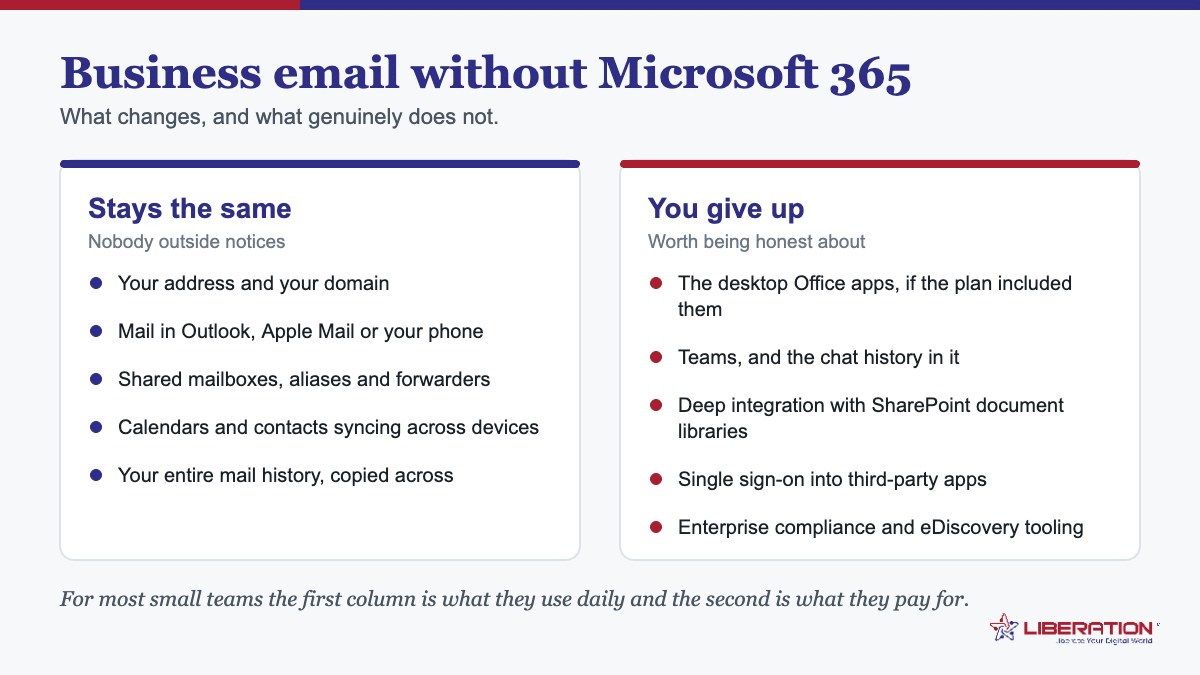
- Your addresses. They belong to your domain, not to Microsoft. Nothing about them changes.
- Your mail client. Standards-based hosting speaks IMAP, SMTP, CalDAV and CardDAV, so Outlook, Apple Mail, Thunderbird and every mobile mail app connect normally. People who like Outlook can keep using Outlook.
- Calendar and contact sync across devices.
- Shared mailboxes for info@, sales@ and support@ – better handled as shared inboxes than as forwards, so replies come from the role rather than from whoever happened to answer.
- Your mail history, which is copied across during migration.
What you actually give up
Being specific here matters more than being persuasive:
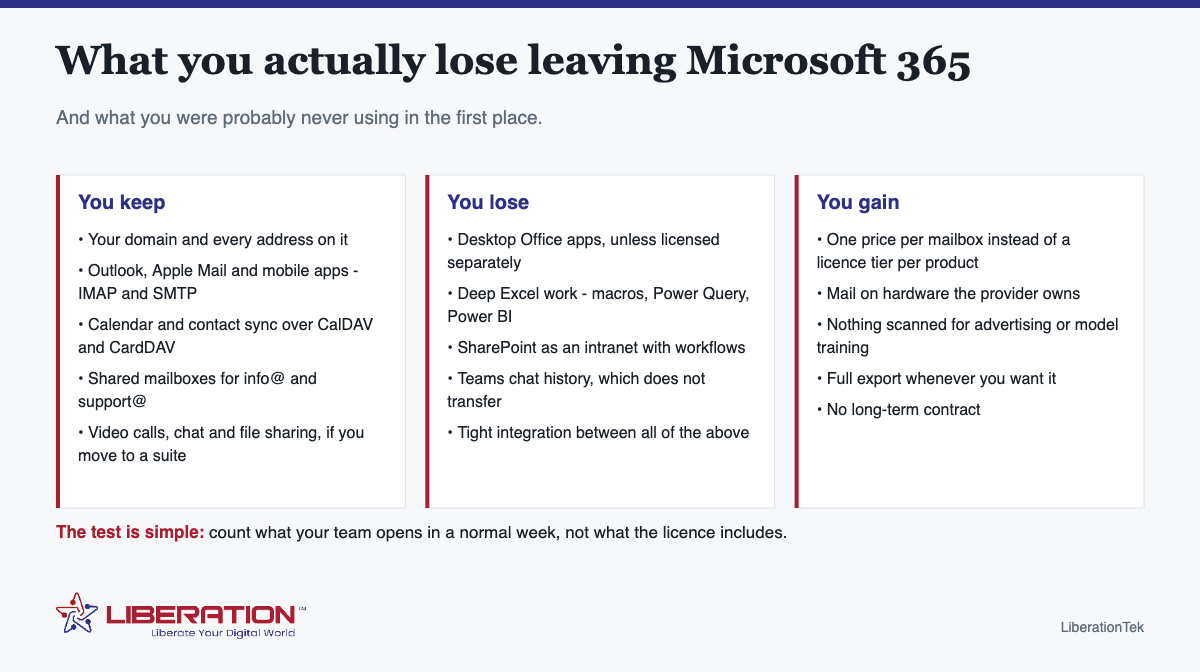
- Desktop Office applications, unless you license them separately. If Word and Excel on the desktop are essential, that is a cost to keep in the comparison.
- Deep Excel capability – macros, Power Query, Power BI, and any model colleagues or clients depend on. Alternatives handle ordinary spreadsheets well and complex ones poorly.
- SharePoint as an intranet. Document storage has equivalents; SharePoint with workflows and permissions modeling does not have a drop-in replacement.
- Teams chat history. It does not transfer between platforms in any practical way. Archive anything needed for records before the subscription ends.
- Integration between all of the above. A suite’s real product is that everything assumes everything else.
What you gain besides the bill
Three things, and only one of them is price.
Per-mailbox pricing. You pay for mailboxes rather than a license tier, so a five-person team is not buying enterprise capability to give everyone an inbox.
Knowing where the mail lives. Liberation Email runs on hardware we own and operate in the United States. Nothing in your mail is scanned for advertising, used to train a model, or passed to a data broker – there is no revenue line here that would require it.
An exit. Full export whenever you want one, no long-term contract, and standards-based access so your mail is never in a proprietary format you cannot read elsewhere.
Business email without Microsoft 365: the two options, honestly
| Mailbox hosting | Full suite | |
|---|---|---|
| What it is | Liberation Email – mail, calendar, contacts on your domain | Hub For Teams – adds chat, video, files and documents |
| Suits | Teams whose collaboration happens elsewhere or in person | Teams replacing chat and video subscriptions too |
| From | $1.95 per user per month | $7.49 per user per month |
If you are currently paying separately for a mail plan, a chat app and a video tool, the second column is usually cheaper than the three together – which is the comparison worth doing rather than suite-versus-suite.
Moving to business email without Microsoft 365 without drama
- Inventory first – mailboxes, archives (they are separate and frequently missed), shared mailboxes, distribution lists, and every service where someone signs in with a Microsoft account.
- Create the new mailboxes on your domain. Nothing points at them yet.
- Copy mail across while the old mailboxes still receive.
- Sort out the sign-in-with-Microsoft list before canceling – this is what locks people out weeks later.
- Switch MX, SPF, DKIM and DMARC, then re-sync to catch anything that arrived mid-switch.
- Remove the domain from the tenant only after mail is arriving reliably, then cancel a few weeks later.
We do the migration as part of setting the mailboxes up, including the archives people forget.
The migration in outline
| Stage | What happens | Risk |
|---|---|---|
| Inventory | Mailboxes, archives, shared mailboxes, distribution lists, sign-in-with-Microsoft list | None – but skipping it causes every later problem |
| Create mailboxes | On your domain at the new provider | None; nothing points at them yet |
| Copy mail | IMAP sync while the old boxes still receive | Low; archives are the thing most often missed |
| Identity work | Direct logins on every third-party service | This is what locks people out weeks later |
| Switch DNS | MX, SPF, DKIM, DMARC together | Low if TTL was lowered beforehand |
| Cancel | Two to four weeks after, not the same day | Canceling early is the expensive mistake |
What to tell the team
The question everyone asks first is whether their email address changes. It does not, and saying so up front removes most of the anxiety. The second question is whether they keep Outlook, and for most people the answer is also yes.
Beyond that, two requests worth making explicitly: do not delete anything from the old system “to tidy up” during the transition, and flag anything that looks missing while the old subscription is still live rather than after it lapses.
What it costs to run in parallel for a month
One question comes up repeatedly: can we try it before committing? Yes, and it is cheap. Mailbox hosting is priced per mailbox with no long-term contract, so the honest way to evaluate is to set up two or three mailboxes alongside the existing subscription and use them properly for a few weeks.
At $1.95 per user per month, a three-person trial costs less than a lunch. What you learn is the part that no comparison table captures: whether the webmail suits the people who will live in it, whether calendar sharing behaves the way your team expects, and whether anything in your day quietly depended on an integration you had forgotten about.
The question to settle before anything else
Who actually needs desktop Office? In most small businesses it is one or two people, not everyone. If that is true for you, the arithmetic changes completely – those individuals keep a license, everyone else moves to mailbox hosting, and the bill falls without anyone losing a tool they use.
That split is usually more sensible than an all-or-nothing decision, and it is rarely considered because the licensing model encourages thinking in whole-company tiers.
One thing to check before moving to business email without Microsoft 365
Look at whether any mailbox has a separate online archive. Microsoft mailboxes frequently do, it does not appear in a standard IMAP connection, and it is the single most common thing lost in this migration – discovered months later, once the recovery window has closed. Confirm it for every mailbox before anything else moves.
Worth saying plainly at the end: if your team genuinely lives in Excel and SharePoint, stay where you are. This decision only pays for businesses whose week is mail, a calendar, a shared folder and a video call – and pretending otherwise leads to a migration that is reversed six months later at twice the cost.
Replacing the pieces you actually used
The objection to business email without Microsoft 365 is rarely about email. It is about the other things bundled alongside it, so it is worth being specific about what replaces each.
Documents and spreadsheets. If the desktop applications matter, they can be bought on their own without the subscription, and the one-time purchase pays for itself in a couple of years for a user who simply needs Word and Excel. If browser-based editing is sufficient, several suites handle it. The practical question is how many people genuinely need the desktop versions – in most small organisations the honest answer is fewer than the number of licences being paid for.
File storage and sharing. This is usually the bigger migration, not because files are hard to copy but because permissions and shared links have to be rebuilt. Export the permissions map before you move anything, and expect to spend more time on access than on the transfer itself.
Chat. If Teams is genuinely load-bearing, that is a real cost and worth acknowledging rather than arguing around. Several alternatives exist; what none of them do is bring the existing chat history with them, so decide in advance whether that history matters and export it if it does.
Video calls. Rarely an obstacle. The market is competitive and most organisations already use more than one platform anyway because clients and partners each have their own preference.
Identity. The quiet one. Every third-party service someone signed into with “Continue with Microsoft” needs converting to email-and-password before the tenant lapses. Microsoft documents how tenant and device identity behaves in its device identity FAQ, which is worth reading if laptops are joined to Entra ID. This is the item that sets the timeline for business email without Microsoft 365, and it is the one most plans forget.
What you gain is not only the bill. Fewer moving parts, a smaller surface to administer, and a setup where email is a service you buy rather than a component of a platform that also owns your identity, your files and your chat. For a ten-person organisation that is frequently a simplification rather than a compromise.
Handled deliberately, business email without Microsoft 365 is a smaller change than it appears. The organisations that find it painful are the ones that treated it as an email migration and discovered the identity question afterwards.
Running both for a month, and why it is worth the overlap
The safest way to move to business email without Microsoft 365 is not to switch cleanly at all. It is to run both for a month and let the old tenant expire quietly once nobody has needed it for a fortnight.
The overlap costs one month of licences. Set against the risk of discovering something important three weeks after shutting the tenant down, that is cheap insurance, and it is the single change that most reduces the stress of the whole project.
Mail keeps syncing during the overlap. Leave the IMAP sync running so anything still arriving at the old mailboxes is copied across. Stray senders, automated systems and the occasional client with a cached address all continue to work while you find them.
Use the month to find the stragglers. Watch what still arrives at the old tenant. Every message landing there after cutover identifies something that was never updated – a supplier, a subscription, a form on the website. That list is genuinely difficult to produce any other way.
Keep the old tenant read-only rather than active. Staff should be working in the new system from day one; the old one is a safety net, not an alternative. Two live systems in parallel produces split conversations and people working in the wrong place.
Export before you close. Chat history, SharePoint files, calendar archives and anything else the tenant holds. Once the subscription lapses there is a limited window, and then there is not. Do this while the account is fully live rather than during the grace period.
Then let it go. When nothing has arrived at the old tenant for two weeks and the exports are safely stored, cancel it. By that point business email without Microsoft 365 is simply how the organisation works, and the switch-off is an administrative task rather than an event.
Businesses that regret moving to business email without Microsoft 365 almost always cut over abruptly to save a month’s licensing. The overlap is what turns a migration into a non-event.
Who should stay on Microsoft 365
This page argues that business email without Microsoft 365 suits more organisations than currently believe it, but it does not suit everyone, and the cases where staying is the right call are worth naming plainly.
Organisations where Office is the work. If your staff live in Excel all day with complex workbooks, macros and add-ins, the desktop applications are not a line item to be trimmed. They are the product. Moving email away from the suite is still possible, but the saving is smaller and the disruption larger.
Anyone with a genuine compliance regime. Legal hold, retention policies enforced centrally, eDiscovery on demand – if a regulator or a court expects these of you, the tooling is worth paying for. Business email without Microsoft 365 can meet ordinary obligations comfortably; it is not where you want to be if you are running litigation holds.
Teams-centred organisations. If the company genuinely runs in Teams – channels as the primary workspace, files, calls and decisions all inside it – then email is a small part of what you are paying for, and unpicking it is a bigger project than the bill justifies.
Anywhere with heavy SharePoint customisation. Document libraries with custom metadata, workflows and permissions built up over years are expensive to reproduce. Files move easily; structure does not.
Where staff will genuinely struggle. A change that saves money and costs a month of confusion in a small team with no IT support may not be worth it. This is a legitimate reason and it is often the unspoken one.
The honest test. Count the licences, count the people who use more than mail and calendar, and look at the gap. If the gap is large, business email without Microsoft 365 will probably suit you. If it is small, you are paying for things you use, and that is what the subscription is for.
Frequently asked questions
Can I have business email without Microsoft 365?
Yes. Business email requires a domain you own and a mailbox hosting plan attached to it. Microsoft 365 bundles mail with Office applications, SharePoint and Teams; if you do not use those, you are buying a suite to obtain a mailbox. Standalone mailbox hosting starts at $1.95 per user per month.
Will Outlook still work without a Microsoft 365 subscription?
Yes, as a mail client. Standards-based hosting connects over IMAP and SMTP, with CalDAV and CardDAV for calendar and contacts, so Outlook, Apple Mail, Thunderbird and mobile apps all connect normally. A subscription licenses the desktop Office applications, which is a separate question from where your mail lives.
What do you lose by leaving Microsoft 365?
The desktop Office applications unless licensed separately, deep Excel capability such as macros and Power Query, SharePoint as an intranet, and Teams chat history, which does not transfer. Mail, calendar, contacts, shared mailboxes and file sharing all have straightforward equivalents.
Is business email cheaper without Microsoft 365?
Usually, for teams that mainly use mail, calendar and a shared folder, because mailbox hosting is priced per mailbox rather than per license tier. For a business genuinely running on Excel and SharePoint, the saving will not cover the disruption.
Can I keep my email address if I leave Microsoft 365?
Yes, provided the address is on a domain you own. Point its MX records at the new provider, and remove the domain from the Microsoft tenant only after the new provider is reliably receiving mail.
Related reading
- Migrate From Microsoft 365: 4 Things That Have to Move
- Migrate From Google Workspace: 4 Essential Steps
- Migrate Business Email: 5 Simple Steps, No Lost Mail
- Business Email Setup — Putting business email on your own domain.
- Big Tech Alternatives — The full set of replacements, by category.