
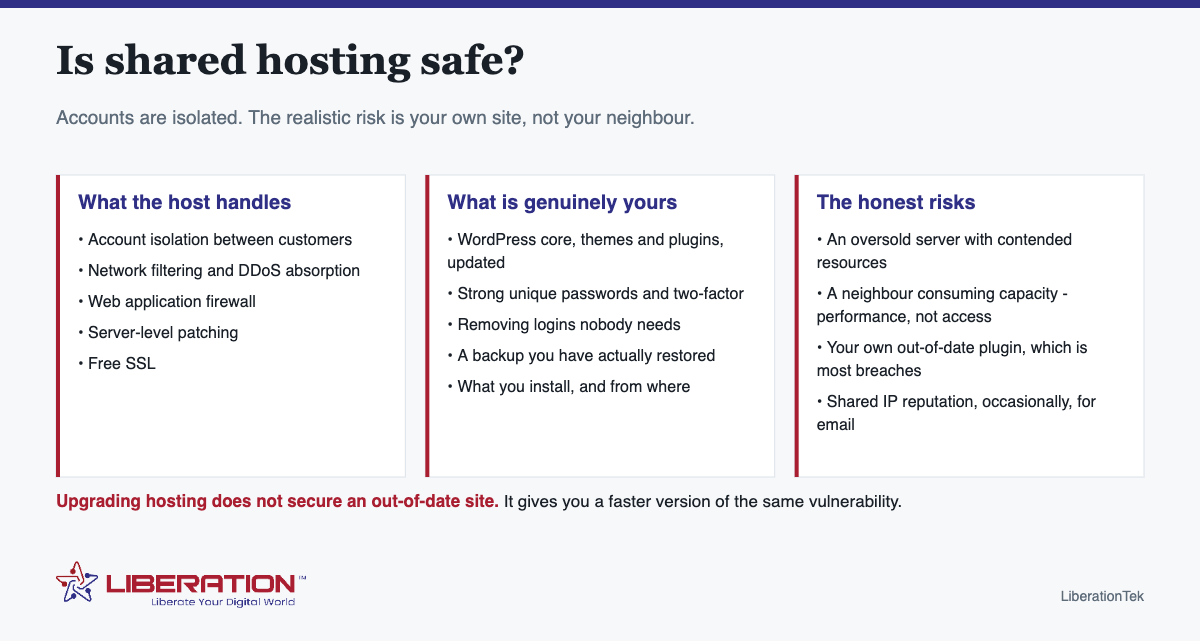
Is shared hosting safe? For the large majority of small business websites, yes. Accounts on a properly run shared server are isolated from one another, and the host handles filtering, firewalls and server patching. The realistic threat is not the site next door – it is an out-of-date plugin or a reused password on your own site, which is where most small-site compromises actually begin.
What “shared” actually shares
Many websites run on one physical server, drawing from a common pool of CPU, memory and storage. Each account is isolated so that one customer cannot read or modify another’s files.
What is genuinely shared is capacity. A neighbor having a very busy day can affect your performance. That is a real limitation of the model and it is a performance issue rather than a security one – important to separate, because the two get conflated in marketing for higher tiers.
Where compromises actually come from
| Cause | Frequency | Whose responsibility |
|---|---|---|
| Out-of-date plugin or theme | Very common | Yours |
| Weak or reused password | Very common | Yours |
| Nulled or pirated plugin | Common, and entirely avoidable | Yours |
| Old user account never removed | Common | Yours |
| Server-level vulnerability | Rare on a maintained platform | The host’s |
| Cross-account access | Rare on a properly configured server | The host’s |
Read that table before paying more for hosting on security grounds. The top four rows are where the risk is, and none of them changes when you move to a bigger plan.
Five things that actually protect a site on shared hosting
- Update promptly. Core, themes and plugins, within days rather than quarters. Most exploited vulnerabilities have had a patch available for some time.
- Unique passwords plus two-factor on WordPress, the hosting control panel, your email and the domain registrar. The registrar is the one people forget and the one with the widest consequences.
- Remove what you do not use. Deactivated plugins still contain code. Old user accounts are still routes in. Delete rather than deactivate.
- Keep a backup you have restored. An untested backup is a belief. Restore one to a staging site once a year.
- Install only from sources you trust. Nulled premium plugins are the single most reliable way to get compromised, and it is a deliberate choice rather than bad luck.
That list is free, takes an afternoon to implement, and does more for your security than any upgrade available for purchase.
When shared hosting genuinely is not enough
Four honest cases:
- Regulated data. Client health, financial or legal records with obligations around access logging and retention need controls a shared plan does not provide.
- Consistent resource ceilings. If you are hitting limits daily rather than occasionally, that is a capacity problem with a capacity answer.
- A client or insurer asking who else is on the machine. “Dedicated resources” is an answer that ends the conversation.
- Real revenue riding on uptime. Once a slow hour costs more than the plan difference, the arithmetic changes.
Outside those, moving up is buying headroom that sits idle – and, importantly, it does nothing about the four rows at the top of the table above.
What to expect from a shared host
A reasonable shared plan should include, without extra charge: free SSL, automatic backups with a stated retention period, a web application firewall, server-level patching, and two-factor authentication on the control panel. If SSL or backups are sold separately, the plan is not as cheap as it appears.
It is also fair to ask who owns the hardware and which country it sits in. Many hosting brands resell capacity from a larger platform, which changes who is actually responsible for the security you are being sold.
Our shared hosting starts at $7.99 a month with cPanel, free SSL, NVMe storage and site security included, on servers we own and operate in the United States. If you outgrow it, VPS gives guaranteed resources – but we would rather tell you your plan is fine and your plugins are not.
How account isolation actually works
The worry behind the question of whether shared hosting is safe is usually a specific one: can the site next door reach mine? On a properly configured server, no. Each account runs under its own system user with its own permissions, and one account cannot read another’s files or connect to another’s database. That separation is the entire basis of shared hosting, and on a competent host it holds.
What is genuinely shared is the machine’s resources, which is a performance question rather than a security one:
| Shared | Not shared |
|---|---|
| CPU and memory, subject to per-account limits | Your files and folders |
| The server’s IP address | Your databases |
| Disk throughput | Your email accounts |
| The underlying operating system | Your WordPress installation and its logins |
The shared IP address is the one people ask about most. In practice it is not a ranking or deliverability problem with a reputable host, because hosts monitor for abuse and remove accounts that generate it. It becomes a real issue only on hosts that do not police their own network, which is an argument about choosing a host rather than about shared hosting as a model.
Where compromises actually come from
Almost every small business site that gets compromised is compromised through its own front door, not through a neighboring account. In rough order of frequency:
- An outdated plugin or theme with a known, published vulnerability. This is the leading cause by a wide margin, and it is entirely within your control.
- A weak or reused administrator password, often one that appeared in a breach of an unrelated service.
- No two-factor authentication on the admin account.
- Abandoned software, including plugins that stopped being maintained years ago and old WordPress installations in subfolders that everyone forgot about.
- Dormant user accounts belonging to developers or staff who left.
- A compromised local machine, where saved FTP credentials get harvested from the owner’s own computer.
Note that the hosting tier does not appear anywhere in that list. Moving the same unpatched site to a VPS moves the vulnerability with it. This is why “upgrade to be more secure” is usually the wrong advice: it addresses the least likely cause while leaving the most likely one untouched.
What actually protects a site on shared hosting
- Update monthly, without exception. Core, themes and plugins. Back up first so a bad update is reversible.
- Use a unique password and two-factor authentication on every administrator account. Unique is the operative word.
- Delete what you do not use. A deactivated plugin still has files on the server and can still be exploited. Deactivating is not removing.
- Review the user list twice a year and remove anyone who no longer needs access.
- Keep working backups you have restored at least once, stored somewhere other than the hosting account itself.
- Keep SSL active so credentials are never sent in the clear. It is included free on LiberationTek hosting and issues automatically.
Those six, done consistently, put a site on a $7.99 shared plan in better shape than a neglected site on an expensive one. Consistency matters considerably more than tier.
When shared hosting genuinely is not the right answer
There are real cases for moving up, and they are mostly about resources and control rather than safety:
- You handle sensitive regulated data and need documented isolation and a signed agreement. LiberationTek signs a Business Associate Agreement where HIPAA applies.
- You need server configuration you cannot get on shared, such as specific PHP extensions or custom cron behavior.
- Traffic peaks are hitting resource limits, which shows up as slowness under load rather than as a security event.
- A busy store, where database performance under concurrent checkout matters commercially.
For everything else, shared hosting is a reasonable and safe choice, provided you do the six things above. Managed VPS hosting keeps cPanel and WHM and includes a free migration of one site when a move up is genuinely warranted.
A short answer on whether shared hosting is safe
For most small sites, shared hosting is safe enough when it is set up and maintained properly. The real question is not whether shared hosting is safe in the abstract, but whether your site, your passwords and your software are in good shape. Most compromises come from outdated plugins and weak logins, and those are problems on any kind of server.
A well-run shared hosting platform separates each account so that one customer cannot read another customer’s files. That isolation, plus a firewall and regular patching on the server side, handles the host’s half of the job. Your half is the site itself.
Your checklist for safer shared hosting
- Keep WordPress, themes and plugins updated, and delete the ones you do not use.
- Use long, unique passwords and turn on two-factor sign-in wherever it is offered.
- Keep backups somewhere other than the shared hosting account itself.
- Use HTTPS on every page and keep your certificate renewed.
- Give each person only the access they need, and remove accounts when people leave.
The FTC cybersecurity guidance for small businesses backs up these basics and is written in plain language. If your site runs on WordPress, the official WordPress hardening guide is a good next read for anyone on shared hosting.
When shared hosting stops being the right fit
Shared hosting is built for modest sites with moderate traffic. If you handle payments, store sensitive customer records or need guaranteed resources, a step up makes sense. Our VPS hosting gives you dedicated resources and more control, and larger needs can move to dedicated cloud hosting. You can compare the entry option on our shared hosting page.
LiberationTek servers are in the United States, and we migrate sites from another provider for free, so you can start on shared hosting and move up later without rebuilding anything. This is general information, not a guarantee against every attack. The honest summary is that shared hosting is safe for the right site when you do your part, and a better fit elsewhere when your needs outgrow it.
Frequently asked questions
Is shared hosting safe for my website?
For most small business sites, yes. Accounts on a properly configured shared server are isolated, and the host handles network filtering, firewalls and server patching. The realistic risk is an out-of-date plugin or a weak password on your own site.
Can another website on my shared server hack mine?
On a properly configured server, accounts are isolated so one customer cannot read or modify another’s files. What a neighbor can affect is performance, by consuming shared resources.
How can I protect my website on shared hosting?
Update core, themes and plugins promptly; use unique strong passwords with two-factor authentication everywhere including the registrar; remove accounts and plugins you do not use; keep a backup you have tested; and install only from sources you trust.
Is VPS hosting more secure than shared hosting?
It removes resource contention and the presence of other customers on the machine. It does not make your application safe – an out-of-date WordPress install is equally vulnerable on either.
What should I look for in a shared host’s security?
Free SSL included, automatic backups with a stated retention period, a web application firewall, server-level patching, two-factor authentication on the control panel, and a clear answer about who owns the hardware.
Does upgrading from shared hosting to a VPS make my site more secure?
Not by itself. Nearly all small business site compromises come through outdated plugins, weak passwords or dormant accounts, and every one of those moves with the site. A VPS gives you isolation and control, which matters for regulated data and custom configuration, but an unpatched site on a VPS is still an unpatched site.
Is a shared IP address bad for my website?
Not with a reputable host. Hosts monitor their networks for abuse and remove accounts that generate it, which keeps the shared address clean. It becomes a genuine problem only on hosts that do not police their own network, so it is a reason to choose your host carefully rather than a reason to avoid shared hosting.