
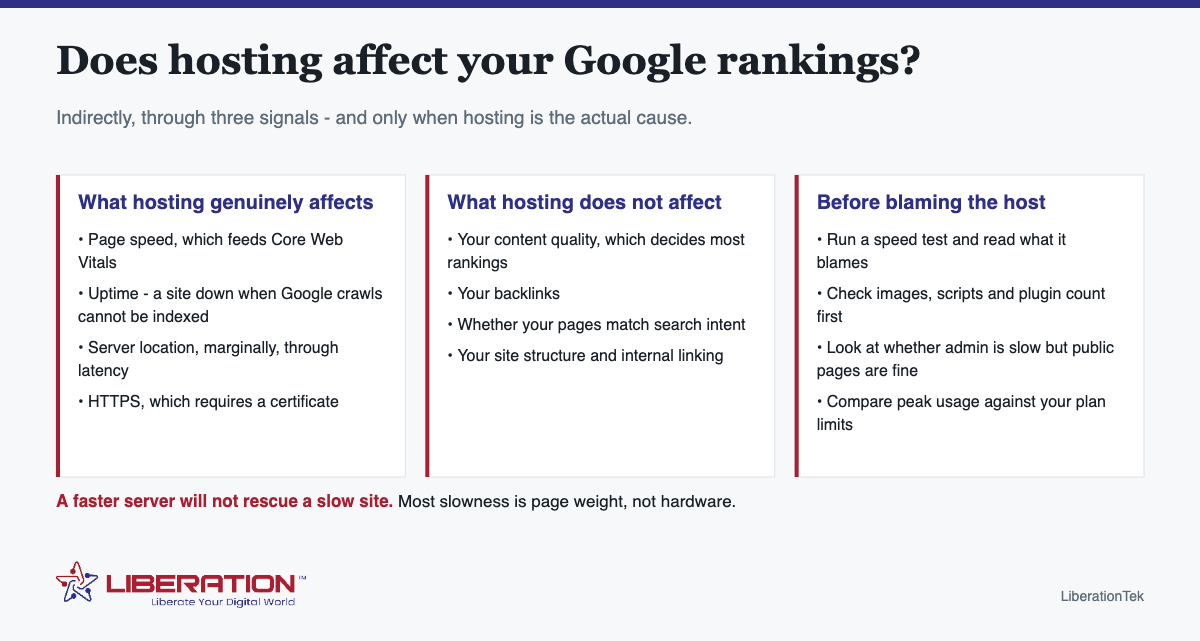
Does web hosting affect SEO? Yes, but indirectly, through three things Google actually measures: page speed, availability, and HTTPS. It does not affect content quality, backlinks or whether your pages match what people searched for – and those decide most of your ranking. The practical implication is that upgrading hosting helps only when hosting is genuinely the constraint, which is less often than the industry suggests.
The three real connections
1. Page speed
Speed is a ranking factor, mediated through Core Web Vitals – how quickly the main content loads, how responsive the page is to input, and how much the layout shifts while loading. Your server contributes to the first of those through time-to-first-byte. It contributes almost nothing to the other two, which are decided by what your page contains and how it is built.
2. Availability
A site that is down when a crawler arrives cannot be indexed, and sustained outages eventually affect how often you are crawled. Occasional brief downtime is normal and not a crisis. A host that is unreliable enough for this to matter is a problem worth fixing for reasons far beyond search.
3. HTTPS
HTTPS is a lightweight ranking signal and a hard requirement for user trust – browsers mark sites without it as not secure, which costs more in abandoned visits than the ranking effect does. It needs an SSL certificate, which should be included with hosting rather than sold as an upgrade.
What hosting does not affect
Worth stating plainly, because “upgrade your hosting to rank better” is a common pitch:
- Content quality and relevance – the largest factor by a wide margin.
- Backlinks – what other sites say about you.
- Intent match – whether your page answers the question someone actually asked.
- Site structure and internal linking.
- Titles, descriptions and structured data.
A site with weak content on excellent hosting loses to a site with strong content on ordinary hosting, every time.
Diagnose before you upgrade
The useful question is not “is my hosting fast enough” but “what is making my site slow”. Four checks:
- Run a speed test and read the report properly. If it names image sizes, unused JavaScript or render-blocking resources, your site is the problem and a bigger server will not fix it.
- Check time-to-first-byte. Consistently poor TTFB on a light page points at the server or the database.
- Compare admin speed with public page speed. Slow admin and fast public pages usually means database bloat rather than hosting.
- Look at resource usage at peak. If you are hitting plan limits daily, that is a genuine hosting constraint. If you never are, you have headroom.
| What you see | Likely cause | Does better hosting fix it? |
|---|---|---|
| Slow at all hours, modest traffic | Page weight, plugins, images | No |
| Slow admin, fast public pages | Database bloat | Rarely |
| Fine normally, collapses under campaigns | No headroom | Yes |
| Consistently poor TTFB on light pages | Server or oversold plan | Yes |
| Intermittent downtime | Host reliability | Yes |
The order that actually produces results
- Fix the site first. Compress images, remove plugins you do not use, enable caching. This is free and usually produces the largest improvement.
- Then check the server. With a light page, TTFB tells you something meaningful.
- Then upgrade, if the evidence supports it. Guaranteed resources solve contention; they do not solve page weight.
- Then keep writing. Content remains the thing that decides whether you rank at all.
Doing this in the wrong order is how businesses end up paying more every month for a site that is still slow.
Where hosting genuinely helps
If you have done the site-side work and the constraint is real, guaranteed resources are the answer. VPS hosting gives resources no other customer draws on, fully managed with cPanel and WHM, and Dedicated Cloud from $65.95 a month goes further for high-traffic sites and applications. For most brochure sites, shared hosting at $7.99 a month with free SSL and NVMe storage is not the thing holding you back.
If you want the SEO side handled properly rather than guessed at, our SEO tool audits the site and turns the result into a prioritized checklist in plain English from $9.99 a month – which is a more useful first purchase than a bigger server for most businesses asking this question.
How to tell whether hosting is actually your problem
The question of whether web hosting affects SEO usually arrives attached to a slow site, and hosting gets blamed for slowness it did not cause. Before spending money on an upgrade, work out where the time is actually going. Server response time and page load time are different measurements, and only the first is really about your host.
| Symptom | Likely cause | Fix |
|---|---|---|
| Server responds slowly, even for a simple page | Hosting, genuinely | Upgrade the plan or move host |
| Server responds fast, page still slow to appear | Images, scripts, theme | Compress images, cut plugins |
| Fast for you, slow for visitors elsewhere | No caching or CDN | Add caching |
| Fast most of the time, slow at peaks | Resource limits on a shared plan | VPS |
| Slow only on certain pages | A specific plugin or query | Isolate by disabling |
| Slow since a particular date | Something you changed | Look at what changed then |
The most common real answer, by a wide margin, is uncompressed images and too many plugins. Moving to a faster server makes a heavy page load slightly faster while leaving it heavy. That is why upgrading hosting so often disappoints: it was a real improvement applied to the wrong problem.
What “fast enough” actually means
Speed is not a ranking factor in the sense of faster always being better. It functions more like a threshold. A site that responds promptly and renders quickly is fine; a site that takes several seconds is being penalized in both rankings and, more importantly, in whether visitors stay.
Practical targets worth measuring against: server response under roughly 200 milliseconds, the main content visible within about two and a half seconds on a normal connection, and no large layout shifts as the page finishes loading. Get to that and further optimization is a matter of user experience rather than search performance.
Test on a real mobile connection, not just your office broadband. The gap between the two is where most sites actually lose people.
The sequence that produces results
If rankings are the goal, hosting belongs in the order rather than at the front of it:
- Measure first. Establish where the time goes before changing anything. Guessing is expensive.
- Fix the images. Compress them and size them correctly. This is usually the largest single win and it costs nothing.
- Cut the plugins you no longer use, and replace any that load scripts on every page for a feature used on one.
- Add caching. Serving a prepared page instead of building it per visit is the single biggest server-side improvement available.
- Then look at hosting. If server response is still slow with a cached, lightweight page, the host is genuinely the constraint and an upgrade will help.
- Fix HTTPS and uptime issues immediately whenever they appear, since these are threshold problems rather than gradual ones.
Done in that order, the hosting decision is informed by evidence and usually costs less than expected. Done in reverse, it is a purchase made in hope.
Where hosting genuinely does matter
None of the above means hosting is irrelevant. It sets the floor. A server that responds slowly to every request caps how fast your site can ever be, no matter how well optimized the page is. Frequent outages during crawls do real harm. A certificate that expires takes the site out of HTTPS and browsers will warn visitors away from it.
What good hosting buys is the absence of a problem rather than an advantage. LiberationTek shared hosting at $7.99 a month runs on NVMe storage with free SSL issued automatically, which covers the floor for most small sites. When a site genuinely outgrows shared resources, managed VPS hosting is the step that resolves peak-time slowness rather than masking it.
Web hosting and SEO in plain terms
Most owners ask about web hosting when rankings stall, so it helps to be clear about what the server really controls. Web hosting decides how quickly your pages start loading, how often the site is reachable, and whether visitors connect over a secure HTTPS address. Everything else that drives rankings, such as content quality, links and search intent, lives in your site, not in your web hosting plan.
Google’s own documentation on time to first byte explains that a slow server response delays everything that follows. If your web hosting answers slowly even when the site itself is light, that is the point where an upgrade makes sense. If the server answers quickly and the page is still slow, the cause is usually heavy images, too many plugins or render-blocking scripts.
A web hosting checklist before you blame the server
- Test the same page three times at different hours and compare the server response time.
- Check that every page redirects to HTTPS and that the certificate is valid.
- Look at your uptime history for the last 90 days before deciding your web hosting is unreliable.
- Compress images and remove plugins you no longer use.
- Turn on page caching so repeat requests do not hit the database.
Work through that list first. In our experience a clean site on modest web hosting beats a bloated site on an expensive plan, and it costs nothing to try.
Choosing web hosting that supports SEO
When the checks point at the server, pick web hosting that matches the site you actually run. A small brochure site does well on shared web hosting. A busier site, a store or an application with steady traffic is better served by a VPS, which gives you dedicated resources so a neighbour’s traffic spike cannot slow your pages. Larger workloads can move to dedicated cloud hosting.
Whatever web hosting you choose, ask three things: where the servers are, what the uptime commitment is in writing, and how migration works. LiberationTek servers are in the United States, and we move sites over from another provider for free, so switching web hosting does not have to mean a weekend of downtime. Plan the move carefully, keep the same URLs and redirect nothing you do not need to.
The short version is that web hosting is a foundation, not a ranking trick. Good web hosting removes obstacles for search engines and visitors, and then your content and links do the real work. If you want to see where your pages stand, our SEO tool is a practical place to start, and the same advice applies whether your web hosting is shared, VPS or dedicated.
Frequently asked questions
Does web hosting affect SEO?
Indirectly, through three things Google measures: page speed, which feeds Core Web Vitals; availability, because a site that is down when crawled cannot be indexed; and HTTPS. Hosting does not affect content quality, backlinks or intent match.
Can cheap hosting hurt my SEO?
It can, if it is slow, unreliable or lacks SSL. It does not inherently – a well-run shared plan hosting a fast, light site performs perfectly well. The problem is oversold hosting where resources are contended, not the price on the invoice.
Will better hosting improve my rankings?
Only if hosting is the actual constraint. If pages are slow because of heavy images, plugins and render-blocking scripts, a faster server gives you a slightly faster version of the same problem.
Does server location matter for SEO?
Marginally, through latency. Physical distance adds milliseconds, which matters more for interactive applications than ordinary pages. It is a real factor and a small one compared with page weight and caching.
How do I know if hosting is the cause of my slow site?
Run a speed test and read what it blames. If it names images or scripts, the site is the problem. If time-to-first-byte is consistently poor on a light page, that points at the server. Slow admin with fast public pages usually means the database.
How do I know if my hosting is making my site slow?
Compare server response time with total page load time. If the server responds quickly but the page still takes seconds to appear, the problem is images, scripts or your theme, not hosting. If the server is slow to respond even for a simple cached page, hosting is genuinely the constraint. Most slow sites turn out to be uncompressed images rather than servers.
Will moving to faster hosting fix my Core Web Vitals?
Only partly. Faster hosting improves server response time, which helps, but Core Web Vitals are mostly determined by what the page loads: image sizes, render-blocking scripts, and layout shifts as elements appear. Fix those first. Hosting sets the floor for how fast a page can be, but it cannot make a heavy page light.