
Reseller email hosting means giving each of your clients branded mailboxes on their own domain, either through the cPanel email accounts that come with every hosting account or through a separate private mailbox service. The short version: start with cPanel email for small clients, publish SPF, DKIM and DMARC records for every domain, and move heavy mail users to a dedicated mailbox service before they hurt your server’s sending reputation.
This guide to reseller email hosting is for agencies, MSPs and freelance developers who already host websites and now get asked, “Can you also do our email?” It walks through seven steps: choosing a model, setting up mailboxes, authenticating each domain, protecting deliverability, setting quotas, migrating mail and pricing the service. If you are still choosing a platform, read our reseller hosting guide first.
1. Choose your reseller email hosting model
You have two realistic options. The first is the email built into cPanel: every account you create gets mailboxes, webmail and forwarders at no extra cost. The second is a separate private email service, where mailboxes live on mail-only infrastructure and your web server never sends client mail. Liberation Mail, our private email add-on, falls in the second group.
Many buyers ask for reseller hosting with email included, and for small sites the built-in option is enough. With reseller email hosting on cPanel, a five-person office that sends a few dozen messages a day will never stress it. The picture changes when a client sends newsletters, shares one server IP with 80 other sites or needs shared calendars and mobile sync.
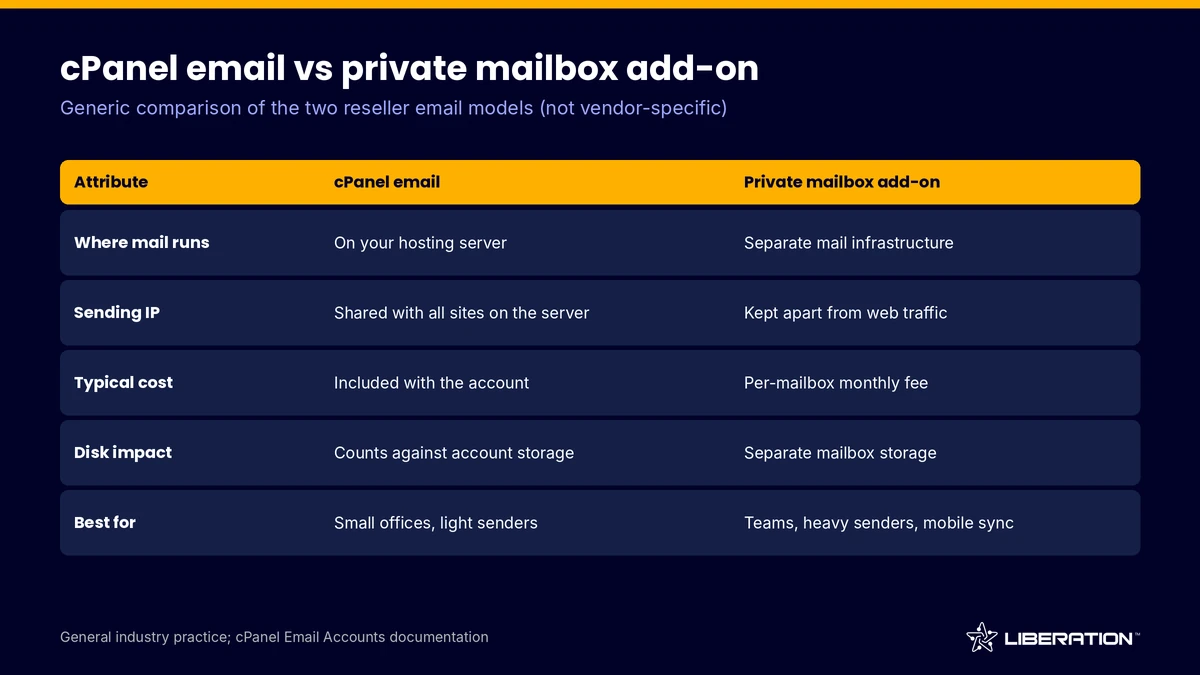
| Attribute | cPanel email | Private mailbox add-on |
|---|---|---|
| Where mail runs | On your hosting server | On separate mail infrastructure |
| Sending IP | Shared with every site on the server | Kept apart from web traffic |
| Typical cost | Included with the account | Per-mailbox monthly fee |
| Disk impact | Counts against account storage | Separate mailbox storage |
| Best for | Small offices, light senders | Teams, heavy senders, mobile sync |
Common mistake: picking one model for every client. Most resellers end up running both, with cPanel mailboxes as the default and a private mailbox service as the upgrade.
2. Create and organize mailboxes in cPanel
In cPanel, the Email Accounts interface lets you create, manage and delete email accounts for the domains on that cPanel account. It also shows how many accounts are allowed and how many you have used. As the provider, you control those limits, and WHM lets you set them per package. cPanel documents this in its Email Accounts guide.
What to check: every mailbox has a quota, webmail loads on the client’s own domain and you have a list of who owns which address. Common mistake: creating mailboxes with unlimited quotas. One client who never deletes anything can fill an entire plan’s disk.
If you are not sure how many accounts your plan needs for email-heavy clients, our breakdown of hosting reseller plans shows how account counts and server resources relate.
3. Set up SPF DKIM DMARC for each client domain
Mailbox providers decide quickly whether to trust a message. Three DNS records give them the evidence, so this trio is the single most important task in any business email hosting service. Do it for every domain, every time.
- SPF lists the servers allowed to send for a domain. It is defined in RFC 7208 (April 2014), which limits evaluation to 10 DNS-querying terms. Go past that limit and the check returns a permanent error.
- DKIM adds a cryptographic signature to each message. It is defined in RFC 6376 (September 2011), and the public key sits in DNS.
- DMARC tells receivers what to do when SPF and DKIM do not line up with the visible From domain: nothing (p=none), quarantine or reject. The original specification, RFC 7489 (March 2015), was obsoleted by RFC 9989 in May 2026.
In cPanel, the Email Deliverability interface checks DKIM, SPF and reverse DNS (PTR) for each domain and can repair invalid records automatically after you review them. You can also edit the records manually.
Common mistake: jumping straight to a strict DMARC policy. Start with p=none, read the reports for a few weeks, fix every legitimate sender you find (the CRM, the invoicing tool, the newsletter service), then move to quarantine and finally reject.
4. Protect reseller email hosting deliverability and IP reputation
On cPanel email, all clients on a server usually send from the same IP. One compromised mailbox or one careless newsletter can damage the reputation of everyone. This is the main argument for separating reseller email hosting from your web server once clients grow.
Receivers also publish rules, and agencies running email hosting for agencies’ clients should know them. Google’s sender guidelines, as of October 2026, define a bulk sender as one that sends close to 5,000 or more messages to personal Gmail accounts in 24 hours. Bulk senders need SPF, DKIM and DMARC, valid forward and reverse DNS, and TLS. They must keep spam complaints under 0.1% (with 0.3% or higher triggering enforcement) and offer one-click unsubscribe on marketing mail. Google began ramping up enforcement in November 2025. See Google’s email sender guidelines.
Yahoo’s published best practices ask all senders to implement SPF or DKIM, require both plus a DMARC policy for bulk senders, and say to keep the spam rate below 0.3%. See Yahoo’s sender requirements. Most of your clients will never reach bulk volume, but the rules describe what good mail looks like for everyone.
What to check: outbound mail limits per mailbox, a queue you can inspect and an alert when a mailbox suddenly sends far more than usual. Our reseller plans include Imunify360 on all plans, which helps catch malware that turns a site into a spam source. Common mistake: letting a client send marketing newsletters through their normal mailbox. Send bulk campaigns through a dedicated sending service.
5. Set mailbox limits and quotas that match the client
Quotas protect your margin and your server, and good reseller email hosting starts with them. A practical starting point (illustrative, adjust to your plan’s disk): 5 GB for ordinary staff, 10 to 15 GB for people who keep years of attachments, and 1 GB for role addresses like info@ or sales@.
Set an hourly send limit as well. A limit of 100 to 200 messages per hour per domain is enough for normal office use and stops a hijacked password from mailing thousands of people before you notice.
What to check: total mailbox storage across all clients against your plan’s disk. If mail takes more than a third of the disk, either raise your plan or move heavy users to a separate mailbox service. Common mistake: forgetting that backups include mail. A 200 GB plan with 120 GB of mail has little room left for websites. Our backup and disaster recovery page explains what a restore covers.
6. Migrate client mailboxes without losing mail
Reseller email hosting migrations go wrong when people copy only the website. The safe order is:
- Lower the DNS TTL on the domain a day before the move.
- Create the mailboxes on the new server with the same addresses and fresh passwords.
- Copy existing mail with an IMAP sync tool while the old server still receives mail.
- Switch the MX records, then run a second sync to catch anything that arrived during the switch.
- Update SPF and DKIM for the new sending server, then confirm with a test message to a few major providers.
Our team handles client migrations at no per-site charge on every reseller plan. If you want a second pair of hands, read how transferring your website works, or contact us before you schedule the move.
Common mistake: changing the MX records before the SPF record includes the new server. For a few hours, mail leaves from an unlisted IP and lands in spam.
7. Price your reseller email hosting service
Price by the mailbox, not by the domain. Clients understand “five mailboxes” and you can scale the bill as they hire. Below is an illustrative model, not a quote: assume 20 clients with 5 mailboxes each, 100 mailboxes in total, charged at $5 per mailbox per month. That is $500 a month in revenue.
If you run that reseller email hosting on cPanel email, your extra cost is mostly the disk and your own support time. If you resell a private mailbox service, you pay a per-mailbox fee and keep the difference. Either way, add a setup fee for domain authentication and migration, because those are the tasks that take an hour or more.
Think about support too. Mail questions arrive at 7 am on Monday: forgotten passwords, phone setup, “my email went to spam.” A short onboarding guide for each client cuts those tickets. Email hosting for agencies often gets bundled into a care plan, similar to how a WordPress care plan bundles updates and backups.
Branding matters too. If clients see your name on the webmail login and the nameservers, the service feels like yours. Our guide to white label reseller hosting covers that side, and the reseller client protection policy explains how we treat your clients.
Where Liberation Technology Services fits
Each reseller hosting plan we sell is a private VPS running cPanel and WHM, with private nameservers, Imunify360, AutoSSL and free client migrations. Liberation Mail is a separate add-on for clients who need private email away from the web server, which makes our plans a fit for reseller email hosting of either kind. If you are planning a WordPress-focused practice, see WordPress reseller hosting. For a plan walk-through before you commit, talk to our team.
Frequently asked questions
Does reseller hosting include email?
Most cPanel-based reseller hosting with email included works this way. Every hosting account you create can hold mailboxes, webmail and forwarders for its domains, within the limits you set in WHM. Heavy senders may still need a separate service.
Should I use cPanel email or a separate private email service?
Use cPanel email for small, light-sending clients and a separate private email service when a client sends large volumes, needs mobile sync or shares an IP with risky neighbors. A private service isolates mail reputation from your web server.
Do I need SPF, DKIM and DMARC for every client domain?
Yes. Google and Yahoo both expect SPF DKIM DMARC style authentication, and bulk senders must have all three. Even small domains benefit, because unauthenticated mail is more likely to land in spam or be spoofed.
How many mailboxes can I put on one reseller plan?
There is no fixed number. The limit is disk space, the account’s mailbox quota set in WHM and the server’s sending reputation. Plan around total storage and send volume rather than mailbox count.
How much should I charge for business email hosting?
For reseller email hosting, charge per mailbox per month and add a setup fee for authentication and migration. Many resellers use a round figure such as $3 to $8 per mailbox. Work backward from your own costs and support time.
Sources
- RFC 7208: Sender Policy Framework (SPF), April 2014
- RFC 6376: DomainKeys Identified Mail (DKIM) Signatures, September 2011
- RFC 9989: DMARC, May 2026 (obsoletes RFC 7489)
- Google email sender guidelines (accessed October 2026)
- Yahoo sender best practices (accessed October 2026)
- cPanel documentation: Email Accounts
- cPanel documentation: Email Deliverability
Related reading: cPanel vs DirectAdmin vs Plesk, how to start a reseller hosting business, best reseller hosting