
White label reseller hosting means your clients see your brand on the nameservers, the control panel, the emails and the invoices, and never see ours. To set it up, you create private nameservers and a hostname on your domain, register glue records at your registrar, apply cPanel branding, and send support and billing mail from your own address.
This guide is for web designers, agencies and MSPs who already host client sites and want to resell them under their own name. It treats reseller hosting for web designers and agencies as one job: white label hosting that carries your brand end to end. It walks through seven steps in order, with what to check and the usual mistake at each one, then lists what a client can still see. If you are weighing providers first, read our guide to hosting reseller plans.
Step 1: Pick a plan that supports white label reseller hosting
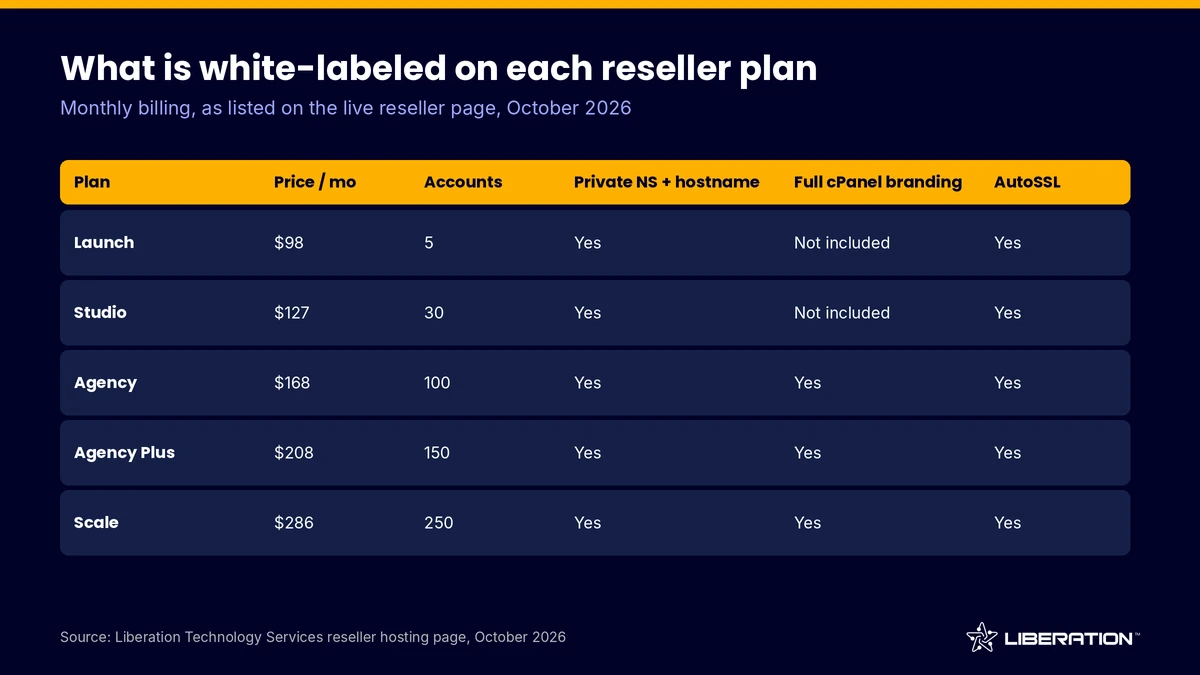
All five of our reseller plans include private nameservers and a hostname, so every plan can present white label reseller hosting at the DNS level. The difference is cPanel branding. Full cPanel branding is included on Agency, Agency Plus and Scale, and not on Launch or Studio (as of October 2026).
If clients will log in to cPanel themselves, plan for Agency or higher. If you manage everything on their behalf, Launch or Studio may be enough. Our reseller hosting page has the current prices and specs.
Check: count how many clients will actually open cPanel. Common mistake: buying a small plan, promising a fully branded login, and finding out later that branding starts higher up.
Step 2: Set your server hostname on your own domain
The hostname is the name of the server itself, such as server1.yourbrand.com. It shows up in email headers, in some error pages and in the login URL clients bookmark, so it should be yours. Our plans include a private hostname, and our support team can help you set it if you are unsure.
Create an A record for the hostname at the DNS host for your brand domain, pointing to the server IP address. Then confirm it resolves before you move on.
Check: run a lookup on the hostname and compare the IP to the one in your welcome details. Common mistake: using a hostname on a domain you might sell or let expire, which breaks every login link you handed out.
Step 3: Create private nameservers for reseller hosting nameservers
Reseller hosting nameservers are usually private nameservers: names like ns1.yourbrand.com and ns2.yourbrand.com that point to your server. Clients point their domains at them in the registrar, so the DNS records they see carry your name instead of ours. This is the most visible part of white label reseller hosting.
In WHM, the Basic WebHost Manager Setup screen takes up to four nameservers and tells you directly that you cannot create new accounts until nameservers are set. It also notes that nameservers need A records to work over IPv4. WHM can create those address records for you from the same screen (cPanel documentation, as of October 2026).
Use two nameservers on two different IP addresses if your plan provides them. Some registrars reject two nameservers that share one address.
Check: the A records for both names exist and resolve. Common mistake: skipping the A records and wondering why new accounts do not resolve.
Step 4: Register glue records at your registrar
A glue record is the entry at your domain registrar that tells the internet where ns1.yourbrand.com lives. Without it, there is a circular problem: to find your nameserver you must look up yourbrand.com, which is answered by that same nameserver. Registrars often call the screen “register nameserver,” “host records” or “child nameservers.”
Register both names with their IP addresses. After that, set the domain’s own nameservers to your two private names if the brand domain will be hosted on the same server.
Propagation can take a few hours. Test from outside your own network before telling clients to use the new names.
Check: a public DNS lookup for the nameserver names returns the right IPs. Common mistake: entering the nameserver names as ordinary A records in your zone and never registering them at the registrar.
Step 5: Apply cPanel branding to your white label reseller hosting
cPanel branding changes what the client sees after login. According to the cPanel documentation (version 108 and later), the Customization interface lets you upload logos for light and dark backgrounds in SVG format, change the main menu colors, set a favicon in ICO format, edit the help and documentation footer links, and enter a public company name and contact URL.
The same page carries an important limit: it updates the cPanel interface only, and it does not update the WHM interface. WHM is your own console, so clients should not see it. It also says hosting providers can enable or disable this feature for resellers, which is why plan-level support for cPanel branding matters.
On Agency, Agency Plus and Scale, full cPanel branding is part of the plan. If you sell to clients who value a polished portal, this is where reseller hosting for web designers pays off: the client logs in to a panel with your logo and your support link.
Check: log in as a test client and click through the main menu, the footer and the help links. Common mistake: uploading a logo and forgetting the footer links, which still point at default documentation.
Step 6: Put support email and billing under your brand
Branding the panel does not brand the conversation, and white label reseller hosting needs both. Clients email you when a site is down, and invoices carry your name when they pay. Set up a support address on your own domain, such as [email protected], and use it as the contact in cPanel branding and in your welcome message.
For branded email hosting, Liberation Mail is available as a private email add-on. For billing, choose any invoicing or billing tool you like, and send invoices from your own domain. We do not bundle a billing system with the plans, so this step is your choice.
Write one welcome message that includes your nameservers, your panel login URL and your support address. Clients should never need to know our name to get help.
Check: send a test welcome email to a personal inbox and read the headers and links. Common mistake: using a free webmail address for support, which looks small and sometimes lands in spam.
Step 7: Issue SSL certificates under your clients’ domains
Every plan includes AutoSSL, which requests and renews free certificates for client domains once their DNS points at the server. Clients get the padlock without a certificate purchase, and you do not track renewal dates.
AutoSSL checks that a domain resolves to your server before it issues a certificate. That is why Step 3 and Step 4 come first: if clients use your private nameservers, validation is straightforward.
Check: add a test domain, wait for DNS, and open it over HTTPS. Common mistake: testing SSL on a domain that still points at an old host, then assuming AutoSSL is broken.
What clients can still see in white label reseller hosting
No white label setup hides everything. Be honest with yourself about what remains visible, and decide what to tell clients.
- The server IP address is public, and a reverse lookup or a WHOIS check on the IP can show the network owner.
- Default documentation links and some error pages may mention cPanel, because cPanel is the software and you cannot rename it.
- On plans without full cPanel branding, the panel keeps more default styling.
- Email sent from the server can carry the server’s hostname in the headers, which is why Step 2 matters.
The practical goal is that a normal client never needs to know who runs the server. A technical client who looks hard enough will always find it, and that is acceptable.
White label reseller hosting by plan
This table shows the items in this guide that depend on your plan. Prices are monthly billing as of October 2026, with annual pricing slightly lower on Launch and Studio.
| Plan | Price per month | Accounts | Private nameservers and hostname | Full cPanel branding |
|---|---|---|---|---|
| Launch | $98 | 5 | Yes | Not included |
| Studio | $127 | 30 | Yes | Not included |
| Agency | $168 | 100 | Yes | Yes |
| Agency Plus | $208 | 150 | Yes | Yes |
| Scale | $286 | 250 | Yes | Yes |
Every plan also includes AutoSSL, a domain reseller account, Imunify360 and free client migrations with no per-site fees. When you are ready to move existing clients, see how to start a reseller hosting business, and use our website transfer service to bring sites over.
Why reseller hosting for web designers works
White label reseller hosting solves a common problem for designers: you build the site, then hand the client to a host you do not control. With a branded setup, you keep the hosting relationship, answer the first support request and earn recurring revenue from the same client.
The trade is responsibility. You become the first line of support, so confirm what the provider covers before you promise anything. Our reseller client protection policy explains how we treat your clients, and our reseller hosting guide covers the basics of the model.
Support is available 24/7 from a US-based team by ticket and chat, so you have a second line when something is beyond your own skills.
Frequently asked questions
What is white label reseller hosting?
White label reseller hosting is a service where you buy hosting capacity from a provider and sell it under your own brand. Your clients see your nameservers, your panel branding and your invoices, while the provider runs the servers behind the scenes.
Do I need private nameservers for white label hosting?
Private nameservers are the most visible part of white label hosting, so most resellers set them up. They let clients point domains at ns1.yourbrand.com instead of a provider’s name. All of our reseller plans include them.
Which plans include full cPanel branding?
Full cPanel branding is included on our Agency, Agency Plus and Scale plans. Launch and Studio include private nameservers and a hostname but not full cPanel branding, as of October 2026.
Can clients still see my hosting provider?
A determined technical client can find it through the server IP address or through default cPanel software references. A normal client will see your brand on the nameservers, the panel and the emails. Be upfront about that limit when you describe your service.
How long does it take to set up white label reseller hosting?
The settings take under an hour for most resellers. Waiting for glue records and DNS propagation can add several hours, so schedule the setup before you invite your first client.
Sources
- cPanel documentation, Customization interface
- cPanel documentation, Basic WebHost Manager Setup (nameservers)
- cPanel documentation, Edit Reseller Nameservers and Privileges
- Liberation Technology Services reseller hosting plans and terms
Related reading: best reseller hosting checks, hosting reseller plans and how to start a reseller hosting business.