
Secure file sharing means the right people can open the right files, nobody else can, and you can prove who touched what. The way to get there is to match your tools to the kind of data you handle, switch on a short list of controls, and keep everyone in one approved place so staff don’t improvise. We built Hub for Teams so email, files, office apps, chat, video and projects live in one workspace on servers we own in the United States.
TL;DR
- Start by listing who sends files, who receives them and how sensitive the data is. Federal guidance puts this step before choosing any tool.
- The controls that matter most: encryption, multifactor sign-in, view-only defaults, expiring links, and an activity log you can read.
- Most leaks come from staff using unapproved shortcuts, so a tool that is easy to use is a security feature.
- Before you sign with any provider, ask where data is stored, who can see it and what happens to it when you leave.
- Churches and nonprofits get 15% off at LiberationTek, and every plan carries a 30-day money-back guarantee and free migration.
Table of Contents
- What “secure” actually means for a file
- Start with who sends what to whom
- The controls that matter most
- Where file sharing goes wrong
- How to share a file with someone outside your organization
- Questions to ask any provider before you move your files
- What this looks like for your type of organization
- One workspace instead of five tools
- A one-month plan to tighten your file sharing
- FAQ
- Sources
What “secure” actually means for a file
A file is exposed at three moments: while it travels, while it sits in storage, and after it lands with the recipient. A secure setup covers all three.
- In transit: the file is encrypted on its way between devices and servers, so someone on the same Wi-Fi or network path can’t read it.
- At rest: the file is encrypted where it is stored, so a stolen disk or a misconfigured server doesn’t hand over readable documents.
- After delivery: you control who can open, edit, download or forward it, and you can take that access away.
The third one is where small organizations usually fall short. An attachment sent by email can’t be recalled, forwarded copies multiply, and nobody can say later who has a copy. A shared link with an expiry date and a named recipient can be closed in seconds.
Email encryption works in layers, and file sharing follows the same logic: each layer covers a different gap, and none of them replaces the others.
Start with who sends what to whom
The National Institute of Standards and Technology (NIST) is the U.S. agency that publishes security guidance for government and industry. Its August 2020 bulletin on file exchange tells organizations to begin by identifying their users’ needs: who the senders and recipients are, and what kind of data moves between them. Public flyers, personal details such as Social Security numbers, and health records each call for different handling.
Do this as a one-page exercise before you pick or change a tool:
- List the groups who send files: staff, volunteers, board members, contractors.
- List who receives them: clients, patients, donors, vendors, auditors, government offices.
- Sort the files into three buckets: public, internal, and sensitive (anything with personal, financial, health or legal details).
- Mark which bucket each regular exchange falls into, such as a client contract, a payroll file or a donor list.
The same NIST bulletin notes that most organizations will need more than one way to exchange files, because a newsletter PDF and a medical record don’t need the same protection. The point is to know which exchanges are sensitive, so you can give those the strictest setup.
The controls that matter most
Vendors advertise long feature lists. For a small business, church or campaign, these seven do most of the work.
1. Encryption you can describe
NIST says organizations should use only approved cryptographic algorithms, built into validated modules, when they protect file exchanges. If your work falls under federal or regulated rules, ask any provider to document its encryption in plain terms. End-to-end encryption goes a step further: only the sender and recipient hold the keys, so the service that carries the message can’t read it. Liberation Email offers end-to-end encryption for exactly this reason.
2. Multifactor sign-in
The Cybersecurity and Infrastructure Security Agency (CISA), part of the Department of Homeland Security, advises protecting cloud accounts with a strong password and multifactor authentication. Multifactor means a second proof of identity, such as a code on a phone, so a stolen password alone doesn’t open the account. Turn it on for every user, and first for administrators.
3. View-only by default
CISA’s secure configuration baseline for a widely used cloud file platform says default file and folder permissions should be View, because edit access lets a user make unauthorized changes. The habit carries over to any tool: give people the least access that lets them do the job, and grant editing only when it’s needed.
4. Named recipients and expiring links
A link that anyone can open is the file-sharing equivalent of a key left under the doormat. Share with specific people, and give links an end date. When a project closes, the access closes with it.
5. An activity log
You should be able to answer: who opened this file, when, and from where? If something goes wrong, that record is how you work out what was exposed and who needs to be told.
6. Backups and a way to revoke
Files get deleted by accident and overwritten by mistake. Keep tested backups, and know where the button is that cuts off a shared link or a former employee.
7. Data stored where the law and your clients expect
CISA suggests confirming that a cloud provider encrypts your data and is based in a country with privacy and security laws. Our servers are owned and run by us in the United States, not capacity rented from a Big Tech cloud, and we don’t track or share customer data.
Where file sharing goes wrong
The most common failure isn’t a hacker defeating encryption. It’s an employee emailing a spreadsheet to a personal account because the official tool was slow.
The Federal Financial Institutions Examination Council (FFIEC) lists the risks in its IT Examination Handbook chapter on file exchange: weak or missing encryption, files stored on servers you haven’t vetted, files crossing untrusted networks, files altered along the way, and unapproved ad hoc methods. It also observes that many solutions are hard for people to set up and use, for example when sender and recipient must install software to swap keys, and that this pushes people toward unapproved methods.
NIST makes the same point: users who aren’t trained on the approved solution are likely to circumvent it and use ad hoc means. Security that people avoid protects nothing.
The awareness gap is old but telling. A Ponemon Institute survey of 621 IT practitioners found 62% rated the risk of workplace file sharing as high or very high, and only 11% said they would be very likely to know if sensitive information were lost or stolen in a public cloud breach. The survey dates from 2013 and was published in 2014, so treat the percentages as a snapshot of that period, but the lesson holds: you can’t protect what you can’t see.
What this means for you:
- Pick one approved place for files and say so in writing.
- Make it at least as easy as email, or people will go back to email.
- Spend ten minutes training every new hire, volunteer and board member on how to share a file.
How to share a file with someone outside your organization
Outside recipients are where the risk grows, because you don’t control their devices. Use this routine for anything in your sensitive bucket.
- Classify the file. Is it public, internal or sensitive? If it holds personal, health, legal or financial details, use your strictest path.
- Confirm the recipient through a channel you already trust. A short phone call or a known email address beats a new address that arrived in a message. Fraudsters often pose as clients and vendors.
- Share with that person by name, not with an open link.
- Set the boundaries. View-only unless editing is needed, a link that expires, and multifactor sign-in on your side.
- Send the password or code by a different route than the link, for instance by text message while the link goes by email.
- Close it out. When the work is done, revoke access and glance at the activity log to confirm the file was opened by the person you intended.
If the exchange is mostly conversation around a document, such as a proposal under review, keeping the file and the discussion in one workspace means fewer copies are created in the first place. Team collaboration tools can be set up with security in mind, and that setup is worth doing once, properly.
Questions to ask any provider before you move your files
The NIST bulletin warns that cloud and file-sharing providers might be able to access the files they store, so how far you trust them matters. A written list of questions makes the choice easier.
- Where is my data stored, and who owns the servers? The Idaho state technology office’s guideline on online file storage tells agencies to review a provider’s terms of service for U.S. data storage, control and deletion of data after termination, and limits on using records for other purposes. Those are good questions for a private business too.
- Can the provider read my files? Ask which content is covered by end-to-end encryption and who holds the keys.
- Is my data used for advertising or analytics? A tool that is free or very cheap often pays its way by studying what you store.
- What does it cost to move out, or to move in? Look for migration help and data-transfer fees.
- Who answers when something breaks? A support line staffed by real people matters most during an incident.
- What is the refund policy if it doesn’t fit? A trial window lowers the risk of choosing.
Here is how we answer those on our side: we own our servers in the United States, we don’t track or share customer data, support is direct and U.S. based, migration from another provider is free, and every plan has a 30-day money-back guarantee. Our Private Cloud plans include unmetered monthly data transfer with no egress fees, which means moving large files in and out doesn’t generate a surprise bill.
Privacy-first cloud hosting goes deeper on how to judge where your data lives, and our guide to secure alternatives to traditional email compares the options for the messages that carry your attachments.
What this looks like for your type of organization
The controls are the same everywhere. The emphasis changes with the data you hold.
| Organization | Typical sensitive files | What to prioritize |
|---|---|---|
| Church or ministry | Donor records, counseling notes, staff files | Named recipients, view-only sharing, limited volunteer access |
| Nonprofit | Donor lists, grant documents, client records | Multifactor sign-in, activity log, access ended when volunteers leave |
| Law firm | Client files, discovery, privileged messages | End-to-end encryption, expiring links, strict permissions per matter |
| Healthcare practice | Patient records, referrals, billing | Encryption, audit trail, written rules on who may share what |
| Political campaign | Voter and donor data, strategy documents | Few administrators, multifactor sign-in, one workspace that departing staff lose access to |
| Local government or fire district | Public records requests, personnel files | Data stored in the U.S., clear retention and deletion terms |
Health and legal data come with obligations beyond good habits. If you handle patient information, confirm the rules that apply to your practice with your compliance adviser or attorney before you decide how files move. Law firms can read our eight steps for protecting clients for the practical side of IT.
One workspace instead of five tools
NIST’s finding that people circumvent clumsy approved tools points to a simple fix: put everything people need in one place. When email, files, chat and video sit side by side, nobody has a reason to attach a contract to a text message or park a spreadsheet in a personal account.
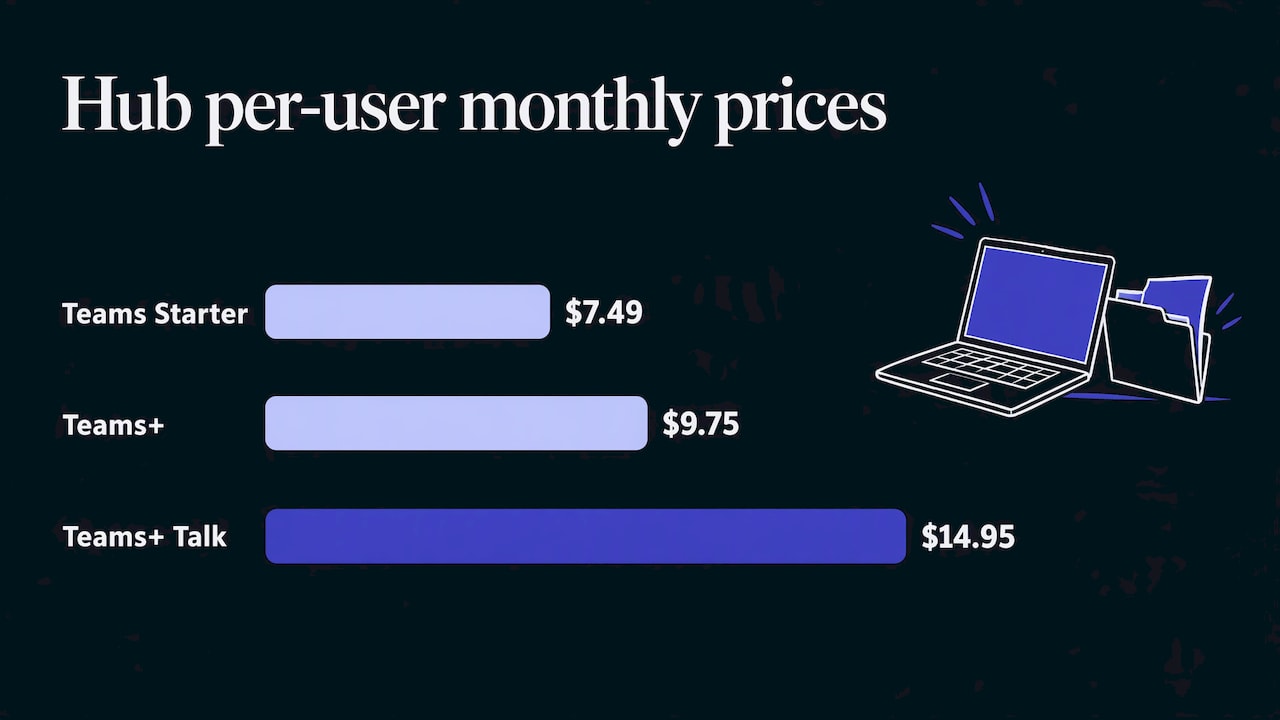
That is what Hub for Teams is for. It brings email, files, office apps, chat, video and projects into one workspace, as an alternative to the large office suites. Plans are priced per user per month:
- Teams Starter: $7.49
- Teams+: $9.75
- Teams+ Talk: $14.95
If you mostly need private email with end-to-end encryption, Liberation Email starts at $1.95 per user per month with Mail Starter, $4.95 with Mail+ and $7.95 with Mail Pro. You can compare the full lineup on the Hub for Teams page. Churches and nonprofits receive a 15% discount, we migrate your existing data for free, and the 30-day money-back guarantee applies to every plan.
Organizations that want their own dedicated environment can look at our Private Cloud plans, from Sentinel at $179 per month. Our overview of five private cloud security controls explains what to look for at that level.
A one-month plan to tighten your file sharing
You don’t need a large project. Work through it in four weeks.
Week 1: Map. Complete the who-sends-what exercise and name the one approved place for files.
Week 2: Configure. Turn on multifactor sign-in for everyone. Set sharing to View by default and to named recipients. Make links expire.
Week 3: Move. Migrate files from personal accounts, shared drives and old email attachments into the approved workspace. Free migration from your current provider makes this step less painful.
Week 4: Train and review. Show everyone how to share a file in five minutes. Read the activity log together, remove access for people who have left, and write down the routine.
Repeat the review twice a year, and any time a staff member, volunteer or board member leaves.
FAQ
How can I securely share files with a client?
Share with the client by name instead of through an open link, set the access to view-only, and give the link an end date. Confirm the recipient’s address by phone first, and send any password by a separate route. When the work is done, revoke access and check the activity log.
Is email attachment sharing safe enough for sensitive documents?
Standard attachments are hard to control once sent, because forwarded copies can’t be recalled and you can’t see who opened them. For sensitive documents, use end-to-end encrypted email such as Liberation Email, or share a link with limited, expiring access from a workspace like Hub for Teams.
Does a small organization really need multifactor sign-in?
Yes. CISA recommends a strong password and multifactor authentication for cloud accounts, because a password alone can be guessed, reused or stolen. It takes a few minutes per person to set up and blocks most account takeover attempts that start with a stolen password.
What file sharing setup suits a church or nonprofit with volunteers?
Give volunteers access only to the folders they need, make the default View, and remove access when they step down. Keeping donor and counseling records in a separate, tightly limited area adds protection. Hub for Teams gives churches and nonprofits a single workspace, with a 15% discount for both.
Sources
- NIST ITL Bulletin, August 2020: Security Considerations for File Exchange
- FFIEC IT Examination Handbook: File Exchange
- CISA: Get the Most out of Cloud Storage and Services While Minimizing Risk
- CISA: SharePoint and OneDrive Secure Configuration Baseline, December 2023
- Ponemon Institute: Achieving Security in Workplace File Sharing
- Idaho ITA G595: Public Online File Storage Services Guideline