
HIPAA compliant email is ordinary email plus three things: a provider who will sign a Business Associate Agreement, transport and storage protections you have assessed and documented, and controls over who inside your practice can reach the mailbox. No mail service is compliant on its own.
The confusion here is understandable, because the rule is less prescriptive than most people expect. The Security Rule does not ban email, does not name an approved provider, and does not flatly require encryption. It requires you to think, choose and write the decision down.
Does HIPAA allow you to email patient information?
Yes. The Security Rule does not expressly prohibit the use of email for sending ePHI. What it requires is that you protect the information appropriately when it travels over open networks.
HHS puts the obligation this way: a covered entity must “assess its use of open networks, identify the available and appropriate means to protect e-PHI as it is transmitted, select a solution, and document the decision.”
Read that carefully, because the last four words are the ones people skip. The documentation is part of the requirement, not an optional extra.
Is email encryption required under HIPAA?
Under the current Security Rule, encryption is addressable rather than required. That word causes more compliance failures than almost any other in HIPAA.
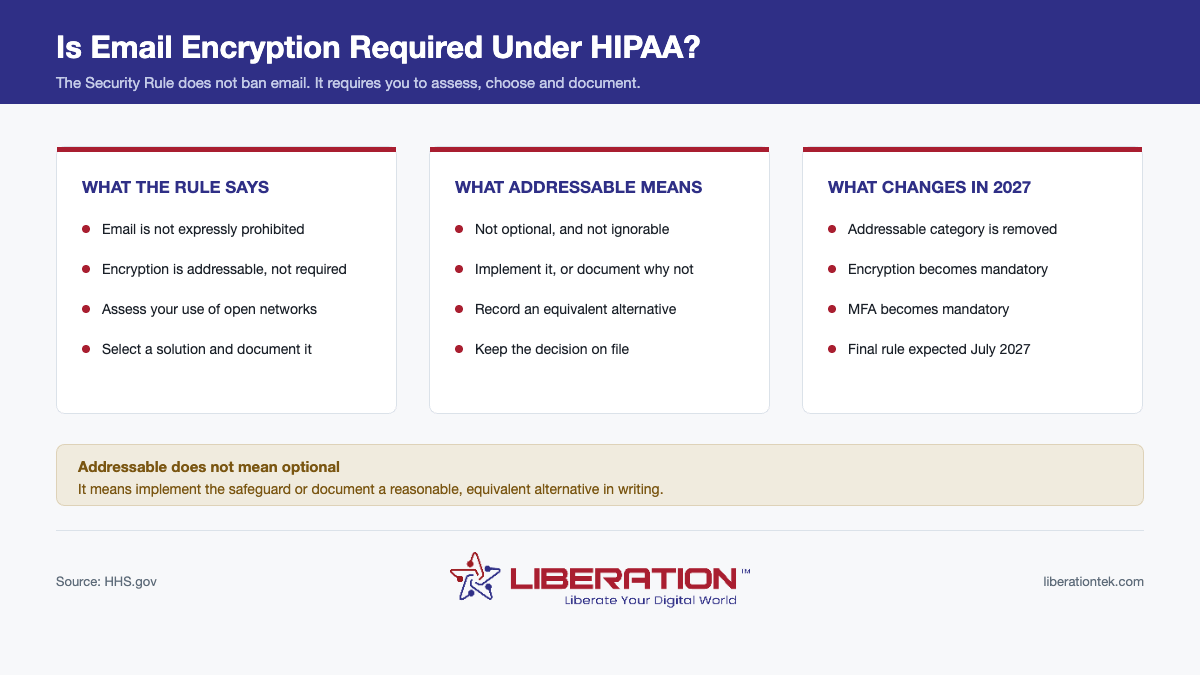
Addressable does not mean optional. It means you must implement the safeguard, or determine that it is not reasonable and appropriate for your situation, implement an equivalent alternative where reasonable, and document why. An undocumented decision to skip encryption is not a decision. It is a gap.
In practice, for a small practice sending patient email over the public internet in 2026, it is very difficult to argue that encryption is not reasonable and appropriate. It is cheap, standard and widely available.
This is also changing. The proposed Security Rule update removes the addressable category entirely and makes encryption and multifactor authentication mandatory. That final rule is now expected in July 2027, having been postponed on 8 July 2026 from its original May 2026 target. Practices that treat encryption as required today will have nothing to do when it lands.
What makes an email service HIPAA compliant email?
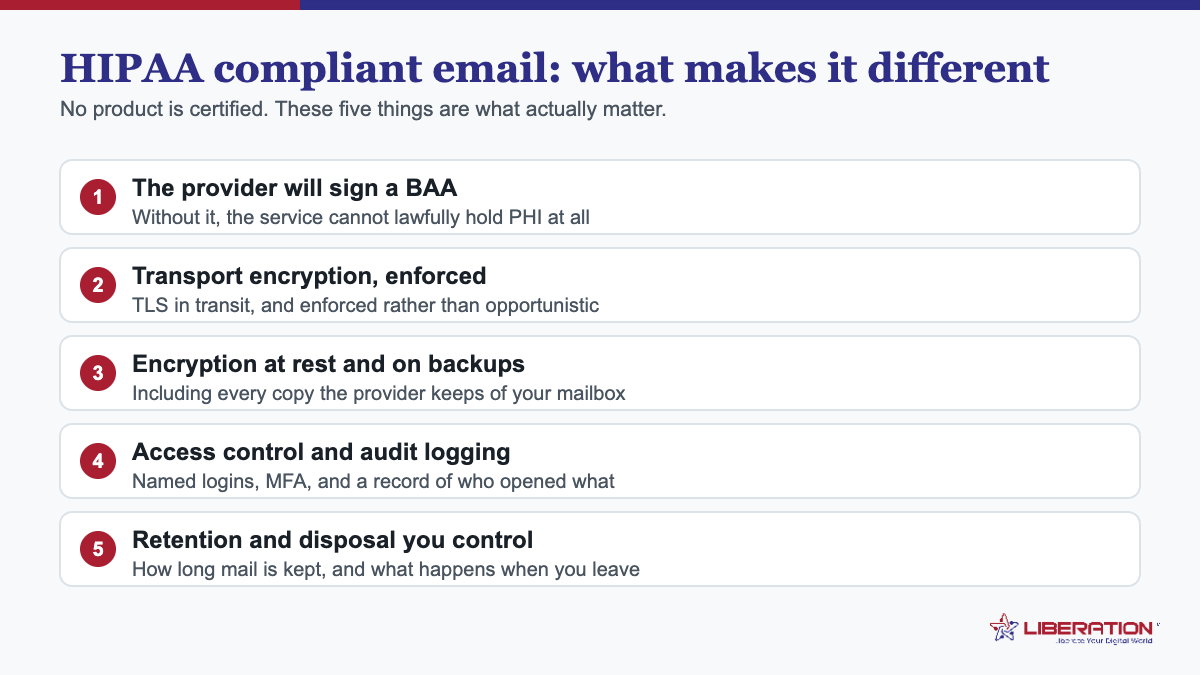
Four things, and the first is contractual rather than technical:
- The provider will sign a BAA. Email is one of the most likely places for PHI to appear, so your mail provider is a business associate. If they will not sign, the service cannot hold patient information regardless of how it is encrypted.
- Transport encryption is enforced, not merely supported. Opportunistic TLS that silently falls back to plaintext is not the same as enforced TLS.
- Mail is encrypted at rest on the provider’s storage, and you know where that storage physically is.
- Access is controlled and logged — unique accounts per person, multifactor authentication, and an audit trail you can actually retrieve.
Two things that are not on the list: a compliance badge on the provider’s website, and the phrase “military-grade encryption”. Neither means anything under the rule.
What about free consumer email?
Consumer mail accounts are generally unsuitable for PHI. The usual problems are no BAA on the free tier, scanning of message content, and no administrative controls over who in the practice can open the mailbox.
Some large providers do offer a BAA on their paid business plans. If you use one, check that your specific plan is covered, that the BAA is actually executed rather than merely available, and that the features you rely on are inside the covered scope. “The company offers BAAs” and “we have one” are different states.
Practical HIPAA compliant email rules for a small practice
- Use your own domain, not a free consumer address. It is a trust signal to patients and it gives you administrative control.
- Keep PHI out of subject lines. Subject lines leak into notifications, previews and logs.
- Send the minimum necessary. A message saying “your results are ready, please log in” avoids the problem entirely.
- Give every staff member their own account. Shared mailboxes destroy your audit trail.
- Turn on multifactor authentication for everyone, not just administrators.
- Write down your transmission decision once, and revisit it annually alongside your risk analysis.
How LiberationTek approaches email for healthcare
Our private email hosting runs on servers we own and operate in the United States. Mail is not scanned, not sold, and not used to train AI models — which for a practice is a straightforward way to reduce how many parties have any relationship with your patient data at all.
For healthcare specifically we sign a Business Associate Agreement, and our healthcare offering adds encrypted file transfer, secure messaging and patient intake forms so that the sensitive exchanges do not have to happen over email in the first place. That is usually the better answer: the most secure email is the one you did not need to send.
For the wider picture, see our guide to HIPAA compliant hosting, or book a consultation and we will look at your current setup honestly.
The better answer: stop sending PHI by email
The most secure email is the one you did not need to send. Most of what practices email to patients does not need to contain clinical detail at all.
A message saying “your results are ready, please sign in to view them” carries no PHI beyond the fact of a relationship, and moves the sensitive part into a system built for it. A patient portal, a secure messaging tool or an encrypted file transfer link all solve the transmission problem more cleanly than trying to harden email itself.
This is worth doing even where your email is properly encrypted, because email has a second problem encryption does not fix: it leaves copies everywhere. In the recipient’s inbox, in their phone’s mail cache, in your sent folder, in backups of both, and often in a forwarded chain you never see.
Email mistakes that cause most breaches
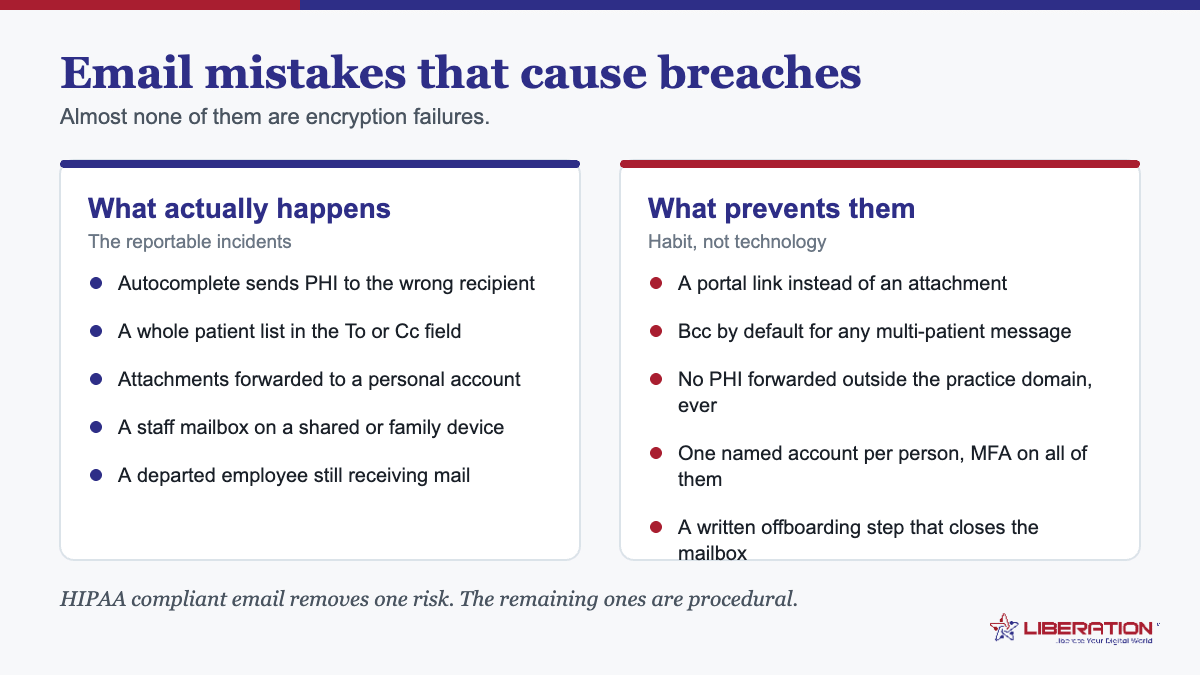
Enforcement actions involving email rarely turn on weak cryptography. They turn on ordinary human error:
- Wrong recipient. Autocomplete picks the wrong surname. This is the single most common email breach.
- CC instead of BCC on a group message. Sending a reminder to 300 patients with every address visible discloses that all of them are your patients.
- Attachments carried down a reply chain into a conversation the original patient was never part of.
- Auto-forwarding rules pushing clinical mail to a personal account, often set up years earlier and forgotten.
- Mail on unmanaged personal devices with no passcode, no encryption and no way to wipe them.
- Departed staff whose mailbox was never disabled.
Most of these are addressed by administrative controls rather than technical ones: unique accounts, an offboarding checklist, disabling external auto-forwarding at the server, and training people to slow down on the address line.
How to document your HIPAA compliant email decision
The documentation is part of the requirement, and it does not need to be long. One page, revisited annually alongside your risk analysis, covering:
- What ePHI travels by email, and to whom
- What protections you apply — enforced TLS, encryption at rest, MFA, access controls
- Why those are reasonable and appropriate for your size and risk
- What you considered and rejected, and why
- Who signed off, and the date
That last line does more work than people expect. An undated, unsigned decision looks indistinguishable from no decision at all.
Does a HIPAA compliant email service exist off the shelf?
Services exist that can be used compliantly, but no service is compliant on its own. Compliance depends on how you configure it, who you let into it, and whether you signed the agreement — none of which the vendor controls.
Treat any product marketed as “HIPAA compliant email” as a starting point that still requires three things from you: an executed BAA covering the specific plan you are on, administrative controls over accounts and offboarding, and a documented decision about how you protect messages in transit. A vendor can supply the first and enable the second. Only you can produce the third.
What patients are allowed to ask for, and why it changes the HIPAA compliant email question
There is a part of this subject that gets left out of most vendor pages, and it changes the practical answer considerably: a patient may ask you to send their own health information by ordinary, unencrypted email, and you are generally permitted to comply.
The right of access is the patient’s, not the practice’s. HHS has been explicit that individuals can request their records in the form and format they prefer, including unencrypted email, provided they have been warned of the risk and still want it that way. The HHS guidance on individuals’ right of access sets this out directly. A practice that refuses outright, insisting everything goes through a portal the patient cannot use, may be creating a different compliance problem while solving this one.
Warn, record, then send. The workable process is short: tell the patient plainly that ordinary email is not secure, note in the record that you told them and that they asked for it anyway, and send it. That note is the whole protection. It takes one line.
This does not extend to anyone else. The patient’s choice covers mail to the patient. It does not authorise emailing their records to a third party, discussing them with a colleague over consumer email, or sending a spreadsheet of several patients to anyone. HIPAA compliant email still governs everything that is not a patient exercising their own right of access.
Which is why the portal-versus-email argument is usually the wrong one. The realistic setup for a small practice is both: a secure portal for routine clinical exchange and anything involving more than one patient, plus a documented process for the patient who simply wants a PDF in their inbox. Insisting on one channel for everything is what produces the workarounds that actually cause breaches – staff forwarding to personal accounts because the official route was too slow.
The practical rule. Use HIPAA compliant email as the floor for the practice’s own communications, use the portal for anything substantive, and treat a patient’s explicit, documented request as the one lawful exception. That combination is defensible, workable, and considerably less painful than the all-or-nothing policies many practices write and then quietly ignore.
Frequently asked questions
Can I email patients under HIPAA?
Yes. The Security Rule does not prohibit email. You must assess your use of open networks, choose appropriate protections, and document the decision.
Is encryption mandatory for HIPAA email?
Not under the current rule, where encryption is addressable. You must implement it or document a reasonable equivalent alternative. The proposed update removes the addressable category and makes encryption mandatory, with the final rule expected in July 2027.
Does Gmail or Outlook work for HIPAA email?
Only on plans where the provider will execute a Business Associate Agreement, and only if that agreement is actually signed and covers the services you use. Free consumer tiers generally do not qualify.
Can I put patient details in the subject line?
Avoid it. Subject lines appear in notifications, previews and server logs, and are frequently retained where the message body is not.
Do I need a BAA with my email provider?
Yes, if PHI could appear in any message. In a clinical practice it will, so treat the mail provider as a business associate.
This article is general information, not legal advice. Consult a qualified professional about your own HIPAA obligations.
Related reading
- HIPAA Business Associate Agreement: 5 Vendor Checks
- HIPAA Compliant Hosting: 5 Questions to Ask Before You Sign
- HIPAA Compliant Email With a Signed BAA — What a BAA-backed mailbox actually includes.
- HIPAA Compliant Hosting for Healthcare — Where the rest of a practice’s data lives.