
WordPress is a good fit for most small businesses that want to own their website outright and expect it to grow. Budget roughly $100 to $200 a year for hosting and a domain, plus a few hours a month for updates and backups. If nobody on your team wants that maintenance, a website builder is the more honest choice.
Most advice about WordPress for small business is written for people who already like WordPress. This is written for the owner who just wants a website that works, does not want to become a systems administrator, and needs to know what they are signing up for before they commit. Below is what the platform is genuinely good at, what it costs to keep running, what maintenance actually looks like month to month, and the cases where something simpler is the better answer.
Is WordPress a good choice for a small business?
For most small businesses, yes, and the case for WordPress for small business has less to do with features than with ownership. A WordPress site is yours. The content lives in a database you control, the files sit on hosting you choose, and if you ever want to leave, you take the whole thing with you. Closed platforms do not work that way. When a hosted builder changes its pricing, its terms, or its mind about your line of business, your options are limited to accepting it or rebuilding from scratch.
The practical advantages that follow from that:
- No platform lock-in. Any host that runs PHP and MySQL will run your site. That keeps your host honest on price and service.
- Functionality without custom development. Booking, invoicing, memberships, events, multilingual content, e-commerce. Most of what a small business needs already exists as a plugin.
- It grows with you. The same software runs a three-page contractor site and a store doing serious volume. You change hosting as you grow, not platforms.
- The skills are common. If your web person leaves, replacing them is straightforward. That is much less true of niche platforms.
The honest counterweight: WordPress hands you responsibility along with control. Nobody patches it for you on a shared plan, nobody notices when a plugin goes abandoned, and nobody takes a backup unless it has been set up. That is the whole trade.
What does a WordPress site actually cost to run?
The software is free. Everything around it is not, and the surprises usually come from the middle column below rather than the first.
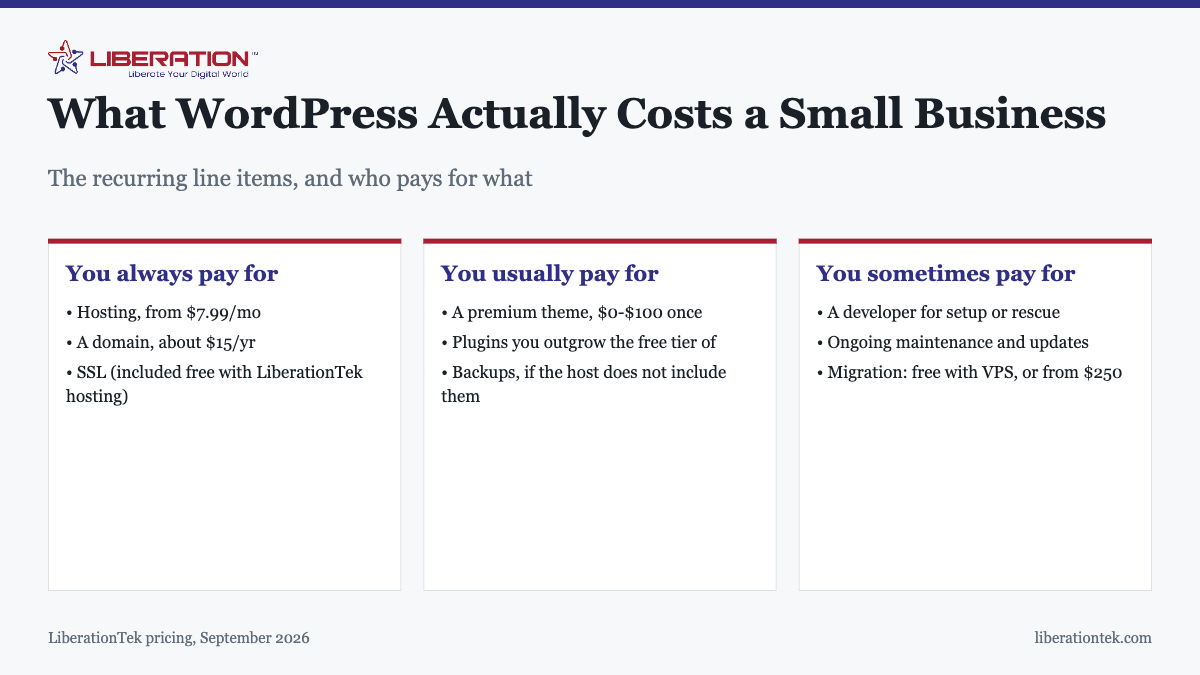
| Item | Typical cost | Notes |
|---|---|---|
| Hosting | From $7.99/mo | LiberationTek shared hosting includes cPanel, NVMe storage, free SSL, and room for up to nine sites |
| Domain name | About $15/yr | Renews annually; keep it in your own name |
| SSL certificate | Included | Free with LiberationTek hosting. Do not pay separately unless you need an extended validation certificate |
| Theme | $0 to $100 once | Free themes are fine for most sites; premium buys design and support |
| Plugins | $0 to a few hundred/yr | Free tiers cover most needs until you hit a specific limit |
| Backups | $0 to $60/yr | Check whether your host includes them before buying a plugin |
| Developer, if hired | Project-based | Setup, custom work, or rescue |
| Migration in | Free with VPS, or from $250 | Covers 25+ source platforms |
A straightforward WordPress for small business setup on shared hosting with a free theme lands near $110 a year, all in. Add a premium theme and a paid plugin or two and you are closer to $300. Those are the real numbers, and they are stable, which is the point.
What do you have to keep on top of?
This is the part that decides whether WordPress is right for you, and it is the part most comparisons skip.
Updates
WordPress core, your theme, and every plugin release updates, and a meaningful share of those are security patches. Outdated plugins are the most common route into a small business site. Check monthly at an absolute minimum, and take a backup first so a bad update is an inconvenience rather than an outage.
Backups
A backup you have never restored is a hope, not a backup. Confirm where yours are stored, confirm they run on a schedule, and restore one to a staging location at least once so you know the process works before you need it at speed.
Security basics
Most compromises are unglamorous: a reused administrator password, an abandoned plugin, a stale user account belonging to someone who left. Strong unique passwords, two-factor authentication on admin accounts, removing users who no longer need access, and deleting plugins you stopped using will prevent the large majority of incidents. We cover the specifics in how to secure your WordPress website.
Time
Realistically, an hour a month for a small site that is not changing much, and more when you are actively publishing. If that hour does not exist anywhere in your business, plan to pay someone for it or choose a platform where it is not required.
When is a website builder the better answer?
Sometimes it plainly is, and pretending otherwise does nobody any favors. A website builder is the better choice when your site is mostly informational, when you want hosting, updates, and security handled as part of the subscription, and when no one on your team wants to think about maintenance at all.
LiberationTek Website Builder starts at $10.99 a month with hosting and SSL included, and has an AI generator for getting a first draft of the site up quickly. Against that, WordPress on shared hosting at $7.99 a month costs less and gives you more control, but the maintenance is yours.
The deciding question is not which platform is more capable. It is whether anyone in your business will do the upkeep. If the answer is no, the more capable platform is the wrong one. We go through this in more detail in WordPress vs website builder.
What should you look for in WordPress hosting?
Hosting is the decision that most affects how a WordPress site performs, and the specifications that matter are short:
- NVMe storage. Database-driven sites are read-heavy, and disk speed shows up directly in page load times.
- Free SSL, issued automatically. Anything else is an upsell on something that should be standard.
- cPanel or equivalent. You want to be able to reach your files, databases, and email without filing a ticket.
- Backups you can actually restore yourself. Ask what the restore process looks like, not just whether backups exist.
- Room to grow. Moving from shared hosting to a VPS should be a change of plan, not a change of company.
LiberationTek shared hosting covers all of that at $7.99 a month, and when a site outgrows it, managed VPS hosting keeps cPanel and WHM and includes a free migration of one site. Shared, reseller, and VPS plans are covered by a 30-day money-back guarantee for first-time customers. If your trade is one some hosts quietly turn away, read the acceptable use policy before you buy — firearms businesses, for instance, can start on 2A friendly WordPress hosting at $29 a month.
Getting started without over-committing
A sensible order of operations for an owner doing this themselves:
- Register the domain in your own name. Not your designer’s, not your nephew’s. This is the single most common thing small businesses get wrong, and it is painful to undo.
- Pick hosting you can grow on rather than the cheapest introductory rate you can find.
- Install WordPress and a free theme and get a real page published before buying anything.
- Add plugins only when you hit an actual need. Every plugin is a thing to maintain.
- Set up backups on day one and test a restore in the first week.
- Write down who has admin access and review that list twice a year.
If you would rather hand the build to someone, our web development team builds WordPress sites on hosting we run ourselves, and you keep ownership of the site either way.
Frequently asked questions
Is WordPress good for a small business website?
Yes, for most small businesses. WordPress gives you full ownership of the site and its content, an enormous plugin ecosystem, and no platform lock-in. The trade-off is maintenance: someone has to apply updates, keep backups, and watch security. If nobody on the team will do that, a hosted website builder is the better fit.
How much does a WordPress website cost per year for a small business?
Running costs for a small business WordPress site typically land between $100 and $200 a year. That covers hosting from $7.99 a month and a domain at roughly $15 a year, with SSL included free on LiberationTek hosting. A premium theme is a one-time cost of $0 to $100. Design work, if you hire it out, is separate.
Is WordPress free?
The WordPress software itself is free and open source. You still pay for hosting and a domain name, because the software has to run somewhere and people need an address to reach it. Some themes and plugins are free, others are paid.
Do I need a developer to run a WordPress site?
No. Installing WordPress, picking a theme, and publishing pages are all things a non-technical owner can do. A developer is worth hiring for custom functionality, a design you cannot get from a theme, or recovering a site that has broken or been hacked.
How often do I need to update WordPress?
Check monthly at minimum. WordPress core, themes, and plugins all release security patches, and outdated plugins are the single most common way small business sites get compromised. Take a backup before applying updates so you can roll back if something breaks.
Should I use WordPress or a website builder?
Choose WordPress if you want to own the site, expect it to grow, or need functionality a builder cannot provide. Choose a website builder if you want the hosting, updates, and security handled for you and your site is mostly informational. LiberationTek Website Builder starts at $10.99 a month with hosting and SSL included.
Can I move my WordPress site to a different host later?
Yes. WordPress is portable by design, which is one of its real advantages over closed platforms. LiberationTek migrates one site free with a VPS plan, and quotes other migrations from $250, covering more than 25 source platforms.