
Small business cybersecurity comes down to a short list of habits and one big decision. The habits are multi-factor authentication, strong passphrases, updates, backups you have tested and staff who know a phishing email when they see one. The decision is where your email, files and website live, because that choice determines who can see your data and who answers the phone when something goes wrong. At LiberationTek we run hosting, email and collaboration on servers we own in the United States, so this guide pairs the habits with that decision.
TL;DR
- Attackers go after small businesses mainly for money, and most breaches start with stolen logins, phishing or a weak web application, not exotic hacking.
- Turn on multi-factor authentication for email, banking, file storage and every administrator account first. It is the highest-value hour you will spend.
- Keep backups in more than one place and practice restoring them, because a backup you have never restored is a guess.
- Write a one-page incident plan with phone numbers on paper before you need it.
- Choose email and hosting providers that keep your data private, patch their systems and put a real person on the phone.
Table of Contents
- Why small businesses get attacked
- The attacks that actually hit small businesses
- Eight protections to put in place
- Email and hosting: the decision that shapes everything else
- Where LiberationTek fits
- Vendors, remote work and your website
- Write the incident plan before you need it
- What small business cybersecurity costs
- A 30-day starter plan
- FAQ
- Sources
Why small businesses get attacked
There is a common belief that attackers only want big companies. The numbers say otherwise. The U.S. Small Business Administration’s Office of Advocacy counts 34.8 million small businesses in the United States, 99% of all U.S. businesses, according to NIST’s small business guidance. That is a very large pool of targets, many with no full-time IT person.
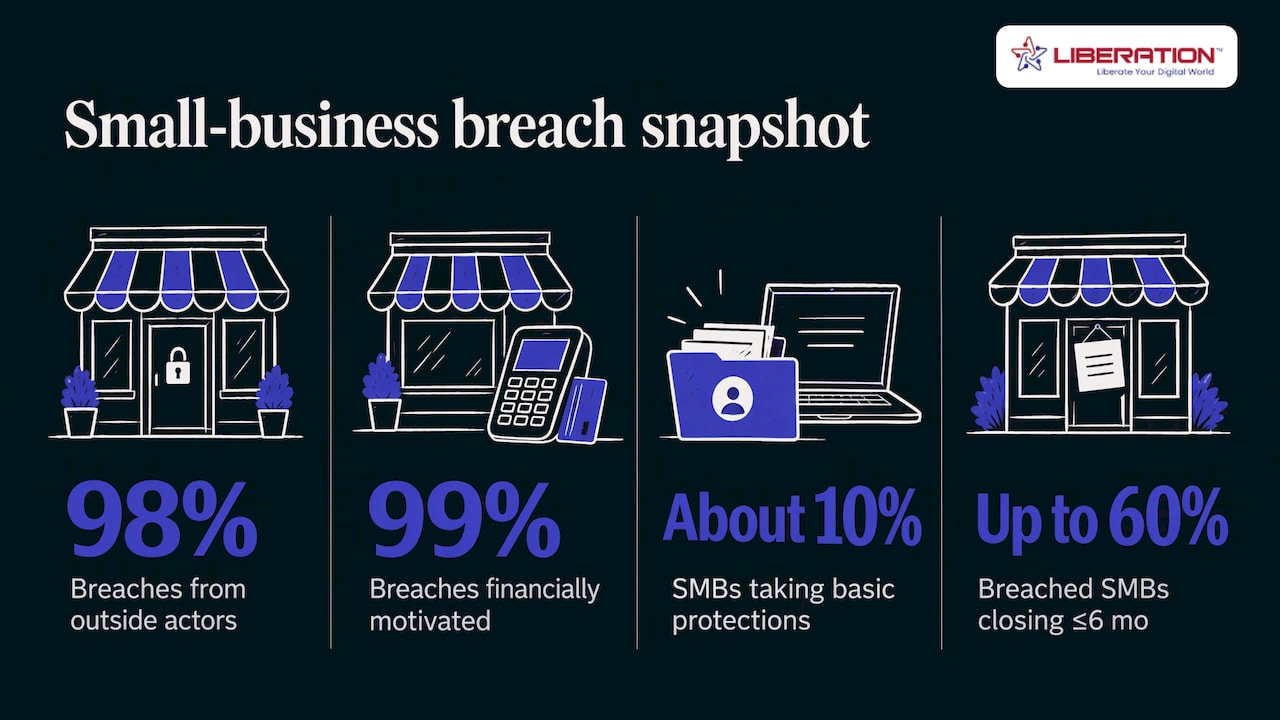
Verizon’s 2025 Data Breach Investigations Report looked at small-business incidents, meaning companies with fewer than 1,000 employees. It counted 3,049 incidents, 2,842 of them with confirmed data disclosure. The same snapshot found that 98% of the breaches came from outside actors and 99% were financially motivated. In plain terms: someone is trying to get paid, and a small organization with weak locks is an easy way to do it.
The New York State Attorney General’s small business guide adds that studies indicate at least half of confirmed data breaches targeted small businesses, and that only about 10% of small and medium businesses had taken basic steps to protect customer information. The guide also cites a figure as high as 60% of breached small businesses closing within six months. Treat that last number as a warning about how hard recovery can be rather than a certainty for any one company.
If you run an online store, the stakes include customer payment and account data. This overview of why cybersecurity matters for e-commerce covers the business side of that exposure.
What a breach actually costs
NIST lists the effects a cyber incident can have on a small business: inability to operate, lower productivity, regulatory fines, lost business-critical data, legal fees, lost income, reputational damage and damage to credit that can make it harder to get a bank loan. The New York guide adds the duty to notify employees, consumers and the Attorney General after a breach, plus possible civil liability if you did not take reasonable precautions.
For churches, healthcare practices, law firms and campaigns, the cost is often trust. Members, patients, clients and donors handed you information because they expected you to protect it.
The attacks that actually hit small businesses
You do not need to learn every threat. Verizon found that System Intrusion, Social Engineering and Basic Web Application Attacks account for 96% of small-business breaches. Here is what those mean in everyday language:
- Stolen credentials. Verizon names stolen credentials as the top action in these breaches, at 33%. Someone gets a working username and password, often from a phishing email or from a leak elsewhere, and logs in like an employee.
- Social engineering. This is phishing and its cousins: a fake invoice, a message that looks like it came from your pastor, your bookkeeper or your bank, asking you to click or pay.
- Basic web application attacks. These go after your website or login pages, usually through outdated software or weak passwords.
- Ransomware. Malware that locks your files and demands payment. In the same Verizon data, ransomware showed up in 88% of small-business breaches, against 39% at large organizations.
The pattern is consistent: most of these attacks need one of your people to make one mistake, or one of your accounts to have one weak lock. That is good news, because both are fixable.
For more on the numbers, see our own breakdown of small business cyber attack statistics and our ransomware statistics page. If you want to see how stolen passwords spread, read about the 184 million passwords exposed in one credential leak.
Eight protections to put in place
The federal government publishes free guidance for small businesses, and it agrees on the basics. This list draws on NIST’s Cybersecurity Basics page and CISA’s guidance for small businesses. CISA is the federal Cybersecurity and Infrastructure Security Agency. NIST is the National Institute of Standards and Technology.
1. Turn on multi-factor authentication everywhere it counts
Multi-factor authentication (MFA) asks for a second proof, such as a code or a hardware key, in addition to your password. NIST recommends phishing-resistant MFA on every account that offers it, especially email, banking, file storage, password manager and cloud accounts.
CISA adds two points. Enforce MFA with technical settings so it is not optional, and cover every administrator account. CISA notes that in many compromises attackers gained a foothold through a system administrator account, which hands them complete access to company assets. Our article on why MFA matters walks through the options.
2. Use long passphrases and a password manager
NIST recommends passphrases of at least 15 characters, kept in a password manager or replaced with passkeys, and says to change the default password on any new device or router. A passphrase is a few unrelated words strung together. It is easier to remember than a jumble of symbols and harder to crack. Each account gets its own, so one leak does not open every door.
3. Give people only the access they need
NIST’s Small Business Quick-Start Guide says to restrict sensitive-data access to the employees who need it. CISA and NIST both advise standard user accounts for daily work, with administrator rights kept for the few people who truly need them. A volunteer who only updates the event calendar should not be able to open donor records.
4. Keep everything updated
Turn on automatic updates for computers, phones, your website software and plugins. CISA tells organizations to patch systems and to prioritize flaws on its Known Exploited Vulnerabilities list, which is a catalog of weaknesses attackers are already using. For a small team, the practical version is simple: no device or website plugin sits on an old version for months.
5. Encrypt laptops and phones
Both CISA and NIST recommend full-disk encryption on laptops. If a laptop is stolen or left in a taxi, encryption keeps its contents unreadable. Windows and Apple computers both include a built-in option.
6. Back up, in more than one place, and test the restore
CISA’s guidance recommends the 3-2-1 backup rule: three copies of important files, on two different kinds of storage, with one copy off-site. It also says to test the procedure so you can restore data. CISA points out that many ransomware victims had no backups, or incomplete or damaged ones, and some found that restoring took much longer than expected. Schedule a test restore of a few files each quarter, and a full one once a year.
7. Train your people, a little at a time
Most breaches begin with a person, so training is a security control, not a formality. NIST recommends training on phishing and ransomware for everyone. The business resources from Idaho State University’s small business development center add a useful reality check: employees can realistically be asked to change one or two behaviors per year. Pick the two that matter most, such as checking the sender before clicking and calling to confirm any request to change payment details, and repeat them often.
Second-party verification is worth adopting now: no one moves money or changes bank details on the strength of one email.
8. Know what you have
NIST advises keeping an inventory of your devices, accounts and software. You cannot protect an old laptop or a forgotten website login you do not know exists. A spreadsheet is enough to start.
Email and hosting: the decision that shapes everything else
The eight steps above are your habits. The other half of small business data security is the infrastructure you rent: your email, your files, your website. Those hold most of your sensitive information, so the provider matters as much as your own discipline.
CISA, the NSA, the FBI and MS-ISAC (the federal partnership for state and local governments) jointly advise small businesses with limited resources to move from self-run mail servers to managed, cloud-based email from a trusted outside provider, because those providers regularly patch their systems and monitor email traffic. Running your own mail server in a back closet is rarely the safe option for a ten-person office.
That guidance tells you to use a managed provider. It leaves you to decide which kind. Four questions help:
- Who owns the servers? Some providers resell space on someone else’s cloud. We own and operate our servers in the United States, so your data does not pass through a reseller chain.
- Is your data tracked or shared? Ad-supported email reads your mail patterns to sell ads. We do not track or share customer data, and our email is ad-free.
- Is your email encrypted end to end? Liberation Email offers end-to-end encryption, meaning only you and the people you write to can read the message.
- Will a human help you? Every LiberationTek plan includes direct U.S.-based support.
If you are already on another provider, moving can feel like a project in itself. We offer free migration from another provider on every plan, and a 30-day money-back guarantee.
Our guides on privacy-first cloud hosting and data privacy for small businesses go deeper on this choice.
Match the setup to your organization
| Your situation | What to look at | Starting price |
|---|---|---|
| A few people who mostly need private email | Liberation Email, Mail Starter | $1.95 per user per month |
| A team that wants email, files, chat, video and projects in one place | Hub for Teams, Teams Starter | $7.49 per user per month |
| A brochure website or church site | Shared Cloud Hosting, Starter | $14.99 per month |
| A WordPress site that needs managed care | WP Starter | $35 per month |
| An online store | Commerce | $129 per month |
| Sensitive data and the need for dedicated resources | Private Cloud Hosting, Sentinel | $179 per month |
The higher tiers exist for organizations whose data needs more isolation. Private Cloud includes unmetered monthly data transfer with no egress fees, which means no surprise charge for moving your own data out.
Where LiberationTek fits
For many of the organizations we serve, including churches, ministries, nonprofits, healthcare practices, law firms, political campaigns and local government, the first step is moving email and files onto a provider that does not track them. Liberation Email starts at $1.95 per user per month on Mail Starter, and Hub for Teams puts email, files, office apps, chat, video and projects in one workspace from $7.49 per user per month. Churches and nonprofits receive a 15% discount.
If you would like to see what moving looks like for your organization, start at liberationtek.com. Migration is free and the 30-day money-back guarantee applies to every plan.
Vendors, remote work and your website
Vendors. Every company that touches your data is part of your security. NIST notes that a small business cybersecurity team can be one person in-house, an outside vendor, community support or a mix, and advises documenting your legal, regulatory and contractual obligations and your most valuable assets before you build it. Write down which vendors hold which data, and what each has promised in writing.
Remote access. CISA and its partners recommend a secure VPN with MFA for staff who connect from outside the office. A VPN is an encrypted tunnel between a remote device and your systems. Do not let remote staff reach internal systems through an open door with only a password on it.
Your website. Basic web application attacks are one of the three patterns behind most small-business breaches, so your site deserves the same care as your inbox. Keep the site software and plugins updated, use MFA on the admin login and limit who has an administrator account. Our shared cloud hosting, managed WordPress hosting and Website Builder plans run on servers we own in the United States.
Write the incident plan before you need it
Nobody thinks clearly in the first hour of an attack, so decide now. NIST suggests keeping a paper list of internal and external contacts, including law enforcement, legal counsel and incident response professionals, because the systems you would use to look them up may be the ones that are down.
If a phishing email has already compromised an account, the joint CISA, NSA, FBI and MS-ISAC guidance gives six steps:
- Re-provision the compromised accounts, which means resetting them and issuing new credentials.
- Audit account access to see what the attacker touched.
- Isolate the affected computer from the network.
- Have the malware analyzed.
- Eradicate the malware.
- Restore systems to normal operation.
NIST’s guide for the smallest firms adds two habits: document the incident with a description, the time you detected it, logs, screenshots and the actions you took, and plan how you would keep working with manual workarounds and a backup way to reach customers. Your state may also require you to notify affected people, so ask your attorney which deadlines apply to you.
For a longer prevention walk-through, see our guide on how to prevent data breaches.
What small business cybersecurity costs
The core framework is free. NIST publishes its Cybersecurity Framework 2.0 Small Business Quick-Start Guide at no charge, and CISA and NIST both post free checklists. Most of the cost of a first year is time: a few hours to turn on MFA, set up a password manager, write down your contacts and schedule backups.
The paid part is mostly subscriptions you may already be buying. A private email plan, a collaboration workspace and a hosting plan each carry security features as part of the price, so choosing them well is the cheapest security upgrade available. For example, Mail Starter is $1.95 per user per month, so a five-person office pays $9.75 per month before any discount. Ask a licensed insurance agent about cyber liability coverage, since policy terms vary by company and state.
A 30-day starter plan
Week 1. Turn on MFA for email, banking and every administrator account. Set up a password manager and move the most important logins into it.
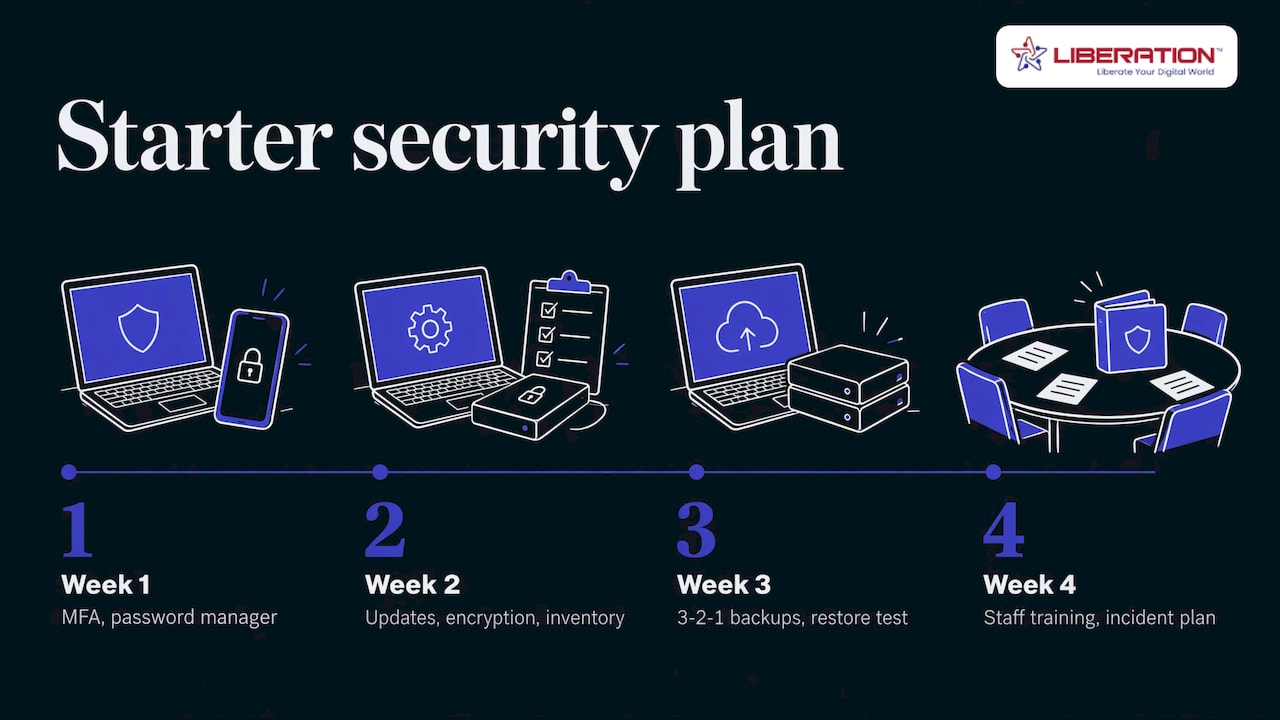
Week 2. Update every computer, phone and website plugin. Turn on disk encryption on laptops. Make a list of your devices, accounts and vendors.
Week 3. Set up backups using the 3-2-1 rule and restore a few files as a test.
Week 4. Hold a 30-minute staff session on two behaviors: verifying payment requests by phone, and reporting suspicious messages. Write the one-page incident plan and print the contact list.
Then repeat the checks quarterly. Our cybersecurity best practices article and the overview of current cyber security threats help you keep the plan current.
FAQ
Does a small business really need cybersecurity?
Yes. NIST says small businesses must address cybersecurity risk alongside their other business risks, because an incident can stop you from delivering goods and services and the effects reach customers, employees and partners. Having few employees does not make you invisible, since attackers target the logins and data you hold.
What is the most common cyber attack on small businesses?
Phishing and stolen credentials sit at the center. Verizon’s 2025 report lists stolen credentials as the top action in small-business breaches at 33%, and social engineering is one of the three patterns behind 96% of them. MFA and staff training address both.
Where should a small business start?
Start with MFA on email, banking and administrator accounts, then a password manager, updates and tested backups. These steps come straight from NIST and CISA guidance and cost little beyond time. After that, review where your email and files are hosted.
How is private email different from ordinary business email?
Private email is not ad-supported and does not track your messages. Liberation Email is ad-free, offers end-to-end encryption and starts at $1.95 per user per month on Mail Starter.
Sources
- Small Business Cybersecurity: Non-Employer Firms (NIST)
- 2025 Data Breach Investigations Report, small business snapshot (Verizon)
- Small Business Guide to Cybersecurity in New York State
- Cybersecurity Basics (NIST)
- Cyber Guidance for Small Businesses (CISA)
- NIST Cybersecurity Framework 2.0: Small Business Quick-Start Guide
- Level Up Your Defenses (CISA)
- Phishing Guidance: Stopping the Attack Cycle at Phase One
- Building Your Small Business’s Cybersecurity Team (NIST)
- Business Resources (Idaho State University)