
You cannot force Google to index a site, but you can remove every reason it might not. Verify the site in Google Search Console, submit an XML sitemap, request indexing for your key pages, and confirm nothing is blocking crawlers.
That is the whole legitimate process to get my website on Google, as the question is usually put. It is free and takes about twenty minutes.
The phrase “submit your website to Google” belongs to an era that ended a long time ago, which is why there is still an industry selling it. Google finds sites by following links and reading sitemaps. Your job is to make that easy and then get out of the way.
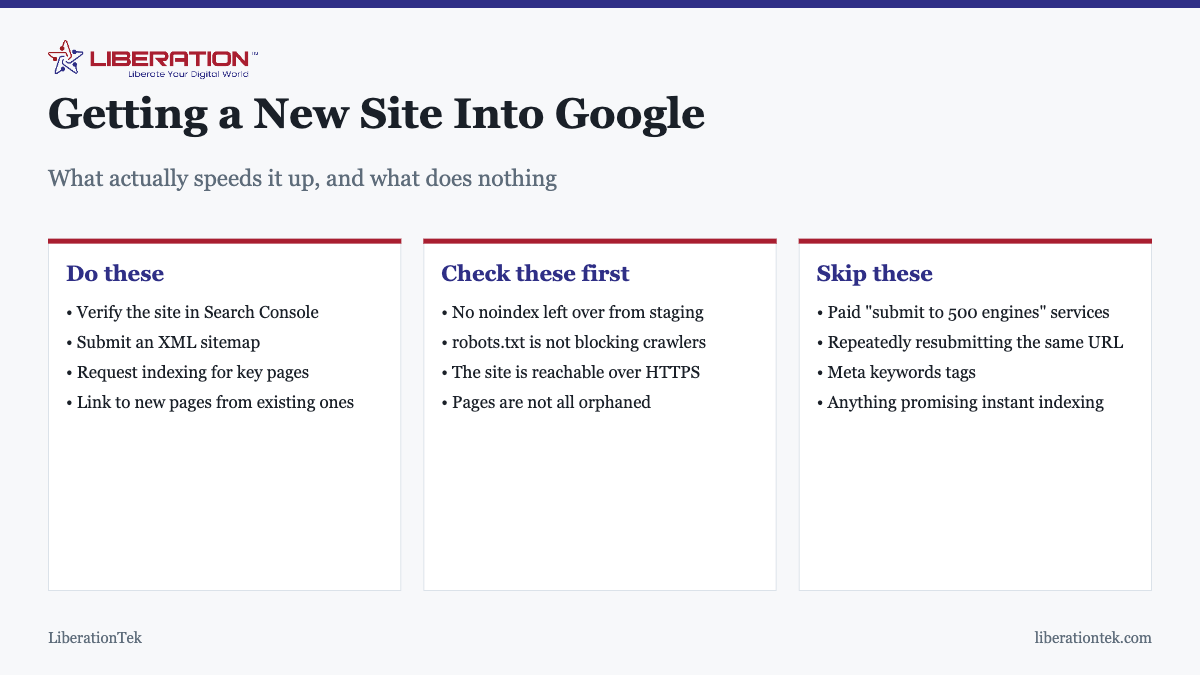
Check the blockers first
Before doing anything active, rule these out, because if one applies, nothing else you do will help.
A leftover noindex
The most common reason a new site never appears. Sites are routinely blocked from indexing during development, correctly, and the block is then forgotten at launch. In WordPress this is a single checkbox under Settings, Reading: “Discourage search engines from indexing this site.” If it is ticked, untick it and nothing else in this article matters until you do.
robots.txt
Visit yourdomain.com/robots.txt and read it. A line reading Disallow: / blocks the entire site. This usually arrives with a migration or a plugin default rather than deliberately.
Orphaned pages
Google follows links. A page that nothing links to, is not in your sitemap, and has no external links pointing at it, is genuinely difficult to find. Every page you care about should be reachable by clicking from the homepage.
The site is simply new
A domain with no history and no inbound links takes longer. This is normal and not a fault. It is worth distinguishing from a blocker, because the responses are different: one needs patience, the other needs fixing.
The four things that actually help
- Verify the site in Google Search Console. Free, takes minutes, and it is the only place Google tells you directly what it thinks of your site. Without it you are guessing.
- Submit an XML sitemap. Most SEO plugins generate one automatically, usually at
/sitemap_index.xmlor/sitemap.xml. Submit the URL in Search Console. This is the closest thing to “submitting your site” that exists. - Request indexing for your most important pages. The URL Inspection tool lets you ask for a specific page to be crawled. Use it for your homepage and main service pages. Do not use it on everything; it is a nudge, not a queue you can fill.
- Link to new pages from pages that already exist. Internal links are how Google discovers most content. A new page linked from your homepage is found far faster than one sitting alone.
What to ignore
| Tactic | Why it does nothing |
|---|---|
| “Submit to 500 search engines” services | Those engines mostly do not exist, and the ones that do use their own crawlers |
| Resubmitting the same URL repeatedly | Not how the queue works; find the blocker instead |
| Meta keywords tags | Ignored by every major engine for many years |
| Paying for “guaranteed instant indexing” | Nobody can guarantee this, including people charging for it |
| Buying links to speed things up | Against the guidelines and a real risk to a new site |
Organic listing is free. Anyone charging you for inclusion is charging for a form you can submit yourself.
How to check what is actually indexed
Search Google for site:yourdomain.com. That lists what it currently holds for your domain, and the result tells you which problem you have:
- Nothing listed at all. Almost certainly a noindex or a robots.txt block. Go back to the top of this article.
- The homepage only. Your internal linking or sitemap needs work.
- Most pages, missing a few. Normal. Check those specific pages in Search Console for the stated reason.
- Pages you did not create. Investigate promptly, as covered in how to tell if your site has been hacked.
Search Console’s Pages report gives the actual reason for each exclusion, which is considerably more useful than guessing. “Crawled, currently not indexed” generally means Google saw the page and did not think it worth listing, which is a content problem rather than a technical one.
Indexed is not the same as ranking
Worth separating, because people conflate them and then solve the wrong problem.
Indexed means Google holds the page and could show it. This is the easy part, and everything above is about achieving it.
Ranking means appearing high enough that someone sees it. That is a different and much longer project involving content that answers real questions, a site that is reasonably fast, and other sites referring to yours over time.
A new site is typically indexed within weeks and competitive for meaningful terms considerably later. If you are indexed but getting no traffic, the work ahead is content and authority, not indexing. Hosting plays a supporting part in this, which we cover in does web hosting affect SEO.
Getting into the other places people search
Google is the priority, but it is not the only surface worth a few minutes, and the others are usually faster to appear in.
- Bing Webmaster Tools. The same routine: verify, submit a sitemap. It takes minutes and Bing traffic is far from nothing, particularly for business audiences on office machines. It also feeds several other search surfaces.
- Google Business Profile. If you serve customers in a physical place, this appears in local results and on maps, and it frequently produces enquiries faster than organic listings do for a new site.
- AI assistants and answer engines. Increasingly people ask a question of an assistant rather than searching. Those systems tend to favor pages that answer a question directly and plainly near the top, with specific, checkable detail. Writing that way helps in ordinary search too, so it is not a separate project.
The common thread is that none of these reward tricks. They reward a site that loads, states plainly what it does, and answers the questions a real customer would ask. That is also, conveniently, what makes the twenty minutes of technical setup above worth doing at all.
A sensible launch checklist
- Untick the WordPress search engine discouragement setting.
- Read your robots.txt and confirm it is not blocking anything you want found.
- Confirm HTTPS works and that HTTP redirects to it in one hop.
- Verify in Search Console and submit your sitemap.
- Request indexing for the homepage and your main pages.
- Check internal linking so nothing important is orphaned.
- Wait a fortnight, then check
site:yourdomain.comand the Search Console Pages report.
If you would rather not manage this yourself, our marketing team handles SEO alongside PPC, social and email, and the SEO Tool at $9.99 a month covers DIY auditing and keyword tracking.
What it means to have your website on Google
Having your website on Google means one thing: Google has found your pages, read them and stored them in its index so they can appear in results. It does not mean you rank first, and it does not cost anything. A new website on Google usually shows up within days to a few weeks once Google can reach it, and you can speed that up with a few simple steps.
Google publishes its own plain-language explanation of how to get your website on Google, and it agrees with the approach below: make the site reachable, tell Google it exists, and give people a reason to visit.
Steps to put your website on Google
- Create a free Google Search Console account and verify that you own the website on Google’s side.
- Submit your sitemap so Google can see every page of your website on Google’s crawl list.
- Use the URL inspection tool to request indexing for your most important pages.
- Link new pages from pages that are already indexed, so Google finds them naturally.
- Make sure no page you want found is set to noindex or blocked in robots.txt.
These steps are free and take under an hour. If your website on Google still does not appear after a few weeks, check for blockers first, then look at content quality and internal links.
Keeping your website on Google and growing it
Getting indexed is the start. To keep your website on Google and move up, publish pages that answer real questions in plain language, and keep the site fast and secure. Our article on whether web hosting affects SEO explains the speed and uptime side, and our SEO tool helps you check what each page needs.
Be patient and be wary of promises. Nobody can guarantee a place for your website on Google, and anyone who says so is guessing. If you want to know what paid help costs, read how much SEO services cost before you hire anyone. A small business that keeps its website on Google healthy with steady, useful pages will usually do better than one that chases tricks.
To recap, put your website on Google by verifying it in Search Console, submitting a sitemap and linking your pages together, then keep improving. Do those things and your website on Google will be found, indexed and ready to earn visitors.
Frequently asked questions
How do I get my website on Google?
You do not submit a site to Google in any meaningful sense; Google finds sites by crawling links and reading sitemaps. What you do is remove obstacles and give it a map. Verify your site in Google Search Console, submit an XML sitemap, request indexing for your most important pages, and make sure nothing is blocking crawlers. Then wait.
How long does it take for a new website to appear on Google?
Usually days to a few weeks for the first pages, though it can be longer for a brand-new domain with no links pointing at it. Individual pages on an established site are often indexed within hours. If nothing has appeared after several weeks, that is not slowness, it is a blocker worth investigating rather than waiting out.
Why is my website not showing up on Google?
The most common causes are a noindex tag left over from development, a robots.txt rule blocking crawlers, pages that nothing links to, or a site that is simply too new. Search for site:yourdomain.com to see what is indexed. If nothing is listed at all, it is almost always one of the first two.
Do I need to pay to be listed on Google?
No. Appearing in organic search results is free and always has been. Paid advertising places you above the organic results and is a separate product that does not affect organic ranking. Services charging to “submit your site to search engines” are selling you something you can do yourself in minutes.
What is Google Search Console and do I need it?
It is Google’s free tool showing how your site appears in search: what is indexed, which queries you appear for, and what problems Google has found. You do not strictly need it to be indexed, but without it you are working blind, and it is the only place that reports indexing problems directly to you.
Does submitting a sitemap guarantee indexing?
No. A sitemap tells Google which pages exist and is genuinely useful, particularly on a new site or one with poor internal linking. It does not oblige Google to index anything. Pages can be crawled and then excluded as thin, duplicated, or not worth listing, and Search Console will usually say which.
Should I resubmit my site if it is not appearing?
Resubmitting repeatedly does nothing and is not how the queue works. If a page has not been indexed after a few weeks, find the reason in Search Console rather than resubmitting. Usually it is a blocker, a page with nothing linking to it, or content too thin to be worth listing.