
Looking for email that does not scan your messages? Almost every provider says it respects your privacy, so the claim carries no information. What carries information is the business model and the wording of three documents – the privacy policy, the data processing terms, and the acceptable use policy. Ten minutes with a browser search function tells you more than any homepage, and the specific words to look for are predictable.
Email that does not scan your messages: separate two things first
Scanning is not one activity, and conflating them makes the question unanswerable.
Filtering reads message content to detect spam, phishing and malware. It is universal and necessary. Any provider claiming to read nothing whatsoever is either describing that inaccurately or not protecting you.
Everything else – advertising, personalization, profiling, product analytics, training a model – is a choice, and it is the choice you are actually asking about. So the useful question is not “do you scan my mail” but “what is content used for beyond filtering, and who else receives it”.
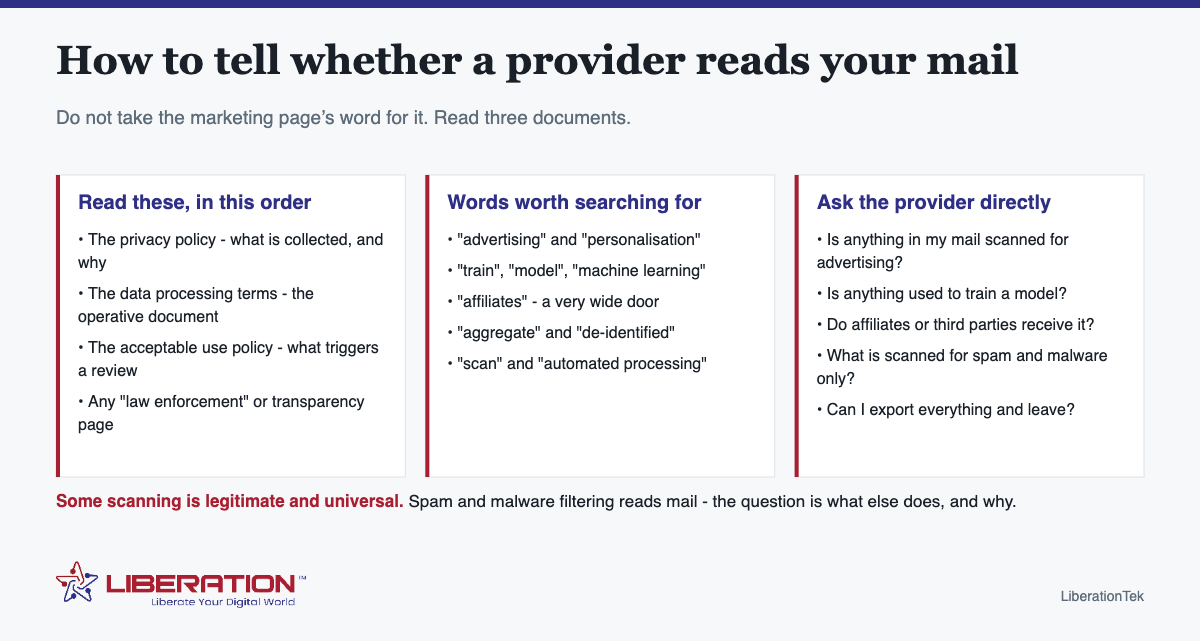
The three documents, and the words to search
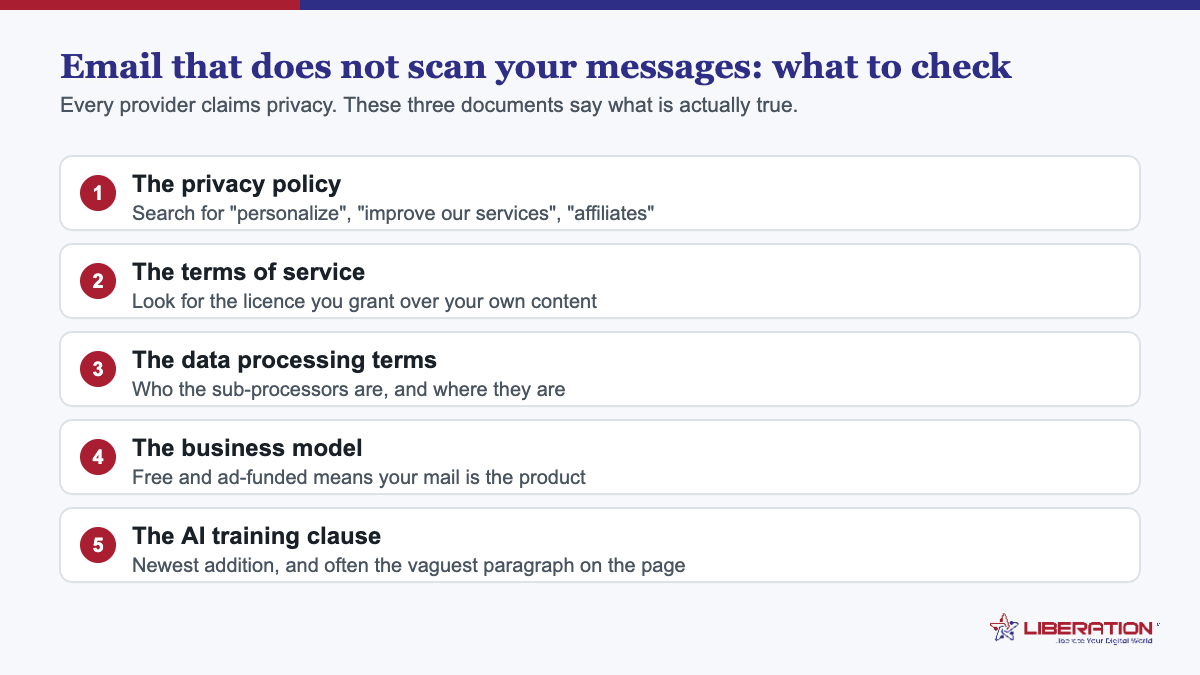
Open the provider’s privacy policy, data processing terms and acceptable use policy. Then use the browser search function for these terms:
| Search for | What you are checking |
|---|---|
| advertising, personalization | Whether these clauses apply to message content or only to account data |
| train, model, machine learning | Whether content may be used to develop products or models |
| affiliates | A very wide door – it can mean an entire corporate group |
| aggregate, de-identified | What is done with derived data, and how reversible it is |
| scan, automated processing | The scope beyond spam and malware |
| retain, deletion | What happens after you delete, and after you cancel |
Read the clauses you find rather than the summary at the top. Summaries describe intent; the clauses describe permission, and permission is what survives a change of ownership or strategy.
Follow the business model to find email that does not scan your messages
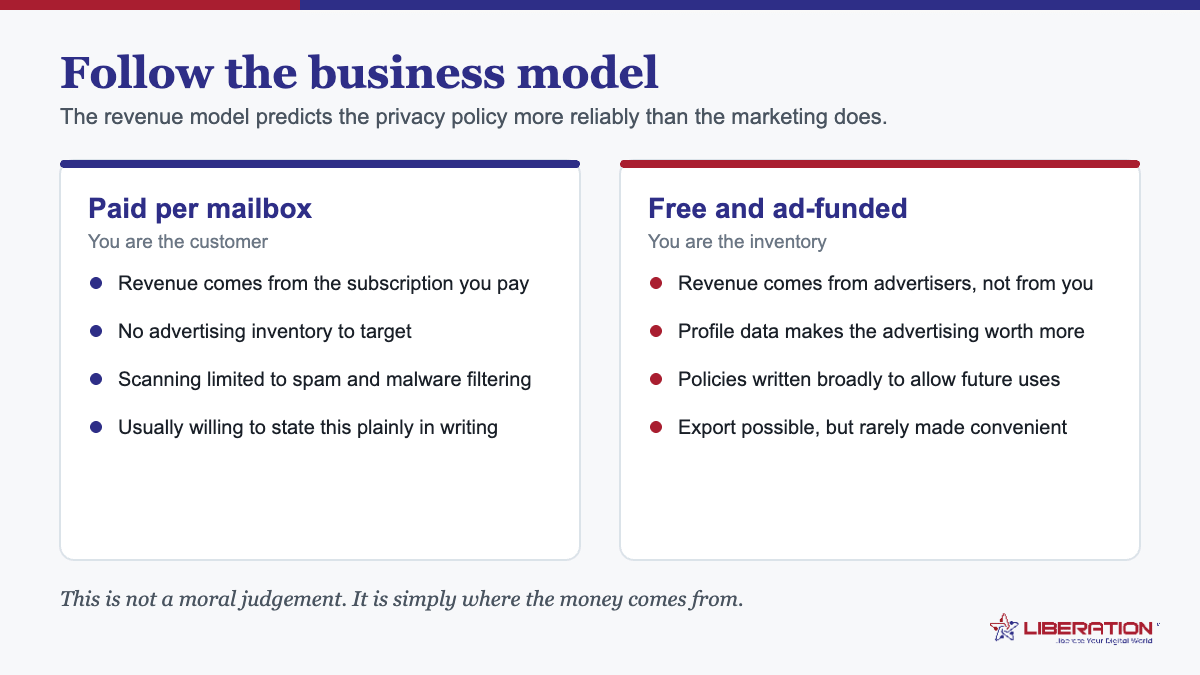
This is the shortcut that rarely misleads. A service with no subscription fee earns money somewhere, and the terms will eventually say where. That is not an accusation – it is arithmetic. Storage, bandwidth, filtering and support cost money, and they are paid for either by you or by something else.
A paid service can still monetize data, and some do. But a provider whose entire revenue is subscriptions has no structural reason to build the machinery that would – and machinery that does not exist cannot be repurposed later by a new owner or a new strategy.
Five questions worth emailing any email that does not scan your messages provider
- Is anything in my mail scanned for advertising or personalization?
- Is message content used to train any model?
- Do affiliates or third parties receive message content or metadata?
- What is scanned purely for spam and malware, and is anything retained from it?
- Can I export everything, in a usable format, and what is deleted when I leave?
A provider confident in its answers will reply in a paragraph. One that escalates the question, answers a different question, or points you back at the marketing page has told you something worth knowing.
What we do about email that does not scan your messages, stated plainly
Liberation Email is paid mailbox hosting on your own domain, from $1.95 per user per month with no long-term contract. Nothing in your mail is scanned for advertising, used to train a model, or passed to a data broker. There is no advertising business attached that would create a reason to – the subscription is the revenue.
Beyond that: the servers are ours, owned and operated in the United States rather than rented from a larger platform, so the list of people who could reach your mail is short and is not one contract removed from you. The service speaks IMAP, SMTP, CalDAV and CardDAV, so nothing is locked in a proprietary format, and there is a full export whenever you want one.
Spam and malware filtering works as it must on any mail service. We would rather say that than claim something that is not true of anyone.
If you decide to move
The order that keeps mail flowing: create the new mailboxes on your domain, copy mail across by IMAP while the old mailboxes are still receiving, verify folder counts and attachments, then change MX, SPF, DKIM and DMARC together – and keep the old account live and receiving for a fortnight afterwards.
Your addresses do not change, because they belong to your domain rather than to any provider. We run the migration as part of setting the mailboxes up, including the archives people forget.
What metadata gives away
Content is only half the question. Even where message bodies are untouched, metadata – who you correspond with, how often, when, and with what subject lines – describes a business or a person in considerable detail. Ask what is retained, for how long, and whether it is used for anything beyond operating the service.
This is worth asking precisely because it is the part policies are vaguest about. A provider that has thought carefully about content will usually have thought about metadata too; one that has not will answer this question noticeably less well than the previous one.
A practical five-minute check for email that does not scan your messages
- Open the provider’s privacy policy and search for the six terms above.
- Note whether each clause applies to message content or only to account data – this distinction does a lot of work.
- Check whether a separate data processing agreement exists, and whether it is available without asking sales.
- Look at how the service is paid for.
- Email the five questions and time the reply.
Five minutes and one email. It will tell you more than an afternoon of comparison articles, because you are reading the document that actually governs rather than the page written to persuade.
Why email that does not scan your messages is worth the switch
For most individuals, ordinary mail scanning is a preference question. For a business it is occasionally more than that: professional confidentiality obligations, client contracts that specify how their information is handled, and regulatory duties in sectors like healthcare, legal and financial services all care about who else can read correspondence. If any of those apply to you, the answer needs to be documented rather than assumed – which means asking in writing and keeping the reply.
What “private” claims usually mean
| Claim on the page | What to verify |
|---|---|
| “We respect your privacy” | Nothing. Every provider says this. Read the terms. |
| “We don’t sell your data” | Selling is only one route. Check sharing with affiliates and use for advertising or training. |
| “Encrypted” | In transit, at rest, or end to end? These are very different claims. |
| “Zero access” | A strong claim with real trade-offs – usually no server-side search and no recovery if you lose the key. |
| “Based in [country]” | Where the company is incorporated, not necessarily where the servers are or who owns them. |
None of these are dishonest by nature. They are simply less specific than they sound, and specificity is the whole point of the exercise.
If you only do one thing to find email that does not scan your messages
Open the data processing terms of whoever currently hosts your business mail and search for the word “advertising”. Read whatever clause comes back, and note whether it applies to message content or only to your account details. That single search takes under a minute and settles the question you actually came here with – and if no such document exists at all, that is an answer too.
One last framing. You are not looking for a provider that promises perfection – you are looking for one whose written terms match what its marketing says, and whose business model does not depend on the thing you are worried about. Those two tests are quick, and they are the ones that hold up over time.
What changed when AI training clauses arrived
Until recently the question was whether a provider scanned your mail to target advertising. That question is still worth asking, but a second one now sits alongside it: whether your messages are used to train machine learning models, and whether the policy that governs that can change without you noticing.
Read the clause, not the blog post. Providers frequently publish a reassuring summary while the binding document says something broader. The phrase to search for is “improve our services”, which historically covered spam filtering and now covers considerably more at some providers. If the policy reserves the right to use content for model training, it does not matter how the summary is worded.
Watch for the opt-out that is not one. Some services offer a setting that excludes your data from training while reserving the right to change the default later, or that applies only to some products. An opt-out you have to re-check after every policy update is a weaker promise than a provider that simply says it never does this.
Business and consumer tiers often differ. The same brand may commit to one thing for paying business customers and something looser for free consumer accounts. If you are reading a policy, make sure it is the policy for the plan you are actually on.
Enforcement is thin, so wording matters. In the United States there is no single federal law requiring a provider to leave your mail alone, which is precisely why the contract is what protects you. The FTC’s guidance on privacy and safeguards obligations sets a floor for how businesses handle customer data, but the specifics of what your provider may do with your mailbox come from the agreement you accepted.
Which brings it back to the same test. Finding email that does not scan your messages is less about certifications and more about whether a provider will put a plain sentence in writing and stake its subscription revenue on it. Ask directly, keep the reply, and re-check once a year. A provider that answers clearly in an email today is a provider you can hold to it tomorrow.
Moving to email that does not scan your messages, without losing anything
Deciding is the easy part. The reason most people stay where they are is the assumption that moving is painful, and it is worth being specific about what it actually involves.
Your address does not have to change. This is the single biggest misconception. If your mail is on your own domain, moving to email that does not scan your messages is a provider change, not an address change – nobody you correspond with notices anything. If you are currently on a free address ending in someone else’s domain, that is the real lock-in, and registering a domain is the first step regardless of which provider you choose next.
Your history comes with you. IMAP synchronisation copies mail between providers while both mailboxes stay live, so nothing is deleted from the old account during the move. You can take years of archived mail across and keep the original as a fallback until you are satisfied.
Your apps keep working. Any provider offering standard IMAP, SMTP and CalDAV works in Outlook, Apple Mail, Thunderbird and the mail app on your phone. You are changing server settings, not learning new software. A provider that requires its own proprietary client to function is worth a second look, because that is its own form of lock-in even when the privacy policy is excellent.
Calendars and contacts need a separate export. This is the step people forget. Export them before you close anything, and confirm they import properly on the other side.
Budget an evening, not a project. For a household or a small business, the realistic shape is: register or confirm the domain, create the mailboxes, start the sync running, update DNS, reconfigure the devices, keep the old account open for a month. Most of the elapsed time is the sync running unattended.
What you get is a different relationship. With email that does not scan your messages, the provider’s incentive is to keep you subscribed rather than to learn about you. That shows up in small ways – support you can reach, policies written in plain language, and an export process that works because they expect you to be able to leave.
None of this requires technical confidence. It requires an evening and a decision, and the decision is the harder of the two. If email that does not scan your messages is what you want, the obstacle is almost never the migration.
What email that does not scan your messages still cannot promise
It is worth being honest about the limits, because overclaiming is exactly the behaviour this page is asking you to be sceptical of.
The other end of the conversation is not yours. If you email somebody whose mail is on an ad-funded service, that copy lives under their provider’s policy, not yours. Choosing email that does not scan your messages controls your half of every conversation, which is meaningful but is not the whole of it.
Metadata still exists. Who you corresponded with and when is recorded by every mail system in the chain, because that is how mail is delivered. A provider can commit to not analysing it commercially; no provider can make it not exist.
Lawful process still applies. Any provider in any country can be compelled to produce data it holds. What differs is the jurisdiction, whether the provider publishes a transparency report, and whether it commits to notifying you where it is legally permitted to do so. Those are reasonable questions to ask.
Privacy is not the same as encryption. A policy commitment not to read your mail is a contractual protection. End-to-end encryption is a technical one. They solve different problems and a provider offering both is telling you more than one offering only the first – so ask which you are being sold.
Your own habits matter as much. Mail forwarded to a personal ad-funded address, a shared device with a saved password, or a mailbox with no multi-factor authentication undoes a good provider choice quickly.
None of which argues against switching. It argues for switching with accurate expectations: email that does not scan your messages removes one specific commercial incentive to read your mail, from your side of the exchange, under a contract you can point at. That is a real improvement and a bounded one, and a provider willing to describe the bounds is usually the one worth paying.
Frequently asked questions
Which email providers scan your messages?
Rather than trusting a claim either way, read the provider’s privacy policy and data processing terms and search for advertising, personalization, training, models, affiliates, aggregate and automated processing. Those terms tell you what is permitted, which matters more than what a marketing page says today.
Is all email scanning bad?
No. Spam and malware filtering reads message content by necessity and is universal. The meaningful question is what else content is used for: advertising, personalization, profiling, or training a model.
How can I tell if my email is being used for advertising?
Search the privacy policy and data processing terms for advertising and personalization, and check whether those clauses apply to message content or only to account data. Also look at the business model – a service with no subscription fee earns money somewhere.
Does Liberation Email scan messages?
Nothing in your mail is scanned for advertising, used to train a model, or passed to a data broker. There is no advertising business attached that would create a reason to. Spam and malware filtering operates as it must on any mail service.
What should I do if I want to move to a provider that does not scan mail?
Check the terms of the provider you are considering, then migrate in the safe order: create the new mailboxes, copy mail by IMAP while the old ones still receive, verify, change MX, SPF, DKIM and DMARC, and keep the old account live for a fortnight.
Related reading
- Email Hosting With cPanel: 5 Essential Limits to Know
- Business Email Without Microsoft 365: 5 Simple Checks
- Migrate From Microsoft 365: 4 Things That Have to Move
- Business Email Setup — Putting business email on your own domain.
- Big Tech Alternatives — The full set of replacements, by category.