
Managed WooCommerce hosting is a service where the provider configures, secures and maintains the server for your store, including caching, backups, staging, security monitoring and support. You still own the store itself: products, plugins, payment settings and content. It pays off when the store earns money every week and nobody on your team wants to run a server.
This guide is for store owners and developers deciding between a managed plan and a self-run server. It explains what managed WooCommerce hosting covers, what you still own, when the extra cost makes sense and seven questions to ask any provider.
1. What is managed WooCommerce hosting?
If you are asking what is managed WooCommerce hosting, start with the problem it solves. A store has pieces that a blog does not: carts, checkout, customer accounts and a database that changes with every order. Those pieces need tuned PHP capacity, object caching and cache rules that skip private pages.
In a managed plan, the host sets that up and keeps it running. The provider handles the server stack, PHP versions, caching, backups, malware scanning and the first response when something breaks. You handle what happens inside WordPress and WooCommerce.
For the technical baseline behind this, read our guide to WooCommerce hosting requirements. For the general model, see managed WordPress hosting, which covers sites without a store.
2. What managed WooCommerce hosting covers
Managed WooCommerce hosting usually bundles five jobs. Providers differ, so confirm each one in writing.
- Server tuning: current PHP, a database sized for the plan and PHP workers set aside for checkout.
- Caching: page caching for catalog pages, an object cache such as Redis for carts and sessions, and exclusions for cart, checkout and account pages.
- Backups: daily copies with a stated retention period and a restore you can start yourself.
- Security: a firewall, malware scanning and vulnerability monitoring for plugins and themes.
- Support: people who understand WooCommerce problems and answer when a checkout fails.
On our own plans, for example, the Commerce plan reserves 6 PHP workers for checkout and keeps daily backups for 30 days, and every plan includes Imunify360 and Patchstack protection. Those details come from our WooCommerce hosting plans, and other hosts will list different numbers.
Support quality is the part of managed WooCommerce hosting that is hardest to see on a pricing page. Test it before you buy: open a pre-sales ticket with a technical question about checkout and note how fast, and how specifically, a person answers. That reply is a fair preview of what an incident will feel like.
3. Managed vs unmanaged hosting: who does what
The clearest way to understand managed vs unmanaged hosting is to list the tasks and mark the owner. On an unmanaged VPS, you or your developer run the server. On a managed plan, the host runs it. The table below shows the usual split for a store, and the exact line varies by provider.
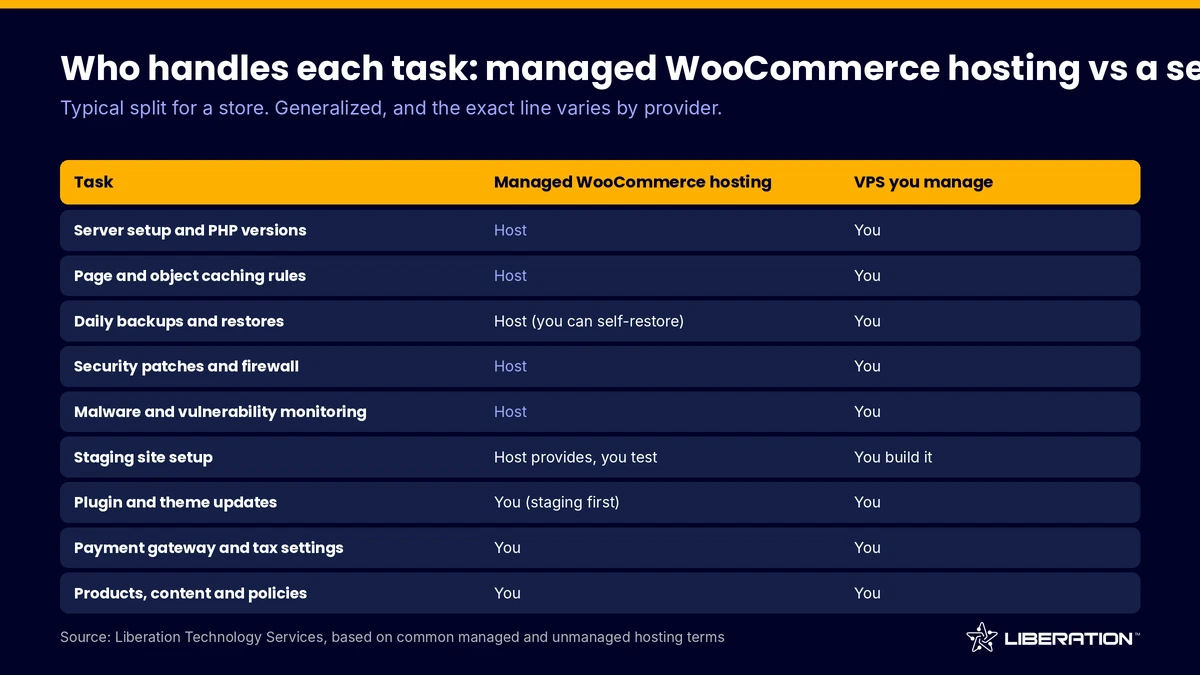
Two rows deserve attention. First, application work always stays with you on either model: product data, plugin choices and payment gateway settings. Second, on a VPS the security and backup rows become your responsibility unless you buy a management layer. Our VPS web hosting page shows that option.
4. What you still own on managed WooCommerce hosting
Managed does not mean hands-off. A good provider will say plainly where its job ends. Expect to keep these responsibilities.
You own the store configuration. That covers tax settings, shipping rules, product pages and the payment gateway account. You also own plugin choices. A host can warn you about a slow or vulnerable plugin, but it cannot decide which extensions your business needs.
You own payment security decisions as well. The host provides a hardened environment with encryption and access control, while card data is handled by your payment processor. Be careful with any provider that promises PCI compliance for you without qualification. Ask what the host covers, what you cover and what the processor covers.
Finally, you own the business content: legal pages, product descriptions, refund policies and email marketing. For stores that want help with the technical side of that list, WordPress care plans cover maintenance and monitoring.
5. Why WooCommerce staging matters
WooCommerce staging is a private copy of your store where you test updates before customers see them. It is the single feature that most reduces the risk of a broken checkout, because payment plugins, shipping extensions and PHP upgrades can all fail in new ways.
The detail to check is what happens when you publish staging back to live. If the whole database is overwritten, you can erase orders that arrived while you were testing. Look for selective publish-back, where you push chosen files or tables instead. Our staging supports it for that reason, and cloning is part of every plan.
Use staging for every major change: a PHP upgrade, a new payment gateway, a theme switch or an extension that touches orders. Test checkout on staging with the gateway in test mode, then repeat the steps on live during a quiet hour.
6. When managed WooCommerce hosting pays off
The extra cost is easiest to justify when one of these is true.
- Orders arrive daily, so an hour of downtime has a dollar value you can estimate.
- Nobody on your team wants to patch servers, tune caching or restore backups.
- You run promotions or seasonal peaks that need capacity ready in advance.
- You run many small stores or client stores and want consistent backups and security.
It is a weaker fit if you have a capable operations person and want full control, or if the shop is a side project with a handful of orders a month. A VPS can be the right call for a team that wants root access and is ready to own patching, firewalls and backups. Our comparison of WordPress hosting vs WooCommerce hosting helps if you are unsure which category your store belongs to.
Do the arithmetic before deciding. Take your average daily revenue, estimate the hours of downtime or slowness you would otherwise risk per year, and compare that figure to the price gap between a managed plan and a cheaper one. Our guide on how much WooCommerce costs shows the other budget lines to include.
Plan for growth too. A store that doubles its orders in a year needs a host that can move it to a bigger plan without a rebuild. Ask how upgrades work and whether the move is a billing change or a migration.
7. Best managed WooCommerce hosting: seven questions to ask
There is no single best managed WooCommerce hosting provider for every store, so use a checklist instead of a ranking. Ask these seven questions and get the answers in writing.
- How many PHP workers does the plan have, and are any reserved for checkout? Workers decide how many shoppers can check out at the same moment.
- How are cart, checkout and account pages excluded from caching? The host should handle this without a plugin on your side.
- Is there an object cache for carts and sessions? Redis or a similar service speeds up uncached pages.
- How long are backups kept, and can I restore them myself? Look for daily copies and enough history to catch a problem found days later.
- Does staging support selective publish-back? Ask what happens to new orders when you push to live.
- What security tools are included, and who responds to an incident? Firewall, malware scanning and vulnerability monitoring should be named.
- What fees are not in the headline price? Ask about setup, migration, visitor overage and renewal increases.
Compare woocommerce hosting plans on those answers rather than on the monthly price alone. A plan that costs $20 more but includes reserved workers and 30-day backups can be the cheaper plan after a bad week.
8. Comparing WooCommerce hosting plans on price
For reference, our plans on annual billing are $59 per month for WP Growth (150,000 visits), $109 for Commerce (200,000 visits) and $179 for Commerce Scale (500,000 visits). Commerce reserves 6 PHP workers for checkout and Commerce Scale reserves 10. Backups run 14 days on WP Growth and 30 days on the Commerce plans.
Plan prices cover the server side. They do not cover payment fees, extension licenses or development, which usually add more to the yearly total than hosting does. We do not bill overage fees by visitor, and plans include free migration by a person with a 30-day money-back guarantee.
If you are moving a store, plan the cutover carefully: copy the store, test checkout on the new server, then switch DNS. You can start from our transfer page, or contact us and we will size a plan for your catalog and traffic.
Frequently asked questions
What is managed WooCommerce hosting?
It is hosting where the provider tunes and maintains the server for WooCommerce, including caching, backups, staging, security and support. You manage the store itself, such as products, plugins and payment settings.
What is the difference between managed vs unmanaged hosting?
On unmanaged hosting, such as a plain VPS, you handle updates, security, backups and tuning yourself. On managed hosting, the provider handles those server tasks and you focus on the store.
Is managed WooCommerce hosting worth it for a small store?
It can be, if the store takes orders daily and you would rather not maintain a server. For a very small shop with a few orders a month, a simpler plan may be enough until volume grows.
Does managed hosting include WooCommerce staging?
Many providers include it, but the details differ. Ask whether you can push selected files or tables back to live, so you never overwrite orders that arrived during testing.
Can I still use my own plugins on managed hosting?
Mostly yes. Some hosts block plugins that duplicate server features, such as caching plugins, so ask for the list before you migrate.
Sources
- WooCommerce documentation, server requirements
- WordPress.org, recommended requirements
- Liberation Technology Services WooCommerce hosting plans
Related reading: WooCommerce hosting services guide, how to set up WooCommerce hosting and why WooCommerce keeps crashing.