
A secure website form does five things: it sends data over an encrypted connection, checks every entry on the server, blocks bots, collects only what you need, and sits on a server that is patched and watched. Most of that work happens on the hosting side, which is why we run managed hosting on servers we own in the United States, with U.S.-based support and free migration. Below is what each layer means and where forms usually fail.
TL;DR
- Use HTTPS everywhere and send form data with POST, never GET.
- Treat every entry as untrusted: validate it on the server, not just in the browser.
- Add bot protection and a unique token to each form to stop spam and forged submissions.
- Ask only for what you need. Every extra field is more data to protect if something goes wrong.
- Payment forms carry extra duties under PCI DSS, the card industry’s security standard. Keeping card entry off your own pages shrinks them.
Table of Contents
- What attackers do to website forms
- Step 1: Encrypt the connection and use POST
- Step 2: Validate everything on the server
- Step 3: Block spam, bots and forged submissions
- Step 4: Collect less data
- Step 5: Lock down the server behind the form
- Payment and checkout forms
- A quick checklist by form type
- If a form is abused or data is exposed
- How we help
- FAQ
- Sources
What attackers do to website forms
A form is a door from the open internet into your server. The U.S. Cybersecurity and Infrastructure Security Agency (CISA) lists the common attacks on web servers: exploiting software bugs, denial of service, stealing back-end data through SQL or LDAP injection and cross-site scripting, defacement, and spreading malware.
In plain terms, the ones that hit forms most often are these:
- Spam and bot submissions. Scripts fill your contact form with junk or test stolen logins against your login form.
- SQL injection. An attacker types database commands into a field. If your site pastes that text into a database query, the database obeys.
- Cross-site scripting (XSS). Malicious code typed into a comment or contact field runs in the browser of whoever views it, as Sucuri’s overview of form attacks explains.
- Cross-site request forgery (CSRF). A logged-in user is tricked into sending a form they never meant to send.
- Form hijacking. The form’s destination is changed so submissions go to someone else.
- Skimming. Malicious JavaScript on a checkout page copies card numbers as customers type. The NJCCIC describes this kind of attack, often called Magecart, as one that reaches a site directly or through a supplier’s script.
Step 1: Encrypt the connection and use POST
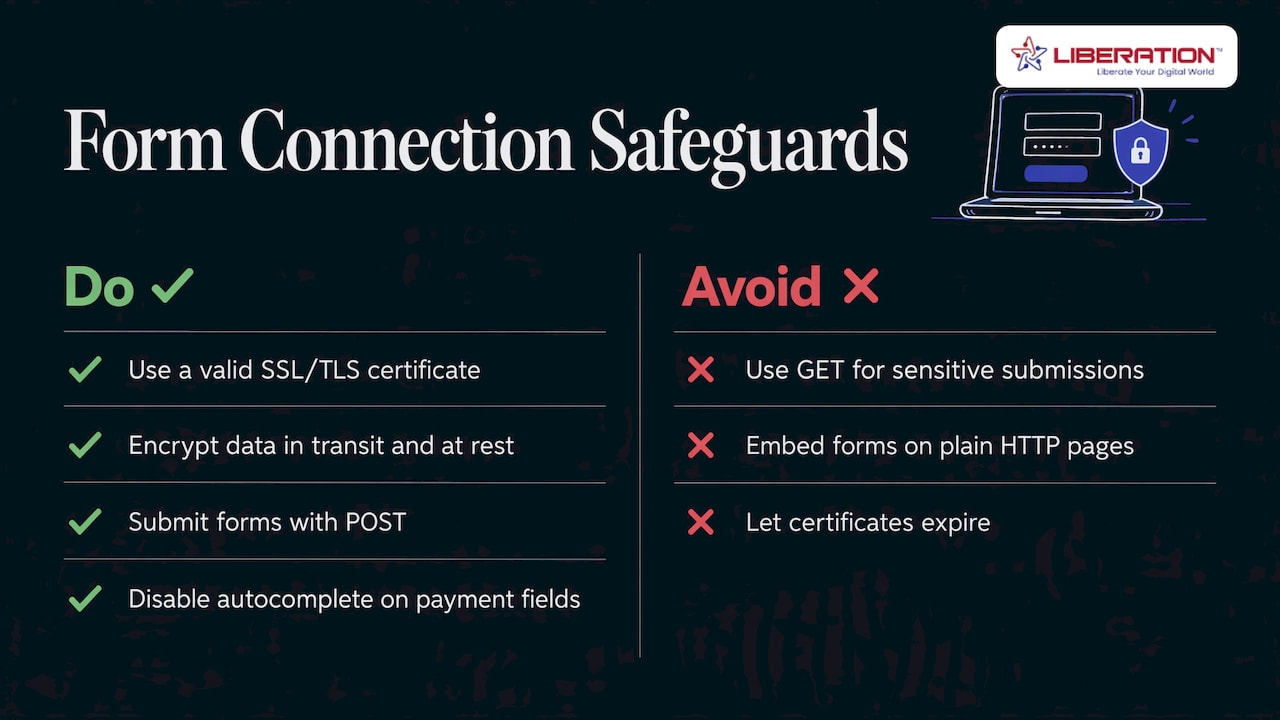
Every page with a form needs a valid SSL/TLS certificate, so data is encrypted between the visitor and your server. SiteLock recommends encrypting form data in transit and again at rest, meaning in storage. The second half is the one people forget: a contact form that emails you is also a copy of that message sitting in a database and an inbox.
Submit forms with POST rather than GET. The PCI Security Standards Council explains that browsers and proxies cache and log GET query strings, which can leave sensitive data in clear text. The same guide advises turning off autocomplete on payment fields.
Where this goes wrong: a certificate that expires, or a form embedded in a plain HTTP page. Our hosting plans include SSL certificates among the products we offer, and the hosting security guide on our site covers what compliant hosting handles.
Step 2: Validate everything on the server
The rule behind most form attacks is simple. OWASP, a respected nonprofit for web security, says all data must be treated as untrusted until it is validated. That includes data from browser storage and cached responses, not just typed text.
For database-connected forms, CISA recommends that the application:
- Does not connect to the database with privileged access.
- Checks input for length, range, format and type.
- Accepts only allow-listed characters.
- Uses prepared statements or parameterized queries instead of building queries from strings.
Browser-side checks, like a field that insists on an email format, are a courtesy to visitors. An attacker skips them. The server must repeat every check.
Worked example. A church’s prayer-request form has a name field. Server rules say: letters, spaces, apostrophes and hyphens only, 80 characters maximum. A string of database commands fails the check and is discarded before it ever reaches a query.
Step 3: Block spam, bots and forged submissions
Two defenses cover most cases:
- A challenge for bots. SiteLock suggests reCAPTCHA in either checkbox or invisible scoring form to stop bot spam and credential stuffing, which is the automated trying of stolen passwords.
- A CSRF token. The SANS Institute recommends a unique random token in each HTML form plus the SameSite cookie attribute. The server accepts the submission only if the token matches, so a forged form from another site fails.
Bots are not a small problem for online stores. One 2026 industry report cites Akamai’s count of 26 billion credential-stuffing attempts per month in 2024.
If you run WordPress, the form plugin is the usual weak point because it must be kept updated. Our managed WordPress hosting is built so updates and server care are not left on your to-do list.
Step 4: Collect less data
Data minimization means asking only for what you need. It is a privacy principle and a security control. SiteLock points out that each extra field adds sensitive data to protect and widens the damage of a breach. The California Privacy Protection Agency makes the same point in its 2024 enforcement advisory, saying data minimization should apply to every purpose for which personal information is collected.
Practical edits:
- A contact form needs a name, a reply address and a message. A phone number and street address are optional extras.
- A volunteer or donor form should not ask for a birth date unless you truly use it.
- Delete old submissions on a schedule.
Privacy notices matter too. Under California’s law, a notice at collection must state what you collect, why, whether it is sold or shared, and how long you keep it, and it must be given at or before collection. Many other states have passed comprehensive privacy laws, and Gibson Dunn’s review counts around 20 covering roughly half the U.S. population by 2026. Linking a clear privacy policy next to every form is a habit that works in all of them.
For healthcare practices and law firms, forms often collect sensitive details. Ask your own attorney or compliance officer which rules apply to your intake forms before you publish them.
Step 5: Lock down the server behind the form
A well-built form still fails if the server is weak. CISA’s guidance for web servers includes:
- Changing all default credentials and disabling unused accounts.
- Two-factor authentication for web server access.
- Long passwords for privileged accounts (15 characters or more).
- Keeping the server patched.
Those are all in CISA’s website security paper. Our own write-ups on multi-factor authentication and cybersecurity for small businesses walk through the same habits in everyday terms.
This is where hosting choice counts most. Shared Cloud Hosting runs on servers we own in the United States, and every plan includes direct U.S.-based support. If your forms collect more sensitive information, our Private Cloud plans give you a more isolated environment, with unmetered monthly data transfer and no egress fees.
Payment and checkout forms
Card forms are the highest-value target. The U.S. Secret Service warns that criminals inject malicious code into e-commerce payment pages to capture card data, and that the code is hard to detect. Its advice includes PCI DSS compliance, script integrity checks on payment pages, multi-factor authentication and offline backups.
The PCI Security Standards Council’s guide also says to avoid or tightly vet third-party content on payment forms, since every outside script is a possible way in.
PCI DSS 4.0 added requirements for payment-page scripts. One summary reports they became mandatory for all merchants on April 1, 2025: an inventory of scripts, authorization, and tamper detection. Merchants who fully outsource payment processing and never touch card data have a lighter questionnaire, SAQ A, updated in January 2025, but must still confirm their site is not open to script attacks.
If you take card payments, the lowest-risk design is to keep card entry off your own pages as far as you can and keep the rest of the site tightly managed. Our guides on securing a WooCommerce store and PCI compliant hosting cover the store side. Firearms retailers and other businesses that sell online can also read a layered approach to ecommerce fraud prevention for the payment layer.
If your form sells a subscription or recurring donation, federal law adds disclosure duties. 15 U.S.C. § 8403 requires you to clearly disclose all material terms before getting billing information, obtain express consent before charging, and offer a simple way to stop recurring charges.
A quick checklist by form type
| Form type | Must have | Watch for |
|---|---|---|
| Contact | TLS, server-side validation, bot challenge | Spam floods, header injection |
| Login | TLS, MFA, rate limits, CSRF token | Credential stuffing |
| Donation or checkout | TLS, POST, vetted scripts, PCI DSS duties | Skimming code, third-party scripts |
| Intake (medical, legal) | Encryption in transit and at rest, minimal fields, restricted access | Over-collection, open inboxes |
| Newsletter signup | Consent text, double opt-in, privacy link | Fake signups |
If a form is abused or data is exposed
Act in this order:
- Preserve evidence first. Snapshot the logs before changing code, because premature edits can destroy the trail.
- Rotate database passwords and API keys.
- Fix the cause, for example by switching to parameterized queries.
- Check your state’s breach-notification law. All 50 states have one, and most set deadlines of 30 to 90 days.
If personal data was exposed, talk to your attorney about notification duties. Healthcare practices should do so promptly.
How we help
A secure form is a stack: encryption, validation, bot defense, minimal data, a patched server and sensible backups. When you host with us, the server layer is ours to run. We own our servers in the United States, we do not track or share customer data, and real people in the U.S. answer support. Migration from another provider is free, and every plan has a 30-day money-back guarantee. Churches and nonprofits receive a 15% discount.

For most small sites, Shared Cloud Hosting starts at $14.99 per month, and managed WordPress starts at $35 per month with WP Starter. Stores can look at the Commerce plan at $129 per month. See WordPress hosting plans or Shared Cloud Hosting. If you want forms built and reviewed for you, our custom web development team can do it, and our website security service guide shows the steps involved.
FAQ
What makes a website form secure?
A secure form uses HTTPS, POST submission, server-side validation, a bot challenge, and a CSRF token. It also collects as little data as possible and runs on a patched server. No single feature is enough on its own.
How do I protect a contact form from spam?
Add a challenge such as reCAPTCHA and validate every field on the server. Rate limits on submissions help as well. Keep the form plugin updated, since outdated plugins are a common way in.
Do I need PCI compliance for a donation or checkout form?
If you accept card payments, PCI DSS applies to you in some form. How much you must do depends on how much card data touches your own site. Keeping card entry off your pages reduces your scope, and your payment provider or acquirer can confirm which questionnaire fits.
How should I secure ecommerce forms specifically?
Vet every third-party script on checkout pages, use multi-factor authentication for admin accounts, and keep software patched. Keep card data off your server where possible. Our WooCommerce security steps go through this in order.
Sources
- CISA Technical Information Paper TIP-12-298-01, Website Security
- Sucuri, Best Practices for Web Form Security
- NJCCIC, Magecart Attacks
- SiteLock, Web Form Security Guide
- PCI SSC, Securing eCommerce
- OWASP Web Frontend Security Cheat Sheet
- SANS Institute, Security Checklist for Web Application
- TrustSig, Bot Attacks on E-Commerce Web Forms
- CPPA Enforcement Advisory No. 2024-01
- CPPA, General Notices Required by the CCPA
- Gibson Dunn, U.S. Cybersecurity and Data Privacy Review
- U.S. Secret Service, Guide to e-Skimming
- usd AG, Transition period to PCI DSS 4.0
- cside, January 2025 updates to PCI DSS SAQ A
- 15 U.S.C. § 8403, Negative option marketing on the Internet
- Haktechs, How To Fix A Website Affected By SQL Injection
- FluxForce, PCI DSS 4.0 reference
- Ecommerce Fraud Prevention: A Layered Playbook for Merchants