
Most nonprofits need one of two things: a simple site that staff can edit without a developer, or a WordPress site that can grow into donations, events and a store. A website builder fits the first case. Managed WordPress hosting fits the second. At LiberationTek, nonprofits get a 15% discount on either, free migration from your current provider, a 30-day money-back guarantee and direct U.S.-based support, on servers we own in the United States.
This guide helps a small nonprofit, church or ministry decide which route it needs, what the site must include, and what the budget should cover beyond the monthly fee.
TL;DR
- Choose a website builder if your site is mostly pages, a story, an events list and a way to give. Choose managed WordPress hosting if you need more control, more plugins or an online store.
- Whatever you pick, plan for accessibility, especially donation forms, and for who owns updates, backups and security.
- Budget for more than the plan: domain, integrations, staff time, content, testing and an exit plan all count.
- LiberationTek Website Builder starts at $10.99 per month, WP Starter at $35 per month, and nonprofits and churches receive 15% off.
- Ask every provider about renewal pricing, the discount’s limits and how you would get your content out.
Table of Contents
- Builder or WordPress: which does your nonprofit need?
- What a nonprofit website needs to do
- Accessibility, especially on the donation form
- Security and privacy: what you hold about supporters
- Hosting: shared, WordPress or private cloud
- What the site really costs
- Moving from your current site
- A short checklist before you decide
- How LiberationTek fits a nonprofit
- FAQ
- Sources
Builder or WordPress: which does your nonprofit need?
A hosted builder takes care of more of the technical foundation. A self-managed WordPress site gives you more control, but it also asks for more active maintenance. That tradeoff is the whole decision.
The question is not which tool has the longest feature list. The better question is which one your team can run responsibly over several years, including when the person who built it has moved on.
| Your situation | Better fit |
|---|---|
| Under 20 pages, one or two editors, a donate button and an events page | Website Builder |
| Growing blog or resource library, members area, or several programs with their own sections | Managed WordPress hosting |
| Merchandise, ticketed events or a fundraising store | WordPress with WooCommerce on Commerce hosting |
| Large volunteer team, unusual workflows or custom integrations | Managed WordPress, or a custom build |
| A site that must be fast and always up during year-end giving | A plan with room to grow, discussed with our team |
A checklist from NPO Resources notes that WordPress, agency-supported sites and custom builds are worth examining when you need structured content, complex integrations or multilingual pages, and that they also add responsibility for hosting, updates, plugins, backups and security. Managed hosting exists to take much of that responsibility off your volunteers.
If you are still weighing the options, our overview of how to pick the right website builder walks through the decision in eight steps.
What a nonprofit website needs to do
Before comparing plans, write down what the site must accomplish. Most nonprofit sites do five jobs:
- Explain the mission in the first screen, in plain words a first-time visitor understands.
- Show proof: programs, impact, leadership, annual reports and financial information.
- Take gifts through a clear donate page, including recurring gifts.
- Recruit people: volunteers, event signups, a newsletter.
- Answer practical questions: location, hours, contact, how to get help.
The Minnesota Council of Nonprofits advises registering a short, memorable domain tied to your name or work, judging your scope and internal resources before choosing a platform, and planning content and a sitemap before design. It also suggests that visitors should not need more than four clicks to reach what they want. That is a useful test for your menu.
The pages to build first
- Home
- About and leadership
- Programs or services
- Donate
- Get involved (volunteer, events)
- News or stories
- Contact
- Privacy policy
Start with these. A small site that is kept current beats a large one that is out of date.
Accessibility, especially on the donation form
Accessibility is the part of a nonprofit site most often left until after launch. It should be a buying criterion.
According to one 2026 nonprofit accessibility guide, nonprofits that operate places of public accommodation fall under ADA Title III, though coverage of websites without a physical location is unsettled and varies by federal circuit. The same guide says nonprofits that receive federal grants must make federally funded digital content accessible under Section 508, and that noncompliance can put funding at risk. It also points to a common trouble spot: donation forms with unlabeled fields and multi-step recurring-gift screens that lose keyboard focus between steps.
In practical terms, ask whether the builder or theme supports the following:
- Keyboard navigation and visible focus states
- Proper heading structure
- Alt text for meaningful images
- Labeled form fields and clear error messages
- Enough color contrast and text that resizes
- Captions and transcripts for video and audio
A platform guide from SmallSpark lists these same requirements and adds that the W3C’s WCAG is the recognized framework, but editors still have to use the tools correctly. The platform can make accessibility possible. Your staff makes it real by writing alt text, using headings in order and captioning video.
Accessibility also helps people find you. This overview of web accessibility and SEO explains how the two overlap. Whatever you choose, tab through your own donate page with only a keyboard before you announce it. If you cannot finish a gift that way, a visitor using assistive technology cannot either.
Security and privacy: what you hold about supporters
A nonprofit website often holds names, emails, addresses and giving history. That is information your supporters trust you with. Some are donors who prefer to give quietly, and some belong to churches, ministries or causes that draw unwanted attention.
Three questions matter more than any feature list:
- Who owns the servers your site runs on? LiberationTek runs on servers we own in the United States, not capacity resold from a large cloud company.
- Is your data tracked or shared? LiberationTek does not track or share customer data.
- Can you reach a person? Every LiberationTek plan includes direct U.S.-based support.
On your side, use strong, unique passwords and two-factor sign-in for every editor, and remove access the day a volunteer or staff member leaves. NPO Resources’ checklist makes the same point about making maintenance responsibility visible before launch: who handles hosting, themes, plugins and integrations, who gets the alert when something breaks, and that offboarding is supported. It also warns against mistaking a content export for a full, restorable backup. Ask any provider to explain, in plain terms, how a full restore works.
For more on what to look for, see our guides to website builder security features and choosing a secure website builder.
Hosting: shared, WordPress or private cloud
If you pick WordPress, or your builder site eventually outgrows its plan, the hosting tier matters. Here is how LiberationTek’s plans line up for a nonprofit.
| Plan | Price | Good for |
|---|---|---|
| Shared Cloud Hosting, Starter | $14.99 per month | A small informational site |
| Shared Cloud Hosting, Ramping Up | $19.99 per month | A growing site with more content |
| Shared Cloud Hosting, Growth | $29.95 per month | A busier site with more visitors |
| WP Starter | $35 per month | A managed WordPress site |
| WP Growth | $69 per month | A larger WordPress site with more traffic |
| Commerce | $129 per month | WordPress with WooCommerce for a store or ticketing |
| Private Cloud Hosting, Sentinel | $179 per month | Dedicated resources for sites that cannot slow down |
Private Cloud also includes unmetered monthly data transfer with no egress fees. Higher Private Cloud tiers (Steward at $299, Sovereign at $479 and Citadel at $679 per month) exist for organizations with heavy traffic or many applications. Full details are on our Private Cloud page.
How much power do you really need?
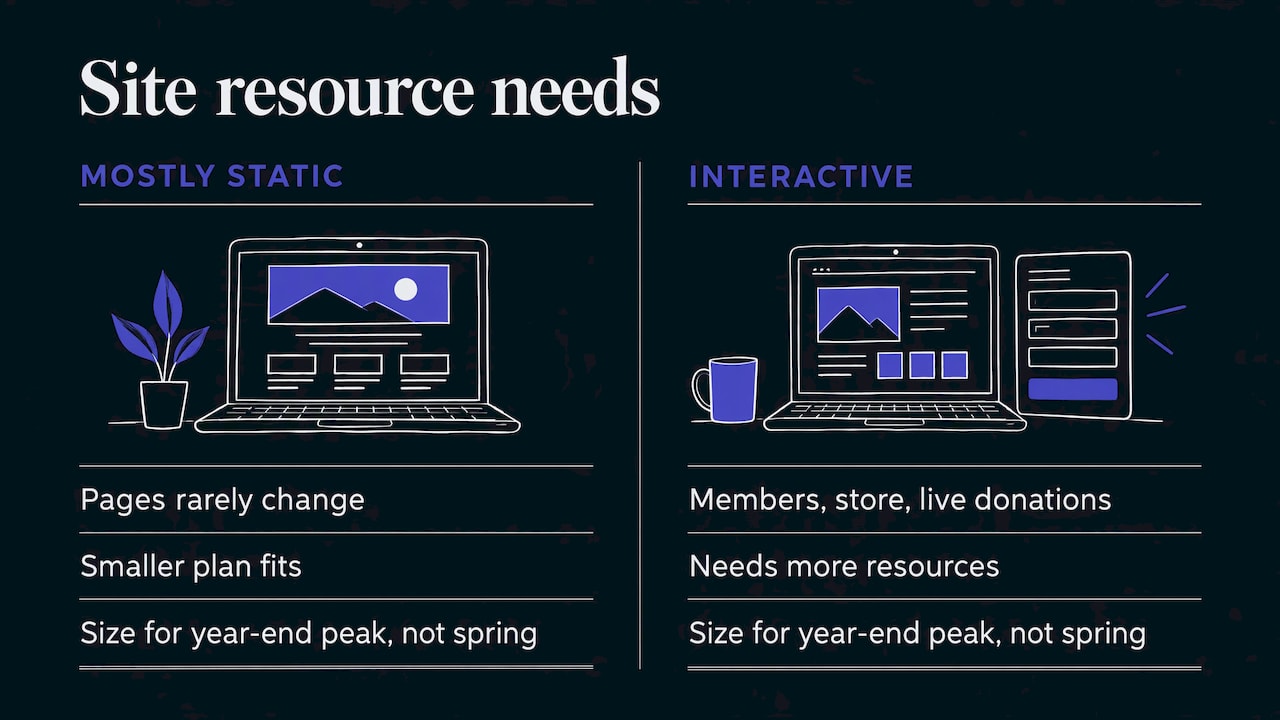
A mostly static site, with pages that rarely change, can run comfortably on a smaller plan. A site with logged-in members, a store or live donation processing needs more resources, and the cost of downtime rises with it. For many nonprofits, the busiest stretch is the year-end giving season. If a slow or unavailable donate page would cost you gifts, size the plan for that peak, not for an average week in spring.
Our guides to managed WordPress hosting and WordPress hosting requirements explain what to check before you commit.
Selling merchandise or tickets
If your nonprofit sells books, apparel, event tickets or sponsorships, a store belongs on WooCommerce, the store tool for WordPress. Our Commerce plan is built for WordPress and WooCommerce sites, at $129 per month before the nonprofit discount.
What the site really costs
The monthly plan is only part of the budget. NPO Resources recommends counting build or migration, platform and hosting, domain, apps and plugins, integrations, internal labor, support, content work, testing, maintenance and an exit plan. It also suggests confirming nonprofit discounts directly with each provider, including renewal terms and limits, and verifying that the features in a demo are included in the plan you are quoted.
Here is a simple way to total a first-year budget:
- Plan: monthly price times twelve, minus any nonprofit discount.
- Domain: your name and the yearly renewal.
- Email: a mailbox for each staff member and key volunteer. Liberation Email starts at $1.95 per user per month.
- Setup time: hours from staff or a volunteer to write pages and add photos.
- Maintenance: who updates, who backs up, who answers when something breaks.
A worked example
Say a church of 150 people wants a refreshed site and four staff mailboxes.
- WP Starter at $35 per month is $420 per year before any discount.
- Four Mail Starter mailboxes at $1.95 per user per month come to $93.60 per year.
- Together that is $513.60 per year before the 15% discount for churches and nonprofits.
That is a planning figure, not a quote. Domain fees, any custom design and added mailbox tiers are extra. Our nonprofit web hosting guide goes deeper on what to expect.
If you are comparing against a plan with a long list of add-ons, ask what the renewal price is and whether the nonprofit discount continues after the first term.
Moving from your current site
Many nonprofits already have a site that is slow, hard to edit or tied to a volunteer who has left. Changing providers sounds risky, but it follows a clear order:
- Make a list of every page, form, plugin and email address in use.
- Confirm who controls your domain and where its records are managed. Many organizations discover the domain is registered under a former volunteer’s personal account.
- Move the site and email. LiberationTek migrates both for free from another provider.
- Test your donate form, contact form and signup forms before switching the domain.
- Switch DNS, the records that point your domain to the new host, and watch for email delivery problems.
Our guide to WordPress hosting free migration covers the steps in more detail.
A short checklist before you decide
- Can your least technical editor update a page without help?
- Does the donate flow work by keyboard and screen reader?
- Who owns the domain and the login for each account?
- Where do backups live, and has anyone tested a restore?
- What does the plan cost at renewal, after the nonprofit discount?
- Can you export your content if you leave?
- Is there a person to call when something breaks?
An honest answer to each of these will tell you more than any “best of” list.
How LiberationTek fits a nonprofit
LiberationTek is a U.S.-owned provider based in Seminole, Florida, founded in 2021. Our customers include small businesses, churches and ministries, nonprofits and faith-based organizations. Every plan comes with direct U.S.-based support, free migration and a 30-day money-back guarantee. Churches and nonprofits receive 15% off.
If your site is simple, start with our Website Builder, from $10.99 per month. If you need more room or a store, our managed WordPress plans start at $35 per month. For a custom design, we also offer custom web development, quoted to your project.
See our nonprofit website and donation platform page for how we work with nonprofits, or explore managed WordPress hosting to pick a plan. You can also add private email on your own domain with Liberation Email, so staff addresses match your website.
FAQ
How do I create a website for my nonprofit?
Start with your goals and a short list of pages: home, about, programs, donate, get involved and contact. Register a domain that matches your name, choose a builder or managed WordPress plan, write the content, then test the donate and contact forms before launch. LiberationTek can migrate an existing site for free if you already have one.
Is a website builder or WordPress better for a nonprofit?
A builder is simpler and suits a site with a handful of pages and a donate button. WordPress suits organizations that need more control, more content types or a store. Managed WordPress hosting takes the updates and server upkeep off your volunteers.
Do nonprofits get a discount on hosting?
At LiberationTek, churches and nonprofits receive a 15% discount. Whatever provider you choose, ask about the discount’s limits and what the price becomes at renewal.
Can a nonprofit sell merchandise or tickets online?
Yes. Our Commerce plan, at $129 per month, is built for WordPress with WooCommerce, which handles products, orders and event tickets. Check your state’s rules on selling items and issuing receipts for gifts with your accountant.
Does my nonprofit’s website have to be accessible?
It should be. Nonprofits that receive federal grants face accessibility requirements under Section 508, and the ADA may apply to organizations that operate places of public accommodation. Ask your attorney how the rules apply to you, and test your donation form by keyboard.
Sources
- Developing an Effective Website, Minnesota Council of Nonprofits
- Choosing a Website Platform for Your Organization, SmallSpark
- Nonprofit Accessibility Guide 2026
- Nonprofit Website Platform Selection Checklist, NPO Resources
- Web Accessibility: Boosting Inclusion and SEO Impact