
Email migration is priced per mailbox on top of a project fee. LiberationTek charges $15 per user for self-service, $50 per user for a done-for-you email migration with a dedicated engineer, and $100 per user when files and workspace data move as well. For a five-person business, that is roughly $75 to $500 in per-user cost.
Most providers will not publish their email migration cost, which makes it hard to budget for and easy to be surprised by. Here is what drives the number, what each tier actually includes, and how to work out what your own move would cost before you talk to anyone.
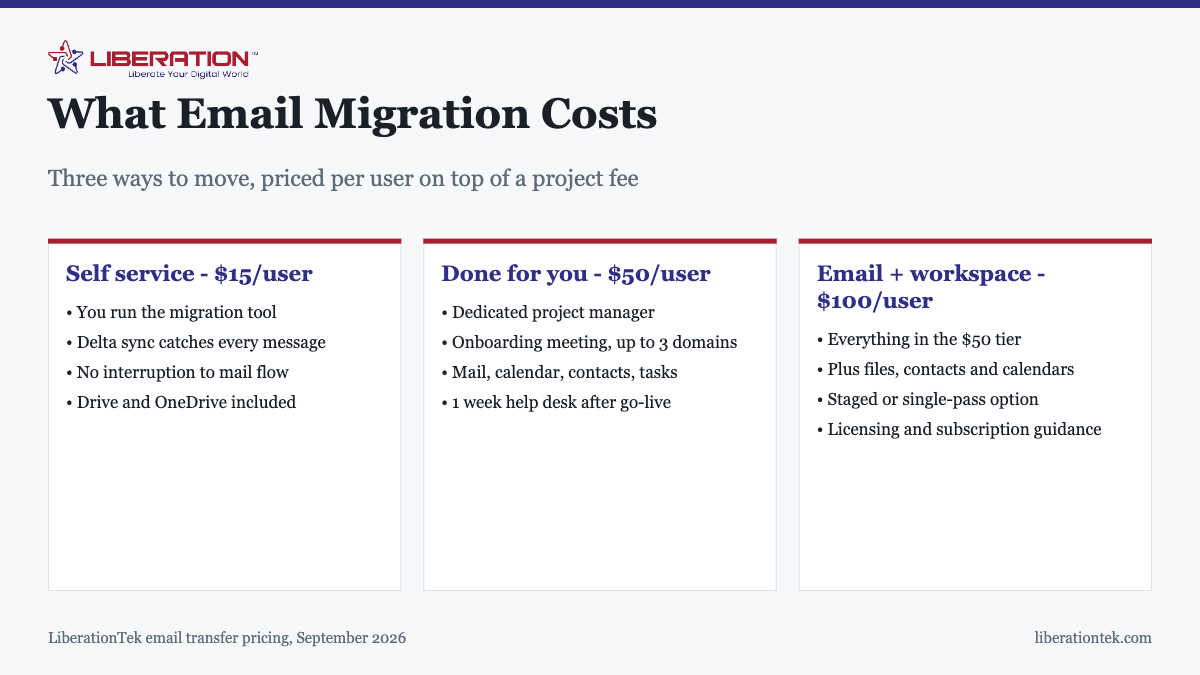
What email migration costs, tier by tier
Every tier is charged per mailbox, on top of a project fee quoted for the job. The per-user figure is the part that scales with your headcount.
Self service, $15 per user
You are given the migration tool and you run it. This includes the delta migration that catches every last message, so mail arriving mid-move is not stranded, and it covers Google Drive and OneDrive data with a 50GB allowance. Suitable when you have a handful of straightforward mailboxes and someone willing to work through it carefully.
Done for you, email only, $50 per user
A dedicated project manager and engineer run the migration. You get an onboarding meeting, registration of up to three domains, guidance on licensing and subscriptions, and migration of mail, calendar, contacts and tasks with a 50GB mailbox allowance. You can choose a staged migration or a single pass, and there is a week of help desk support after go-live.
Done for you, email plus workspace, $100 per user
Everything in the tier above, plus migration of your workspace: files, contacts and calendars. This is the tier for businesses whose work lives in Google Drive or OneDrive as much as in the inbox, where moving mail alone would leave half the problem unsolved.
What a real migration costs
Per-user pricing makes this easy to estimate. The table below is per-user cost only; the project fee is quoted separately for the job.
| Mailboxes | Self service | Done for you, email | Email + workspace |
|---|---|---|---|
| 3 | $45 | $150 | $300 |
| 5 | $75 | $250 | $500 |
| 10 | $150 | $500 | $1,000 |
| 25 | $375 | $1,250 | $2,500 |
Count active mailboxes, not addresses. This is where estimates most often go wrong. Aliases and forwarders that deliver into an existing mailbox are not separate users and should not be priced as if they were. Shared mailboxes such as info@ or accounts@ generally are separate mailboxes. Half an hour auditing this before you ask for a quote is the single easiest saving available.
What makes a migration cost more
The per-user rate is fixed, so the variables are how many users and which tier. A few things push a project into a higher tier or a larger fee:
- Workspace data. If files and shared drives move too, that is the $100 tier rather than the $50 one.
- Tenant-to-tenant projects. Google to Google, or Microsoft 365 to Microsoft 365, where the source domain is added to the target tenant. These require the advanced project type.
- Provisioning and group structure. The standard plan is mailbox to mailbox. If you need user accounts, groups and distribution lists created as part of the project, that is the advanced plan, which also carries two weeks of help desk support rather than one.
- Very large or very old mailboxes. The 50GB allowance covers most business users comfortably. Decades of mail with large attachments is a different conversation.
- Legacy platforms. Migration from HCL Notes Domino, Micro Focus GroupWise or old POP servers is supported, but these take more engineering time than a standard Gmail or Microsoft 365 source.
Is doing it yourself actually cheaper?
In direct cost, clearly. Five mailboxes self-service is $75 against $250 managed. Whether that is the better decision is a different question, and it comes down to what happens when something goes wrong rather than what happens when it goes right.
Self-service is a reasonable choice when mailboxes are simple and self-contained, nobody shares a mailbox or a calendar in a complicated way, nothing else in the business sends mail as your domain, and you can afford for one mailbox to be unavailable for an afternoon.
The managed tier earns its price when you have shared inboxes and delegated access, when your CRM, invoicing system or website forms send mail as your domain and will need reconnecting, when DNS is managed somewhere you do not fully control, or when mail genuinely cannot stop. The cost of a mishandled DNS cutover is not measured in migration fees. It is measured in the mail that bounced while it was wrong.
Weighing it against what you save
Migration is a one-time cost. The reason most businesses move is the recurring one.
LiberationTek Email starts at $1.95 per user per month, with $4.95 and $7.95 tiers. Against the per-user pricing at the large providers, the monthly difference for a small team is usually enough to repay a done-for-you migration within a few months, and every month after that is saving. If your team also needs calendars, files, chat and video, Hub For Teams starts at $7.49 per user per month and replaces several subscriptions at once.
Worth weighing alongside the money: mail on LiberationTek is not scanned for advertising, model training or data brokers, runs on standard IMAP, SMTP, CalDAV and CardDAV so nothing is locked in, exports in full whenever you want, and carries no long-term contract.
What to ask before you commit
- How many mailboxes am I actually being charged for? Get the count agreed in writing, with aliases excluded.
- Is a delta migration included? It should be. Without one, mail arriving during the move can be stranded.
- What support follows go-live, and for how long? A week is standard; two weeks comes with the advanced plan.
- Who changes the DNS records, and when? This is the step with real consequences. Know who owns it.
- How long does the old system stay available? There should be an overlap, not a hard switch.
- What happens to rules, signatures and shared permissions? These rarely transfer and usually need rebuilding.
Full tier details and source platforms are on the email transfer page. If you are still working out what the process involves, start with what email migration actually means.
How to estimate your email migration cost
Before you ask anyone for a quote, work out your own email migration cost on paper. The number depends on a short list of inputs, and once you know them every provider quote becomes easier to compare. A fair email migration cost reflects the number of mailboxes, how much mail each one holds, how many calendars and contacts move with it, and how much careful DNS work the cutover needs.
- Count every mailbox, including shared inboxes and old accounts you still need to keep.
- Note which mailboxes are very large, because they raise the email migration cost more than small ones.
- List the devices and apps that connect to each account so nothing stops syncing on cutover day.
- Decide who on your team will test the new setup and how much of their time that takes.
Staff time is the part people forget. Even a smooth move pulls someone away from normal work for a few hours, and that belongs in your email migration cost just like a vendor fee does.
Ways to lower your email migration cost
The biggest single saving is choosing a provider that moves your mail for you. LiberationTek migrates mailboxes from another provider for free, so the labor line in your email migration cost can drop to zero. You can read how the process works on our email transfer page, and the guide to what email migration involves explains each stage in plain terms.
Other ways to keep the email migration cost down are simple. Archive or delete mail you no longer need before the move, because less data means a shorter transfer. Clean out unused accounts so you do not pay to move them. Schedule the cutover for a quiet evening so nobody loses time. If you plan ahead, the email migration cost stays small and predictable.
Questions to ask about email migration cost
When a vendor gives you a number, ask what it covers. A low headline email migration cost can hide charges for extra mailboxes, large archives or after-hours cutover work. Ask whether the price is per mailbox or a flat fee, whether calendars and contacts are included, and who fixes problems if mail goes missing. Liberation Email starts at $1.95 per user per month, so you can compare your ongoing cost against what you pay today as well as the one-time email migration cost.
It also helps to read independent guidance on protecting your accounts during a change. The FTC cybersecurity guidance for small businesses covers password and access basics worth reviewing while you move. After the switch, a professional email address on your own domain keeps everything tidy, and the email migration cost is a one-time item rather than a recurring one.
In short, the email migration cost for a small business is usually modest when you plan the move, pick a provider that handles the work, and keep your own estimate to compare against. Ask for the full email migration cost in writing before you commit.
Frequently asked questions
How much does email migration cost for a small business?
Email migration is priced per mailbox on top of a project fee. LiberationTek charges $15 per user for a self-service migration, $50 per user for a done-for-you email migration with a dedicated engineer, and $100 per user when files and workspace data move too. A five-person business doing a done-for-you email move is therefore looking at $250 in per-user cost plus the project fee.
Is it cheaper to migrate email myself?
In direct cost, yes. The self-service tier is $15 per user against $50 for a managed move, so a five-person business saves around $175. Whether that is genuinely cheaper depends on what your own time is worth and whether you have shared mailboxes, delegated access or mail-sending integrations, which is where self-managed migrations tend to run into difficulty.
What is a delta migration and why does it matter for cost?
A delta migration re-syncs anything that arrived after the initial copy, so mail landing during the transition is not stranded on the old system. It is included at every LiberationTek tier. It matters for cost because the alternative, discovering weeks later that a fortnight of mail never came across, is far more expensive to resolve than the migration itself.
Do I pay per mailbox or per domain?
Per mailbox. The per-user price is charged for each mailbox being moved, which is why the total scales with headcount rather than with the number of domains. The done-for-you tiers include registering up to three domains within the project.
Are there ongoing costs after migrating email?
Yes, your email hosting subscription, which is the cost you were paying before. LiberationTek Email starts at $1.95 per user per month, with $4.95 and $7.95 tiers. Migration itself is one-time. For most businesses leaving a large provider, the monthly saving repays the migration cost within a few months.
What is the difference between the standard and advanced migration plans?
Standard covers mailbox-to-mailbox migration with one week of help desk support after go-live. Advanced adds provisioning, groups, user accounts and distribution lists, with two weeks of support. Tenant-to-tenant projects, such as Google to Google or Microsoft 365 to Microsoft 365 where the source domain is added to the target tenant, require the advanced type.
How do I know how many users I am paying for?
Count active mailboxes, not email addresses. Aliases and forwarders that point at an existing mailbox are not separate users and should not be priced as such. Shared mailboxes such as info@ or accounts@ usually are separate mailboxes. Auditing this before you get quoted is the easiest way to avoid paying for addresses that are not really mailboxes.