
Effective email phishing protection comes in layers: a mail system that authenticates and filters messages, sign-in rules that stop a stolen password from working, and staff who know what to do with a suspicious message. No single setting covers all three. If your organization runs on private, ad-free mail such as Liberation Email, which offers end-to-end encryption, you already have the right foundation. This guide covers what to add on top and what to do when someone clicks.
TL;DR
- Phishing is a message built to trick a person into clicking, logging in or paying. Spam is mostly an advertising nuisance.
- Publish SPF, DKIM and DMARC records so no one can easily send mail that pretends to be your domain.
- Use phishing-resistant multi-factor authentication (MFA) first on administrator and finance accounts.
- Train everyone once a year, check that it stuck, and make reporting easy and blame-free.
- If someone clicks, change the password from a different device, sign out all sessions and check inbox rules the same day.
Table of Contents
- Phishing versus spam: why the difference matters
- Signs an email is phishing
- Step 1: Make your domain hard to spoof
- Step 2: Filter and label what comes in
- Step 3: Protect the login, not just the inbox
- Step 4: Train people and make reporting easy
- If someone clicks: the first hour
- A one-page checklist
- Where Liberation Email fits
- FAQ
- Sources
Phishing versus spam: why the difference matters
NIST, the federal standards agency, describes phishing as convincing emails or messages that trick people into opening harmful links or downloading malicious software. They are often disguised as a bank, a card company or a leader in your own organization. NIST also notes that AI can now make these attacks more convincing.
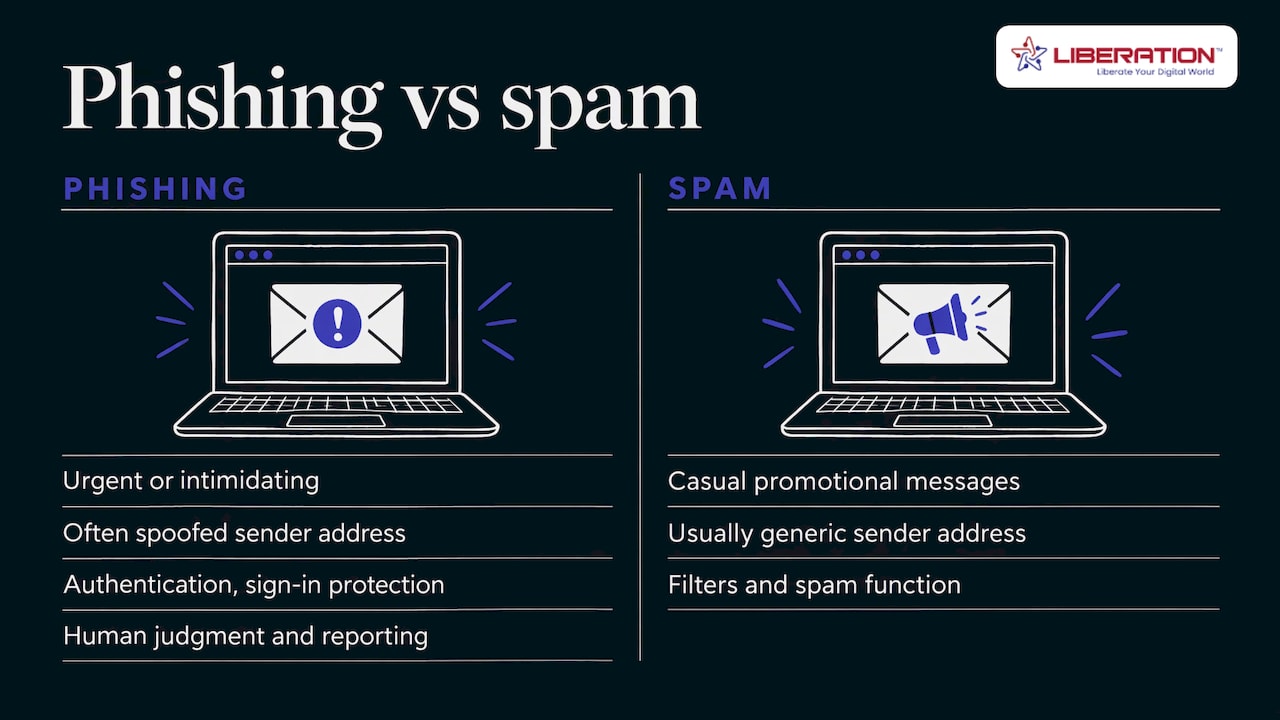
Spam is different. A court-system security article separates the two: phishing is usually unexpected, urgent or intimidating, and often comes from a spoofed sender address. Spam is promotional, casual and usually from a generic address.
This matters because the fixes differ. Spam is handled with filters and the spam button. Phishing needs authentication, sign-in protection and human judgment. A university IT office advises reporting real phishing through a dedicated report button and ordinary spam through the mail client’s spam function.
Signs an email is phishing
CISA, the federal cybersecurity agency, lists these common signs:
- Urgent or emotional language that warns of dire consequences.
- Requests for personal or financial information.
- Shortened links you cannot inspect.
- Sender addresses or links that are slightly wrong.
Do not rely on typos. CISA notes that some AI-written emails have perfect grammar and spelling. Look at the request instead: does it ask you to log in, pay, change bank details or open an attachment you did not expect?
One industry report found that invoices were the most common phishing theme, at 31.91% of the phishing it analyzed, followed by payroll or account updates and requests for action. That fits small organizations well. A church treasurer, a campaign manager, a clinic office manager and a gun-store owner all handle invoices and payment changes.
A worked example
A bookkeeper receives a message that appears to come from the pastor or owner: “Are you at your desk? I need a payment sent today, details to follow.” There is no link, so a link scanner has nothing to flag. The tell is the combination of urgency, secrecy and money. The safe move, in line with CISA’s advice, is to contact the person using a number you already know, never the details in the message.
Step 1: Make your domain hard to spoof
Three DNS records (the public settings attached to your domain name) tell receiving mail servers which messages really come from you:
- SPF lists the servers allowed to send mail for your domain.
- DKIM adds a digital signature that proves the message was not altered.
- DMARC tells receivers what to do when SPF or DKIM fail, and sends you reports.
The FBI’s Internet Crime Complaint Center recommends SPF and DKIM to limit spoofing. Federal guidance from CISA, NSA, FBI and MS-ISAC goes further, recommending DMARC with a “reject” policy for mail sent from your domain.
Where it goes wrong: people publish SPF but forget a second sender, such as a newsletter tool or a donation system, and their legitimate mail starts failing. Start DMARC in monitoring mode, read the reports, fix the senders, then tighten to reject. Our walkthrough, SPF, DKIM and DMARC explained, covers each record in plain terms. If you move to Liberation Email, free migration is included with every plan.
Step 2: Filter and label what comes in
CISA’s counter-phishing guide for agencies describes the features of a good email gateway: screening headers and content, blocking macros and risky file types, checking compressed files, and showing warning banners on external mail. The FBI adds that external emails should be marked with a banner and that spam filters should block executable files.
A small organization can apply the same ideas:
- Add an “external sender” banner so a fake message from “the boss” stands out.
- Block file types such as .exe and .scr. The federal small-business guidance lists these as a priority.
- Treat links with care. CISA explains that rewriting links as plain text helps because the damage usually begins at the click.
The same federal guide suggests small businesses consider managed, cloud-based email from a reputable provider rather than running their own mail server. LiberationTek runs Liberation Email on servers we own in the United States, with no ads, no tracking and no sharing of customer data. Our page on mailbox security goes deeper on mailbox protection.
Step 3: Protect the login, not just the inbox
Some phishing will always get through, so the goal is to make a stolen password useless. NIST says that training combined with phishing-resistant MFA can significantly reduce the chance of falling victim. Phishing-resistant MFA means a hardware security key or similar method (FIDO or PKI-based) that cannot be handed to a fake login page the way a texted code can.
Prioritize in this order:
- Administrator accounts for your email, website and domain registrar.
- Finance, payroll and donation-processing accounts.
- Everyone else.
The FBI also advises strong unique passphrases, patching, and least-privilege access, meaning each person can reach only what their role needs. A volunteer who only posts to the website should not be a mail administrator.
Step 4: Train people and make reporting easy
The federal guide recommends annual phishing training with a check that employees retained it, and it points small businesses to commercial programs or NIST’s free resources. Keep sessions short and concrete:
- Show real examples from your own spam folder, with names removed.
- Agree on one reporting path, for example forwarding to a named person.
- Tell staff that reporting a click quickly is the right move, never a punishment.
Attackers count on volume. One industry report notes that only 1% or 2% of targets fall for a campaign, and that is enough for them. In a ten-person office, one careless afternoon is the whole risk.
If someone clicks: the first hour
Speed matters more than perfection. Combining NIST’s guidance with an incident checklist from a managed IT firm, act in this order:
- Stop using the page. If a file was opened, disconnect the device and run a full antivirus scan.
- From a different device, change the password, and any reused ones. NIST says to do this immediately.
- Sign out of all sessions and remove any MFA method you do not recognize.
- Check inbox rules and forwarding. A hidden rule that forwards mail outside is a common step toward business email compromise.
- Review recent sign-ins.
- Warn colleagues and clients if mail went out from the account.
- Report the message. CISA accepts reports at [email protected], and the FTC takes scam reports at ReportFraud.ftc.gov.
If money moved, call the bank first, then file with the FBI’s IC3 at ic3.gov. NIST adds that you should follow your incident response plan and check your state attorney general’s site for data breach notification rules. Healthcare practices and law firms often have extra duties under their own regulations, so involve your compliance contact or attorney early.
Phishing is also a common route for ransomware. Our ransomware statistics page shows why a fast response matters, and the plain-English small business cybersecurity plan helps you write the response down before you need it.
A one-page checklist
| Layer | What to do | Who owns it |
|---|---|---|
| Domain | Publish SPF, DKIM, DMARC; move DMARC toward reject | Whoever manages DNS |
| Inbox | External banner, block risky file types | Mail administrator |
| Login | Phishing-resistant MFA, admins first | Administrator |
| People | Annual training, one reporting path | Owner or office manager |
| Response | Written steps, bank and IC3 contacts | Owner |
A broader set of habits is in our guide to cybersecurity best practices for small businesses. For the network side of malware that arrives by email, an article on business network security and cabling covers the hardware layer.
Where Liberation Email fits
Phishing protection is easier when your mail provider is not also an advertising company reading your messages. Liberation Email is private, ad-free business email with end-to-end encryption, run on servers LiberationTek owns in the United States. Real people in the U.S. answer support, migration from your current provider is free, and every plan carries a 30-day money-back guarantee. Plans run from Mail Starter at 1.95 USD per month per user to Mail Pro at 7.95 USD per month per user. Churches and nonprofits receive a 15% discount.
If you want email, files, chat and video in one workspace, Hub for Teams starts at 7.49 USD per month per user. Our secure business email guide shows what to look for and how to set it up.
FAQ
What is the best protection against email phishing?
Layers work best: authenticated mail with SPF, DKIM and DMARC, filtering, phishing-resistant MFA and regular training. NIST says that training plus phishing-resistant MFA can significantly lower the chance of falling victim.
Why do I keep getting spam after blocking the sender?
Spam senders use many addresses and domains, so blocking one does little. Mark messages as spam so your filter learns, and do not click “unsubscribe” in suspicious messages. CISA advises deleting them without clicking anything.
What should I do with a phishing email?
Do not click, reply or open attachments. Use the report option in your mail program or the spam button, then delete it. Federal guidance also suggests reporting to CISA at [email protected].
How often should we train staff?
Federal guidance recommends at least annual training with a check that people remembered it. Short refreshers after a real attempt help it stick.
Sources
- Phishing | NIST
- Wisconsin Court System, Third Branch eNews, August 2024
- UF Information Security: phishing vs. spam
- Recognize and Report Phishing | CISA
- The State of Email Security in 2025 | TitanHQ
- FBI IC3 public service advisory
- Phishing Guidance: Stopping the Attack Cycle at Phase One | CISA
- Capacity Enhancement Guide: Counter-Phishing | CISA
- Small Business Cybersecurity | NIST CSWP 50
- What to do after clicking a phishing link | Crash Cart HQ